
Yamaha RX-797: CONTROLS AND FUNCTIONS Rear panel
CONTROLS AND FUNCTIONS Rear panel: Yamaha RX-797
Table of contents
- CAUTION: READ THIS BEFORE OPERATING YOUR UNIT.
- CONTENTS
- FEATURES SUPPLIED ACCESSORIES
- CONTROLS AND FUNCTIONS Front panel
- CONTROLS AND FUNCTIONS
- Front panel display
- CONTROLS AND FUNCTIONS Rear panel
- CONTROLS AND FUNCTIONS Remote control
- CONTROLS AND FUNCTIONS
- Zone 2 remote control
- Installing batteries in the remote controls Using the remote controls
- CONNECTIONS Connecting speakers
- Connecting audio and video components
- Connecting the AM and FM antennas
- ■ Connecting the AM loop antenna
- Connecting the power supply cord
- Turning on and off this unit
- PLAYING AND RECORDING Playing a source
- PLAYING AND RECORDING
- Adjusting the tonal quality
- Recording a source
- Using the sleep timer
- Muting the sound output
- FM/AM TUNING Automatic tuning
- Manual tuning
- Automatic preset tuning
- FM/AM TUNING
- FM/AM TUNING Manual preset tuning
- FM/AM TUNING Selecting preset stations Exchanging preset stations
- RADIO DATA SYSTEM (EUROPE MODEL ONLY) Receiving Radio Data System Changing the Radio Data System stations mode
- PTY SEEK function
- EON function
- ADVANCED SETUP Changing the ADVANCED SETUP menu parameters
- Switching the remote control ID
- ZONE 2 Connecting the Zone 2 components
- Controlling Zone 2
- REMOTE CONTROL FEATURES Control area
- Controlling other components
- Setting remote control codes
- TROUBLESHOOTING ■ General
- ■ Tuner
- ■ Remote control
- SPECIFICATIONS
- LIST OF REMOTE CONTROL CODES
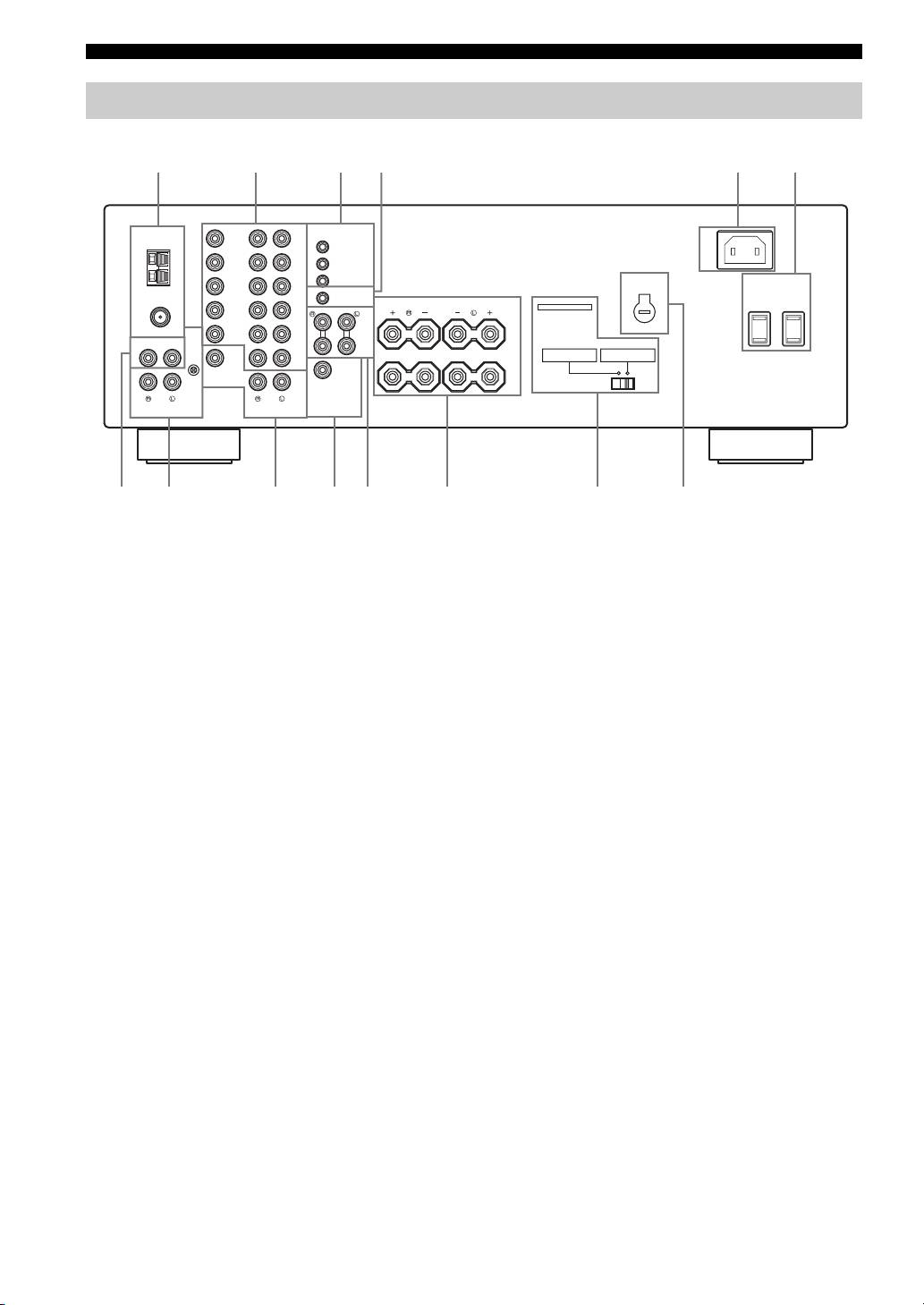
CONTROLS AND FUNCTIONS
Rear panel
123 5
4
6
(General model)
TUNER
REMOTE
AC IN
DVD
DVD
IN
GND
1
DTV/
DTV/
CBL
CBL
OUT
AM
ANT
IN
2
AC OUTLETS
VOLTAGE
IN
IN
SWITCHED
CONTROL OUT
SELECTOR
VCR
VCR
+12V 15mA MAX.
SPEAKERS
IMPEDANCE SELECTOR
OUT
OUT
COUPLER
SET BEFORE POWER ON
75Ω
UNBAL.
FM
ANT
MAIN
IN
GND
MONITOR
(PLAY)
IN
OUT
A
CD
MD/
PRE
TAP E
OUT
ZONE 2
OUT
A OR B: 4ΩMIN. /SPEAKER
A OR B: 6ΩMIN. /SPEAKER
OUT
(REC)
A+B: 8ΩMIN. /SPEAKER
A+B:12ΩMIN. /SPEAKER
PHONO
SUB
WOOFER
B
VIDEO
ZONE 2
OUT
OUTPUTAUDIOAUDIO
70 CD8AB
9
1 Antenna terminals
8 PHONO jacks and GND terminal
Connect FM and AM antennas.
Connect a turntable.
See page 13 for connections information.
See page 12 for connection information.
2 AUDIO/VIDEO jacks
9 ZONE 2 jacks
Connect audio and video components.
Connect a Zone 2 component.
See page 12 for connection information.
See page 34 for connection information.
3 REMOTE jacks
0 SUBWOOFER OUTPUT jack
These jacks are used to input/output remote control
Connect a subwoofer with built-in amplifier.
signals.
A COUPLER jacks
See page 34 for connection information.
Connect an external unit.
4 CONTROL OUT jack
See page 15 for connection information.
This is a control expansion jack. Consult your nearest
B SPEAKERS terminals
authorized YAMAHA dealer or service center about this
Connect speakers.
jack.
See page 11 for connection information.
5 AC IN
C IMPEDANCE SELECTOR switch
Use to plug in the supplied power cable.
Switches the impedance setting.
See page 15 for connection information.
See page 15 for details.
6 AC OUTLET(S) (SWITCHED)
■ Asia and General models only
Use to supply power to your other audio and video
components.
D VOLTAGE SELECTOR
See page 15 for details.
See page 15 for details.
7 CD jacks
Connect a CD player.
See page 12 for connection information.
6
