
Yamaha RX-797: PLAYING AND RECORDING Playing a source
PLAYING AND RECORDING Playing a source: Yamaha RX-797
Table of contents
- CAUTION: READ THIS BEFORE OPERATING YOUR UNIT.
- CONTENTS
- FEATURES SUPPLIED ACCESSORIES
- CONTROLS AND FUNCTIONS Front panel
- CONTROLS AND FUNCTIONS
- Front panel display
- CONTROLS AND FUNCTIONS Rear panel
- CONTROLS AND FUNCTIONS Remote control
- CONTROLS AND FUNCTIONS
- Zone 2 remote control
- Installing batteries in the remote controls Using the remote controls
- CONNECTIONS Connecting speakers
- Connecting audio and video components
- Connecting the AM and FM antennas
- ■ Connecting the AM loop antenna
- Connecting the power supply cord
- Turning on and off this unit
- PLAYING AND RECORDING Playing a source
- PLAYING AND RECORDING
- Adjusting the tonal quality
- Recording a source
- Using the sleep timer
- Muting the sound output
- FM/AM TUNING Automatic tuning
- Manual tuning
- Automatic preset tuning
- FM/AM TUNING
- FM/AM TUNING Manual preset tuning
- FM/AM TUNING Selecting preset stations Exchanging preset stations
- RADIO DATA SYSTEM (EUROPE MODEL ONLY) Receiving Radio Data System Changing the Radio Data System stations mode
- PTY SEEK function
- EON function
- ADVANCED SETUP Changing the ADVANCED SETUP menu parameters
- Switching the remote control ID
- ZONE 2 Connecting the Zone 2 components
- Controlling Zone 2
- REMOTE CONTROL FEATURES Control area
- Controlling other components
- Setting remote control codes
- TROUBLESHOOTING ■ General
- ■ Tuner
- ■ Remote control
- SPECIFICATIONS
- LIST OF REMOTE CONTROL CODES
PLAYING AND RECORDING
PLAYING AND RECORDING
CAUTION
Extreme caution should be exercised when you play back CDs encoded in DTS.
If you play back a CD encoded in DTS on a DTS-incompatible CD player, you will only hear some unwanted noise that may damage
your speakers. Check whether your CD player supports CDs encoded in DTS. Also, check the sound output level of your CD player
before you play back a CD encoded in DTS.
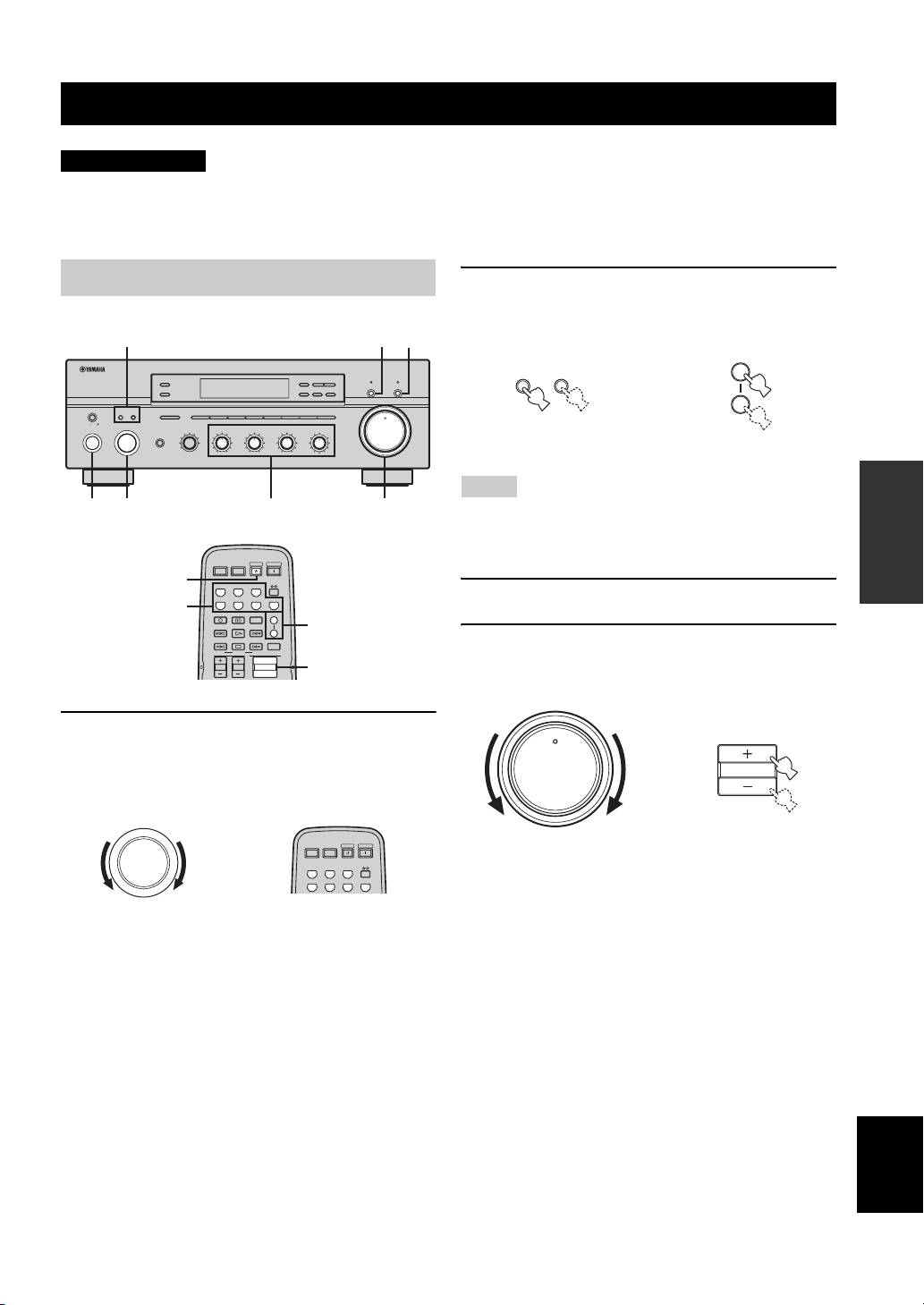
Playing a source
2 Press SPEAKERS A and/or SPEAKERS B on
the front panel or on the remote control to
select speakers A and/or speakers B.
2 5
5
ZONE 2 ON/OFF
FM/AM
l
TUNING
h
CD DIRECT AMPPURE DIRECT
ZONE CONTROL
EDIT
MEMORY
TUNING MODE
MAN'L/AUTO FM
AUTO/MAN'L
MASTER SPEAKERS
BA
A/B/C/D/E
12345678
VOLUME
12
ON OFF
MAIN ZONE
INPUT
REC OUT
SOURCE
BASS
BALANCE
PHONES
MD/TAPE
CD
0
TREBLE
LOUDNESS
1
1
1
0
1
1
0
1
1
FLAT
VCR TUNER
22
22
22
210
–
30dB
ON/OFF
DTV/CBL
PHONO
3
3
3
3
3
3
3
9
DVD
44
–
55
+
44
–
55
+
44
L
55
R
48
57
6
0
OPERATION
BASIC
6
1
5
4
• Both SPEAKERS A and B can be selected.
• Make sure that the IMPEDANCE SELECTOR switch is
correctly set (see page 15).
3 Play the source.
4 Rotate VOLUME on the front panel (or press
VOLUME +/– on the remote control) to adjust
the sound output level.
1 Rotate the INPUT selector on the front panel
(or press one of the input selector buttons on
the remote control) to select the desired
input source.
English
17
12
20
8
4
2
∞
20
60
60
26
26
40
40
16
16
-dB
-dB
SPEAKERS
SPEAKERS
BA
A
or
B
Front panel
Remote control
Notes
POWER POWER
STANDBY
POWER
AVTV
6
CD
MD/TAPE
TUNER
DTV/CBL
VCR
PHONODVD
1
REC
CODE SET
SPEAKERS
A
DISC SKIP
B
2
FREQ/TEXT
EON
SLEEP
MODE PTY SEEK
START
TV VOL
TV CH
VOLUME
4
12
0
INPUT
POWER POWER
STANDBY
POWER
AVTV
or
CD
MD/TAPE
TUNER
DTV/CBL
VCR
PHONODVD
Front panel Remote control
12
20
8
4
2
∞
20
60
60
26
26
40
40
16
16
-dB
-dB
VOLUME
or
VOLUME
Front panel
Remote control
