
Yamaha RX-797: Front panel display
Front panel display: Yamaha RX-797
Table of contents
- CAUTION: READ THIS BEFORE OPERATING YOUR UNIT.
- CONTENTS
- FEATURES SUPPLIED ACCESSORIES
- CONTROLS AND FUNCTIONS Front panel
- CONTROLS AND FUNCTIONS
- Front panel display
- CONTROLS AND FUNCTIONS Rear panel
- CONTROLS AND FUNCTIONS Remote control
- CONTROLS AND FUNCTIONS
- Zone 2 remote control
- Installing batteries in the remote controls Using the remote controls
- CONNECTIONS Connecting speakers
- Connecting audio and video components
- Connecting the AM and FM antennas
- ■ Connecting the AM loop antenna
- Connecting the power supply cord
- Turning on and off this unit
- PLAYING AND RECORDING Playing a source
- PLAYING AND RECORDING
- Adjusting the tonal quality
- Recording a source
- Using the sleep timer
- Muting the sound output
- FM/AM TUNING Automatic tuning
- Manual tuning
- Automatic preset tuning
- FM/AM TUNING
- FM/AM TUNING Manual preset tuning
- FM/AM TUNING Selecting preset stations Exchanging preset stations
- RADIO DATA SYSTEM (EUROPE MODEL ONLY) Receiving Radio Data System Changing the Radio Data System stations mode
- PTY SEEK function
- EON function
- ADVANCED SETUP Changing the ADVANCED SETUP menu parameters
- Switching the remote control ID
- ZONE 2 Connecting the Zone 2 components
- Controlling Zone 2
- REMOTE CONTROL FEATURES Control area
- Controlling other components
- Setting remote control codes
- TROUBLESHOOTING ■ General
- ■ Tuner
- ■ Remote control
- SPECIFICATIONS
- LIST OF REMOTE CONTROL CODES
CONTROLS AND FUNCTIONS
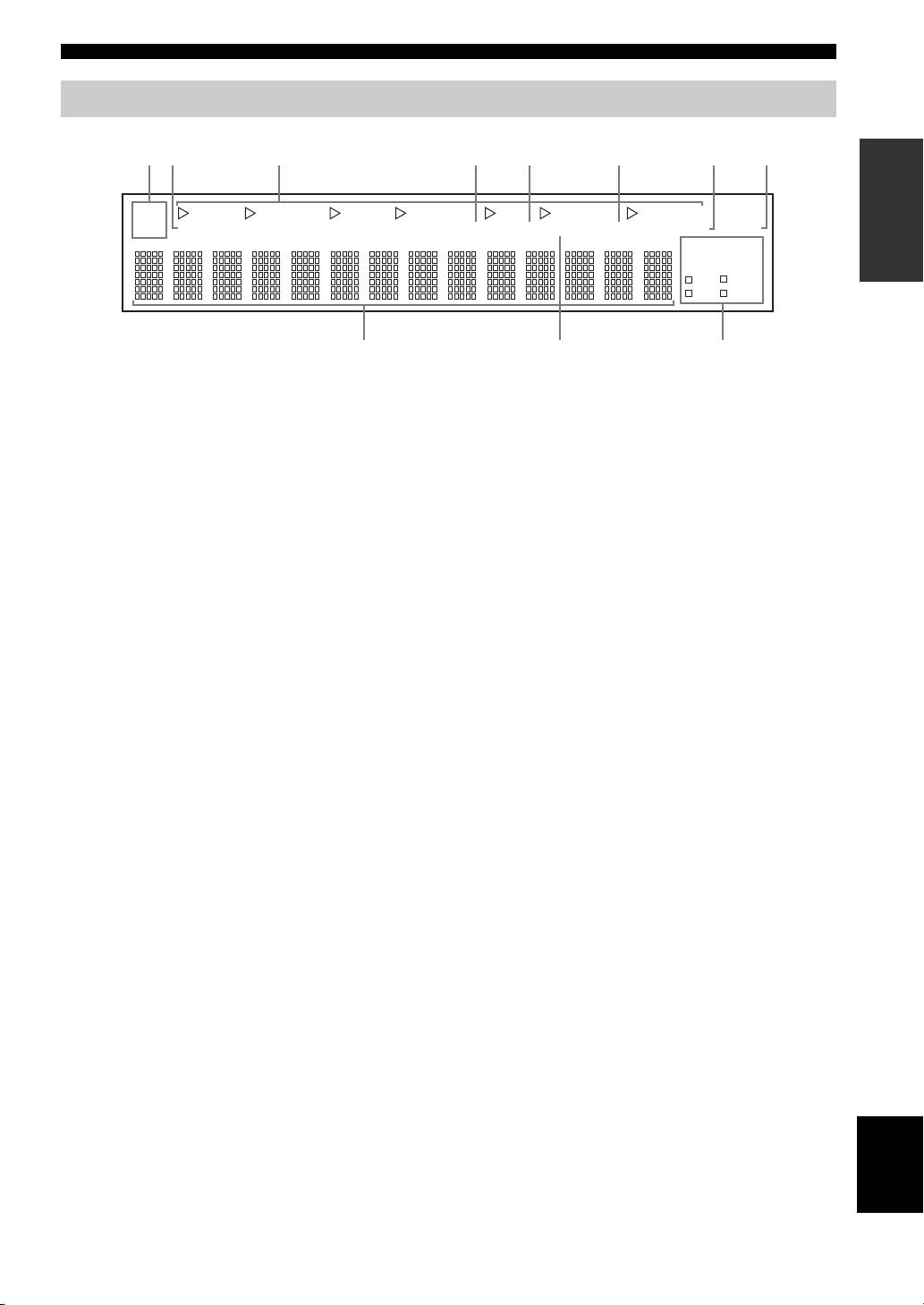
Front panel display
INTRODUCTION
SP
DVD VCR CD TUNER PHONO
DTV/CBL
MD/TAPE
A B
ZONE2 ZONE3 MEMORY AUTO
TUNED STEREO
SLEEP
MUTE
HOLDPTY
EON
PS
PTY
RT
CT
1 SP (SPEAKERS) A/B indicators
7 SLEEP indicator
Light up according to the set of speakers selected.
Lights up when the sleep timer is turned on.
Both indicators light up when both sets of speakers are
8 MUTE indicator
selected.
Flashes while the MUTE function is turned on.
2 ZONE 2 indicator
9 Multi-information display
Lights up when Zone 2 is turned on.
Shows information when adjusting or changing settings.
3 Input source indicators
0 TUNED indicator
Light up when this unit is in the corresponding mode.
Lights up when this unit is tuned into a station.
4 MEMORY indicator
■ Europe model only
Flashes for approximately 5 seconds after MEMORY on
the front panel is pressed. While the MEMORY indicator
A Radio Data System indicators
is flashing, store the displayed station in the system
The box-shaped indicator beside the name of each Radio
memory by using A/B/C/D/E and one of the preset station
Data System mode lights up when the corresponding
number buttons on the front panel.
Radio Data System mode is selected.
5 AUTO indicator
PTY HOLD indicator
Lights up when this unit is in the automatic tuning mode.
Lights up while searching for stations in the PTY
6 STEREO indicator
SEEK mode.
Lights up when this unit is receiving a strong signal for an
EON indicator
FM stereo broadcast while the AUTO indicator is lit.
Lights up when the Radio Data System station that
offers the EON data service is being received.
English
5
0A9
12 4 5 6 738
