
Yamaha RX-797: CONNECTIONS Connecting speakers
CONNECTIONS Connecting speakers: Yamaha RX-797
Table of contents
- CAUTION: READ THIS BEFORE OPERATING YOUR UNIT.
- CONTENTS
- FEATURES SUPPLIED ACCESSORIES
- CONTROLS AND FUNCTIONS Front panel
- CONTROLS AND FUNCTIONS
- Front panel display
- CONTROLS AND FUNCTIONS Rear panel
- CONTROLS AND FUNCTIONS Remote control
- CONTROLS AND FUNCTIONS
- Zone 2 remote control
- Installing batteries in the remote controls Using the remote controls
- CONNECTIONS Connecting speakers
- Connecting audio and video components
- Connecting the AM and FM antennas
- ■ Connecting the AM loop antenna
- Connecting the power supply cord
- Turning on and off this unit
- PLAYING AND RECORDING Playing a source
- PLAYING AND RECORDING
- Adjusting the tonal quality
- Recording a source
- Using the sleep timer
- Muting the sound output
- FM/AM TUNING Automatic tuning
- Manual tuning
- Automatic preset tuning
- FM/AM TUNING
- FM/AM TUNING Manual preset tuning
- FM/AM TUNING Selecting preset stations Exchanging preset stations
- RADIO DATA SYSTEM (EUROPE MODEL ONLY) Receiving Radio Data System Changing the Radio Data System stations mode
- PTY SEEK function
- EON function
- ADVANCED SETUP Changing the ADVANCED SETUP menu parameters
- Switching the remote control ID
- ZONE 2 Connecting the Zone 2 components
- Controlling Zone 2
- REMOTE CONTROL FEATURES Control area
- Controlling other components
- Setting remote control codes
- TROUBLESHOOTING ■ General
- ■ Tuner
- ■ Remote control
- SPECIFICATIONS
- LIST OF REMOTE CONTROL CODES
CONNECTIONS
CONNECTIONS
Connecting speakers
Be sure to connect the left channel (L), right channel (R), “+” (red) and “–” (black) properly. If the connections are faulty,
no sound will be heard from the speakers, and if the polarity of the speaker connections is incorrect, the sound will be
unnatural and lack bass.
CAUTION
• Before connecting the speakers, make sure that the power of this unit is turned off.
• Do not let the bare speaker wires touch each other or do not let them touch any metal part of this unit. This could
PREPARATION
damage this unit and/or the speakers.
• Use magnetically shielded speakers. If this type of speakers still creates the interference with the monitor, place the
speakers away from the monitor.
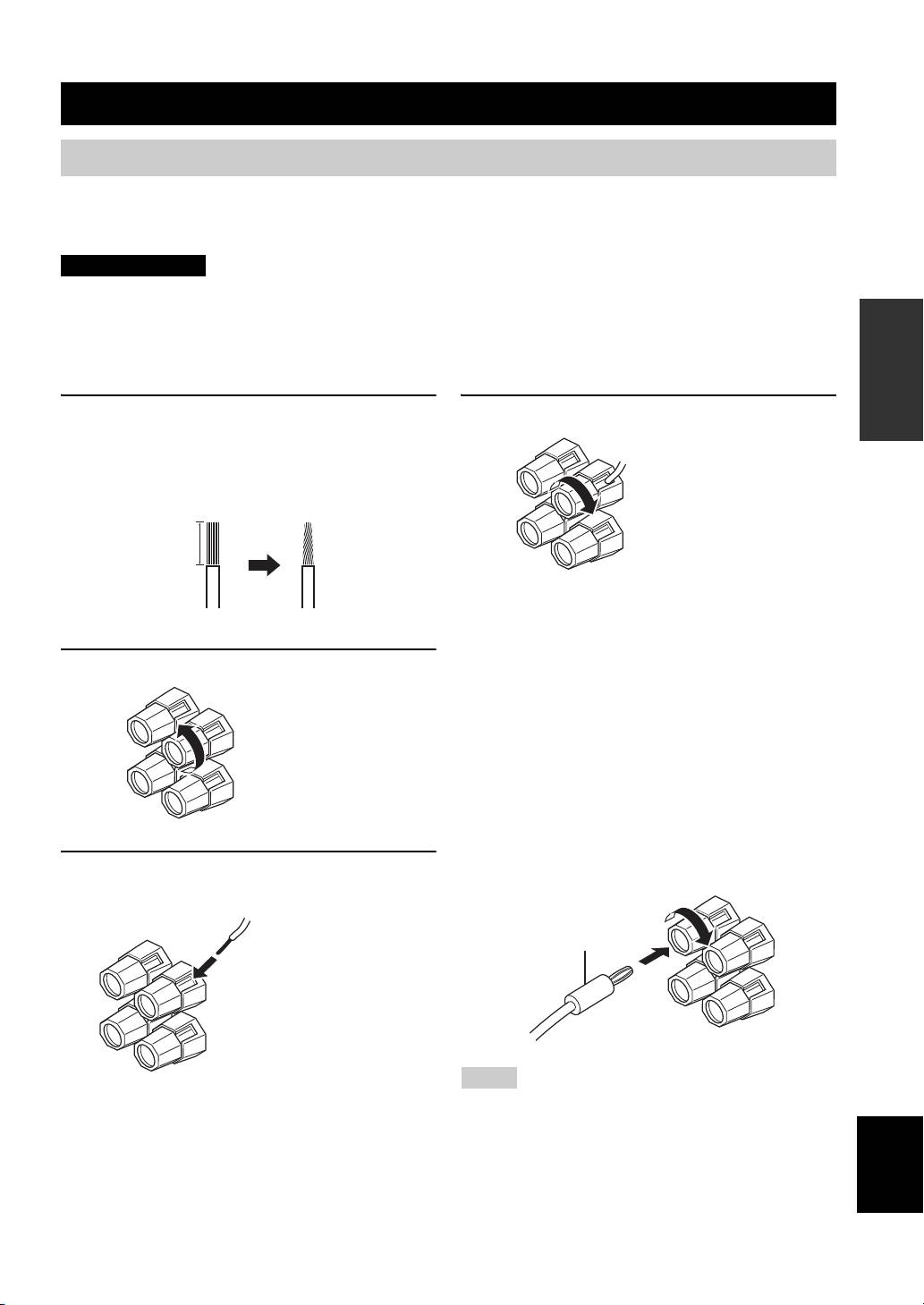
1 Remove approximately 10 mm (3/8 in) of
4 Tighten the knob to secure the wire.
insulation from the end of each speaker
cable and twist the exposed wires of the
Red: positive (+)
cable together to eliminate the risk of a
Black: negative (–)
short-circuit.
10 mm (3/8 in)
■ Notes on the speaker cord
A speaker cord is actually a pair of insulated cables
running side by side. One cable is colored or shaped
2 Unscrew the knob.
differently, perhaps with a stripe, groove or ridge. Connect
the striped, grooved or ridged cable to the “+” (red)
terminals on this unit and your speaker. Connect the plain
cable to the “–” (black) terminals on this unit and your
speaker.
Red: positive (+)
Black: negative (–)
■ Connecting the banana plug
(U.S.A., Canada, Australia and General
models only)
First, tighten the knob and then insert the banana plug into
the end of the corresponding terminal.
3 Insert one bare wire into the hole in the side
of each terminal.
Banana plug
Red: positive (+)
Black: negative (–)
Notes
• One or two speaker sets can be connected to this unit. If you use
only one speaker set, connect it to either the SPEAKERS A or
English
SPEAKERS B terminals.
• Use speakers with the specified impedance shown on the rear
panel of this unit.
11
