
Yamaha DV-C6860: Remote control
Remote control: Yamaha DV-C6860
Table of contents
- Important notes for users in the U.K.
- DANGER CAUTION LASER SAFETY
- CAUTION: READ THIS BEFORE OPERATING THIS UNIT.
- Introduction Region codes Cleaning discs Supplied accessories Patent information Notes on discs
- Functional Overview Front panel
- Rear panel
- Remote control
- Connections General notes on connections Audio connections
- Video connections
- Getting Started Step 1: Inserting batteries into the remote control
- Getting Started Step 2: Turning on the power Step 3: Setting a TV type and display
- Getting Started
- Step 4: Setting a language preference
- Disc Operations Basic playback General operation
- Selecting the various repeat/ shuffle functions
- Disc Operations Operations for video playback (DVD/VCD/SVCD)
- Disc Operations Zooming in On-screen display (OSD) DVD Resuming playback from the last stopped point VCD/SVCD
- Disc Operations Special DVD features
- Audio CDs Special VCD & SVCD features Playing MP3/JPEG/Kodak picture CDs
- Disc Operations Special picture disc features
- Scan effect Playing MP3 music and JPEG pictures simultaneously
- Setup Menu UNLOCK General setup menu
- Setup Menu
- Setup Menu Audio setup menu
- Setup Menu
- Setup Menu Video setup menu
- Setup Menu
- Setup Menu
- Setup Menu Preference setup menu
- Setup Menu
- Setup Menu
- Language Code
- Language Code
- Troubleshooting
- Troubleshooting
- Glossary
- Specifications
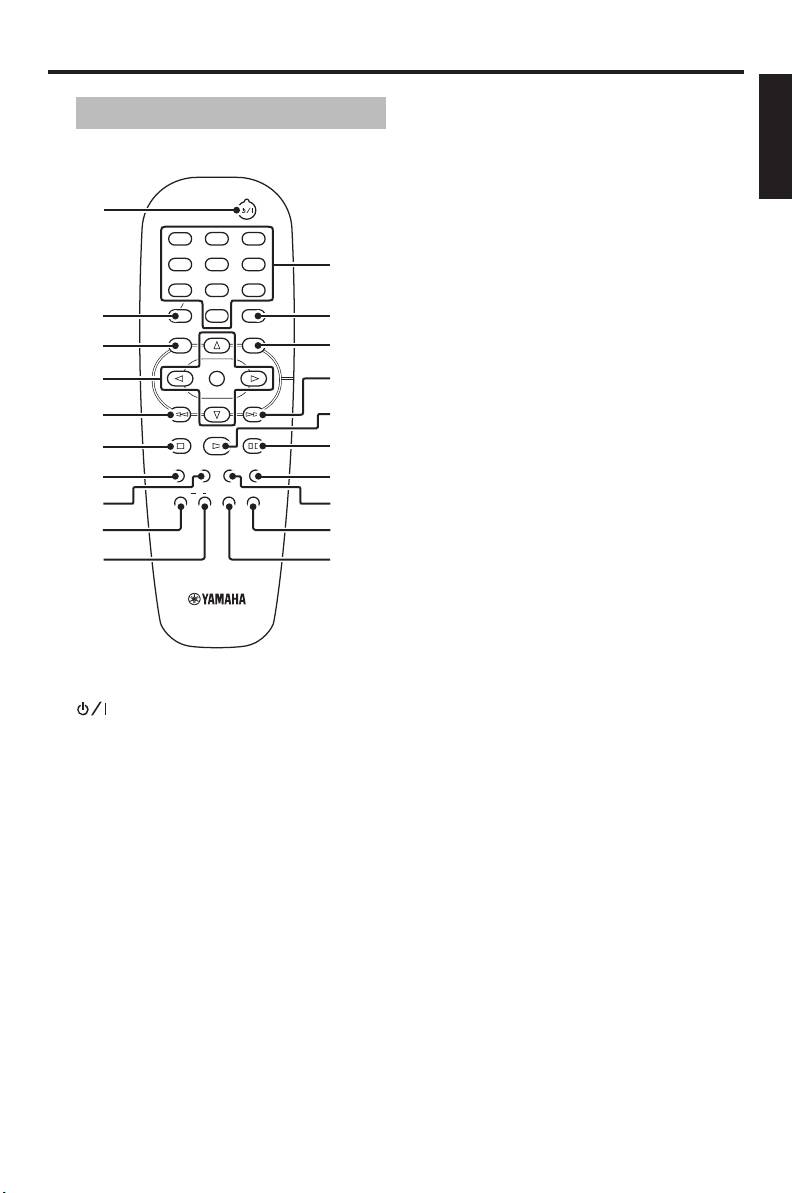
Functional Overview
English
Remote control
6 STOP (9)
Stops playback.
7 SUBTITLE
Selects the subtitle language.
1
8 ANGLE
1
2
3
Selects the DVD camera angle.
4
5
6
q
9 REPEAT
7
8
9
TOP MENU RETURN
ON SCREEN
Repeats the chapter, track, title, disc or
2
0
w
all discs.
MENU SETUP
3
e
0 A-B
ENTER
Repeats a specific segment.
4
r
OK
t
q Numeric buttons (0-9)
5
STOP
PLAY
PAUSE
Selects numbered items in the currently
6
y
displayed menu.
SUBTITLE
ANGLE
ZOOM AUDIO
7
u
REPEAT
A B
SHUFFLE
w ON SCREEN
DISC SKIP
8
i
Accesses or exits from the on-screen
DVD
display (OSD) menu of this unit.
9
o
0
p
e SETUP
Accesses or exits from the setup menu
of this unit.
r T
Searches forward.*
Moves to the next chapter or track.
1
t PLAY (B)
Turns on this unit or sets it to the
Starts playback.
standby mode.
y PAUSE (;)
2 TOP MENU/RETURN
Pauses playback temporarily.
Displays the top-level disc menu (DVD).
Frame-by-frame playback.
Moves back to the previous menu (DVD*/
VCD).
u AUDIO
Selects the audio language or format.
3 MENU
Accesses the menu of a disc (DVD).
i ZOOM
Switches PBC on or off (VCD).
Enlarges the video image.
4 1 / 2/3 / 4
o DISC SKIP
Selects an item in the currently displayed
Selects another disc.
menu. Search or slow playback.
p SHUFFLE
ENTER/OK
Plays tracks in a random order.
Confirms the menu selection.
5 S
* Press and hold the button for about two
Searches backward.*
seconds.
Moves to the previous chapter or track.
5 En


