
Yamaha DV-C6860: Getting Started Step 1: Inserting batteries into the remote control
Getting Started Step 1: Inserting batteries into the remote control: Yamaha DV-C6860
Table of contents
- Important notes for users in the U.K.
- DANGER CAUTION LASER SAFETY
- CAUTION: READ THIS BEFORE OPERATING THIS UNIT.
- Introduction Region codes Cleaning discs Supplied accessories Patent information Notes on discs
- Functional Overview Front panel
- Rear panel
- Remote control
- Connections General notes on connections Audio connections
- Video connections
- Getting Started Step 1: Inserting batteries into the remote control
- Getting Started Step 2: Turning on the power Step 3: Setting a TV type and display
- Getting Started
- Step 4: Setting a language preference
- Disc Operations Basic playback General operation
- Selecting the various repeat/ shuffle functions
- Disc Operations Operations for video playback (DVD/VCD/SVCD)
- Disc Operations Zooming in On-screen display (OSD) DVD Resuming playback from the last stopped point VCD/SVCD
- Disc Operations Special DVD features
- Audio CDs Special VCD & SVCD features Playing MP3/JPEG/Kodak picture CDs
- Disc Operations Special picture disc features
- Scan effect Playing MP3 music and JPEG pictures simultaneously
- Setup Menu UNLOCK General setup menu
- Setup Menu
- Setup Menu Audio setup menu
- Setup Menu
- Setup Menu Video setup menu
- Setup Menu
- Setup Menu
- Setup Menu Preference setup menu
- Setup Menu
- Setup Menu
- Language Code
- Language Code
- Troubleshooting
- Troubleshooting
- Glossary
- Specifications
Getting Started
Using the remote control
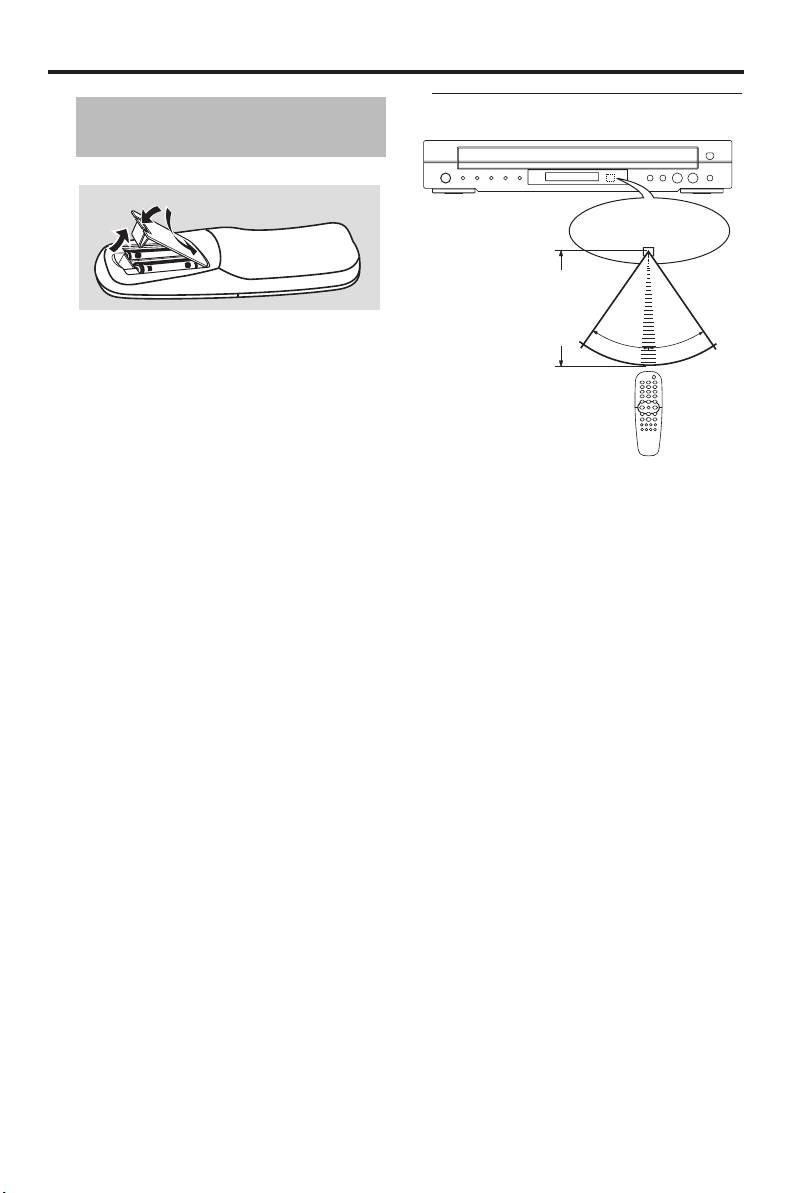
Step 1: Inserting batteries
into the remote control
3
Remote control
1
sensor
2
2
Point the remote control at
the remote control sensor,
within approximately 6 m
(20 ft) from the unit.
1 Open the battery compartment.
30°
30°
2 Insert the two supplied batteries (AA, R06,
UM-3) following the indications (+/–)
inside the compartment.
3 Close the cover.
Notes:
– Insert batteries correctly according to the
polarity markings (+/–). The batteries
Handling the remote control
inserted in the opposite direction may leak.
• Do not spill water or other liquids on
– Replace the exhausted batteries
the remote control.
immediately with new ones to prevent a
• Do not drop the remote control.
leakage.
• Do not leave or store the remote
– Remove the batteries from the
control in the following types of
compartment if the remote control is not
conditions:
used for more than a month.
– places of high humidity, such as near a
– If the batteries have leaked, dispose of
bath
them immediately. Avoid touching the
– places of high temperature, such as near
leaked material or letting it come into
a heater or stove
contact with clothing, etc. Clean the battery
– places of extremely low temperatures
compartment thoroughly before installing
– dusty places
new batteries.
– Do not use old batteries together with new
ones.
– Do not use different types of batteries (such
as alkaline and manganese batteries)
together. Read the packaging carefully as
these different types of batteries may have
the same shape and color.
– Dispose of the batteries correctly in
accordance with your local regulations.
8 En


