
Yamaha DV-C6860: Disc Operations Basic playback General operation
Disc Operations Basic playback General operation: Yamaha DV-C6860
Table of contents
- Important notes for users in the U.K.
- DANGER CAUTION LASER SAFETY
- CAUTION: READ THIS BEFORE OPERATING THIS UNIT.
- Introduction Region codes Cleaning discs Supplied accessories Patent information Notes on discs
- Functional Overview Front panel
- Rear panel
- Remote control
- Connections General notes on connections Audio connections
- Video connections
- Getting Started Step 1: Inserting batteries into the remote control
- Getting Started Step 2: Turning on the power Step 3: Setting a TV type and display
- Getting Started
- Step 4: Setting a language preference
- Disc Operations Basic playback General operation
- Selecting the various repeat/ shuffle functions
- Disc Operations Operations for video playback (DVD/VCD/SVCD)
- Disc Operations Zooming in On-screen display (OSD) DVD Resuming playback from the last stopped point VCD/SVCD
- Disc Operations Special DVD features
- Audio CDs Special VCD & SVCD features Playing MP3/JPEG/Kodak picture CDs
- Disc Operations Special picture disc features
- Scan effect Playing MP3 music and JPEG pictures simultaneously
- Setup Menu UNLOCK General setup menu
- Setup Menu
- Setup Menu Audio setup menu
- Setup Menu
- Setup Menu Video setup menu
- Setup Menu
- Setup Menu
- Setup Menu Preference setup menu
- Setup Menu
- Setup Menu
- Language Code
- Language Code
- Troubleshooting
- Troubleshooting
- Glossary
- Specifications
Disc Operations
IMPORTANT!
5 To stop playback, press 9
(STOP) on the
– If the inhibition icon ( or X)
front panel or STOP (9) on the remote
appears on the TV screen when a
control.
button is pressed, the function for
• To play back a specific disc directly,
that button is not available on the
press DISC SKIP repeatedly on the
current disc or at the current time.
remote control or press DISC (1, 2, 3,
– Depending on the DVD or VIDEO
4, 5) on the front panel.
CD disc, some operations may
• Press PLAYXCHANGE on the front
operate differently or be
panel to open the disc tray, and then
restricted.
reload or unload discs without
– Do not push on the disc tray or put
interrupting current disc playback.
any objects other than discs on the
• Playback stops after all discs have been
disc tray. Doing so may cause the
played.
disc player to malfunction.
• When the disc tray is open, press
B/;
(PLAY/PAUSE),
/
(OPEN/CLOSE),
Basic playback
PLAYXCHANGE or
DISC (1, 2, 3, 4, 5) to close the disc
1 Press STANDBY/ON on the front panel
tray automatically.
or on the remote control.
2 Press /
(OPEN/CLOSE) on the front
panel to open the disc tray.
General operation
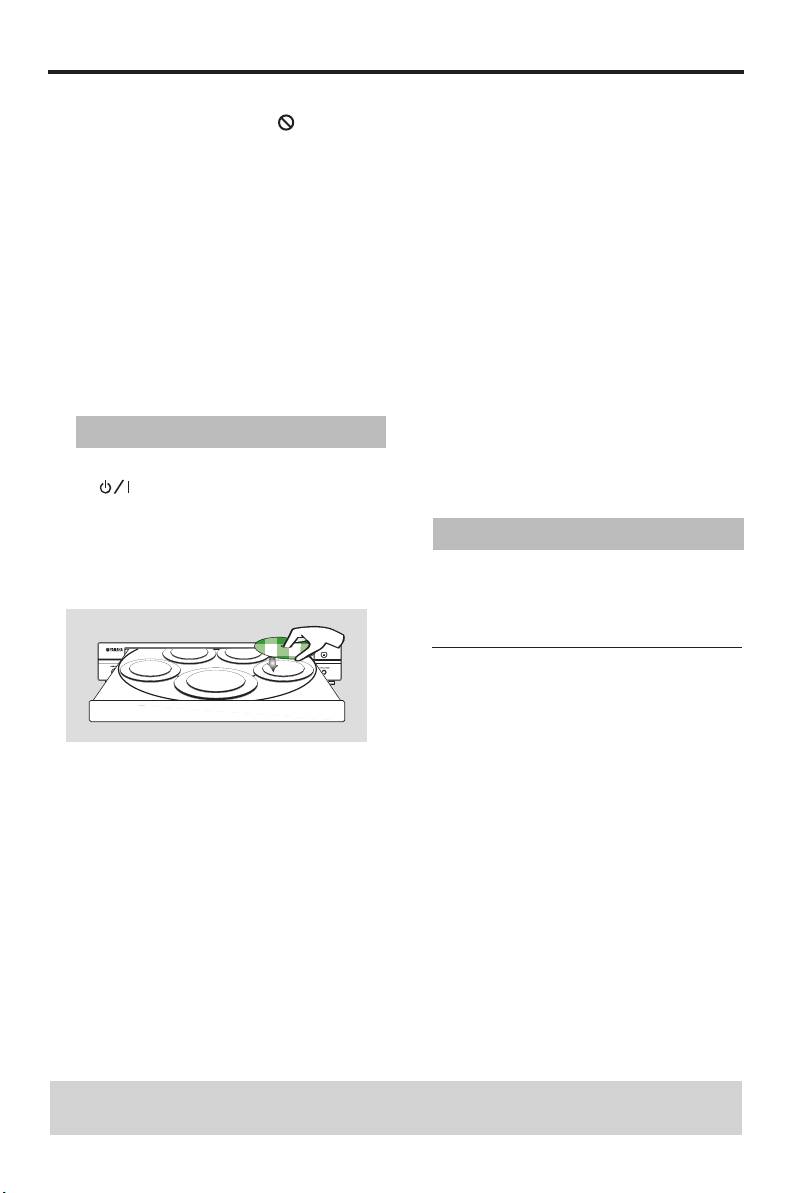
3 Place discs in the disc tray with the printed
Unless stated otherwise, all operations
side up.
described here are carried out using the
supplied remote control.
Pausing playback
1 During playback, press PAUSE (;).
➜ Playback is paused and the sound is
muted.
2 Press PAUSE (;) again to select the next
4 Press B/;
(PLAY/PAUSE) on the front
picture frame.
panel or PLAY (B) on the remote
control.
3 To resume normal playback, press
➜ The disc tray closes and playback starts
PLAY (B).
automatically for all of the loaded discs
in the tray in sequence.
TIPS: The operating features described here might not be possible for certain discs.
Always refer to the instructions supplied with the disc.
12 En


