
Yamaha DV-C6860: Rear panel
Rear panel: Yamaha DV-C6860
Table of contents
- Important notes for users in the U.K.
- DANGER CAUTION LASER SAFETY
- CAUTION: READ THIS BEFORE OPERATING THIS UNIT.
- Introduction Region codes Cleaning discs Supplied accessories Patent information Notes on discs
- Functional Overview Front panel
- Rear panel
- Remote control
- Connections General notes on connections Audio connections
- Video connections
- Getting Started Step 1: Inserting batteries into the remote control
- Getting Started Step 2: Turning on the power Step 3: Setting a TV type and display
- Getting Started
- Step 4: Setting a language preference
- Disc Operations Basic playback General operation
- Selecting the various repeat/ shuffle functions
- Disc Operations Operations for video playback (DVD/VCD/SVCD)
- Disc Operations Zooming in On-screen display (OSD) DVD Resuming playback from the last stopped point VCD/SVCD
- Disc Operations Special DVD features
- Audio CDs Special VCD & SVCD features Playing MP3/JPEG/Kodak picture CDs
- Disc Operations Special picture disc features
- Scan effect Playing MP3 music and JPEG pictures simultaneously
- Setup Menu UNLOCK General setup menu
- Setup Menu
- Setup Menu Audio setup menu
- Setup Menu
- Setup Menu Video setup menu
- Setup Menu
- Setup Menu
- Setup Menu Preference setup menu
- Setup Menu
- Setup Menu
- Language Code
- Language Code
- Troubleshooting
- Troubleshooting
- Glossary
- Specifications
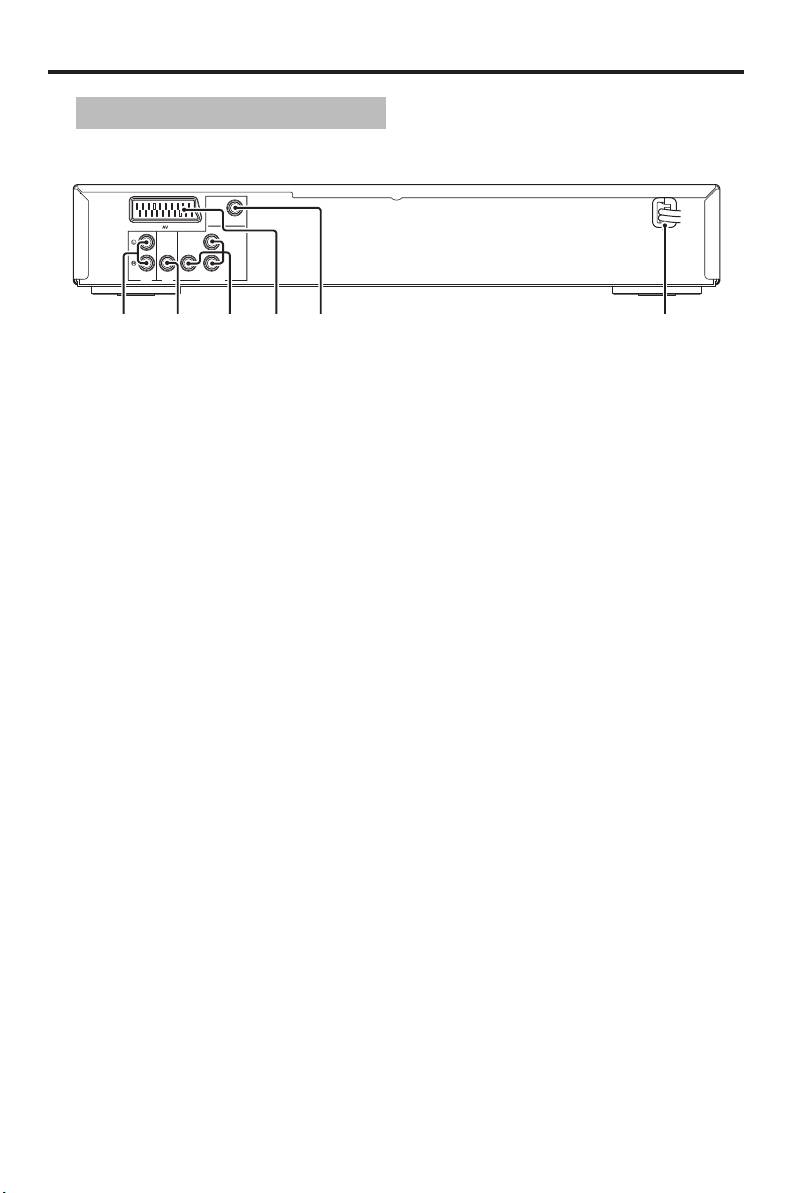
Functional Overview
Rear panel
VIDEO
Y
COAXIAL COMPONENT
AUDI O
OUT
DIGITAL
OUT
PR /CR
VIDEO OUT
P
B /CB
1
2
3
4
5
6
1 AUDIO OUT (L, R) jacks
4 AV terminal
Connect to the audio input jacks of your
Connect to SCART input terminal of your
AV receiver or stereo system.
TV.
2 DIGITAL OUT - COAXIAL jack
5 VIDEO OUT - VIDEO jack
Connect to the coaxial input jack of your
Connect to the composite video input jack
AV receiver.
of your AV receiver.
3 VIDEO OUT - COMPONENT
6 AC power cord
(Y, PB/CB, PR/CR) jacks
Connect to a standard AC outlet.
Connect to the component input jacks of
your AV receiver.
Caution: Do not touch the inner pins of the jacks on the rear panel of this unit.
Electrostatic discharge may cause permanent damage to this unit.
4 En
Top 10 manuals
100.00
NZXT HALE90 1000W99.99
Samsung SM-R38099.97
AEG BSB 18C99.97
Dell 2700W99.97
Smeg KSEC70X99.96
Beurer HDE 4099.96
Pyramida KH 50 v.299.96
MSI CSM-H81M-P3299.96
AEG HR 562799.95
Melissa 640-048


