
Siemens DE2427555: Child protection Activating child protection Deactivating child protection
Child protection Activating child protection Deactivating child protection: Siemens DE2427555
Table of contents
- Safety information Your new appliance Operating the continuous-flow heater
- Desired temperature Changing the desired temperature Wellness program Starting wellness program 1
- Starting wellness program 2 Ending wellness program 1 or 2 Changing the wellness program temperature
- Child protection Activating child protection Deactivating child protection
- Conserving energy and water at the touch of a button
- The meaning of display indications
- Using the appliance after switching off the water supply Start-up after power failure Cleaning Customer Service
- A fault, what to do? Fault Cause Solution Who
- Fault Cause Solution Who
- Disposal Guarantee
en
Use the same procedure to change the temperature in wellness
program 2.
■ twice to select wellness
Press the wellness program button
program 2. The saved shower temperature in °C appears and
the
symbol flashes.
■ pressed for 3 seconds to se-
Keep wellness program button
lect the programming function. The symbol starts to flash
at intervals.
■
Use the rotary knob to set the desired temperature between
30 °C and 42 °C.
■ for 3 seconds to store
Press the wellness program button
the new value. The selected temperature is now saved in well-
ness program 2.
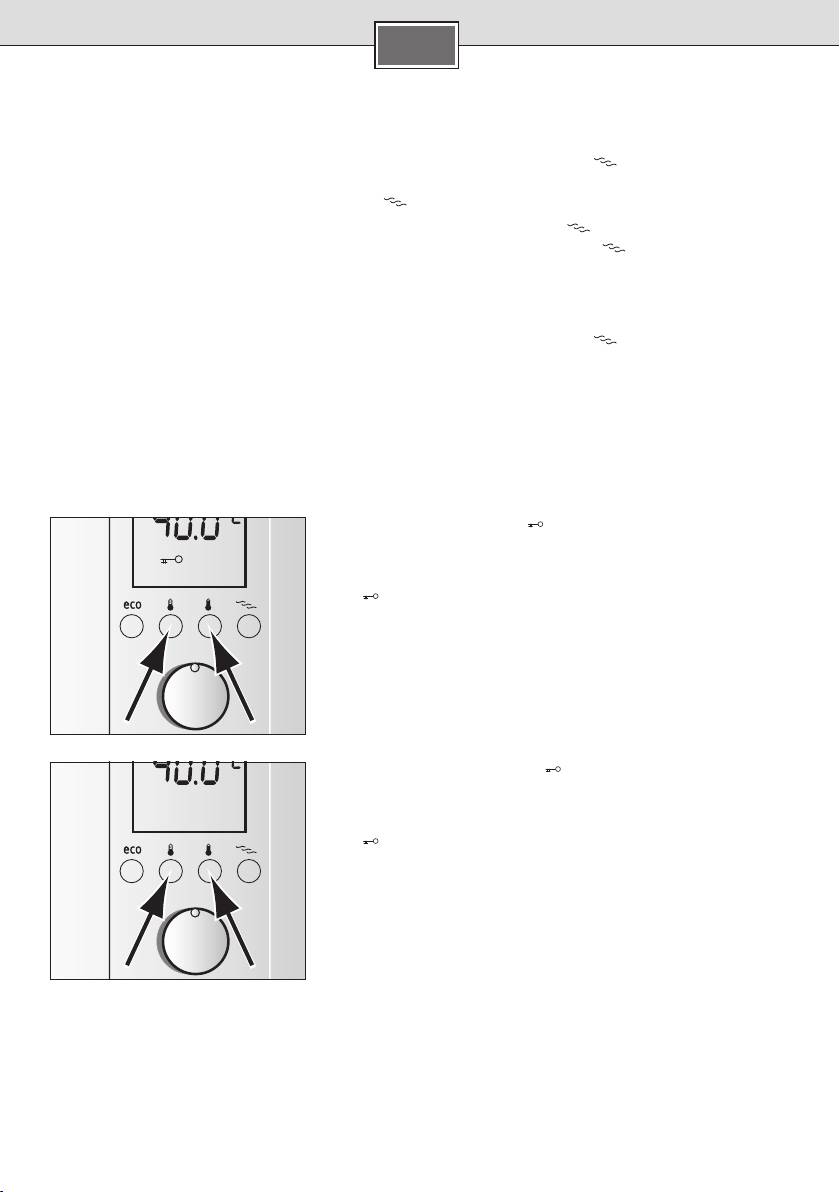
Child protection
You have the option of limiting the temperature to 42 °C, e.g. to prevent children from being accidentally
scalded.
Activating child protection
Briefly press desired temperature buttons ■ 1 and 2
simultaneously.
The
symbol appears on the display, the temperature is limited
to maximum 42 °C.
Deactivating child protection
Briefly press desired temperature buttons ■ 1 and 2
simultaneously.
The
symbol on the display disappears, the temperature can
now be freely selected between 20 °C and 60 °C.
15
