
Indesit WITL 86: Washing machine description
Washing machine description: Indesit WITL 86
4
GB
ON-OFF/LID LOCK led:
If this LED is on, the appliance Lid is locked to prevent it from being opened accidentally; to avoid any
damages, you must wait for the lamp to flash before you open the Lid.
.
The rapid flashing of the ON-OFF/LID LOCK Led together with the flashing of at least one other LED indicates
there is an abnormality (
see page 11
).
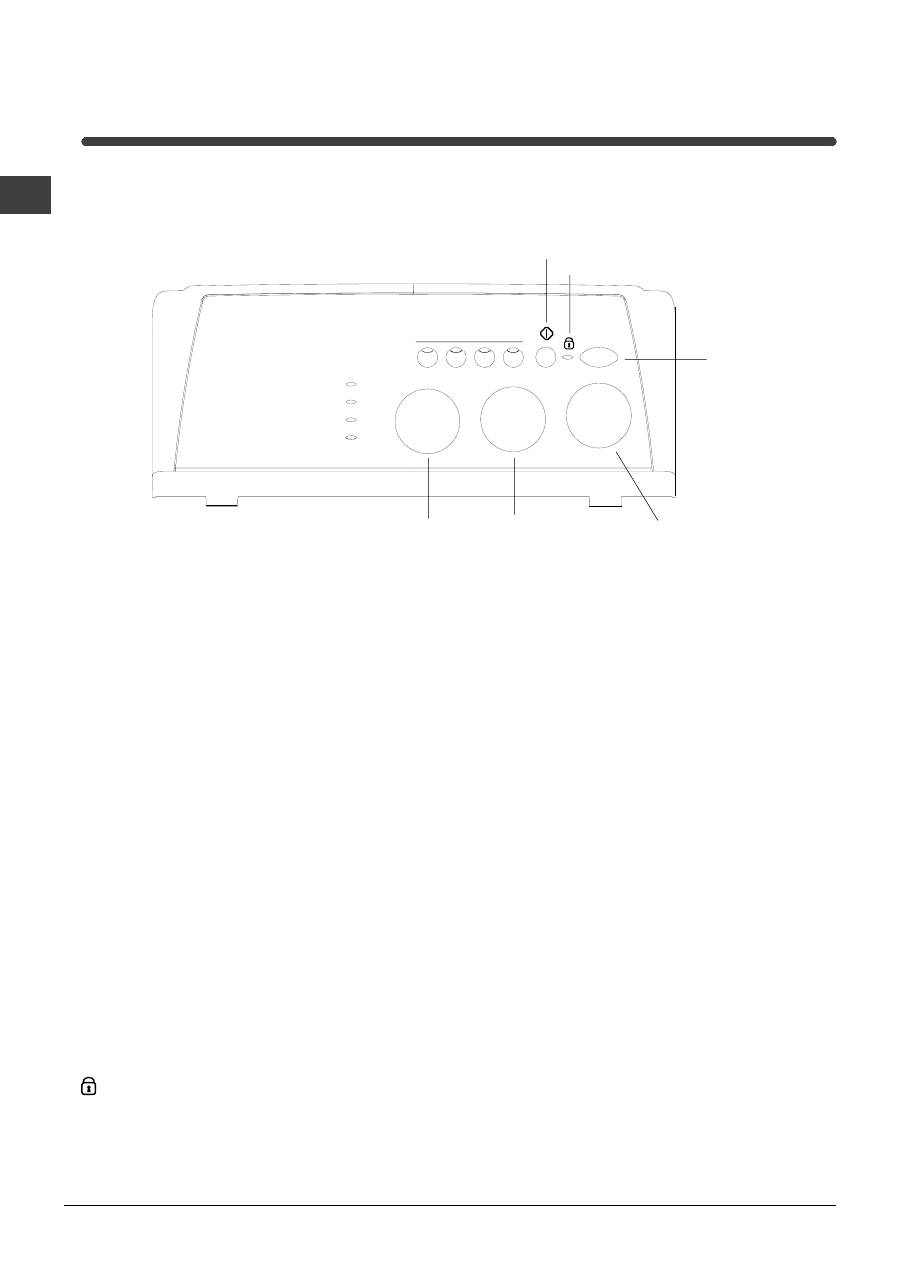
Control panel
Washing machine description
START/STOP
button
SPIN
knob
TEMPERATURE
knob
START/RESET
button
FUNCTION
Buttons
PROGRAMME
knob
LEDs
LID LOCKED
LED
Detergent dispenser
to add detergent and fabric
softener (
see page 8
).
LEDs
to find out which wash cycle phase is under way.
If the Delay Timer function has been set, the time left
until the programme starts will be indicated (
see page 5
).
FUNCTION
keys to select the functions available.
The button corresponding to the function selected will
remain on.
SPIN SPEED
knob to set the spin speed or exclude the
spin cycle completely (
see page 7
).
TEMPERATURE
knob to set the temperature or the cold
wash cycle (
see page 7
).
ON/OFF
key to turn the washing machine on and
off.
START/RESET
key to start the programmes or
cancel incorrect settings.
ON-OFF/LID LOCK
led, to find out whether the
washing machine is on (flashing) and if the lid may be
opened (
see page 5
).
PROGRAMME
knob to set the programmes
(
see page 6
).
The knob stays still during the cycle.
5
GB
Service
Tr
oubleshooting
Precautions
C
ar
e
Programmes
Detergents
Installation
Description
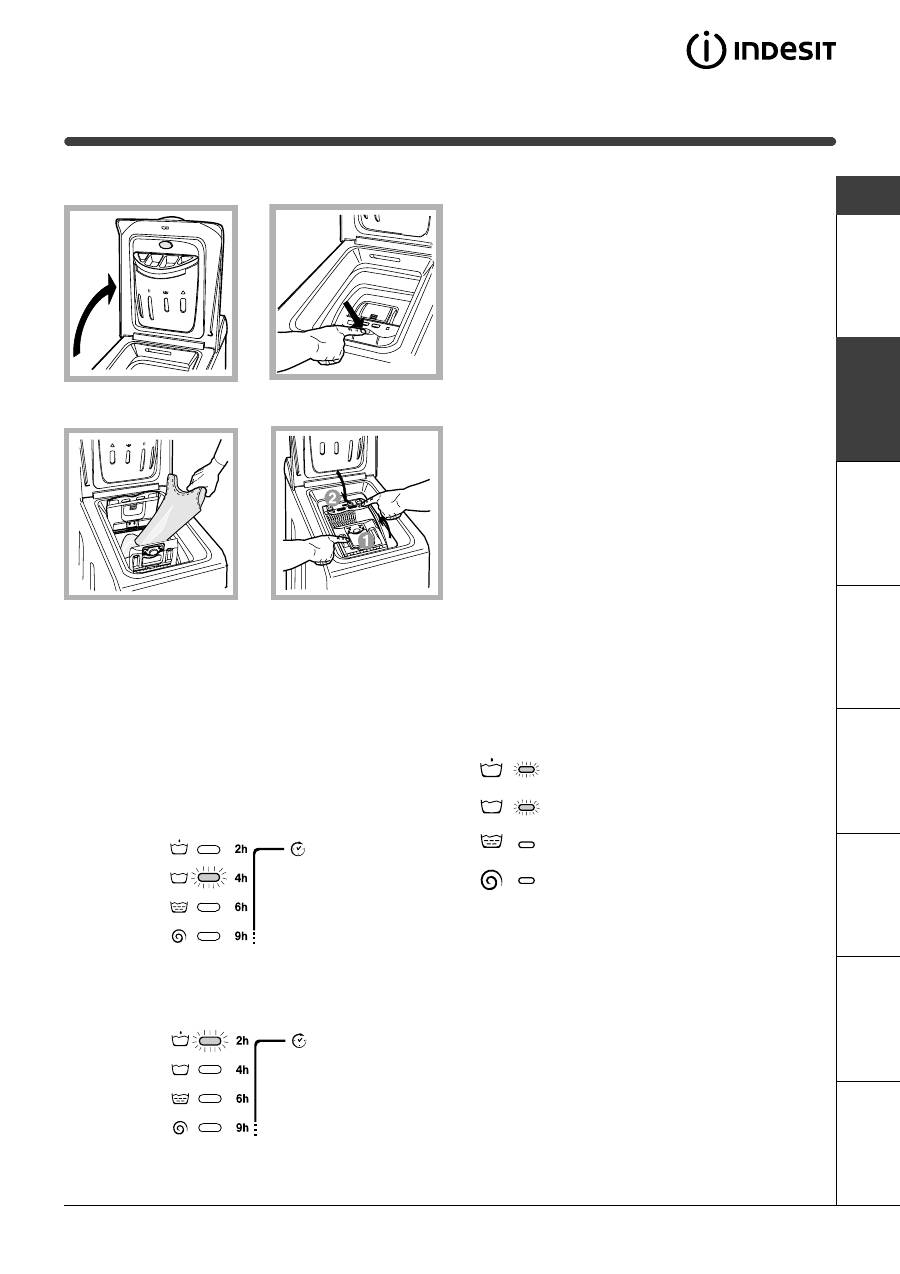
Cycle phase under way:
During the wash cycle, the LEDs gradually illumi-
nate on to indicate the cycle phase under way:
Prewash
Wash
Rinse
Spin cycle
Note: during draining, the LED corresponding to
the Spin cycle phase will be turned on.
Function buttons
The FUNCTION BUTTONS also act like LEDS.
When a function is selected, the corresponding
button is illuminated.
If the function selected is incompatible with the
programme set, the button will flash and the function
will not be enabled.
If you set a function that is incompatible with another
function you selected previously, only the last one
selected will be enabled.
Leds
The LEDS provide important information.
This is what they can tell you:
Delay set:
If the Delay Timer function has been enabled
(see
page. 7)
, once you have started the programme,
the LED corresponding to the delay set will begin to
flash:
As time passes, the remaining delay will be
displayed, and the corresponding LED will flash:
Once the set delay is complete, the flashing LED will
turn off and the programme set will start.
Fig. 3
Fig. 4
Fig. 1
Fig. 2
A) Opening (Fig. 1).
Lift the external lid and open it completely.
B) Opening the drum (Soft opening):
With one finger, push the button indicated in fig. 2
and the drum will open delicately.
C) Loading the washing machine. (Fig. 3)
.
D) Shutting (Fig. 4).
- close the drum fully by first shutting the front door
followed by the rear one;
- then ensure the hooks on the front door are perfectly
housed within the seat of the rear door;
- after the hooks have clicked into position, press both
doors lightly downwards to make sure they do not
come loose;
- finally shut the external lid.
How to open and to close the drum
Table of contents
- Installation
- Washing machine description
- Starting and Programmes
- Personalisations
- Detergents and laundry
- Precautions and advice
- Care and maintenance
- Troubleshooting
- Service
- Ðóêîâîäñòâî ïî ýêïóàòàöèè
- Óñòàíîâêà
- Îïèñàíèå ñòèðàëüíîé ìàøèíû
- Çàïóñê ìàøèíû.Ïðîãðàììû
- Ïåðñîíàëèçàöèÿ ñòèðêè
- Ìîþùèå ñðåäñòâà è áåëüå
- Ïðåäóïðåæäåíèÿ èðåêîìåíäàöèè
- Îáñëóæèâàíèå è óõîä
- Íåèñïðàâíîñòèè ìåòîäû èõ óñòðàíåíèÿ
- Ñåðâèñíîåîáñëóæèâàíèå
- Instrucciones para el uso
- Instalación
- Descripción de la lavadora
- Puesta en marcha y Programas
- Personalizaciones
- Detergentes y ropa
- Precauciones y consejos
- Mantenimiento y cuidados
- Anomalías y soluciones
- Asistencia
- Használati utasítás
- Üzembehelyezés
- A mosógép leírása
- Indítás és Programok
- Program módosítások
- Mosószerek és mosandók
- Óvintézkedések
- Karbantartás és törõdés
- Rendellenességekés elhárírásuk
- Szerviz
- Návod k pouití
- Instalace
- Popis praèky
- Uvedení do chodu a programy
- Nastavení èinnostidle potøeb uivatele
- Prací prostøedky a prádlo
- Opatøení a rady
- Údrba a péèe
- Poruchy azpùsob jejich odstranìní
- Servisní sluba
- Návod na pouitie
- Intalácia
- Popis práèky
- Uvedenie do chodu a programy
- Nastavenie èinnostipod¾a potrieb uivate¾a
- Pracie prostriedky a bielizeò
- Opatrenia a rady
- Údrba a starostlivos
- Poruchy aspôsob ich odstránenia
- Servisná sluba





