
Sharp CV-P10PR: USING THE REMOTE CONTROL LOADING BATTERIES HOW TO USE THE REMOTE CONTROL
USING THE REMOTE CONTROL LOADING BATTERIES HOW TO USE THE REMOTE CONTROL: Sharp CV-P10PR
Table of contents
- A. Information on Disposal for Users (private households) B. Information on Disposal for Business Users.
- CONTENTS
- SAFETY PRECAUTIONS WARNINGS CAUTIONS
- LOCATION INCLUDED
- PART NAMES FRONT VIEW REAR VIEW
- REMOTE CONTROL
- INSTALLATION AND REMOVAL OF EXHAUST HOSE Installation of the exhaust hose 1 2 3
- 4 5 Removal of the exhaust hose
- USING THE REMOTE CONTROL LOADING BATTERIES HOW TO USE THE REMOTE CONTROL
- NOTE ON OPERATION NOTES ON OPERATION OPERATING CONDITIONS ENERGY EFFICIENCY TIPS
- USE FOR AIR CONDITIONER COOL MODE DRY MODE
- FAN MODE VENTILATION MODE
- USE FOR AIR CONDITIONER TO CHANGE AIR FLOW DIRECTION UP / DOWN AIR FLOW DIRECTION LEFT / RIGHT AIR FLOW DIRECTION
- TURBO COOL OPERATION TO CANCEL SLEEP OPERATION TO CANCEL
- TIMER ON TO CANCEL USE FOR AIR CONDITIONER TIMER OPERATION TIMER OFF
- USE FOR ION GENERATOR ION GENERATOR MODE
- USE FOR ION GENERATOR TO CHANGE AIR FLOW DIRECTION MAX DENSITY OPERATION
- REFRESH OPERATION TIMER OFF OPERATION
- MAIN UNIT OPERATION DRAINAGE
- MAINTENANCE CLEANING THE FILTER AIR INLET FILTER CLEANING THE UNIT AND THE REMOTE CONTROL WHEN STORING FOR A LONG PERIOD (NOT IN USE)
- BEFORE CALLING FOR SERVICE
USING THE REMOTE CONTROL
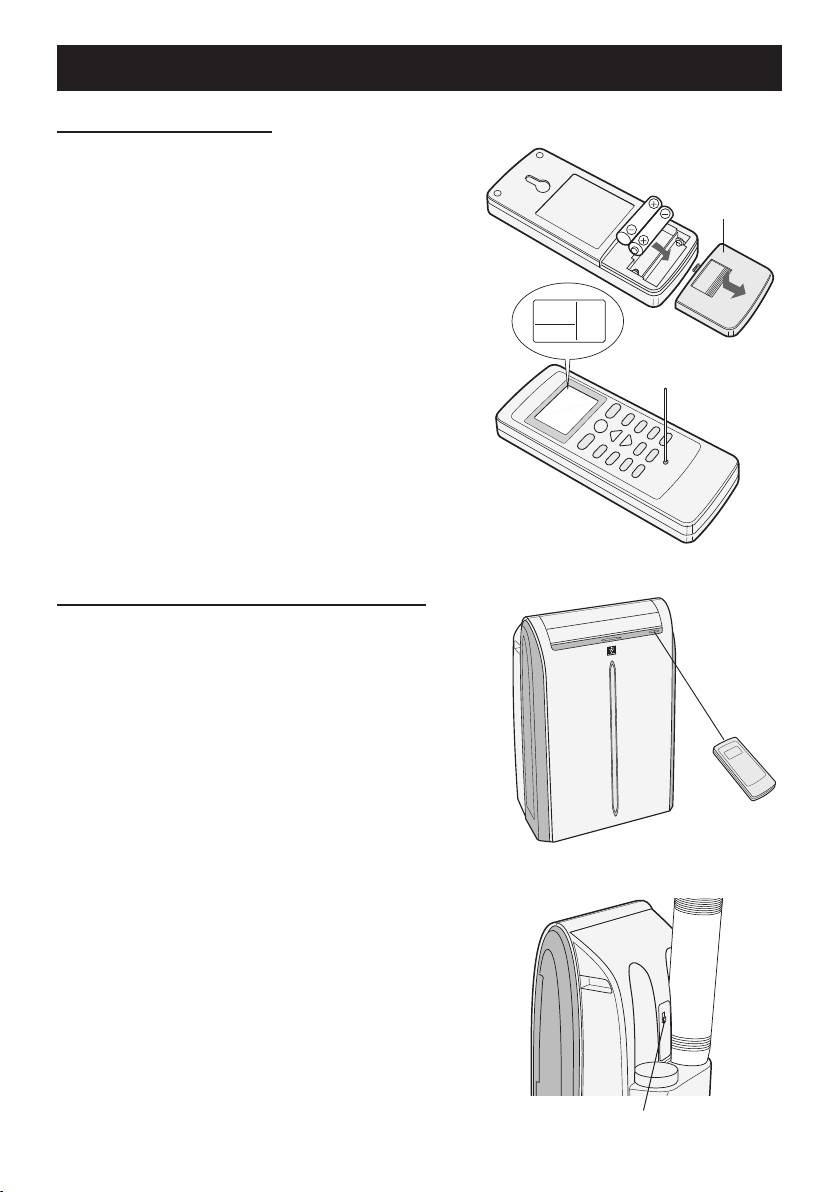
LOADING BATTERIES
Remove the battery cover.
1
Insert two batteries.
(AAA(R03))
Battery cover
2
• Make sure the (+) and (-) polarities are cor-
rectly aligned.
• Lines will appear on the display when bat-
teries are properly installed.
Reattach the battery cover.
3
Press the RESET button using a thin
4
pointed implement.
NOTES:
• The battery life is approximately 1 year in normal
use.
• When replacing the batteries, always change
both and use the same type.
• If you will not be using the unit for a long time, re-
move the batteries from the remote control.
HOW TO USE THE REMOTE CONTROL
Point the remote control toward the Signal re-
ceiver and press the desired button. The unit
generates a beep when it receives the signal.
• Make sure nothing, such as curtains, blocks the
signal receiver window.
• The signal effective distance is 7 m.
CAUTION:
• Do not expose the receiver window to direct sun-
light. This may adversely affect its operation.
• Use of certain uorescent lamp in the same room
may interfere with transmission of the signal.
• Do not leave the remote control in direct sunlight
or near a heater. Protect the remote control from
moisture and shock.
To prevent the remote control from being
misplaced,hookittotheunitwhennotin
use.
When attached, to remove the remote control from
the unit, lift the remote control up slightly and pull it
out.
Remote control hook
GB-8
01_CV-P10PR_OM_EN.indd 8 14/08/29 16:42
