
Sharp PN-E601: instruction
Class: Household, kitchen appliances, electronics and equipment
Type:
Manual for Sharp PN-E601
Table of contents
ENGLISH DEUTSCHFRANÇAIS ESPAÑOL РУССКИЙ
PN-E601
PN-E521
LCD MONITOR
MONITEUR LCD
MONITOR LCD
LCD FARBMONITOR
ЖК МОНИТОР
OPERATION MANUAL
MODE D’EMPLOI
MANUAL DE INSTRUCCIONES
BEDIENUNGSANLEITUNG
РУКОВОДСТВО ПО ЭКСПЛУАТАЦИИ
ENGLISH ..... E1
FRANÇAIS .... F1
ESPAÑOL .... S1
DEUTSCH .... D1
РУССКИЙ ..... Р1
(
.ﺔﻘﻓﺮﳌﺍ CD-ROM ﺔﻧﺍﻮﻄﺳﺃ ﰲ ﺪﺟﻮﻳ ﺔﻴﺑﺮﻌﻟﺍ ﺔﻐﻠﻟﺎﺑ ﻞﻴﻟﺪﻟﺍ
香港電器安全規格
(
國際電工委員會規格適合
)
)
IMPORTANT:
To aid reporting in case of loss or theft, please record the
Model No.:
product’s model and serial numbers in the space provided.
The numbers are located in the rear of the product.
Serial No.:
U.S.A. ONLY
FOR CUSTOMERS IN U.K.
IMPORTANT
The wires in this mains lead are coloured in accordance with the following code:
GREEN-AND-YELLOW: Earth
BLUE: Neutral
BROWN: Live
As the colours of the wires in the mains lead of this apparatus may not correspond with the coloured markings identifying the
terminals in your plug proceed as follows:
•ThewirewhichiscolouredGREEN-AND-YELLOWmustbeconnectedtotheterminalintheplugwhichismarkedbythe
letter E or by the safety earth
or coloured green or green-and-yellow.
•ThewirewhichiscolouredBLUEmustbeconnectedtotheterminalwhichismarkedwiththeletterN or coloured black.
•ThewirewhichiscolouredBROWNmustbeconnectedtotheterminalwhichismarkedwiththeletterL or coloured red.
Ensurethatyourequipmentisconnectedcorrectly.Ifyouareinanydoubtconsultaqualiedelectrician.
“WARNING: THIS APPARATUS MUST BE EARTHED.”
®
Products that have earned the ENERGY STAR
are designed to protect the environment through superior
energyefciency.
®
Les produits labellisés ENERGY STAR
sont conçus pour protéger l’environnement par un rendement
énergétique supérieur.
®
Los Productos que han conseguido el ENERGY STAR
están diseñados para proteger el medio ambiente a
travésdeunamejorecienciaenelconsumodeenergía.
®
Mit dem ENERGY STAR
ausgezeichnete Produkte zeichnen sich durch ein besonders energiesparendes
Design aus und schützen die Umwelt.
®
Изделия,отмеченныезнакомENERGYSTAR
,разработанысучетоммерпоохранеокружающей
средыотличаютсямаксимальнойэффективностьюэнергопотребления.
Authorised representative responsible for the European Union Community Market
Représentant autorisé pour le marché de la communauté européenne
Representante autorizado responsable del mercado comunitario de la Unión Europea
Autorisierter Repräsentant in der Europäischen Union
SHARP ELECTRONICS (Europe) GmbH
Sonninstraße 3, D-20097 Hamburg
ENGLISH
PN-E601
PN-E521
LCD MONITOR
ENGLISH
IMPORTANT INFORMATION
WARNING:
TO REDUCE THE RISK OF FIRE OR ELECTRIC SHOCK, DO NOT
EXPOSE THIS PRODUCT TO RAIN OR MOISTURE.
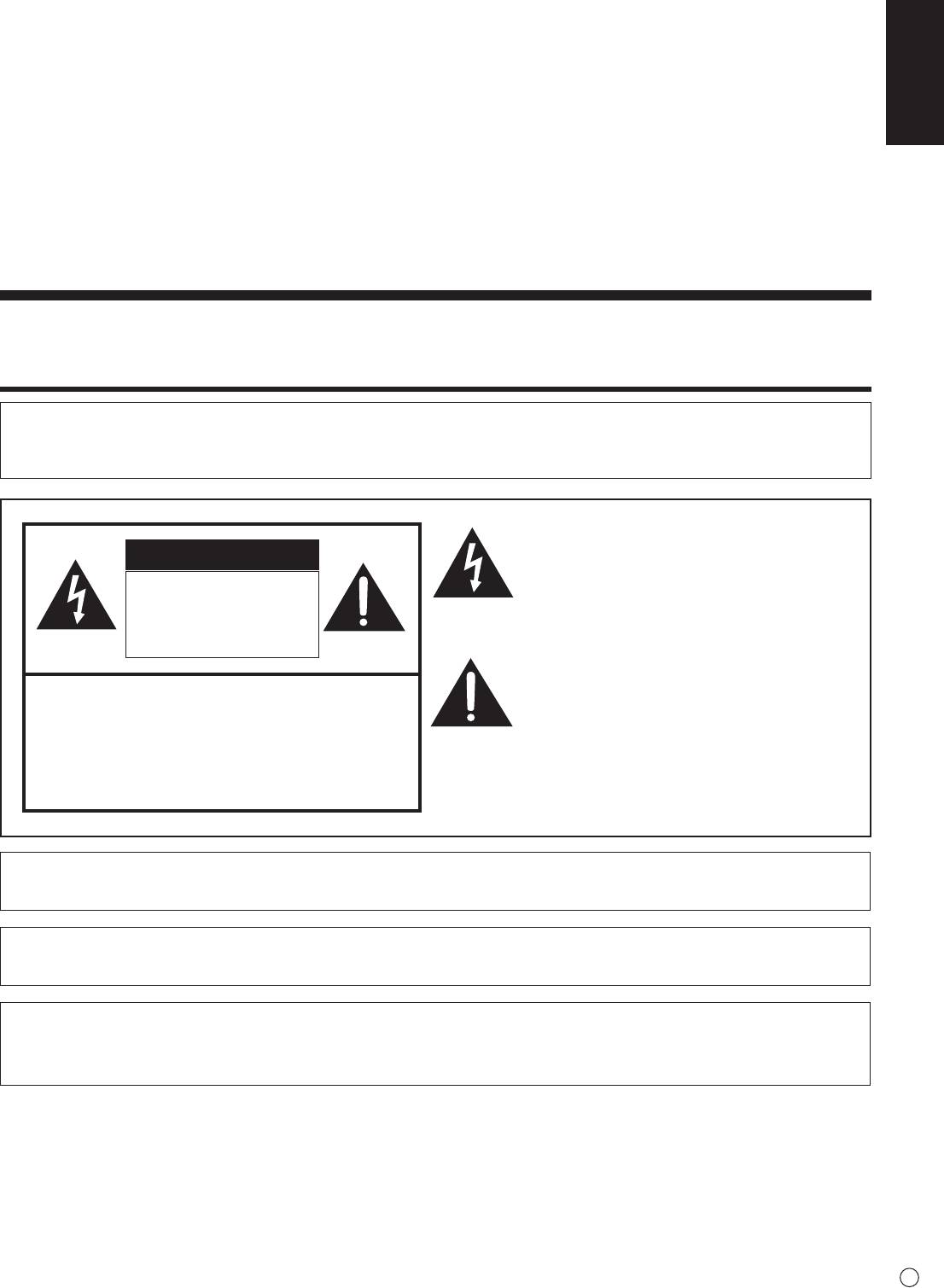
Thelightningashwitharrowheadsymbol,within
an equilateral triangle, is intended to alert the
CAUTION
user to the presence of uninsulated “dangerous
voltage” within the product’s enclosure that may
RISK OF ELECTRIC
beofsufcientmagnitudetoconstituteariskof
SHOCK
electric shock to persons.
DO NOT OPEN
The exclamation point within a triangle is
intended to alert the user to the presence of
CAUTION: TO REDUCE THE RISK OF ELECTRIC
important operating and maintenance (servicing)
SHOCK, DO NOT REMOVE COVER.
instructions in the literature accompanying the
NOUSER-SERVICEABLEPARTS
product.
INSIDE.
REFER SERVICING TO QUALIFIED
SERVICE PERSONNEL.
CAUTION:
The AC outlet shall be installed near the equipment and shall be easily accessible.
CAUTION:
Use the supplied power cord as it is.
Thisproductutilizesuorescenttubescontainingasmallamountofmercury.
Disposal of these materials may be regulated due to environmental considerations. For disposal or recycling
information, please contact your local authorities.
1
E
IMPORTANT INFORMATION (Continued)
WARNING:
FCCRegulationsstatethatanyunauthorizedchangesormodicationstothisequipmentnotexpresslyapprovedbythe
manufacturer could void the user’s authority to operate this equipment.
NOTE:
This equipment has been tested and found to comply with the limits for Class A digital device, pursuant to Part 15 of the
FCC Rules. These limits are designed to provide reasonable protection against harmful interference when the equipment
is operated in a commercial environment. This equipment generates, uses, and can radiate radio frequency energy and, if
not installed and used in accordance with the instruction manual, may cause harmful interference to radio communications.
Operation of this equipment in a residential area is likely to cause harmful interference in which case the user will be required
to correct the interference at his own expense.
Thisproductutilizestin-leadsolder,anduorescentlampcontainingasmallamountofmercury.Disposalof
these materials may be regulated due to environmental considerations.
For disposal or recycling information, please contact your local authorities, the Electronics Industries Alliance:
www.eiae.org,thelamprecyclingorganization:www.lamprecycle.orgorSharpat1-800-BE-SHARP
(For U.S.A. Only)
ThisproductcontainsaCRCoinLithiumBatterywhichcontainsPerchlorateMaterial–specialhandlingmay
apply, California residents, See www.dtsc.ca.gov/hazardouswaste/perchlorate/
U.S.A. ONLY
Attention: Your product is marked with this symbol. It means that used electrical and electronic products
should not be mixed with general household waste. There is a separate collection system for these products.
A. Information on Disposal for Users (private households)
1. In the European Union
Attention: If you want to dispose of this equipment, please do not use the ordinary dustbin!
Used electrical and electronic equipment must be treated separately and in accordance with legislation that requires proper
treatment, recovery and recycling of used electrical and electronic equipment.
Following the implementation by member states, private households within the EU states may return their used electrical and
electronic equipment to designated collection facilities free of charge*. In some countries* your local retailer may also take
back your old product free of charge if you purchase a similar new one.
*) Please contact your local authority for further details.
If your used electrical or electronic equipment has batteries or accumulators, please dispose of these separately beforehand
according to local requirements.
Bydisposingofthisproductcorrectlyyouwillhelpensurethatthewasteundergoesthenecessarytreatment,recoveryand
recycling and thus prevent potential negative effects on the environment and human health which could otherwise arise due
to inappropriate waste handling.
2. In other Countries outside the EU
If you wish to discard this product, please contact your local authorities and ask for the correct method of disposal.
For Switzerland: Used electrical or electronic equipment can be returned free of charge to the dealer, even if you don’t
purchase a new product. Further collection facilities are listed on the homepage of www.swico.ch or www.sens.ch.
B. Information on Disposal for Business Users
1. In the European Union
If the product is used for business purposes and you want to discard it:
Please contact your SHARP dealer who will inform you about the take-back of the product. You might be charged for the
costs arising from take-back and recycling. Small products (and small amounts) might be taken back by your local collection
facilities.
For Spain: Please contact the established collection system or your local authority for take-back of your used products.
2. In other Countries outside the EU
If you wish to discard of this product, please contact your local authorities and ask for the correct method of disposal.
E
2
IMPORTANT INFORMATION (Continued)
ENGLISH
The battery supplied with this product contains traces of Lead.
For EU:
The crossed-out wheeled bin implies that used batteries should not be put to the general household
waste! There is a separate collection system for used batteries, to allow proper treatment and recycling in
accordance with legislation. Please contact your local authority for details on the collection and recycling
schemes.
For Switzerland:
The used battery is to be returned to the selling point.
For other non-EU countries:
Please contact your local authority for correct method of disposal of the used battery.
“BATTERYDISPOSAL”
THISPRODUCTCONTAINSALITHIUMPRIMARY(MANGANESSDIOXIDE)MEMORYBACK-UPBATTERYTHAT
MUSTBEDISPOSEDOFPROPERLY.PLEASECONTACTYOURLOCALSHARPDEALERORAUTHORIZEDSERVICE
REPRESENTATIVEFORASSISTANCEINDISPOSINGOFTHISBATTERY.
U.S.A. AND CANADA ONLY
DEAR SHARP CUSTOMER
Thank you for your purchase of a SHARP LCD product. To ensure safety and many years of trouble-free operation of your
product, please read the Safety Precautions carefully before using this product.
SAFETY PRECAUTIONS
Electricity is used to perform many useful functions, but it can also cause personal injuries and property damage if improperly
handled. This product has been engineered and manufactured with the highest priority on safety. However, improper use can
resultinelectricshockand/orre.Inordertopreventpotentialdanger,pleaseobservethefollowinginstructionswheninstalling,
operating and cleaning the product. To ensure your safety and prolong the service life of your LCD product, please read the
following precautions carefully before using the product.
1. Read instructions — All operating instructions must be read and understood before the product is operated.
2. Keep this manual in a safe place — These safety and operating instructions must be kept in a safe place for future
reference.
3. Observe warnings — All warnings on the product and in the instructions must be observed closely.
4. Follow instructions — All operating instructions must be followed.
5. Cleaning — Unplug the power cord from the AC outlet before cleaning the product. Use a dry cloth to clean the product. Do
not use liquid cleaners or aerosol cleaners.
6. Attachments — Do not use attachments not recommended by the manufacturer. Use of inadequate attachments can result
in accidents.
7. Waterandmoisture—Donotusetheproductnearwater.Donotinstalltheproductinaplacewherewatermaysplashonto
it.Becarefulofequipmentwhichdrainswatersuchasanair-conditioner.
8. Ventilation — The vents and other openings in the cabinet are designed for ventilation.
Donotcoverorblocktheseventsandopeningssinceinsufcientventilationcancauseoverheatingand/orshortenthelife
of the product. Do not place the product on a sofa, rug or other similar surface, since they can block ventilation openings.
Do not place the product in an enclosed place such as a bookcase or rack, unless proper ventilation is provided or the
manufacturer’s instructions are followed.
9. Power cord protection — The power cords must be routed properly to prevent people from stepping on them or objects from
resting on them.
10. The LCD panel used in this product is made of glass. Therefore, it can break when the product is dropped or applied with
impact.BecarefulnottobeinjuredbybrokenglasspiecesincasetheLCDpanelbreaks.
11. Overloading—DonotoverloadACoutletsorextensioncords.Overloadingcancausereorelectricshock.
12. Enteringofobjectsandliquids—Neverinsertanobjectintotheproductthroughventsoropenings.Highvoltageowsin
the product, and inserting an object can cause electric shock and/or short internal parts.
For the same reason, do not spill water or liquid on the product.
13. Servicing — Do not attempt to service the product yourself. Removing covers can expose you to high voltage and other
dangerousconditions.Requestaqualiedservicepersontoperformservicing.
3
E
SAFETY PRECAUTIONS (Continued)
14. Repair—Ifanyofthefollowingconditionsoccurs,unplugthepowercordfromtheACoutlet,andrequestaqualiedservice
person to perform repairs.
a. Whenthepowercordorplugisdamaged.
b. Whenaliquidwasspilledontheproductorwhenobjectshavefallenintotheproduct.
c. Whentheproducthasbeenexposedtorainorwater.
d. Whentheproductdoesnotoperateproperlyasdescribedintheoperatinginstructions.
Do not touch the controls other than those described in the operating instructions. Improper adjustment of controls
notdescribedintheinstructionscancausedamage,whichoftenrequiresextensiveadjustmentworkbyaqualied
technician.
e. Whentheproducthasbeendroppedordamaged.
f. Whentheproductdisplaysanabnormalcondition.Anynoticeableabnormalityintheproductindicatesthattheproduct
needs servicing.
15. Replacement parts — In case the product needs replacement parts, make sure that the service person uses replacement
partsspeciedbythemanufacturer,orthosewiththesamecharacteristicsandperformanceastheoriginalparts.Useof
unauthorizedpartscanresultinre,electricshockand/orotherdanger.
16. Safety checks — Upon completion of service or repair work, request the service technician to
perform safety checks to ensure that the product is in proper operating condition.
17. Wallmounting—Whenmountingtheproductonawall,besuretoinstalltheproductaccordingtothemethod
recommended by the manufacturer.
18. Heat sources — Keep the product away from heat sources such as radiators, heaters, stoves and other heat-generating
products(includingampliers).
19. Batteries—Incorrectuseofbatteriesmaycausethebatteriestoburstorignite.Aleakybatterymaycorrodetheequipment,
dirty your hands or spoil your clothing. In order to avoid these problems, make sure to observe the precautions below:
•Usethespeciedbatteriesonly.
•Installthebatterieswithdueattentiontotheplus(+)andminus(-)sidesofthebatteriesaccordingtotheinstructionsinthe
compartment.
•Donotmixoldandnewbatteries.
•Donotmixbatteriesofdifferenttypes.Voltagespecicationsofbatteriesofthesameshapemayvary.
•Replaceanexhaustedbatterywithanewonepromptly.
•Ifyouwillnotusetheremotecontrolforalongtime,removethebatteries.
•Ifleakedbatteryuidgetsonyourskinorclothing,rinseimmediatelyandthoroughly.Ifitgetsintoyoureye,batheyour
eyewellratherthanrubbingandseekmedicaltreatmentimmediately.Leakedbatteryuidthatgetsintoyoureyeoryour
clothing may cause a skin irritation or damage your eye.
20. Usage of the monitor must not be accompanied by fatal risks or dangers that, could lead directly to death, personal injury,
severe physical damage or other loss, including nuclear reaction control in nuclear facility, medical life support system, and
missile launch control in a weapon system.
21. Do not stay in contact with the parts of the product that become hot for long periods of time. Doing so may result in
low-temperature burns.
WARNING:
This is a class A product. In a domestic environment this product may cause radio interference in which case the user may be
required to take adequate counter measures.
To maintain compliance with EMC regulations, use shielded cables to connect to the following terminals: PC/AV DVI-D output
terminal,PC/AVDVI-Dinputterminal,PC/AVHDMIinputterminal,PCD-SUBinputterminal,PCRGBinputterminals,and
RS-232C input/output terminals.
Ifamonitorisnotpositionedinasufcientlystablelocation,itcanbepotentiallyhazardousduetofalling.Manyinjuries,
particularly to children, can be avoided by taking simple precautions such as:
•Usingxingdeviceslikewallmountbracketsrecommendedbythemanufacturer.
•Onlyusingfurniturethatcansafelysupportthemonitor.
•Ensuringthemonitorisnotoverhangingtheedgeofthesupportingfurniture.
•Notplacingthemonitorontallfurniture(forexample,cupboardsorbookcases)withoutanchoringboththefurnitureandthe
monitor to a suitable support.
•Notstandingthemonitorsonclothorothermaterialsplacedbetweenthemonitorandsupportingfurniture.
•Educatingchildrenaboutthedangersofclimbingonfurnituretoreachthemonitororitscontrols.
Especially for child safety
- Don’t allow children to climb on or play with the monitor.
- Don’t place the monitor on furniture that can easily be used as steps, such as a chest of drawers.
- Remember that children can become excited while watching a program, especially on a “larger than life” monitor. Care
should be taken to place or install the monitor where it cannot be pushed, pulled over, or knocked down.
- Care should be taken to route all cords and cables connected to the monitor so that they cannot be pulled or grabbed by
curious children.
E
4
TIPS AND SAFETY INSTRUCTIONS
- The TFT color LCD panel used in this monitor is made with
The Power Cord
ENGLISH
the application of high precision technology. However, there
- Do not damage the power cord nor place heavy objects on
may be minute points on the screen where pixels never light
it, stretch it or over bend it. Also, do not add extension cords.
or are permanently lit. Also, if the screen is viewed from
Damagetothecordmayresultinreorelectricshock.
an acute angle there may be uneven colors or brightness.
- Use only the power cord supplied with the monitor.
Please note that these are not malfunctions but common
phenomena of LCDs and will not affect the performance of
- Do not use the power cord with a power tap.
the monitor.
Addinganextensioncordmayleadtoreasaresultof
overheating.
- Do not display a still picture for a long period, as this could
cause a residual image.
- Do not remove or insert the power plug with wet hands.
Doing so could result in electric shock.
- Never rub or tap the monitor with hard objects.
- Unplug the power cord if it is not used for a long time.
- Please understand that SHARP CORPORATION bears no
responsibility for errors made during use by the customer or
- Do not attempt to repair the power cord if it is broken
a third party, nor for any other malfunctions or damage to this
or malfunctioning. Refer the servicing to the service
product arising during use, except where indemnity liability is
representative.
recognized under law.
- This monitor and its accessories may be upgraded without
Manual Scope
advance notice.
-Microsoft,WindowsandInternetExplorerareregistered
- Do not use the monitor where there is a lot of dust, where
trademarks of Microsoft Corporation.
humidity is high, or where the monitor may come into contact
- HDMI, the HDMI LogoandHigh-DenitionMultimedia
withoilorsteam,asthiscouldleadtore.
Interface are trademarks or registered trademarks of HDMI
- Ensure that the monitor does not come into contact with
Licensing LLC.
waterorotheruids.Ensurethatnoobjectssuchaspaper
- Adobe, Acrobat, and Reader are either registered trademarks
clipsorpinsenterthemonitorasthiscouldleadtoreor
or trademarks of Adobe Systems Incorporated in the United
electric shock.
States and/or other countries.
- Do not place the monitor on top of unstable objects or in
-ThisproductcomeswithRICOHBitmapFontsproducedand
unsafe places. Do not allow the monitor to receive strong
sold by RICOH COMPANY, LTD.
shocks or to strongly vibrate. Causing the monitor to fall or
- All other brand and product names are trademarks or
topple over may damage it.
registered trademarks of their respective holders.
- Do not use the monitor near heating equipment or in places
- Language of OSD menu used in this manual is English by
where there is likelihood of high temperature, as this may
way of example.
leadtogenerationofexcessiveheatandoutbreakofre.
- Illustrations in this manual may not exactly represent the
- Images cannot be rotated on this monitor.
actual product or display.
Whenusinginverticalorientation,youwillneedtoprepare
- This manual assumes use in horizontal orientation, except
appropriately orientated content in advance.
wherespecicallynoted.
Fluorescent Tubes
● Theuorescenttubesinthisproducthavealimitedlifetime.
*Ifthescreengetsdark,ashesordoesnotturnon,itmay
benecessarytoreplacetheuorescenttubes.These
uorescenttubesareexclusivetothisproductandmust
be replaced by an authorized Sharp servicing dealer or
service center.
* Please contact your local Sharp servicing dealer or
service center for assistance.
● Becauseofthepropertyofuorescenttubes,thescreen
mayashduringtheinitialperiodofuse.Ifthishappens,
please turn off the main power switch of the monitor and
turnonagainafteratleast5secondstoconrmoperation.
5
E
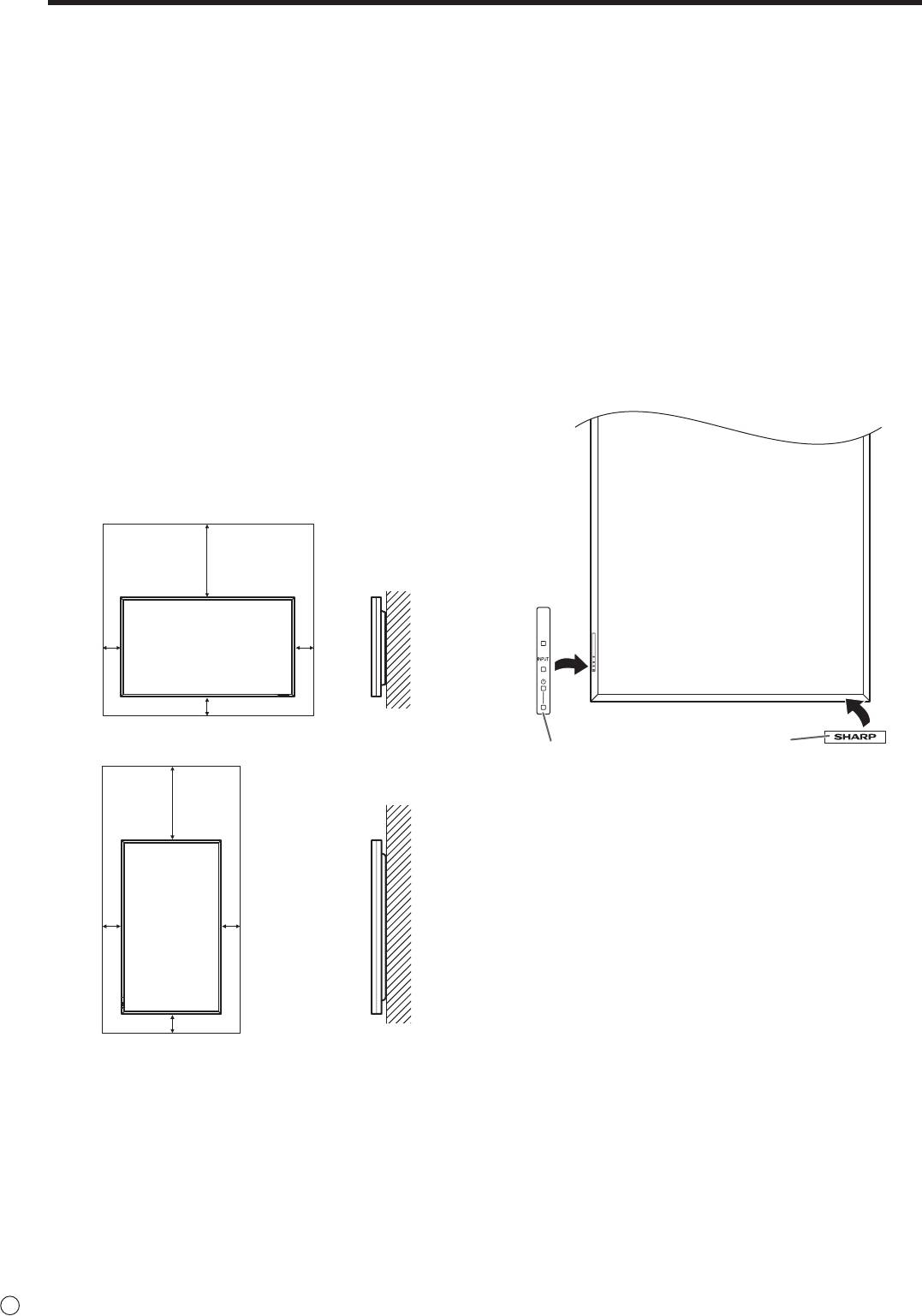
MOUNTING PRECAUTIONS
• Sincethemonitorisheavy,consultyourdealerbefore
installing, removing or moving the monitor.
• Wheninstalling,removingormovingthemonitor,ensure
that this is carried out by at least 2 people.
• AmountingbracketcompliantwithVESAspecications
is required. Do not use any screw holes other than VESA
holes for installation.
• Whenmovingthemonitor,besuretoholditwiththe
handles both on the rear and the unit bottom. Do not hold
the LCD panel. This may cause product damage, failure, or
injury.
• Installthemonitorwiththesurfaceperpendiculartoalevel
surface. If necessary, the monitor may be tilted up to 20
degrees upward or downward.
• Mountingthemonitoronthewallrequiresspecialexpertise
and the work must be performed by an authorized SHARP
dealer. You should never attempt to perform any of this
work yourself. Our company will bear no responsibility
for accidents or injuries caused by improper mounting or
mishandling.
• Thismonitorshouldbeusedatanambienttemperature
between 32°F (0°C) and 104°F (40°C). Provide
enough space around the monitor to prevent heat from
accumulating inside.
E
6
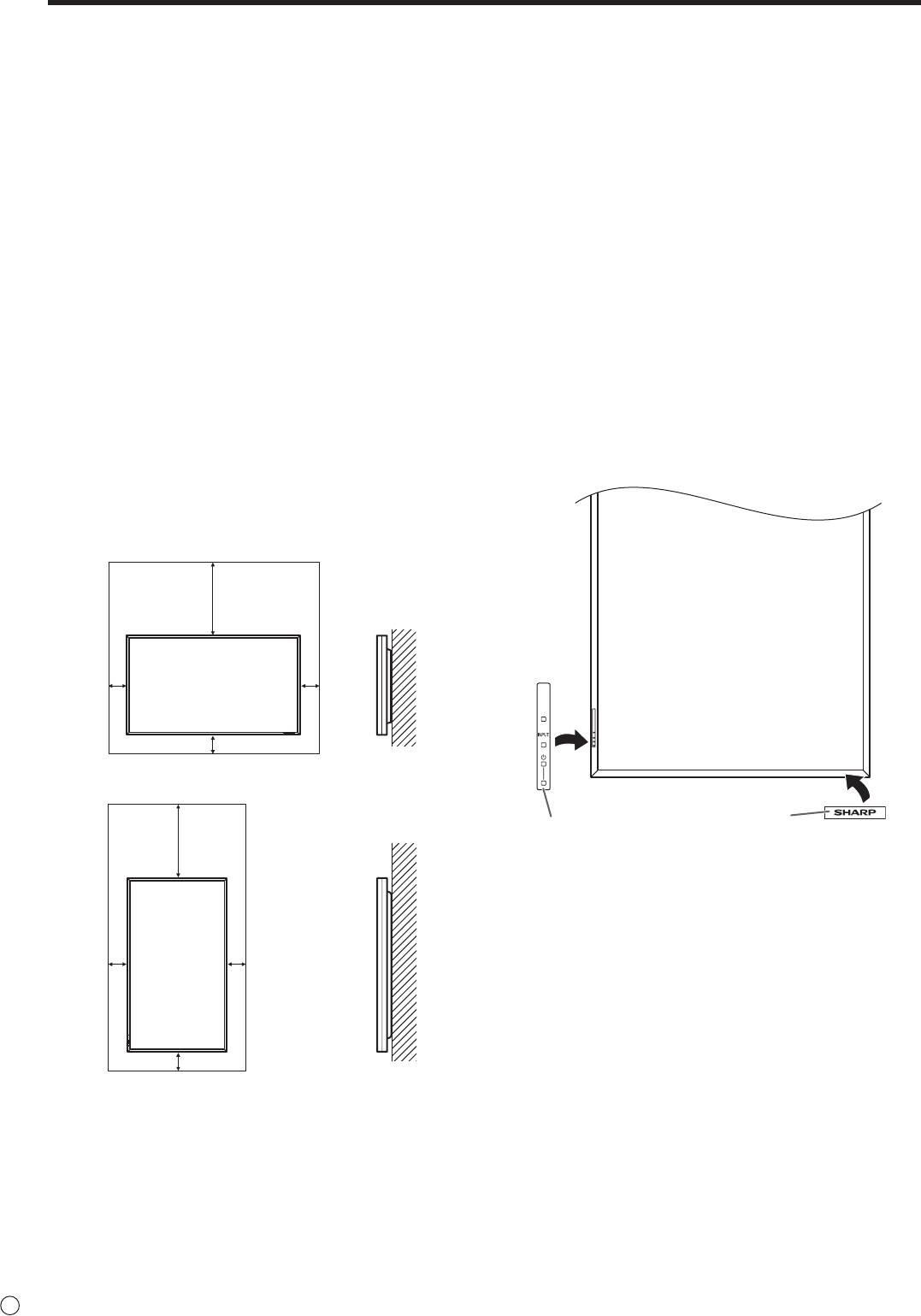
For the monitor in horizontal orientation
Unit: inch [cm]
7-7/8 [20]
*
2
2
[5]
[5]
2 [5]
For the monitor in vertical orientation
Unit: inch [cm]
*
7-7/8 [20]
2
2
[5]
[5]
2 [5]
• Ifitisdifficulttoprovidesufficientspaceforanyreason
such as the installation of the monitor inside a housing, or
if the ambient temperature may be outside of the range
of 32°F (0°C) to 104°F (40°C), install a fan or take other
measures to keep the ambient temperature within the
required range.
• Adheretothefollowingwheninstallingthemonitorinits
vertical orientation. Failing to adhere to the following may
cause malfunctions.
- Install the monitor such that the power LED is located on
the downside.
- Set the MONITOR on the SETUP menu to PORTRAIT.
(See Operation guide.)
• Donotblockanyventilationopenings.Ifthetemperature
inside the monitor rises, this could lead to a malfunction.
• Aftermounting,pleasecarefullyensurethemonitoris
secure, and not able to come loose from the wall or mount.
• Donotplacethemonitoronadevicewhichgeneratesheat.
• Usethesuppliedverticalstickerwhenyouinstallthe
monitor in vertical orientation.
* This monitor can be installed close to a wall. However,
as the monitor emits heat during operation, please be
aware that this heat may discolor or alter the wall.
Logo
Operation panel
Donotremovethefactory-afxedstickerbutafxthelogo
stickeroverit.Becarefulnottocovertheremotecontrol
sensor or buttons.
• Besuretouseawall-mountbracketdesignedor
designated for mounting the monitor.
• Thismonitorisdesignedtobeinstalledonaconcretewall
or pillar. Reinforced work might be necessary for some
materials such as plaster / thin plastic board / wood before
starting installation.
This monitor and bracket must be installed on a wall which
can endure at least 4 times or more the weight of the
monitor. Install by the most suitable method for the material
and the structure.
• Whenattachinganoptionalpart,followthestepsdescribed
in the manual for the optional part.
Contents
IMPORTANT INFORMATION ............................................1
Removing the Handles ..................................................10
ENGLISH
DEAR SHARP CUSTOMER ..............................................3
Afxing the Stand Hole Protection Covers .................11
SAFETY PRECAUTIONS ..................................................3
Preparing the Remote Control Unit ..............................11
TIPS AND SAFETY INSTRUCTIONS ...............................5
Installing the batteries ................................................11
MOUNTING PRECAUTIONS ............................................6
Remote control operation range .................................11
Supplied Components .....................................................7
Turning Power On/Off ....................................................12
Connecting Peripheral Equipment .................................8
Turning on the main power.........................................12
Connection with a PC or AV equipment .......................8
Turning power on/off ..................................................12
ConnectionwhenthePN-ZB01(optional)
Disabling power on/off operations ..............................12
is attached ....................................................................9
Connecting the Power Cord .........................................10
Binding Cables ...............................................................10
This manual contains instructions regarding connection and installation.
For other instructions, refer to the instruction manuals in the “manual” folder on the included CD-ROM.
Adobe Reader is required in order to view the instruction manuals.
Supplied Components
If any component should be missing, please contact your dealer.
Liquid Crystal Display Monitor: 1
Remote control unit: 1
Cable clamp: 2
Power cord: 1
R-6 battery (“AA” size): 2
CD-ROM(UtilityDiskforWindows):1
Operation manual: 1
Stand hole protection cover: 2
Vertical sticker (Operation panel): 1
Vertical sticker (Logo): 1
Blanksticker:1
Place a blank sticker onto the SHARP logo to cover the logo.
* Sharp Corporation holds authorship rights to the Utility Disk program. Do not reproduce it without permission.
* For environmental protection!
Do not dispose of batteries in household waste. Follow the disposal instructions for your area.
7
E
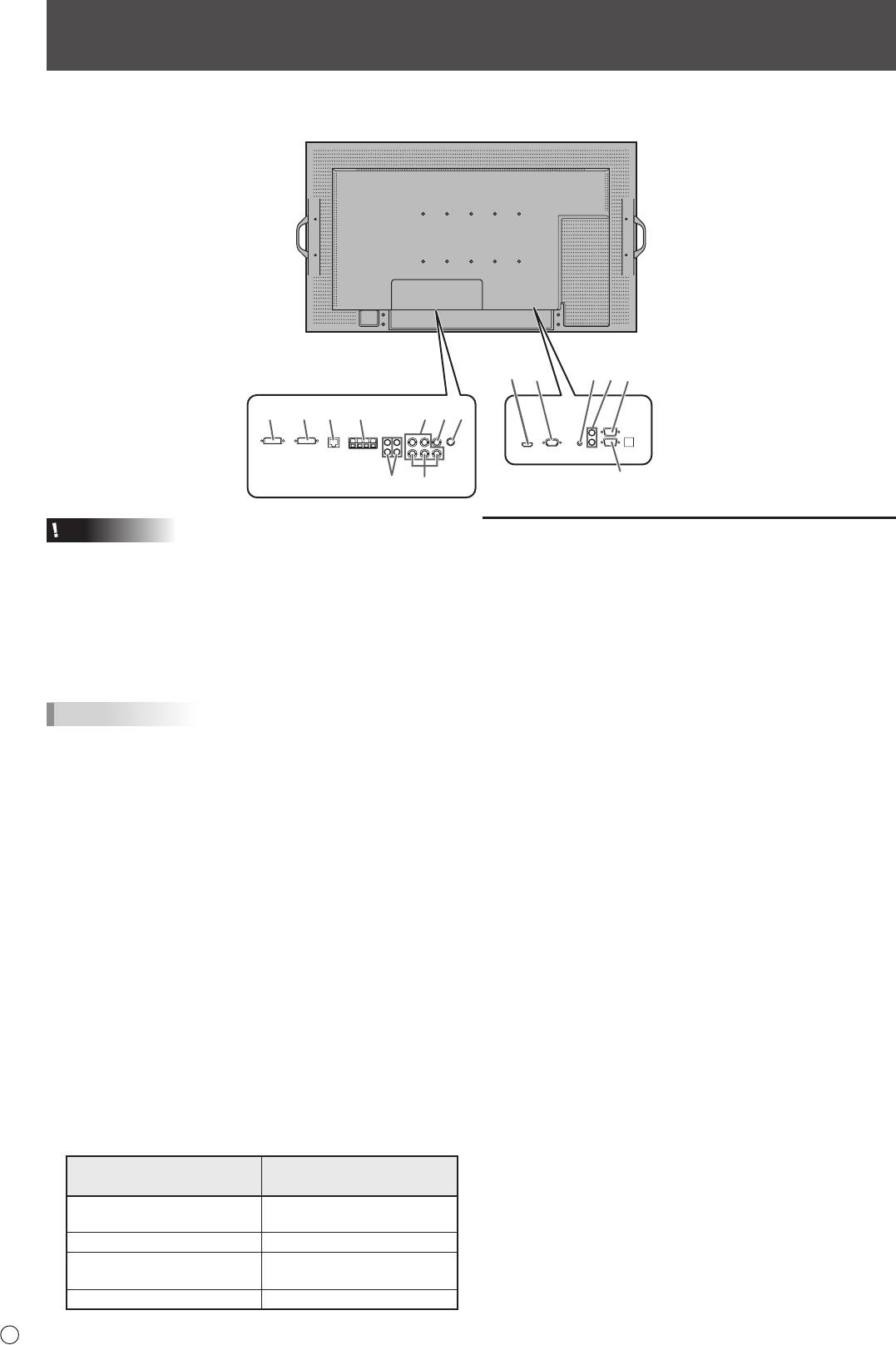
Connecting Peripheral Equipment
Caution
Connection with a PC or AV equipment
• Besuretoturnoffthemainpowerswitchanddisconnect
the plug from the power outlet before connecting/
1. PC/AV HDMI input terminal
disconnecting cables. Also, read the manual of the
• UseacommerciallyavailableHDMIcable(conformingto
equipment to be connected.
the HDMI standard) for PC/AV HDMI input terminal.
• Becarefulnottoconfusetheinputterminalwiththeoutput
• SetHDMIofINPUTSELECTontheOPTIONmenu
terminal when connecting cables. Accidentally reversing
according to the device to be connected.
cables connected to the input and output terminals may
• SelecttheaudioinputterminaltobeusedinPCHDMI
cause malfunctions and the other problems.
or AV HDMI of AUDIO SELECT on the OPTION menu.
WhenHDMIisselected,connectiontotheaudioinput
TIPS
terminal is unnecessary.
• Imagesmaynotbedisplayedproperlydependingonthe
2. PC D-sub input terminal
computer (video card) to be connected.
• WhenthePN-ZB01(optional)isattached,selecttheaudio
• Ascreenwith1920x1080resolutionmaynotbe
inputterminaltobeusedinPCD-SUBofAUDIOSELECT
displayedcorrectlyonPCRGB.Inthiscase,checkthe
on the OPTION menu.
settings of your computer (video card) to verify that input
signalsconformtospecicationsofthismonitor.(See
3. Audio input terminal
Specications.)
• Useanaudiocablewithoutresistance.
• IfthereisacheckboxtodisableEDIDindisplaycontrol
• WhenthePN-ZB01(optional)isattached,settheaudio
panel,checkitwhenusingPCRGB.
input terminal used for each input mode in AUDIO
• UsetheautomaticscreenadjustmentwhenaPCscreen
SELECT on the OPTION menu.
isdisplayedforthersttimeusingPCD-SUBorPCRGB,
4. Audio output terminals
or when the setting of the PC is changed. The screen is
• Theoutputsoundvariesdependingontheinputmode.
adjusted automatically when SELF ADJUST in the OPTION
• Thevolumeoftheoutputsoundcanbexedbysetting
menu is set to ON.
AUDIO OUTPUT on the OPTION menu.
• Iftheaudiooutputfromtheplaybackdeviceisconnected
• Itisnotpossibletocontrolthesoundoutputfromthe
directly to speakers or other devices, the video on the
audio output terminals with the AUDIO menu.
monitor may appear delayed from the audio portion.
Audio should be played through this monitor by connecting
5. RS-232C input terminal
the playback device to the monitor’s audio input, and
RS-232C output terminal
connecting the monitor’s audio output to the speakers or
• YoucancontrolthemonitorfromaPCbyconnectinga
other devices.
commercially available RS-232 straight cable between
• Theaudioinputterminalsusedineachinputmodeare
these terminals and the PC.
factory-set as follows.
Audio input terminal
Input mode
(Factory setting)
PCD-SUB,PCDVI-D,
Audio input terminal
PCRGB
AV DVI-D Audio1 input terminal
AV COMPONENT,
Audio2 input terminal
AV S-VIDEO, AV VIDEO
PC HDMI, AV HDMI PC/AV HDMI input terminal
E
8
When the PN-ZB01 (optional)
1
3
42
5
is attached
1312146
7109
5
811
Connecting Peripheral Equipment
ENGLISH
Connection when the PN-ZB01
(optional) is attached
ThePN-ZB01expansionboard(optional)allowstheuseof
additional connection terminals.
6. PC/AV DVI-D input terminal
• SetDVIofINPUTSELECTontheOPTIONmenu
according to the device to be connected.
• SelecttheaudioinputterminaltobeusedinPCDVI-Dor
AV DVI-D of AUDIO SELECT on the OPTION menu.
7. PC RGB input terminals
• SetBNCofINPUTSELECTontheOPTIONmenutoPC
RGBwhenusingthePCRGBinputterminals.
• SelecttheaudioinputterminaltobeusedinPCRGBof
AUDIO SELECT on the OPTION menu.
8. AV component input terminals
• SetBNCofINPUTSELECTontheOPTIONmenuto
AV COMPONENT when using the AV component input
terminals.
• SelecttheaudioinputterminaltobeusedinAV
COMPONENT of AUDIO SELECT on the OPTION menu.
9. AV video input terminal
• SelecttheaudioinputterminaltobeusedinAVVIDEOof
AUDIO SELECT on the OPTION menu.
10. AV S-video input terminal
• SelecttheaudioinputterminaltobeusedinAVS-VIDEO
of AUDIO SELECT on the OPTION menu.
11. Audio1 input terminals / Audio2 input terminals
• Settheaudioinputterminaltobeusedineachinput
mode in AUDIO SELECT on the OPTION menu.
12. LAN terminal
• YoucancontrolthemonitorfromaPConanetworkby
connecting a commercially available LAN cable between
this terminal and a network.
13. External speaker terminals
• Touseexternalspeakers,setSPEAKERSELECTonthe
SETUP menu to EXTERNAL.
• Besuretouseexternalspeakerswithanimpedanceof6Ω
orgreaterandaratedinputofatleast10W.
9
E
132
Approx.
3-15/16 inch
(10 cm)
14. PC/AV DVI-D output terminal
• ThevideoofthePC/AVDVI-Dinputcanbeoutputtoan
external device.
• OutputtingHDCP-encryptedvideorequiresanexternal
device which supports HDCP.
• Thisterminalallowsthedaisychainconnectionofupto5
monitors.
TIPS
• Thelengthofthesignalcablesorsurroundingenvironment
may affect the image quality.
• Thescreenmaynotdisplayproperlywhenusingterminals
other than PC DVI-D/AV DVI-D for the input mode. In this
case, turn off the power to all the monitors connected in a
daisy chain and then turn the power on again.
• WhenconnectingmonitorsinadaisychainsetAUTO
INPUT CHANGE to OFF.
• Videooutputisdisabledinthefollowingcases:
WhentheinputmodeisPCHDMI/AVHDMI
WhenPIPSOURCEofthePIP/PbyPmenuissettoPC
HDMI or AV HDMI
Whenthepoweristurnedoff
Whenthemonitorisininputsignalwaitingmode
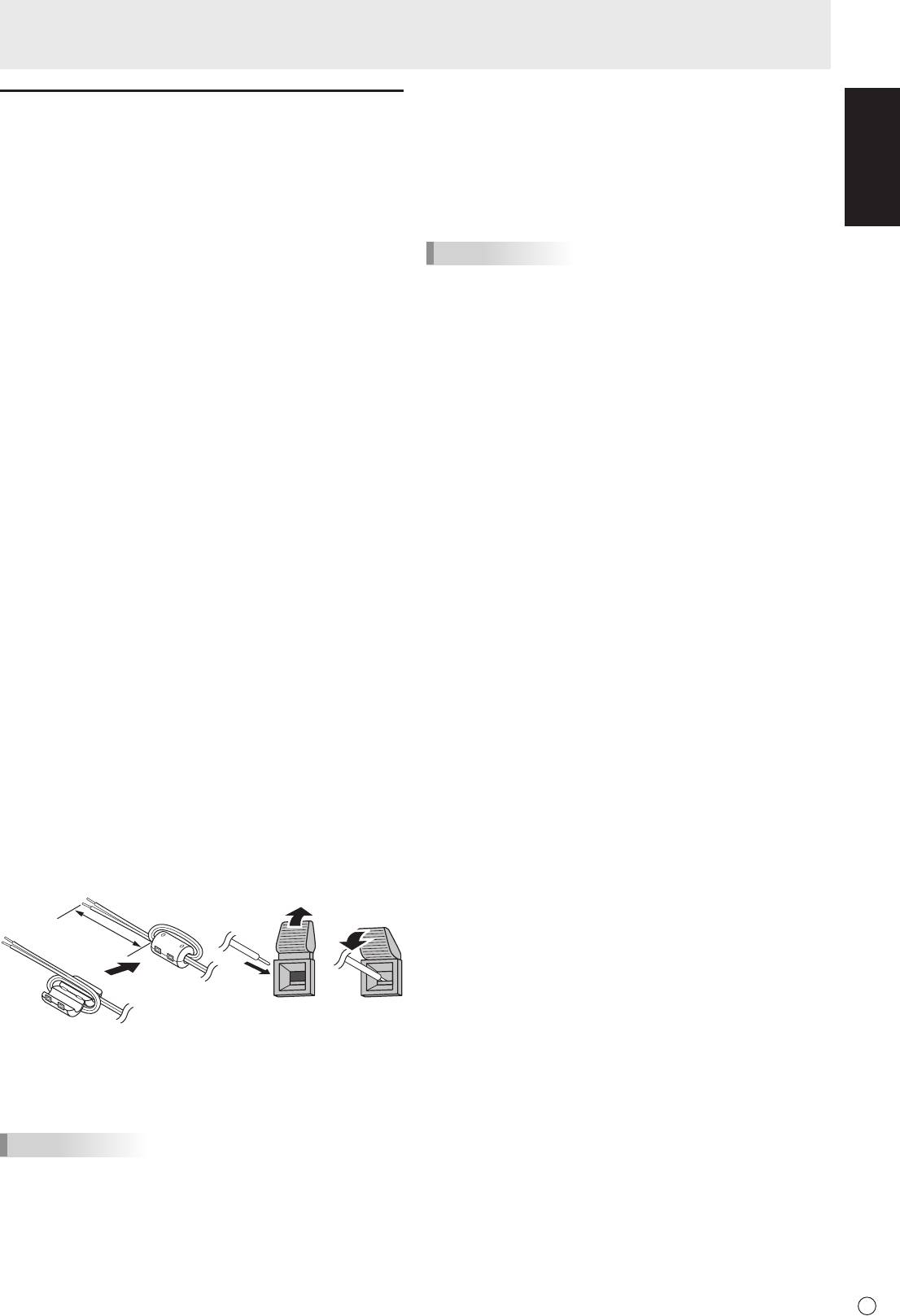
1.Attachaspeakercablecore(includedwiththePN-ZB01)to
the end of the speaker cable connected to the monitor.
2.Whilepushingthetab,insertthetipofthecable.
3. Release the tab.
TIPS
• Besuretoconnectthe+and-terminalsandtheleftand
right speakers properly.
• Avoidshortcircuitingthe+and-terminals.
• WhenSPEAKERSELECTissettoEXTERNAL,the
internal speakers are disabled.
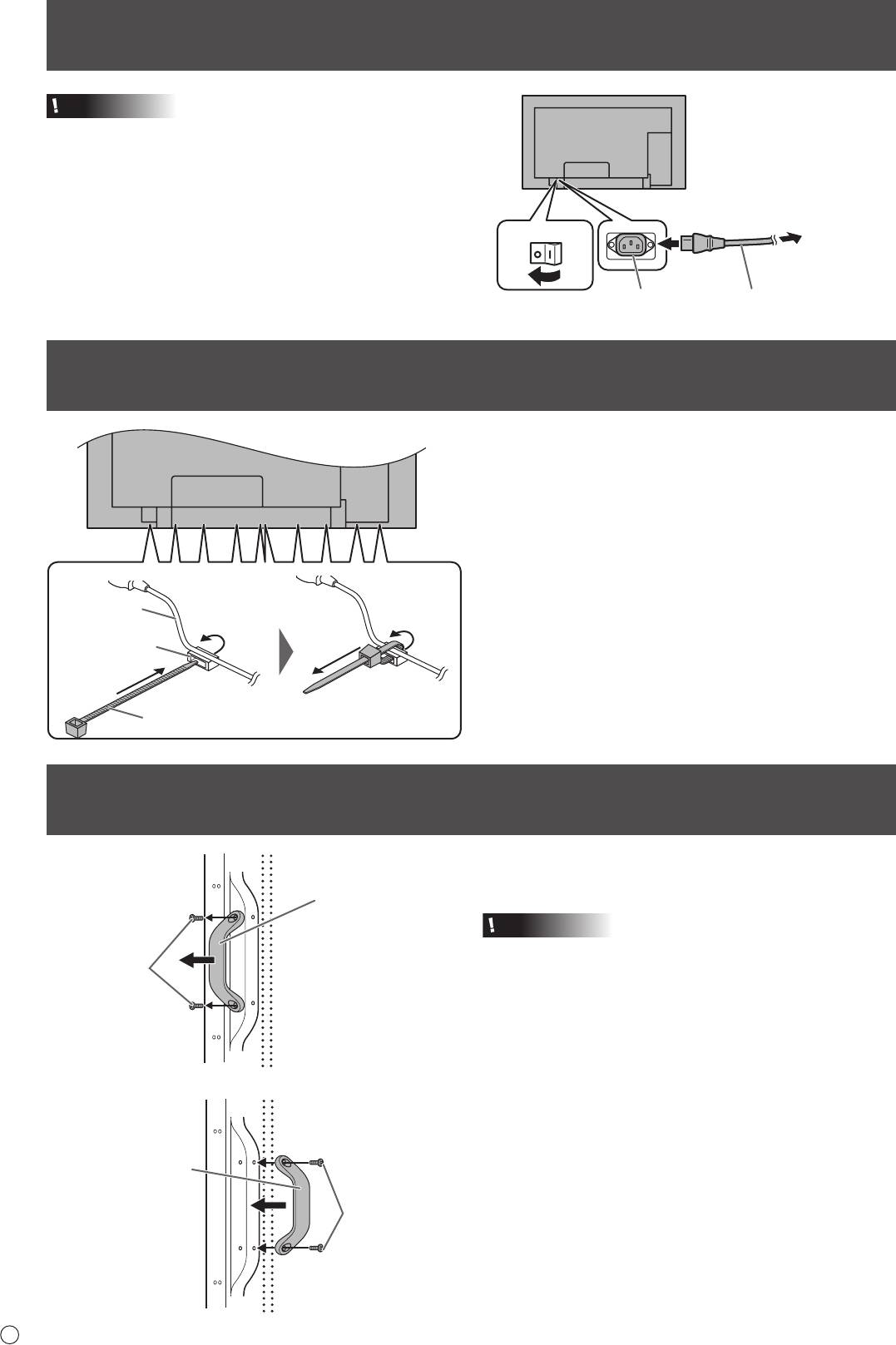
Connecting the Power Cord
Caution
• Donotuseapowercordotherthantheonesuppliedwith
the monitor.
1. Turn off the main power switch.
2. Plug the power cord (supplied) into the AC input terminal.
3. Plug the power cord (supplied) into the AC power outlet.
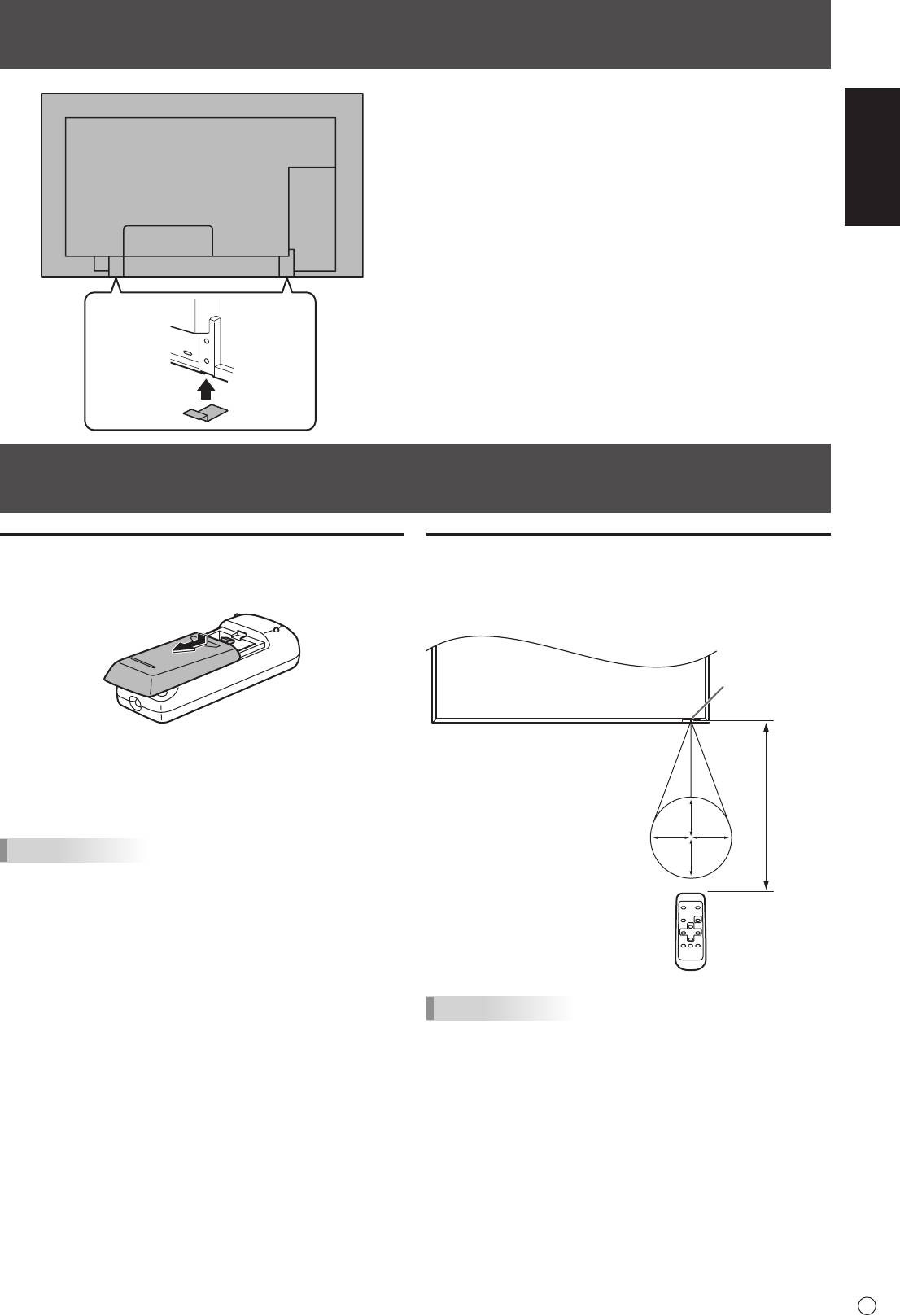
Binding Cables
The cables connected to the terminals on the rear of the
monitor can be fastened with the cable clamp.
Insert the cable clamp into the cable clamp attachment on the
rear of the monitor and fasten the cables.
E
10
3
Main power switch
For power
outlet
1
2
AC input terminal
Power cord (Supplied)
Removing the Handles
The handles can be removed.
The removed handles can be attached on the rear side.
Caution
• Theremovedhandlesandhandlescrewsareforusewith
this monitor. Do not use them for any other devices.
• Toattachhandles,besuretousethehandlesandhandle
screws which were removed from the monitor.
• Besurethehandlesareattachedsecurely.
Handle
Handle screws
Handle
Handle screws
Cable
Cable clamp
attachment
Cable clamp
ENGLISH
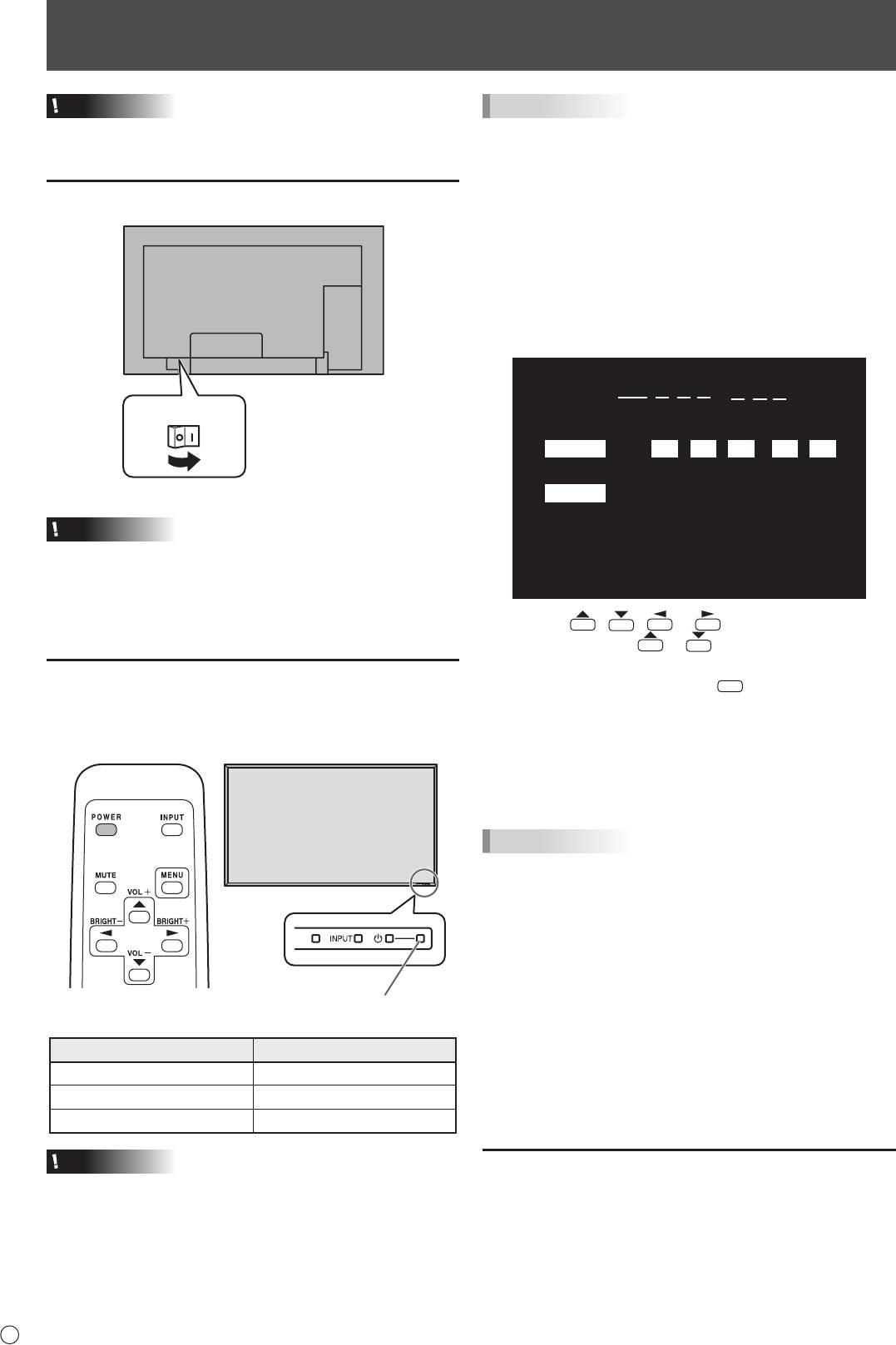
Preparing the Remote Control Unit
Installing the batteries
Remote control operation range
1. Press the cover gently and slide it in the direction of the
The operation range of the remote control unit is approx. 16.4
arrow.
feet (5 m) at an angle of approx 10° from the center to the top/
bottom/right/left of the remote control sensor.
2. See the instructions in the compartment and put in the
suppliedbatteries(R-6(“AA”size)x2)withtheirplus(+)
and minus (-) sides oriented correctly.
3. Close the cover.
TIPS
• Whenthebatteriesbecomeexhaustedreplacethemwith
new (commercially available) batteries.
• Thesuppliedbatteries(R-6(“AA”size)x2)maybecome
exhausted quickly depending on how they are stored.
• Ifyouwillnotbeusingtheremotecontrolforalongtime,
remove the batteries.
• Usemanganeseoralkalinebatteriesonly.
11
E
Remote control
sensor
10°
16.4 feet
(5 m)
10°10°
10°
Afxing the Stand Hole Protection Covers
Afterinstallingthemonitor,afxthestandholeprotection
covers as necessary.
1. Peeloffthebackingsheetandafxthecoveronthe
monitor.
TIPS
• Donotexposetheremotecontrolunittoshockbydropping
or stepping on it. This could lead to a malfunction.
• Donotexposetheremotecontrolunittoliquids,anddonot
place it in an area with high humidity.
• Theremotecontrolunitmaynotworkproperlyiftheremote
control sensor is under direct sunlight or strong lighting.
• Objectsbetweentheremotecontrolunitandtheremote
control sensor may prevent proper operation.
• Replacethebatterieswhentheyrunlowasthismay
shorten the remote control’s operation range.
• Ifauorescentlightisilluminatedneartheremotecontrol
unit, it may interfere with proper operation.
• Donotuseitwiththeremotecontrolofotherequipment
such as air conditioner, stereo components, etc.
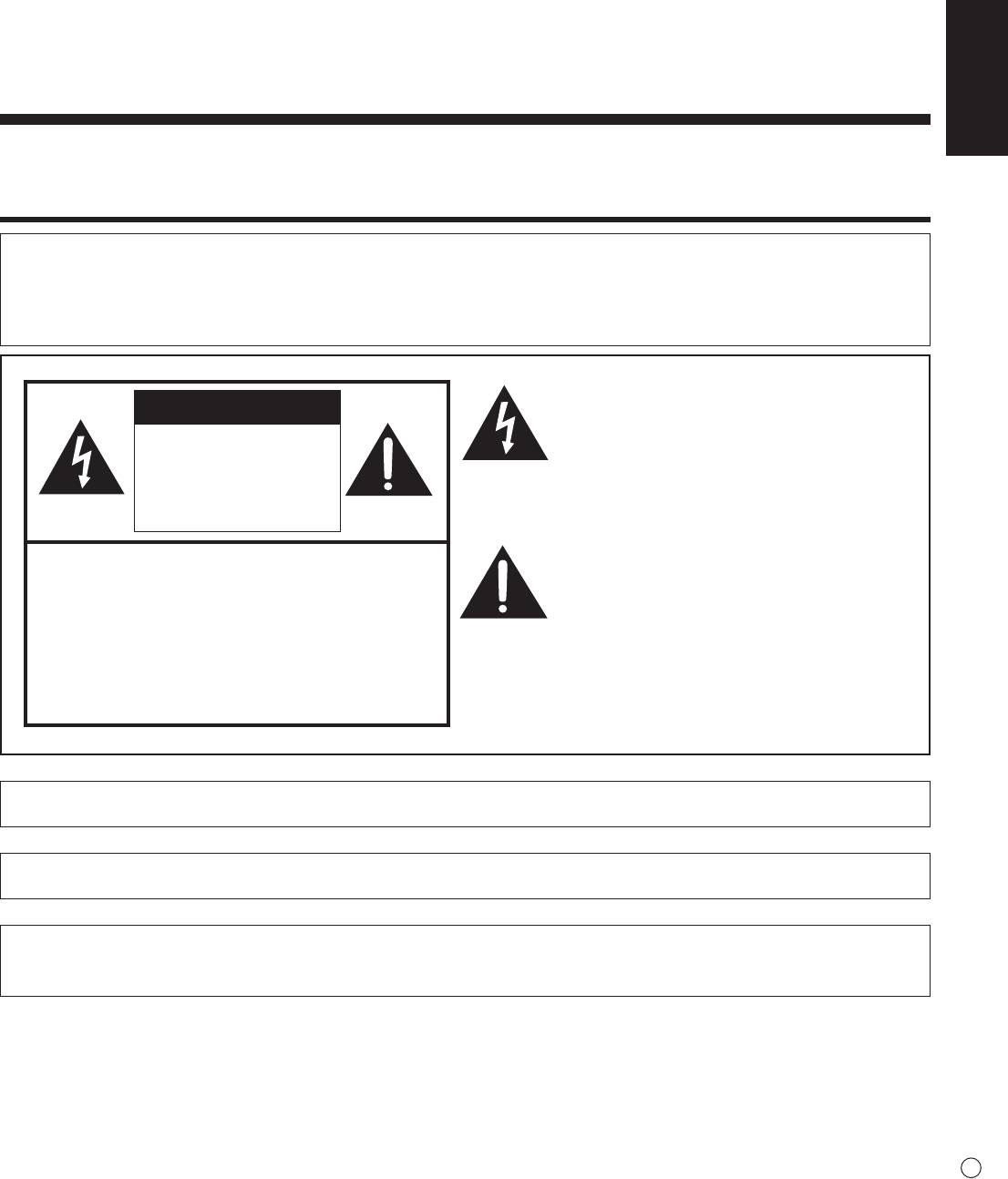
Turning Power On/Off
Caution
• TurnonthemonitorrstbeforeturningonthePCor
playback device.
Turning on the main power
E
12
Main power switch
Caution
• Themainpowermustbeturnedon/offwiththemainpower
switch. Do not connect/disconnect the power cord or turn
the breaker on/off while the main power switch is on.
• WhenswitchingthemainpowerswitchorthePOWER
button off and back on, always wait for at least 5 seconds.
Turning power on/off
PressthePOWERbuttontoturnthepowerON/OFF.
Whenthemainpowerswitchisoff,themonitorcannotbe
turnedonusingthePOWERbuttonontheremotecontrolunit.
Power LED
TIPS
• Ifthemonitorisintheinputsignalstandbymodeandyou
pressthePOWERbuttonontheremotecontrolunit,the
monitor enters standby mode.
• Youcanturnon/offthemonitorbypressingthepower
switch on the front panel of the monitor.
• SettingtheSCHEDULEashesthepowerLEDalternately
in red and orange in standby mode.
n
Date/time setting
• Ifthetimehasyettobesetwhenthemonitorisrstturned
on, the date/time setting screen appears. Set the date and
time.
Status of a power LED Status of the monitor
Green lighting Power on
Orange lighting Power off (Standby mode)
Greenashing Input signal waiting mode
Caution
• WhenswitchingthemainpowerswitchorthePOWER
button off and back on, always wait for at least 5 seconds.
A short interval may result in a malfunction.
DATE/TIME SETTING
//
: :
SET
20
09
/
01
/
01
00 00
:
CANCEL
OK···[MENU]
1. Press , , or to select the date and
time, and press
or to change the numerical
values.
2. Select SET and then press
MENU
.
• Besuretosetthedateandtime.
• Thedate/timesettingscreenwillcloseautomaticallyifno
operation is performed for about 15 seconds. The date
and time can be set using DATE/TIME SETTING from
the OPTION menu when the date/time setting screen
disappears.
TIPS
•
Set the date in “Year/Month/Day” order.
•
Set the time on a 24-hour basis.
•
The clock is maintained by the internal battery.
•
If you already set the time but the date/time setting
screen appears when the power is turned on, the
internal battery may be exhausted. Please contact
your local Sharp servicing dealer or service center for
assistance with battery replacement.
•
Estimated service life of the internal battery: About 5
years (depending on monitor operation)
•
Astherstbatterywasinsertedatthefactory,itmaybe
exhausted prior to the expected continuous operation
life.
Disabling power on/off operations
Power on/power off operations can be disabled in order to
protect the monitor from an accidental power off. Set the
ADJUSTMENT LOCK in FUNCTION menu to “2”. (See
Operation guide.)
PN-E601
PN-E521
FRANÇAIS
MONITEUR LCD
FRANÇAIS
INFORMATION IMPORTANTE
AVERTISSEMENT :
POUR RÉDUIRE LE RISQUE D’INCENDIE OU DE
DÉCHARGE ÉLECTRIQUE, NE PAS EXPOSER CE
PRODUIT À LA PLUIE OU À LA POUSSIÈRE.
Le symbole représenté par l’éclair à la tête
ATTENTION
en pointe de èche à l’intérieur d’un triangle
équilatéral, est placé pour alerter l’utilisateur de la
RISQUE DE
présence d’une “tension dangereuse” non isolée
DÉCHARGE
à l’intérieur du produit. Cette tension peut avoir
ÉLECTRIQUE
une valeur sufsante pour constituer un risque
d’électrocution à toute personne.
NE PAS OUVRIR
Le point d’exclamation à l’intérieur d’un triangle
ATTENTION : POUR RÉDUIRE LE RISQUE DE
est placé pour alerter l’utilisateur de la présence
DÉCHARGE ÉLECTRIQUE, NE PAS
d’une procédure particulière ou d’une procédure
RETIRER LE COUVERCLE. IL N’Y A
de maintenance (entretien) importante dans les
AUCUNE PIÈCE RÉPARABLE PAR
manuels accompagnant le produit.
L’UTILISATEUR À L’INTÉRIEUR.
AVERTIR LE PERSONNEL DE
SERVICE QUALIFIÉ POUR TOUTE
PROCÉDURE D’ENTRETIEN.
ATTENTION :
La prise de secteur doit être installée près de l’équipement et être facilement accessible.
ATTENTION :
Utilisez le cordon d’alimentation fourni avec l’appareil tel quel.
Ce produit utilise une lampe uorescente contenant une petite quantité de mercure.
La mise au rebut de ce matériau pourrait être réglementée pour des considérations environnementales. Pour obtenir plus
d’information sur les conditions de mise au rebut ou de recyclage, veuillez contacter les autorités locales.
1
F
INFORMATION IMPORTANTE (Suite)
AVERTISSEMENT :
Les lois FCC établissent que tout changement ou modication non-autorisés de cet équipement qui n’ont pas été
expressément approuvés par le producteur, constituent un motif d’annulation des droits de l’utilisateur d’utiliser cet appareil.
REMARQUE :
Cet équipement, après les tests, a été jugé conforme aux limites d’un équipement numérique de Classe A, conformément
à la section 15 de la règlementation FCC. Ces limites sont établies pour fournir une protection raisonnable contre les
interférences nuisibles lorsque l’équipement est utilisé dans un environnement commercial. Cet équipement produit, utilise
et peut rayonner de l’énergie sous forme de radiofréquences et, s’il n’est pas installé et utilisé conformément aux instructions
du mode d’emploi, peut provoquer des interférences nuisibles aux communications par radio. Le fonctionnement de cet
équipement dans une zone résidentielle peut vraisemblablement provoquer des interférences nuisibles, auquel cas
l’utilisateur est prié de corriger ces interférences à ses propres frais.
Ce produit utilise de la soudure plomb-étain, et une lampe uorescente contenant une petite quantité de mercure.
La mise au rebut de ces matériaux pourrait être réglementée pour des considérations environnementales. Pour
obtenir plus d’information sur les conditions de mise au rebut ou de recyclage, veuillez contacter les autorités
locales, consulter le site Internet de Electronics Industries Alliance : www.eiae.org, celui de l’organisation de
recyclage des lampes : www.lamprecycle.org ou la
société Sharp au numéro 1-800-BE-SHARP (Pour les États-
Unis Seulement)
Ce produit inclut une pile au lithium CR contenant du perchlorate. Des précautions particulières peuvent
s’appliquer concernant la manipulation. Si vous résidez en Californie, veuillez consulter le site www.dtsc.ca.gov/
hazardouswaste/perchlorate/.
ÉTATS-UNIS SEULEMENT
Attention : votre produit comporte ce symbole. Il signie que les produits électriques et électroniques usagés
ne doivent pas être mélangés avec les déchets ménagers généraux.
Un système de collecte séparé est prévu pour ces produits.
A. Informations sur la mise au rebut à l’intention des utilisateurs privés (ménages)
1. Au sein de l’Union européenne
Attention : si vous souhaitez mettre cet appareil au rebut, ne le jetez pas dans une poubelle ordinaire !
Les appareils électriques et électroniques usagés doivent être traités séparément et conformément aux lois en vigueur en
matière de traitement, de récupération et de recyclage adéquats de ces appareils.
Suite à la mise en œuvre de ces dispositions dans les Etats membres, les ménages résidant au sein de l’Union européenne
peuvent désormais ramener gratuitement* leurs appareils électriques et électroniques usagés sur des sites de collecte
désignés. Dans certains pays*, votre détaillant reprendra également gratuitement votre ancien produit si vous achetez un
produit neuf similaire.
*) Veuillez contacter votre administration locale pour plus de renseignements.
Si votre appareil électrique ou électronique usagé comporte des piles ou des accumulateurs, veuillez les mettre séparément
et préalablement au rebut conformément à la législation locale en vigueur.
En veillant à la mise au rebut correcte de ce produit, vous contribuerez à assurer le traitement, la récupération et le recyclage
nécessaires de ces déchets, et préviendrez ainsi les effets néfastes potentiels de leur mauvaise gestion sur
l’environnement et la santé humaine.
2. Pays hors de l’Union européenne
Si vous souhaitez mettre ce produit au rebut, veuillez contacter votre administration locale qui vous renseignera sur la
méthode d’élimination correcte de cet appareil.
Suisse : les équipements électriques ou électroniques usagés peuvent être ramenés gratuitement au détaillant, même si
vous n’achetez pas un nouvel appareil. Pour obtenir la liste des autres sites de collecte, veuillez vous reporter à la page
d’accueil du site www.swico.ch ou www.sens.ch.
B. Informations sur la mise au rebut à l’intention des entreprises
1. Au sein de l’Union européenne
Si ce produit est utilisé dans le cadre des activités de votre entreprise et que vous souhaitiez le mettre au rebut :
Veuillez contacter votre revendeur SHARP qui vous informera des conditions de reprise du produit. Les frais de reprise et
de recyclage pourront vous être facturés. Les produits de petite taille (et en petites quantités) pourront être repris par vos
organisations de collecte locales.
Espagne : veuillez contacter l’organisation de collecte existante ou votre administration locale pour les modalités de reprise
de vos produits usagés.
2. Pays hors de l’Union européenne
Si vous souhaitez mettre ce produit au rebut, veuillez contacter votre administration locale qui vous renseignera sur la
méthode d’élimination correcte de cet appareil.
F
2
INFORMATION IMPORTANTE (Suite)
Les piles/accus fournies avec ce produit peuvent contenir des traces de Plomb.
Au sein de l’Union Européenne :
Le symbole de la poubelle sur roues barrée laisse supposer que les piles/accus usagées ne doivent pas être
mélangées avec les déchets ménagers ! Il existe un mode de collecte séparé pour les piles/accus usagées,
ce qui permet d’effectuer un traitement et un recyclage en accord avec la législation. Veuillez contacter une
autorité locale pour plus de renseignements sur le système mis en place.
Pour la Suisse :
Les piles/accus usagées doivent être retournées chez votre détaillant.
Pour les pays hors Union Européenne :
Veuillez contacter une autorité locale an de connaître la bonne méthode à utiliser pour la collecte de vos
FRANÇAIS
piles/accus usagées.
“TRAITEMENT DES PILES USAGÉES”
CE PRODUIT CONTIENT UNE PILE DE SAUVEGARDE DE MÉMOIRE LITHIUM PRIMAIRE (DIOXYDE DE MANGANÈSE)
QUI DOIT ÊTRE TRAITÉE CORRECTEMENT. VEUILLEZ PRENDRE CONTACT AVEC VOTRE DÉTAILLANT SHARP
LOCAL OU L’ AGENT DE SERVICE AUTORISÉ POUR DES INFORMATIONS SUR LE TRAITEMENT DE LA PILE USAGÉE.
ÉTATS-UNIS ET CANADA SEULEMENT
CHER CLIENT
Nous vous remercions d’avoir acheté cet appareil SHARP à écran LCD. An de garantir le bon fonctionnement de ce moniteur,
nous vous conseillons de lire attentivement cette brochure et de la conserver pour toute référence ultérieure.
PRÉCAUTIONS DE SÉCURITÉ
L’électricité remplit de nombreuses fonctions utiles, mais elle peut provoquer des blessures et des dégâts matériels si elle n’est
pas utilisée correctement. Cet appareil a été conçu et fabriqué en attachant la plus grande importance à la sécurité. Cependant,
une utilisation inadéquate peut entraîner une décharge électrique et/ou un incendie. An d’éviter tout danger potentiel, veuillez
respecter les consignes suivantes lors de l’installation, de l’utilisation et du nettoyage de l’appareil. An d’assurer votre propre
sécurité et de prolonger la durée de service de votre moniteur LCD, veuillez lire attentivement les précautions ci-dessous avant
d’utiliser l’appareil.
1. Lisez ces explications — Vous devez lire et comprendre toutes les informations relatives au fonctionnement de l’appareil
avant de l’utiliser.
2. Conservez cette brochure dans un endroit sûr — Ces explications concernant la sécurité et le fonctionnement doivent être
conservées dans un endroit sûr pour vous y référer en cas de besoin.
3. Respectez les avertissements — Tous les avertissements gurant sur l’appareil et dans ce mode d’emploi doivent être
strictement respectés.
4. Suivez les instructions — Toutes les explications sur le fonctionnement doivent être respectées.
5. Nettoyage — Débranchez le cordon d’alimentation au niveau de la prise du secteur avant de nettoyer l’appareil.
Servez-vous d’un linge sec, et n’employez pas de détergents liquides ou en atomiseur.
6. Accessoires — N’utilisez pas d’accessoires non recommandés par le fabricant, car ceci pourrait provoquer des accidents.
7. Eau et humidité — N’utilisez pas cet appareil près de l’eau. N’installez pas le produit à un endroit où il pourrait recevoir de
l’eau. Évitez en particulier les emplacements sous les appareils à vidange d’eau tels que les climatiseurs.
8. Ventilation — Des ouïes et autres ouvertures sont prévues dans le coffret de l’appareil pour sa ventilation. Ne recouvrez
pas et ne bouchez pas ces ouvertures car une ventilation insufsante peut provoquer une surchauffe et réduire la durée de
vie de l’appareil. Ne placez pas l’appareil sur un sofa, un tapis ou toute autre surface analogue car ceci pourrait obstruer
les ouvertures de ventilation. Cet appareil n’est pas conçu pour une installation encastrée; ne le placez donc pas dans
un endroit fermé comme une bibliothèque ou une baie à moins qu’une ventilation adéquate ne soit prévue et que les
consignes du fabricant ne soient respectées.
9. Protection du cordon d’alimentation — Faites passer les cordons d’alimentation à un endroit où ils ne seront pas écrasés
ou coincés par d’autres objets.
10. Le panneau de l’écran à cristaux liquides (LCD) de cet appareil est fabriqué en verre et, par conséquent, il peut se briser si
l’appareil tombe ou s’il reçoit un fort impact. Veillez à ne pas vous blesser par les éclats de verre si le panneau LCD devait
être brisé.
11. Surcharge — Ne surchargez pas les prises de courant ou les rallonges car ceci peut entraîner un risque d’incendie ou
d’électrocution.
12. Insertion de solides ou de liquides — N’introduisez jamais des objets par les orices de cet appareil, car ils pourraient
provoquer une électrocution et/ou un court-circuit en touchant des pièces internes sous haute tension.
Pour la même raison, ne renversez jamais de l’eau ou un liquide sur l’appareil.
13. Entretien — N’essayez pas de réparer vous-même l’appareil. La dépose des couvercles peut vous exposer à une haute
tension ou à d’autres dangers. Conez toute réparation à un personnel qualié.
3
F
PRÉCAUTIONS DE SÉCURITÉ (Suite)
14. Réparation — Dans les cas suivants, débranchez le cordon d’alimentation au niveau de la prise secteur et demandez à un
personnel qualié d’effectuer les réparations.
a. Dégât sur le cordon ou la prise de courant.
b. Inltration d’un liquide ou pénétration d’un objet à l’intérieur de l’appareil.
c. Exposition de l’appareil à la pluie ou à l’eau.
d. Fonctionnement anormal malgré une conformité aux explications du mode d’emploi.
Ne réglez que les commandes dont il est fait mention dans le mode d’emploi. Un réglage incorrect des autres
commandes peut provoquer des dégâts qui nécessiteraient des réparations complexes par un technicien spécialisé.
e. Chute ou dégâts subis par l’appareil.
f. Tout changement notoire ou situation anormale de l’appareil indique qu’une réparation est nécessaire.
15. Pièces de rechange — Lorsque des pièces doivent être remplacées, assurez-vous que le technicien a utilisé les pièces
spéciées par le fabricant ou des pièces dont les performances et les caractéristiques sont identiques. Des changements
non autorisés de pièces peuvent entraîner un incendie, une électrocution et/ou d’autres dangers.
16. Contrôles de sécurité — Après une intervention d’entretien ou de réparation, demandez au technicien de procéder à un
contrôle pour être sûr que l’appareil peut être utilisé en toute sécurité.
17. Installation sur paroi — Si l’appareil doit être xé sur une paroi, installez-le en respectant la méthode recommandée par le
fabricant.
18. Sources de chaleur — Tenez l’appareil à l’écart de sources de chaleur, telles que radiateurs, dispositifs de chauffage,
poêles et autres appareils dégageant de la chaleur (y compris les amplicateurs).
19. Piles — Une utilisation incorrecte des piles peut les faire éclater ou prendre feu. Une pile qui fuit peut causer des corrosions
dans l’équipement, des salissures aux mains ou abîmer vos vêtements. An d’éviter ces problèmes, assurez-vous que les
précautions suivantes sont appliquées :
• Utilisez seulement des piles prescrites.
• Installez les piles en faisant bien attention aux polarités plus (+) et moins (-) des piles selon les instructions dans le
compartiment.
• Ne mélangez pas des piles usagées avec des neuves.
• Ne mélangez pas des piles de différents types. Les spécications de voltage des piles de même forme peuvent varier.
• Remplacez rapidement une pile épuisée par une nouvelle.
• Si vous n’avez pas l’intention d’utiliser la télécommande pendant une longue période, retirez les piles.
• Si le liquide provenant d’une pile qui fuit touche votre peau ou vos habits, rincez immédiatement et complètement
les parties touchées. Si un œil est touché, faites immédiatement un bain d’œil plutôt que de le frotter et cherchez
immédiatement un traitement médical. Le liquide provenant de la fuite d’une pile qui atteint votre œil ou vos habits peut
causer une irritation de la peau ou des dommages à votre œil.
20. L’utilisation de ce moniteur ne doit pas entraîner des risques mortels ou des dangers qui pourraient provoquer directement
la mort, des blessures sur le personnel, des dommages physiques sévères ou d’autres destructions, y compris dans le
contrôle des réactions nucléaires dans les installations nucléaires, dans le système médical de réanimation, et dans le
contrôle de lancement des missiles dans les systèmes d’armes.
21. N’entrez pas en contact direct avec les parties du produit ayant chauffé pendant de longues périodes. Il pourrait en résulter
des brûlures à basse température.
AVERTISSEMENT :
Ce produit appartient à la Classe A. Dans un environnement résidentiel, il peut provoquer des interférences radio et, dans ce
cas, l’utilisateur peut être obligé de prendre les mesures nécessaires.
An de satisfaire aux normes EMC, utiliser des câbles blindés pour connecter les bornes suivantes : Borne de sortie
PC/AV DVI-D, borne d’entrée PC/AV DVI-D, borne d’entrée PC/AV HDMI, borne d’entrée PC D-sub, bornes d’entrée PC
RVB, et bornes d’entrée/sortie RS-232C.
Un moniteur placé sur un support instable est dangereux en raison des risques de chute qu’il présente. De nombreuses
blessures, touchant en particulier les enfants, peuvent être évitées en prenant quelques précautions simples :
• Utiliser les dispositifs de xation tels que les supports muraux fournis par le fabricant.
• Utiliser uniquement des meubles capables d’accueillir le moniteur en toute sécurité.
• Vérier que le moniteur ne dépasse pas du bord du meuble sur lequel il est posé.
• Ne pas placer le moniteur sur des meubles hauts, armoires ou étagères, par exemple, sans xer le meuble concerné et le
moniteur à un support approprié.
• Ne pas intercaler de tissu ou toute autre matière entre le moniteur et le meuble sur lequel il est posé.
• Expliquer aux enfants qu’il est dangereux de grimper sur les meubles pour atteindre le moniteur ou ses boutons de
commande.
En particulier pour la sécurité des enfants
- Ne laissez pas les enfants grimper sur ou jouer avec le moniteur.
- Ne placez pas le moniteur sur des meubles qui peuvent facilement se transformer en marches comme une commode avec
tiroirs.
- Souvenez-vous que les enfants s’excitent souvent en visionnant un programme, surtout sur un moniteur « plus grand que la
normale ». Il faut faire en sorte d’installer le moniteur là où il ne peut pas être poussé, tiré, ni basculé.
- Il faut faire en sorte de placer les ls et les câbles connectés au moniteur de façon à ce que des enfants curieux ne puissent
pas les tirer ni les saisir.
F
4
CONSEILS ET MESURES DE SÉCURITÉ
- Le panneau couleur LCD TFT utilisé dans ce moniteur
Le cordon d’alimentation
est fabriqué en application d’une technologie de grande
- N’endommagez pas le cordon d’alimentation, ne déposez
précision. Cependant, il peut avoir sur l’écran des points
pas d’objets lourds sur le cordon d’alimentation, ne tirez
minuscules où les pixels ne s’allument jamais ou restent
pas dessus et ne le pliez pas de manière excessive. De
allumés en permanence. De même, si on regarde l’écran
même, n’ajoutez pas de rallonges. Tout endommagement
avec un angle aigu par rapport à la surface de l’écran,
du cordon d’alimentation peut provoquer un début
les couleurs et la luminosité peuvent paraître inégales.
d’incendie ou un choc électrique.
Notez que ce n’est pas un dysfonctionnement mais un
- Utilisez seulement le cordon d’alimentation fourni avec le
phénomène commun des écrans LCD et que cela
moniteur.
n’affectera pas les performances du moniteur.
- Ne branchez pas le cordon d’alimentation sur une prise
FRANÇAIS
- N’afchez pas une image xe pendant une longue période,
multiple. Ajouter une rallonge peut entraîner une surchauffe
car cela pourrait provoquer l’apparition d’une image
et provoquer un début d’incendie.
rémanente.
- Ne débranchez pas ni ne branchez la prise d’alimentation
- Ne frottez pas, ne grattez pas le moniteur avec un objet
avec des mains humides. En ce faisant, vous risquez un
dur.
choc électrique.
- Il faut savoir que la Sharp Corporation décline toute
-
Débranchez le cordon d’alimentation si l’équipement n’est pas
responsabilité en cas d’erreurs commises durant
utilisé pendant une longue période.
l’utilisation par le client ou par une tierce personne, ainsi
- Ne tentez pas de réparer le cordon d’alimentation s’il est
qu’en cas de dysfonctionnement ou de dommage survenu
coupé ou s’il ne fonctionne pas correctement. Veuillez
à ce produit pendant son utilisation, excepté dans le cas de
prendre contact avec le service après vente et suivre ses
responsabilité reconnue par la loi.
recommandations.
- Ce moniteur et ses accessoires sont susceptibles d’évoluer
Étendue du manuel
sans avis préalable.
- Microsoft, Windows et Internet Explorer sont des marques
- N’utilisez pas le moniteur dans un endroit où il y a
déposées de la société Microsoft Corporation.
beaucoup de poussières, où le degré d’humidité est élevé,
- HDMI, le Logo HDMI et High-Denition Multimedia Interface
ou encore là où il pourrait se trouver en contact avec de
sont des marques de commerce ou des marques déposées
l’huile ou de la vapeur, car cela pourrait provoquer un début
de la société HDMI Licensing LLC.
d’incendie.
- Adobe, Acrobat et Reader sont des marques de commerce
- Assurez-vous que le moniteur ne se trouve pas en contact
ou des marques déposées de la société Adobe Systems
avec de l’eau ou d’autres uides. Assurez-vous qu’aucun
Incorporated aux Etats-Unis et/ou dans d’autres pays.
objet tel que des agrafes et des trombones ne pénètre
- Ce produit est livré avec la police en points de RICOH
dans le moniteur, car cela pourrait provoquer un début
produite et vendue par RICOH COMPANY, LTD.
d’incendie ou un choc électrique.
-
Toutes les autres marques et les noms de produits sont des
- N’installez pas le moniteur au dessus des objets instables
marques commerciales ou des marques déposées par les
ou dans des endroits peu sûrs. Faites attention que le
compagnies respectives.
moniteur ne reçoive pas de chocs violents ni de fortes
-
La langue du menu OSD (afchage à l’écran) utilisée dans ce
vibrations. Provoquer la chute du moniteur ou le culbuter
manuel comme exemple est l’anglais.
peut l’endommager.
- Les illustrations dans ce manuel peuvent ne pas
- N’utilisez pas le moniteur à proximité d’un appareil de
représenter exactement le produit ou l’afchage réels.
chauffage ou dans des endroits où la température est
- Ce manuel suppose l’utilisation de l’appareil dans une
élevée, car cela pourrait conduire à un dégagement
direction horizontale, sauf dans les cas spécialement
excessif de chaleur et provoquer un début d’incendie.
notiés.
- Il n’est pas possible de faire tourner les images sur ce
moniteur.
Quand vous travaillez suivant la direction verticale,
Lampes uorescentes
prévoyez d’orienter au préalable le contenu.
● Les lampes uorescentes qui équipent ce produit ont une
durée de vie limitée.
* Si l’écran s’obscurcit, clignote ou ne s’allume pas, il est
nécessaire de remplacer les lampes uorescentes. Ces
dernières sont exclusives à ce produit et doivent être
remplacées par un revendeur Sharp ou un centre de
services autorisé.
* Pour toute assistance, veuillez contacter votre revendeur
Sharp ou un centre de services local.
● En raison des caractéristiques propres aux lampes
uorescentes, il est possible que l’écran clignote les
premiers temps de son utilisation. Si cela se produit, mettez
hors tension l’interrupteur principal du moniteur, attendez
au moins 5 secondes puis remettez le sous tension pour
assurer sa mise en fonction.
5
F
• Comme le moniteur est lourd, consultez votre revendeur
avant l’installation, le démontage ou le déplacement du
moniteur.
• L’installation, le démontage ou le déplacement du moniteur
doit être fait par 2 personnes ou plus.
• Un support de montage conforme aux spécications VESA
est nécessaire. N’utilisez pas de trous de vis autres que les
trous standard VESA pour l’installation.
• Lorsque vous déplacez le moniteur, assurez-vous de le
saisir par les deux poignées situées à l’arrière et sur le bas
de l’unité. Ne saisissez pas le panneau LCD. Ceci pourrait
causer une panne, un dysfonctionnement ou une blessure.
•
Installez le moniteur perpendiculairement à la surface
horizontale. Si nécessaire, le moniteur peut être incliné, vers
le haut ou vers le bas, à un angle maximal de 20 degrés.
• Le montage du moniteur sur le mur demande des
compétences techniques spéciales et le travail doit être
fait par un revendeur agréé par SHARP. Vous ne devez
jamais tenter de faire ce travail vous-même. Notre société
déclinera toute responsabilité pour les accidents ou
blessures causés par un montage incorrect ou par une
mauvaise manipulation.
• Ce moniteur doit être utilisé sous une température
ambiante entre 0°C et 40°C. Laissez assez d’espace
autour du moniteur pour empêcher que la chaleur ne
s’accumule à l’intérieur.
F
6
Pour le moniteur en position horizontale
Unité : cm
20
*
55
5
Pour le moniteur en position verticale
Unité : cm
*
20
55
5
• S’il est difficile de laisser un espace suffisant pour une
raison ou pour une autre (installation du moniteur dans une
enceinte, par exemple) ou si la température ambiante est
susceptible de dépasser la plage de valeurs prévue (de 0 à
40°C), installez un ventilateur ou prenez d’autres mesures
appropriées pour maintenir la température ambiante dans
la plage de valeurs requise.
• Respectez la condition suivante quand vous installez le
moniteur dans la direction verticale. Le non respect de
cette condition peut causer des dysfonctionnements.
- Installez le moniteur de sorte que la diode d’alimentation
soit située sur le bord inférieur.
- Réglez le MONITOR <MONITEUR> sur PORTRAIT dans
le menu SETUP <INSTALLATION>. (Voir le GUIDE DE
L’UTILISATEUR.)
• Ne bloquez pas les ouvertures de ventilation. Si la
température dans le moniteur s’élève, ceci pourrait causer
un dysfonctionnement.
• Après le montage, assurez-vous que le moniteur est bien
xé au mur ou au support, sans risque de relâche.
• Ne placez le moniteur sur un équipement qui dégage de la
chaleur.
• Utilisez l’autocollant vertical quand vous installez le
moniteur dans une direction verticale.
* Le moniteur peut être installé près d’un mur.
Cependant, le moniteur émet de la chaleur pendant
son fonctionnement ; cette chaleur peut décolorer ou
altérer le mur.
Logo
Panneau de fonctionnement
PRÉCAUTIONS POUR LE MONTAGE
N’enlevez pas l’autocollant xé en usine, mais xez
l’autocollant du logo sur l’autre. Assurez-vous de ne pas
recouvrir le capteur de télécommande ou des boutons.
• Veillez à utiliser un support mural conçu ou prévu pour la
xation du moniteur.
• Ce moniteur est prévu pour être installé sur un mur ou
un pilier en béton. Un travail de renforcement pourrait
s’avérer nécessaire pour certains matériaux tels que le
plâtre, un mince panneau de plastique ou le bois avant de
commencer l’installation.
Le mur sur lequel ce moniteur et le support doivent être
installés doit pouvoir supporter, au moins, 4 fois son poids
ou davantage. Installez de la manière qui convient le mieux
en fonction du matériau et de la structure.
• Veuillez suivre les étapes relatives au branchement des
pièces optionnelles décrites dans le manuel.

