
Sharp CV-P10PR: USE FOR ION GENERATOR TO CHANGE AIR FLOW DIRECTION MAX DENSITY OPERATION
USE FOR ION GENERATOR TO CHANGE AIR FLOW DIRECTION MAX DENSITY OPERATION: Sharp CV-P10PR
Table of contents
- A. Information on Disposal for Users (private households) B. Information on Disposal for Business Users.
- CONTENTS
- SAFETY PRECAUTIONS WARNINGS CAUTIONS
- LOCATION INCLUDED
- PART NAMES FRONT VIEW REAR VIEW
- REMOTE CONTROL
- INSTALLATION AND REMOVAL OF EXHAUST HOSE Installation of the exhaust hose 1 2 3
- 4 5 Removal of the exhaust hose
- USING THE REMOTE CONTROL LOADING BATTERIES HOW TO USE THE REMOTE CONTROL
- NOTE ON OPERATION NOTES ON OPERATION OPERATING CONDITIONS ENERGY EFFICIENCY TIPS
- USE FOR AIR CONDITIONER COOL MODE DRY MODE
- FAN MODE VENTILATION MODE
- USE FOR AIR CONDITIONER TO CHANGE AIR FLOW DIRECTION UP / DOWN AIR FLOW DIRECTION LEFT / RIGHT AIR FLOW DIRECTION
- TURBO COOL OPERATION TO CANCEL SLEEP OPERATION TO CANCEL
- TIMER ON TO CANCEL USE FOR AIR CONDITIONER TIMER OPERATION TIMER OFF
- USE FOR ION GENERATOR ION GENERATOR MODE
- USE FOR ION GENERATOR TO CHANGE AIR FLOW DIRECTION MAX DENSITY OPERATION
- REFRESH OPERATION TIMER OFF OPERATION
- MAIN UNIT OPERATION DRAINAGE
- MAINTENANCE CLEANING THE FILTER AIR INLET FILTER CLEANING THE UNIT AND THE REMOTE CONTROL WHEN STORING FOR A LONG PERIOD (NOT IN USE)
- BEFORE CALLING FOR SERVICE
USE FOR ION GENERATOR
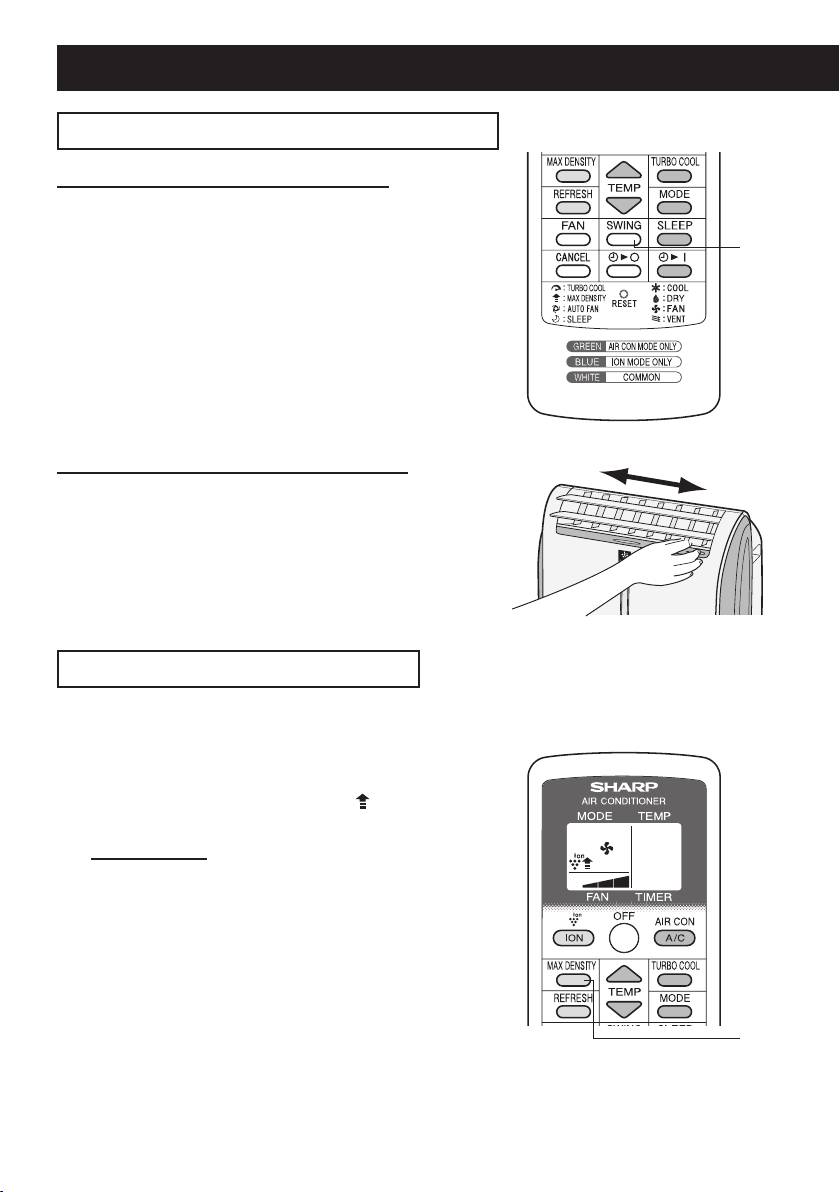
TO CHANGE AIR FLOW DIRECTION
UP / DOWN AIR FLOW DIRECTION
Press the SWING button.
1
• The horizontal louvers will swing.
1
Press the SWING button again to stop the
2
2
desired position.
CAUTION:
Never attempt to adjust the horizontal louvers manually.
• Manual adjustment of the horizontal louvers can cause the
unit to malfunction when the remote control is used for ad-
justment.
LEFT / RIGHT AIR FLOW DIRECTION
Hold the vertical louver as shown in the diagram
and adjust the air ow direction.
MAX DENSITY OPERATION
The unit releases max density Plasmacluster ions. By continuously discharging “extra high”
airow for 30 minutes, the unit discharges the ions throughout the room more effectively.
Press the MAX DENSITY button during Ion
1
generator operation.
• The remote control will display " ".
• The red MAXIMUM lamp will light.
TO CANCEL
Press the MAX DENSITY button again.
• The red MAXIMUM lamp will turn off.
NOTES:
• You cannot set the fan speed during MAX DENSITY opera-
tion.
• The MAX DENSITY operation will be automatically can-
celled in 30 minutes, and the unit will return to the original
settings.
• MAX DENSITY operation and REFRESH operation can not
1
be used together.
GB-16
01_CV-P10PR_OM_EN.indd 16 14/08/29 16:42
