
Sharp CV-P10PR: USE FOR AIR CONDITIONER COOL MODE DRY MODE
USE FOR AIR CONDITIONER COOL MODE DRY MODE: Sharp CV-P10PR
Table of contents
- A. Information on Disposal for Users (private households) B. Information on Disposal for Business Users.
- CONTENTS
- SAFETY PRECAUTIONS WARNINGS CAUTIONS
- LOCATION INCLUDED
- PART NAMES FRONT VIEW REAR VIEW
- REMOTE CONTROL
- INSTALLATION AND REMOVAL OF EXHAUST HOSE Installation of the exhaust hose 1 2 3
- 4 5 Removal of the exhaust hose
- USING THE REMOTE CONTROL LOADING BATTERIES HOW TO USE THE REMOTE CONTROL
- NOTE ON OPERATION NOTES ON OPERATION OPERATING CONDITIONS ENERGY EFFICIENCY TIPS
- USE FOR AIR CONDITIONER COOL MODE DRY MODE
- FAN MODE VENTILATION MODE
- USE FOR AIR CONDITIONER TO CHANGE AIR FLOW DIRECTION UP / DOWN AIR FLOW DIRECTION LEFT / RIGHT AIR FLOW DIRECTION
- TURBO COOL OPERATION TO CANCEL SLEEP OPERATION TO CANCEL
- TIMER ON TO CANCEL USE FOR AIR CONDITIONER TIMER OPERATION TIMER OFF
- USE FOR ION GENERATOR ION GENERATOR MODE
- USE FOR ION GENERATOR TO CHANGE AIR FLOW DIRECTION MAX DENSITY OPERATION
- REFRESH OPERATION TIMER OFF OPERATION
- MAIN UNIT OPERATION DRAINAGE
- MAINTENANCE CLEANING THE FILTER AIR INLET FILTER CLEANING THE UNIT AND THE REMOTE CONTROL WHEN STORING FOR A LONG PERIOD (NOT IN USE)
- BEFORE CALLING FOR SERVICE
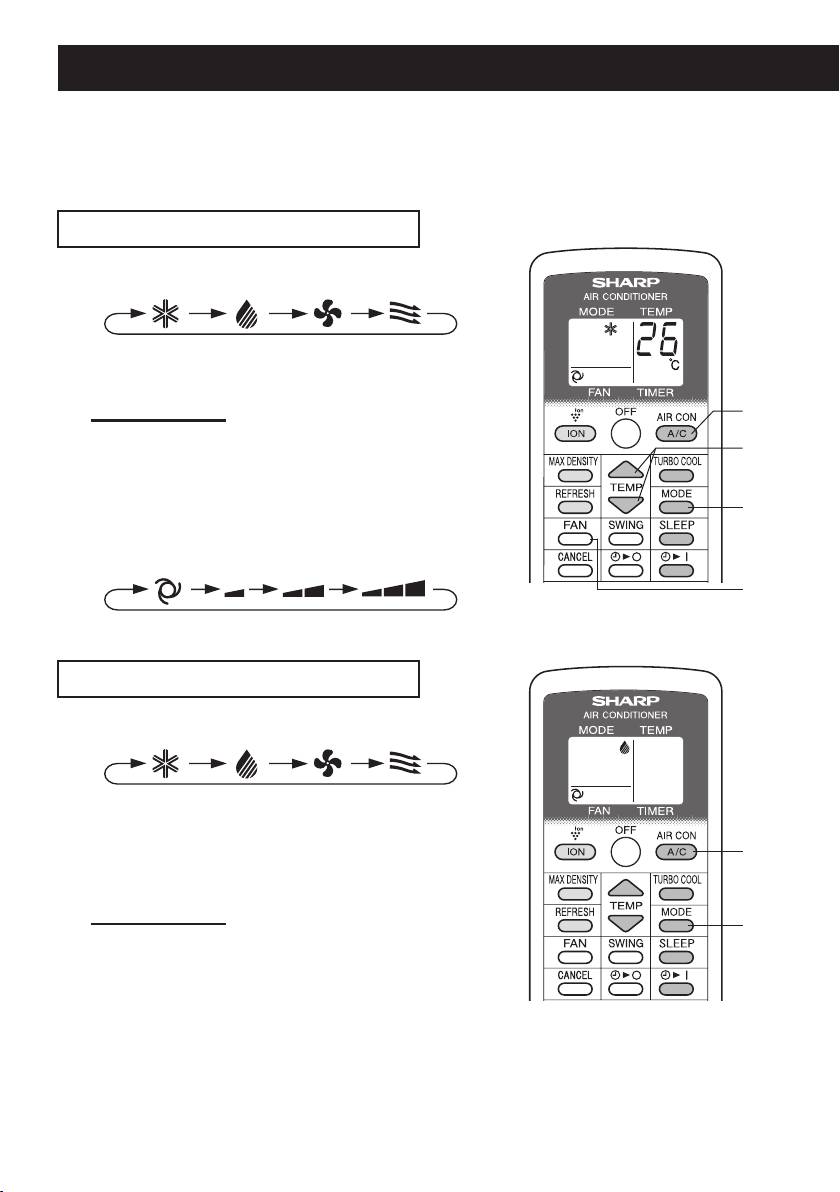
USE FOR AIR CONDITIONER
Use when the unit operates with the cool, dry, fan or ventilation mode. During operation,
Plasmacluster ions are always released into the room.
• The exhaust hose must be installed in these modes.
• Ensure that the stopcock is securely attached the drainpipe.
COOL MODE
Press the MODE button to select COOL mode.
1
COOL DRY FAN VENT
Press the A/C button to start operation.
2
• The green AIR CON lamp will light.
TO TURN OFF
2
Press the OFF button.
• The green AIR CON lamp will turn off.
3
Press the TEMP button to set temperature.
3
• The temperature setting range: 18°C to 32°C.
1
Press the FAN button to set fan speed.
4
AUTO SOFT LOW HIGH
4
DRY MODE
Press the MODE button to select DRY mode.
1
COOL DRY FAN VENT
Press the A/C button to start operation.
2
• The green AIR CON lamp will light.
• The temperature cannot be set.
2
• The fan speed is preset to AUTO and cannot be
changed.
TO TURN OFF
1
Press the OFF button.
• The green AIR CON lamp will turn off.
NOTES:
• Although you can also operate dry mode without the exhaust hose, the unit generates heat during
operation and the room temperature will rise.
• It is also possible to operate in dry mode with hose (not included) attached.
Remove the stopcock and attach the hose to the drainpipe and lead to a oor drain to allow water to
drain from the unit.
GB-10
01_CV-P10PR_OM_EN.indd 10 14/08/29 16:42
