
Olympus SP-590UZ: Using Shooting Functions
Using Shooting Functions: Olympus SP-590UZ
Using Shooting Functions
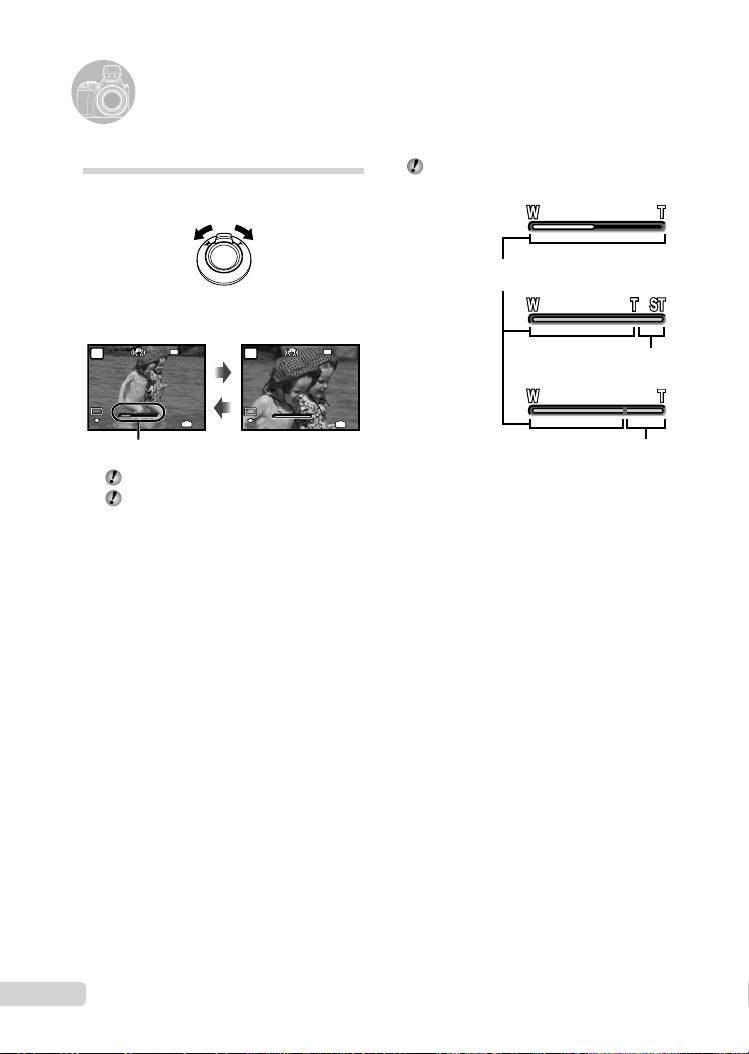
Using the optical zoom
Turning the zoom lever adjusts the shooting
range.
Turning to the
Turning to the
wide (W) end
telephoto (T) end
12
EN
W
W
T
T
12M
P
12M
4
IN
4
N
ORM
N
ORM
1/400
1/400
F3.5
F3.5
W
W
T
T
12
M
P
12
M
4
IN
4
N
ORM
N
ORM
1/400
1/400
F3.5
The zoom bar appearance identifi es the
status of the fi ne zoom/digital zoom.
When using
optical zoom
Optical zoom range
When using
fi ne zoom
NR NR
Fine zoom range
When using
digital zoom
F3.5
Zoom bar
Digital zoom range
Optical zoom: 26x, Digital zoom: 5x
Use of [IMAGE STABILIZER] (p. 35) is
recommended when shooting with the
telephoto zoom.
To take larger images without reducing
image quality
[FINE ZOOM] (p. 33)
To take larger images
[DIGITAL ZOOM] (p. 33)
D4384_en_basic.indb 12D4384_en_basic.indb 12 1/15/2009 4:23:47 PM1/15/2009 4:23:47 PM
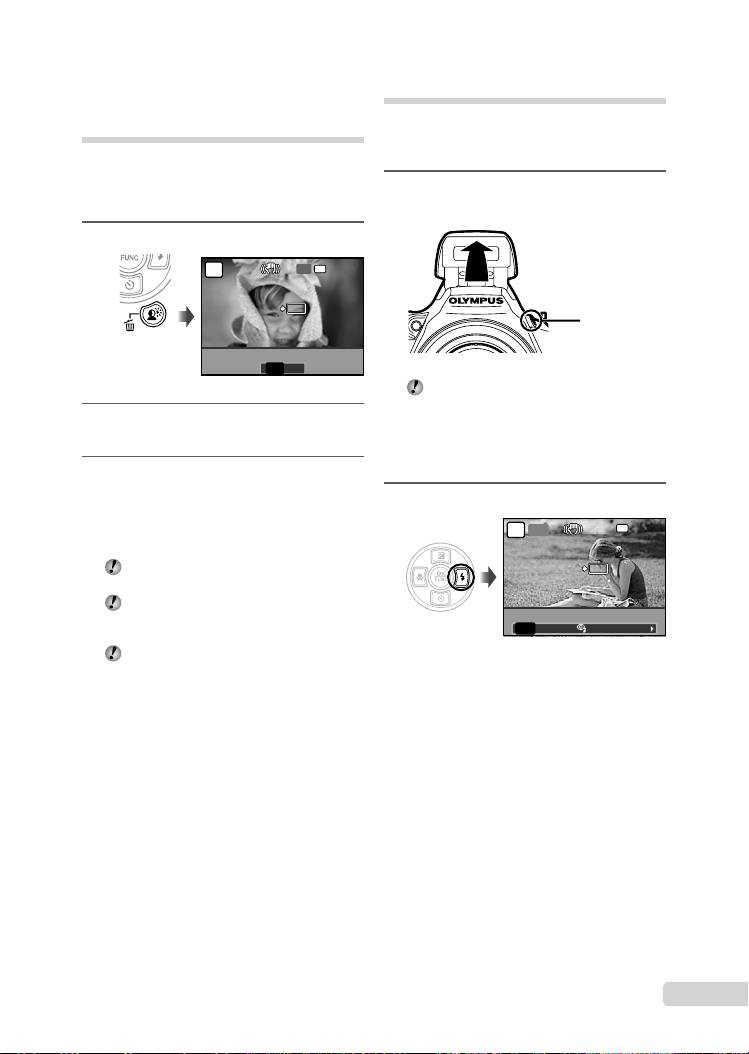
Using the flash
The fl ash functions can be selected to best
match the shooting conditions and render the
desired image.
1
Press the # button to flip up the
built-in flash.
# button
The fl ash settings cannot be adjusted with
the fl ash closed.
To turn off the fl ash
Press the fl ash down back into the camera.
This sets to $ (FLASH OFF) mode.
2
Press :.
P
EN
13
OK
1/400 F3.5
AUTO
OK
1/400 F3.5
AUTO
! # $
L
N
SET
SET
FLASH AUTO
Brightening the subject
against backlight
*1
(SHADOW ADJ
)
The camera fi nds a person’s face that has been
darkened by backlight and makes it appear
brighter.
*1
Shadow adjustment technology
1
Press the f button.
P
NR
FLASH AUTO
$
$
OFF
OK
OK
OFF ON
SET
SET
SHADOW ADJ
NR
SHADOW ADJ
2
Use 9: to select [ON], and press
the o button to set.
3
Point the camera toward the
subject. Check the frame appearing
around the face detected by the
camera, and then press the shutter
button to take the picture.
For some subjects, the frame may not
appear or may take some time to appear.
[METERING] (p. 33) is automatically
fi xed to [ESP], and [AF MODE] (p. 34) is
automatically fi xed to [FACE DETECT].
[i] is automatically switched to [j].
Also, in sequential shooting, this function
is applied only to the fi rst frame. [DRIVE]
(p. 32)
D4384_en_basic.indb 13D4384_en_basic.indb 13 1/15/2009 4:23:47 PM1/15/2009 4:23:47 PM
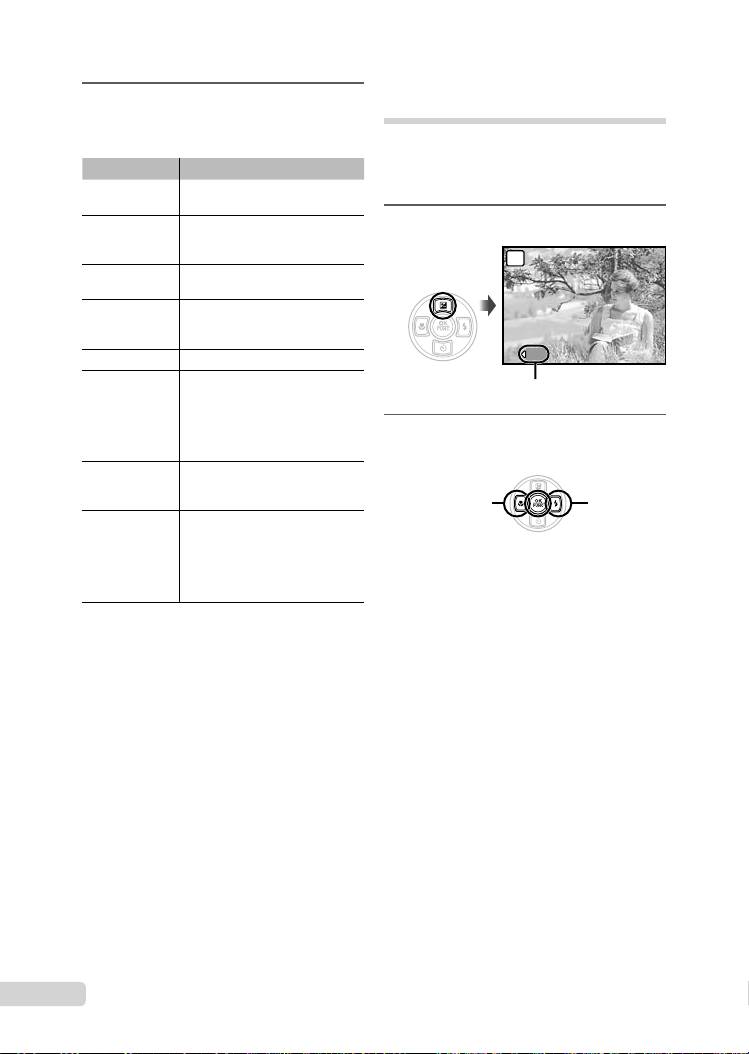
3
Adjusting the brightness
Use 9: to select the setting
(Exposure compensation)
option, and press the o button to
set.
The standard brightness (correct exposure) set
by the camera based on the shooting mode
Item Description
(except for M) can be adjusted brighter or darker
The fl ash fi res automatically in
to obtain the desired shot.
*1
FLASH AUTO
low-light and backlight conditions.
1
This emits pre-fl ashes to reduce
Press 7.
*1
REDEYE
the occurrence of red eye in your
photos.
The fl ash fi res regardless of the
FILL IN
available light.
After the pre-fl ashes that reduce
RED-EYE +
the red eye, the fl ash fi res
FILL-IN
regardless of the available light.
FLASH OFF The fl ash does not fi re.
The fl ash fi res at a slow shutter
speed immediately after the
shutter is opened (fi rst curtain
SLOW
sync). Both the subject in the
foreground and the night scene in
the background are captured.
This combines the pre-fl ashes of
RED-EYE SLOW
red-eye reduction with the fl ash in
SLOW (fi rst curtain sync).
The fl ash fi res at a slow shutter
speed immediately before the
shutter is closed (second curtain
SLOW2
sync). This can be used to create
effects such as the taillights of a
car streaming backwards.
*1
This cannot be set in S and M modes.
14
EN
1/1000
1/1000
F8.0
F8.0
+2.0
P
+2.0
Exposure compensation value
2
Use 9: to adjust the brightness,
and press the o button to set.
9
: Darken
:
: Brighten
D4384_en_basic.indb 14D4384_en_basic.indb 14 1/15/2009 4:23:48 PM1/15/2009 4:23:48 PM
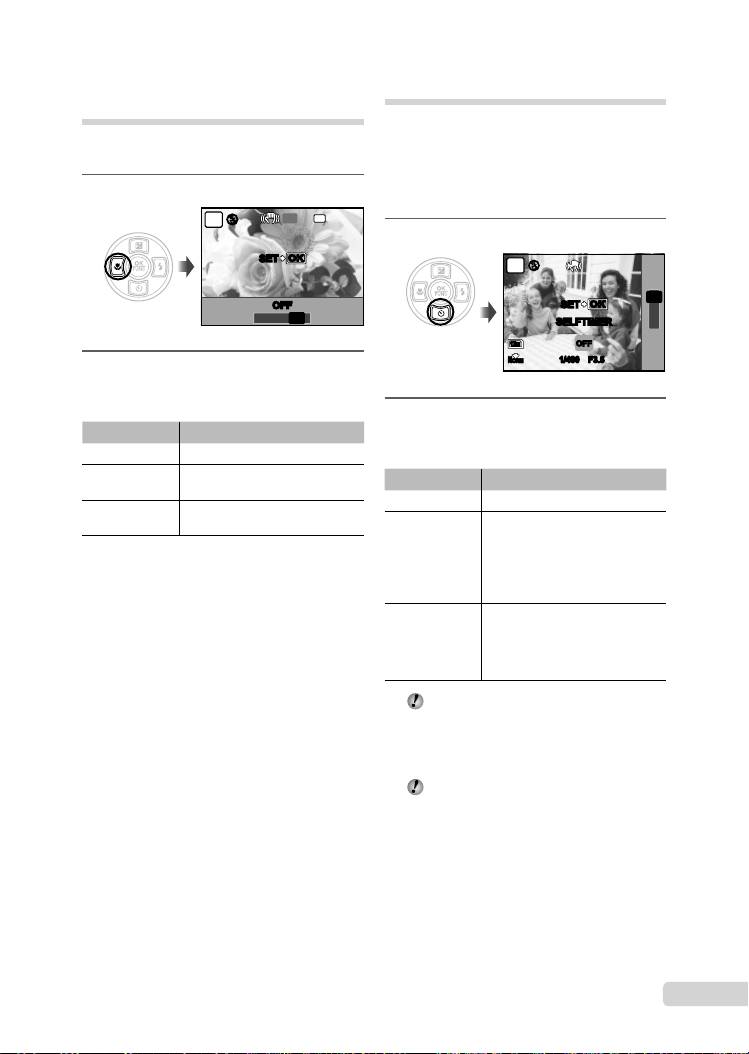
Shooting closeups
Using the self-timer
(Macro shooting)
After the shutter button is pressed all the way
This function enables the camera to focus and
down, the picture is taken after a time delay. By
shoot subjects at close distances.
securing the camera on a tripod, this function
enables the user to take a picture of himself/
herself at a distance from the camera (h) or to
1
Press 9.
take pictures without the camera shake (k).
$$
OFF
NR
P
1
Press 8.
SET
OKOK
P
$
$$
Y
OFF
OFF
SET
OKOK
12s
% &
OFF
SELFTIMER
2s
12
M
OFF
N
ORM
1/400 F3.51/400 F3.5
2
Use 9: to select the setting
option, and press the o button to
set.
2
Use 78 to select the setting
Item Description
option, and press the o button to
OFF Macro mode is deactivated.
set.
This enables shooting as close as
MACRO
Item Description
*1
10 cm (3.9 in.)
to the subject.
OFF This cancels the self-timer.
This enables shooting as close as
SUPER MACRO
*2
1 cm (0.39 in.)
to the subject.
After setting, when the shutter
button is pressed all the way
*1
When the zoom is at the widest (W) setting.
down, the self-time lamp turns
*2
12s SELFTIMER
The zoom is automatically fi xed.
on for approx. 10 seconds, and
then blinks for approx. 2 seconds
before taking the picture.
After setting, when the shutter
button is pressed all the way
2s SELFTIMER
down, the self-time lamp blinks for
approx. 2 seconds before taking
the picture.
Self-timer shooting is automatically canceled
after one shot.
To cancel the self-timer after it starts
Press 8 again.
The self-timer cannot be set when [AF
PREDICT] (p. 35) is set to [ON] or [DRIVE]
(p. 32) is set to [PRE-CAPTURE ON].
EN
15
D4384_en_basic.indb 15D4384_en_basic.indb 15 1/15/2009 4:23:48 PM1/15/2009 4:23:48 PM
Table of contents
- Preparing the Camera
- Shooting, Playback and Erasing
- Using Shooting Modes
- Using Shooting Functions
- Printing
- Using OLYMPUS Master 2
- Appendix
- Préparer l’appareil photo
- Prise de vue, affi chage et effacement
- Utiliser les modes de prise de vue
- Utiliser les fonctions de prise de vue
- Imprimer
- Utiliser OLYMPUS Master 2
- Appendice
- Preparación de la cámara
- Toma, reproducción y borrado
- Uso de los modos de toma
- Uso de las funciones de toma
- Impresión
- Uso del programa OLYMPUS Master 2
- Apéndice
- Vorbereiten der Kamera
- Aufnahme, Wiedergabe und Löschen von Bildern
- Verwendung der verschiedenen Aufnahmemodi
- Verwendung der Aufnahmefunktionen
- Verwenden der Software OLYMPUS Master 2
- Anhang
- Подготовка фотокамеры
- Съемка, воспроизведение и удаление
- Использование режимов съемки
- Использование функций съемки
- Печать
- Использование OLYMPUS Master 2
- Приложение


