
Olympus SP-590UZ: Shooting, Playback and Erasing
Shooting, Playback and Erasing: Olympus SP-590UZ
Shooting, Playback and Erasing
4
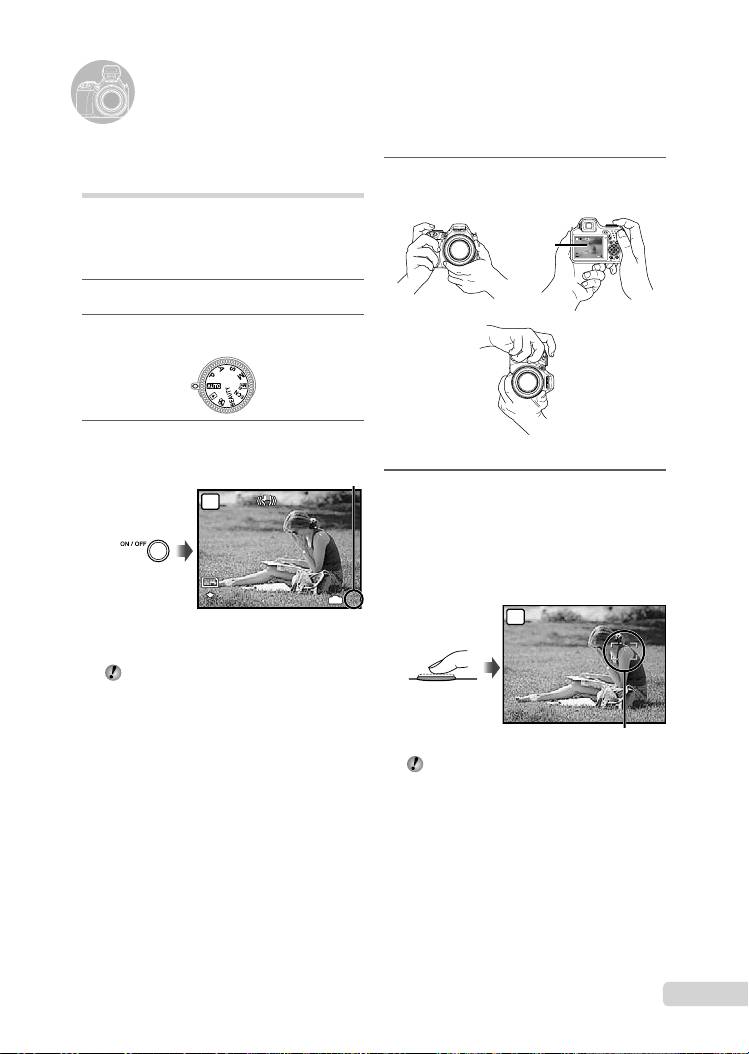
Hold the camera, and compose the
shot.
AUTO
$$
Monitor
12
N
ORM
M
IN
4
Horizontal grip
Vertical grip
5
Press the shutter button halfway
down to focus on the subject.
When the camera focuses on the subject, the
exposure is locked, and the AF target mark
changes to green.
The camera was unable to focus if the AF target
mark fl ashes red. Try focusing again.
AUTO
EN
7
$
Shooting with automatic
settings (
h
mode)
This is a fully automatic mode that allows the
user to take pictures by simply pressing the
shutter button. Settings in the shooting menu
cannot be changed in h mode.
1
Remove the lens cap.
2
Set the mode dial to
h
.
3
Press the n button to turn on
the camera.
●
●
$
Press halfway
AF target mark
“Focusing” (p. 68)
12
M
12
M
4
AUTO
IN
4
$
$
N
ORM
Number of storable still pictures (p. 73)
N
ORM
Monitor
(standby mode screen)
Press the n button again to turn off
the camera.
D4384_en_basic.indb 7D4384_en_basic.indb 7 1/15/2009 4:23:42 PM1/15/2009 4:23:42 PM
6
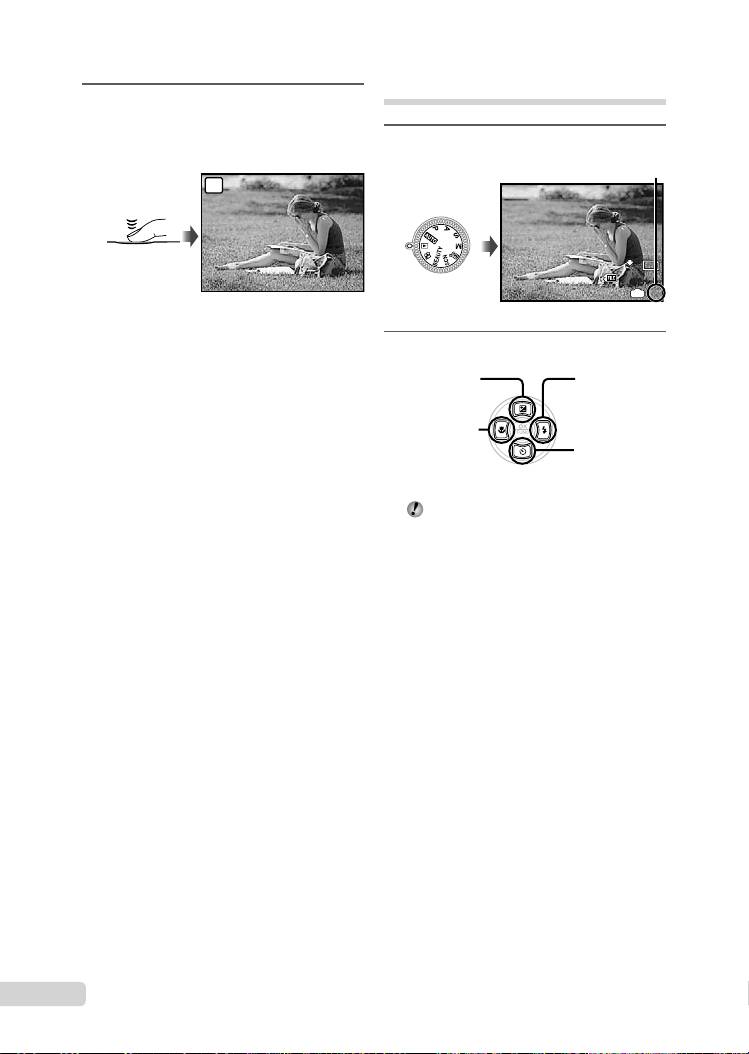
To take the picture, gently press
the shutter button all the way down
while being careful not to shake the
camera.
AUTO
8
EN
$
Viewing images
1
Set the mode dial to q.
$
Press fully
Image review screen
To view images during shooting
Pressing the q button enables playback of
images. To return to shooting, either press
the q button again or press the shutter
button halfway down.
To shoot movies
“Shooting movies (A mode)” (p. 20)
To turn off the camera
Press the n button to turn off the
camera, and attach the lens cap to the lens.
1
IN
1
12
M
12
M
2009.08.26
2009.08.26
12:30
12:30
100-0001
100-0001
N
ORM
Number of frames
N
ORM
Playback image
2
Use 789: to select an image.
Displays
Displays next
10 frames before
image
the current image
Displays previous
image
Displays
10 frames after
the current
image
The display size of the image can be
changed. “Index view, calendar view and
closeup view” (p. 27)
D4384_en_basic.indb 8D4384_en_basic.indb 8 1/15/2009 4:23:44 PM1/15/2009 4:23:44 PM
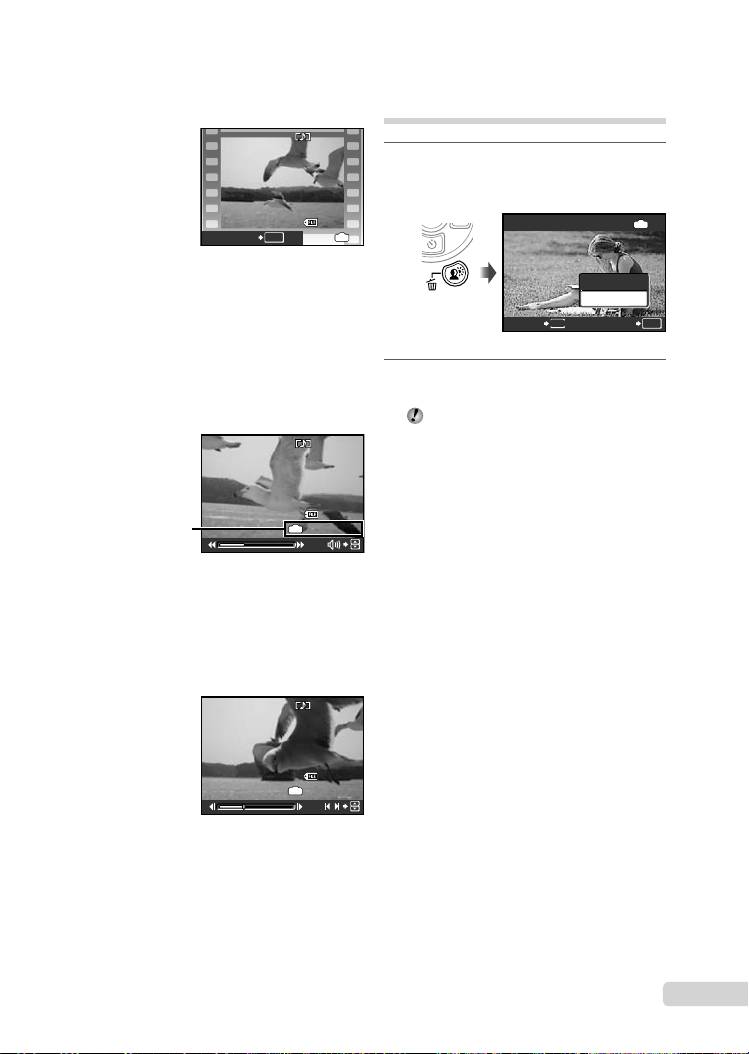
To play back movies
Select a movie, and press the o button.
EN
9
2009.08.26
2009.08.26
12:30
12:30
100-0004
100-0004
4
MOVIE PLAY
OK
IN
4
Movie
Operations during movie playback
Volume: During playback, press 78.
Fast-forward/rewind: Select with 9:.
Each time a button is pressed, the playback
speed cycles through 2x, 20x and standard
(1x) speed in the direction of the pressed
cursor button.
Pause: Press the o button.
2009.08.26
2009.08.26
12:30
12:30
100-0004
100-0004
00:12
/
00:34
Elapsed time/
IN
00:12
/
00:34
Total recording time
During playback
First (last) frame/frame advance:
During pause, press 7 to display the fi rst
frame, and press 8 to display the last
frame. Press 9 to display the previous
frame, and press : to display the next
frame. Press the o button to resume
playback.
2009.08.26
2009.08.26
12:30
12:30
100-0004
100-0004
00:14
/
00:34
Erasing images during
playback (Single image erase)
1
Press the D button when the
playback image to be erased is
displayed.
IN
00:14
/
00:34
/
During pause
To stop movie playback
Press the m button.
ERASE
ERASE
IN
OK
NO
YES
NO
CANCEL
MENU
SET
2
Press 7 to select [YES], and press
the o button.
[K ERASE] (p. 49)
D4384_en_basic.indb 9D4384_en_basic.indb 9 1/15/2009 4:23:44 PM1/15/2009 4:23:44 PM
Table of contents
- Preparing the Camera
- Shooting, Playback and Erasing
- Using Shooting Modes
- Using Shooting Functions
- Printing
- Using OLYMPUS Master 2
- Appendix
- Préparer l’appareil photo
- Prise de vue, affi chage et effacement
- Utiliser les modes de prise de vue
- Utiliser les fonctions de prise de vue
- Imprimer
- Utiliser OLYMPUS Master 2
- Appendice
- Preparación de la cámara
- Toma, reproducción y borrado
- Uso de los modos de toma
- Uso de las funciones de toma
- Impresión
- Uso del programa OLYMPUS Master 2
- Apéndice
- Vorbereiten der Kamera
- Aufnahme, Wiedergabe und Löschen von Bildern
- Verwendung der verschiedenen Aufnahmemodi
- Verwendung der Aufnahmefunktionen
- Verwenden der Software OLYMPUS Master 2
- Anhang
- Подготовка фотокамеры
- Съемка, воспроизведение и удаление
- Использование режимов съемки
- Использование функций съемки
- Печать
- Использование OLYMPUS Master 2
- Приложение


