
Olympus SP-590UZ: Using OLYMPUS Master 2
Using OLYMPUS Master 2: Olympus SP-590UZ
Using OLYMPUS Master 2
Windows
System requirements and
After the computer detects the camera, a
installation of OLYMPUS
message indicating the completion of the
Master 2
setting appears. Confi rm the message and
click “OK”. The camera is recognized as a
Install the OLYMPUS Master 2 software
removable disk.
referring to the included installation guide.
Macintosh
When iPhoto starts, exit iPhoto and start
Connecting the camera to a
OLYMPUS Master 2.
computer
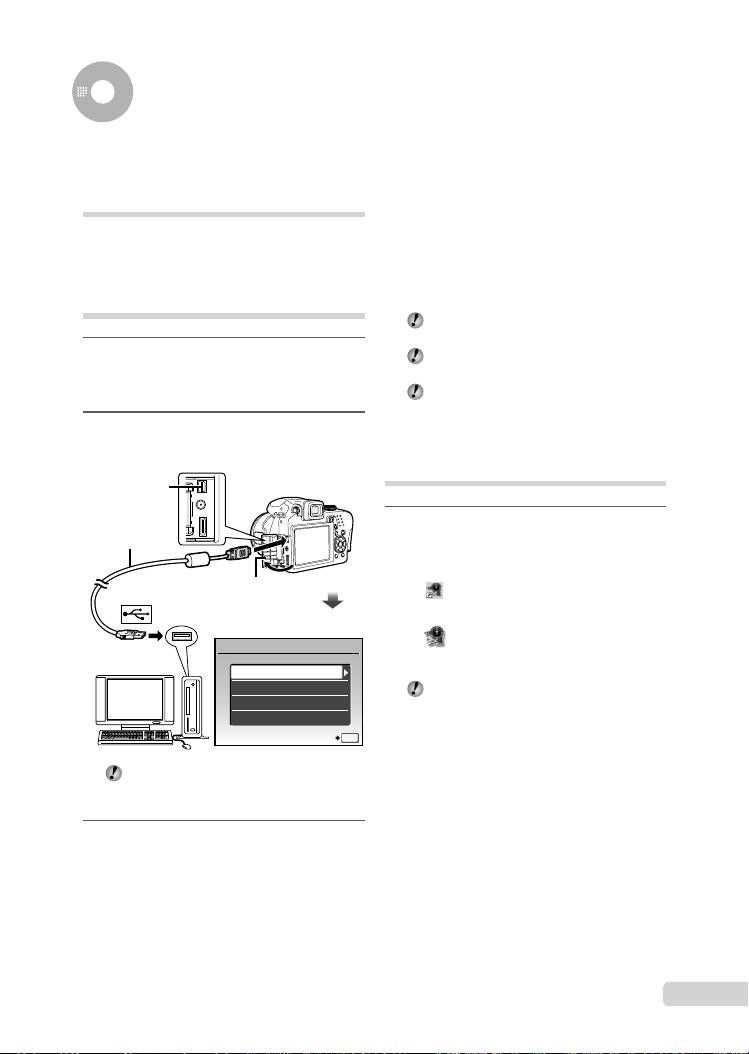
While the camera is connected to the
computer, shooting functions are disabled.
1
Make sure the camera is turned off.
Connecting the camera to a computer via a
USB hub may cause unstable operation.
●
The monitor is off.
●
The lens is retracted.
When [MTP] is set for the submenu that
appears by pressing : after selecting [PC]
in step 3, images cannot be transferred to a
2
Connect the camera to a computer.
computer using OLYMPUS Master 2.
●
The camera automatically turns on.
Starting OLYMPUS Master 2
Multi-connector
1
USB cable
Double-click the OLYMPUS Master 2
(supplied)
icon.
Windows
Open the connector cover
appears on the desk top.
in the direction of the arrow.
Macintosh
appears in the OLYMPUS Master 2 folder.
USB
●
Browse window appears after starting the
PC
software.
EASY PRINT
When you start OLYMPUS Master 2 for the
CUSTOM PRINT
fi rst time after installation, “Default Settings”
EXIT
and “Registration” screen appear. Follow the
SET
OK
instructions on the screen.
Locate the position of the USB port by
referring to your computer instructions
manual.
3
Use 78 to select [PC], and press
the o button.
●
The computer automatically detects the camera as
a new device on the fi rst connection.
EN
17
D4384_en_basic.indb 17D4384_en_basic.indb 17 1/15/2009 4:23:50 PM1/15/2009 4:23:50 PM
Operating OLYMPUS Master 2
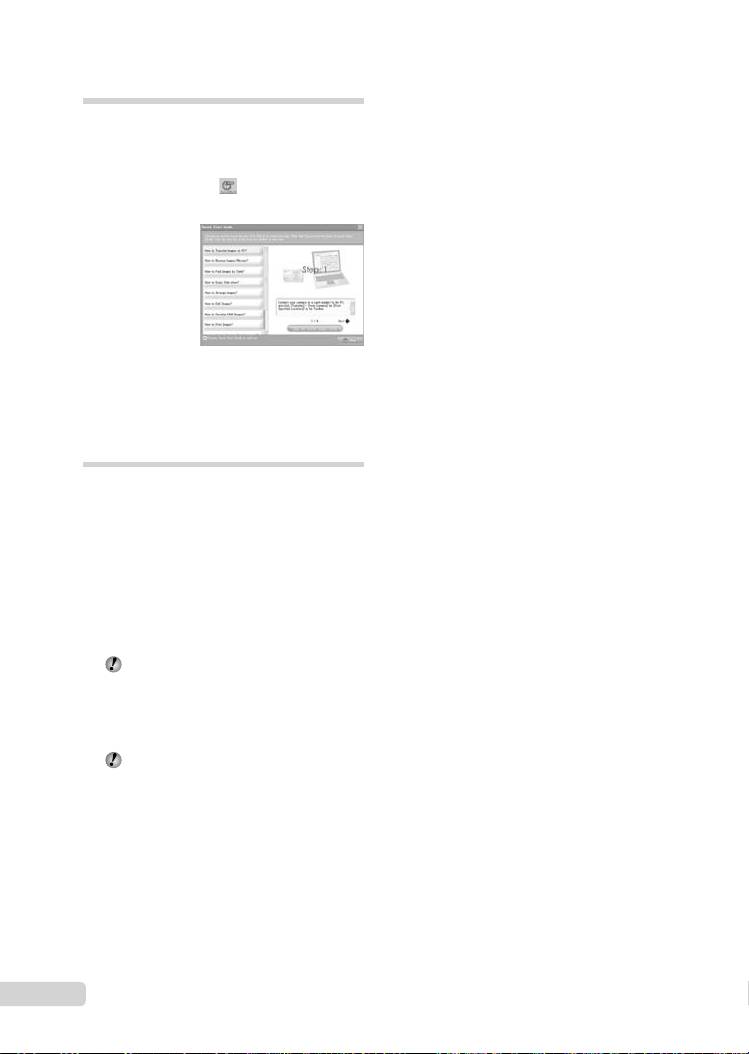
When OLYMPUS Master 2 is started, Quick
Start Guide appears on the screen and
helps you to handle the camera without any
questions. When the Quick Start Guide is
not displayed, click in the tool bar to
show the Guide.
For details on the operation, refer to the help
guide of the software.
Transferring and saving
images without OLYMPUS
Master 2
This camera is compatible with the USB Mass
Storage Class. You can transfer and save the
image data on your computer while the camera
and the computer are connected.
System requirements
Windows : Windows 2000 Professional/
XP Home Edition/
XP Professional/
Vista
Macintosh : Mac OS X v10.3 or later
On a computer running Windows Vista, if
[MTP] is set for the submenu that appears
by pressing : after selecting [PC] in step 3
of “Connecting the camera to a computer”
(p. 64), Windows Photo Gallery will become
available.
Even if a computer has USB ports, proper
operation is not guaranteed in the following
cases.
●
computers with USB ports installed using an
expansion card, etc.
●
computers without a factory-installed OS and
home-built computers
18
EN
D4384_en_basic.indb 18D4384_en_basic.indb 18 1/15/2009 4:23:51 PM1/15/2009 4:23:51 PM
Table of contents
- Preparing the Camera
- Shooting, Playback and Erasing
- Using Shooting Modes
- Using Shooting Functions
- Printing
- Using OLYMPUS Master 2
- Appendix
- Préparer l’appareil photo
- Prise de vue, affi chage et effacement
- Utiliser les modes de prise de vue
- Utiliser les fonctions de prise de vue
- Imprimer
- Utiliser OLYMPUS Master 2
- Appendice
- Preparación de la cámara
- Toma, reproducción y borrado
- Uso de los modos de toma
- Uso de las funciones de toma
- Impresión
- Uso del programa OLYMPUS Master 2
- Apéndice
- Vorbereiten der Kamera
- Aufnahme, Wiedergabe und Löschen von Bildern
- Verwendung der verschiedenen Aufnahmemodi
- Verwendung der Aufnahmefunktionen
- Verwenden der Software OLYMPUS Master 2
- Anhang
- Подготовка фотокамеры
- Съемка, воспроизведение и удаление
- Использование режимов съемки
- Использование функций съемки
- Печать
- Использование OLYMPUS Master 2
- Приложение


