
Olympus SP-590UZ: Printing
Printing: Olympus SP-590UZ
Printing
*1
Direct printing (PictBridge
)
2
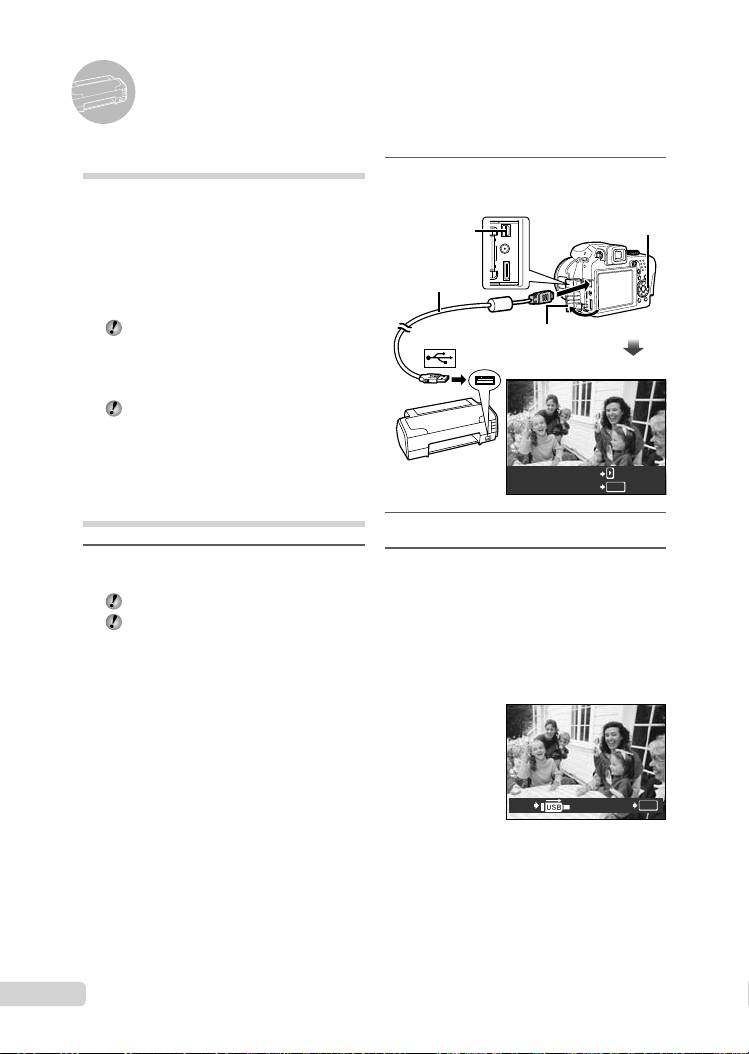
Turn on the printer, and then
connect the printer and camera.
By connecting the camera to a PictBridge-
compatible printer, you can print images directly
without using a computer.
Multi-connector
: button
To fi nd out if your printer supports PictBridge,
refer to the printer’s instruction manual.
USB cable
*1
PictBridge is a standard for connecting digital
(supplied)
cameras and printers of different makers and
printing out pictures directly.
The printing modes, paper sizes and other
Open the connector cover in
setting options that can be set with the
the direction of the arrow.
camera vary depending on the printer that
is used. For details, refer to the printer’s
instruction manual.
For details on the available paper types,
loading paper and installing ink cassettes,
refer to the printer’s instruction manual.
EASY PRINT START
Printing at the printer’s
PC/CUSTOM PRINT
OK
standard settings
[EASY PRINT]
3
Press : to start printing.
1
Display the image to be printed on
4
To print another image, use 9:
the monitor.
to select an image, and press the
“Viewing images” (p. 15)
o button.
Printing can also be started when the
To exit printing
camera is turned off. After performing
step 2, use 78 to select [EASY PRINT],
After a selected image is displayed on the
press the o button. Use 9: to select an
screen, disconnect the USB cable from the
image, press the o button.
camera and printer.
PRINTEXIT
OK
16
EN
D4384_en_basic.indb 16D4384_en_basic.indb 16 1/15/2009 4:23:49 PM1/15/2009 4:23:49 PM
Table of contents
- Preparing the Camera
- Shooting, Playback and Erasing
- Using Shooting Modes
- Using Shooting Functions
- Printing
- Using OLYMPUS Master 2
- Appendix
- Préparer l’appareil photo
- Prise de vue, affi chage et effacement
- Utiliser les modes de prise de vue
- Utiliser les fonctions de prise de vue
- Imprimer
- Utiliser OLYMPUS Master 2
- Appendice
- Preparación de la cámara
- Toma, reproducción y borrado
- Uso de los modos de toma
- Uso de las funciones de toma
- Impresión
- Uso del programa OLYMPUS Master 2
- Apéndice
- Vorbereiten der Kamera
- Aufnahme, Wiedergabe und Löschen von Bildern
- Verwendung der verschiedenen Aufnahmemodi
- Verwendung der Aufnahmefunktionen
- Verwenden der Software OLYMPUS Master 2
- Anhang
- Подготовка фотокамеры
- Съемка, воспроизведение и удаление
- Использование режимов съемки
- Использование функций съемки
- Печать
- Использование OLYMPUS Master 2
- Приложение


