
Indesit WIT 51: Washing machine description
Washing machine description: Indesit WIT 51
16
GB
Washing machine description
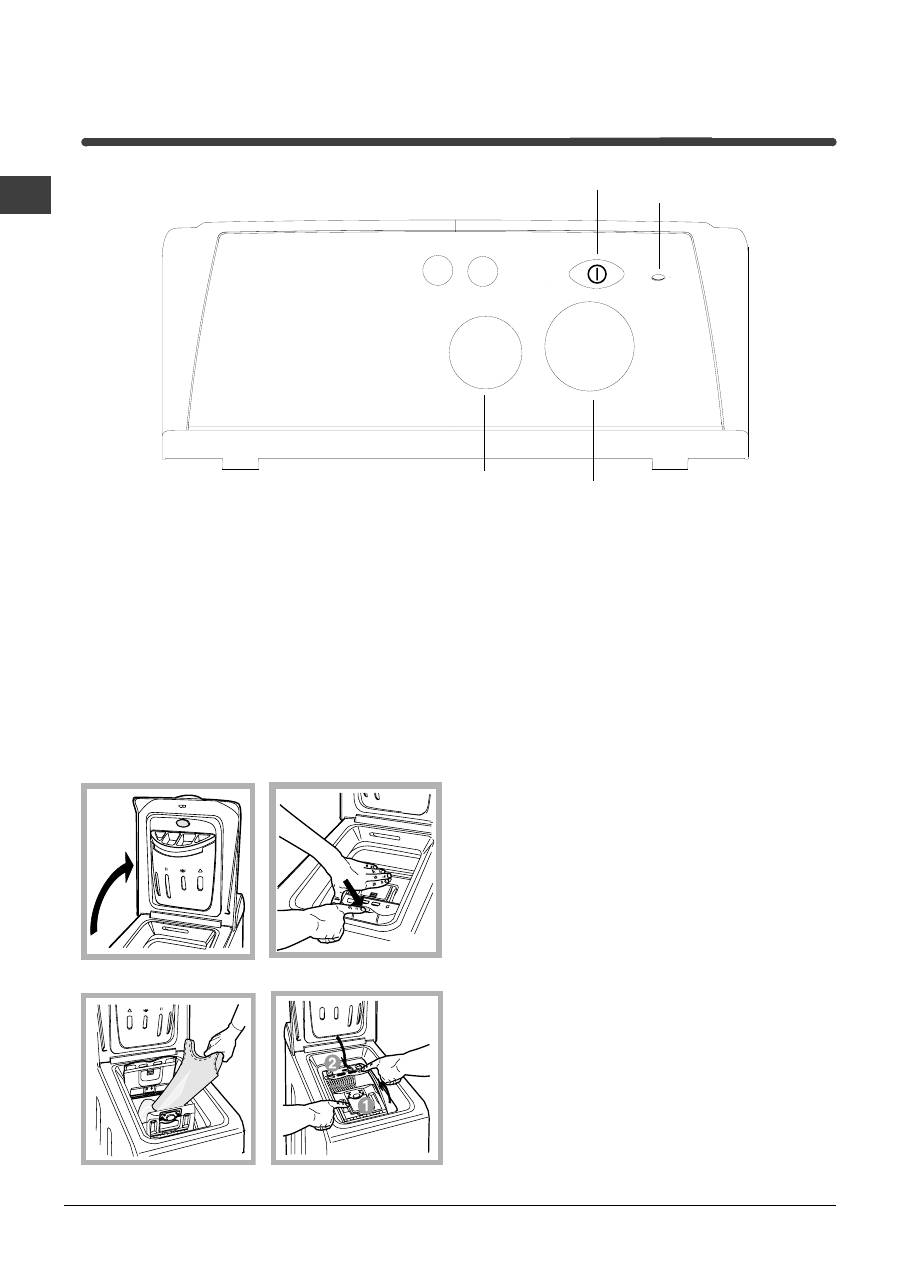
Control panel
Detergent dispenser:
to add detergent and fabric
softener
(see page 19).
FUNCTION
buttons: to select the functions available
(see page 18).
TEMPERATURE
knob: to set the temperature or the
cold wash cycle
(see page 18)
.
ON/OFF
button, to turn the washing machine on
and off.
ON/OFF
led, to find out whether the washing
machine is on
.
PROGRAMME
knob:
to select the wash programmes.
Remember that this dial should be turned in a
clockwise direction and only when the machine is off.
Fig. 3
A) Opening (Fig. 1).
Lift the external lid and open it completely.
B) Then open the drum using both hands as
shown in Fig. 2:
- press the button indicated by the arrow in Fig. 2
lightly downwards, with one hand firmly resting on
the doors to prevent them from suddenly opening
and hurting your fingers;
- therefore follow the appliance doors along as these
unhook and open easily.
C) Loading the washing machine. (Fig. 3)
.
D) Shutting (Fig. 4).
- close the drum fully by first shutting the front door
followed by the rear one;
- then ensure the hooks on the front door are perfectly
housed within the seat of the rear door;
- after the hooks have clicked into position, press both
doors lightly downwards to make sure they do not
come loose;
- finally shut the external lid.
Fig. 1
How to open and to shut the drum
ON-OFF
Button
TEMPERATURE
Knob
PROGRAMME
Knob
FUNCTION
Buttons
ON-OFF
Led
Fig. 4
Fig. 2
Table of contents
- Óñòàíîâêà
- Îïèñàíèå ñòèðàëüíîé ìàøèíû
- Çàïóñê ìàøèíû.Ïðîãðàììû
- Ïåðñîíàëèçàöèÿ ñòèðêè
- Ìîþùèå ñðåäñòâà è áåëüå
- Ïðåäóïðåæäåíèÿ è ðåêîìåíäàöèè
- Îáñëóæèâàíèå è óõîä
- Íåèñïðàâíîñòèè ìåòîäû èõ óñòðàíåíèÿ
- Ñåðâèñíîåîáñëóæèâàíèå
- Instructions for use
- Installation
- Washing machine description
- Starting and Programmes
- Personalisations
- Detergents and laundry
- Precautions and advice
- Care and maintenance
- Troubleshooting
- Service
- Mode d'emploi
- Installation
- Description du lave-linge
- Mise en marche et Programmes
- Personnalisations
- Produits lessiviels et linge
- Précautions et conseils
- Entretien et soin
- Anomalies et remèdes
- Assistance
- Instrucciones para el uso
- Instalación
- Descripción de la lavadora
- Puesta en marcha yProgramas
- Personalizaciones
- Detergentes y ropa
- Precauciones y consejos
- Mantenimiento y cuidados
- Anomalías y soluciones
- Asistencia
- Ïäçãßåò ÷ñÞóçò
- ÅãêáôÜóôáóç
- ÐåñéãñáöÞ ôïõ ðëõíôçñßïõ
- Åêêßíçóç êáé ÐñïãñÜììáôá
- ÐñïóùðéêÝò Ñõèìßóåéò
- ÁðïññõðáíôéêÜ êáé ñïý÷á
- ÐñïöõëÜîåéò êáé óõìâïõëÝò
- ÓõíôÞñçóç êáé öñïíôßäá
- ÐñïâëÞìáôá êáé ëýóåéò
- Ôå÷íéêÞ ÕðïóôÞñéîç


