
Mr Handsfree Blue Compact Microphone: TROUBLE-SHOOTINGTROUBLE-SHOOTING
TROUBLE-SHOOTINGTROUBLE-SHOOTING: Mr Handsfree Blue Compact Microphone
GB - 24
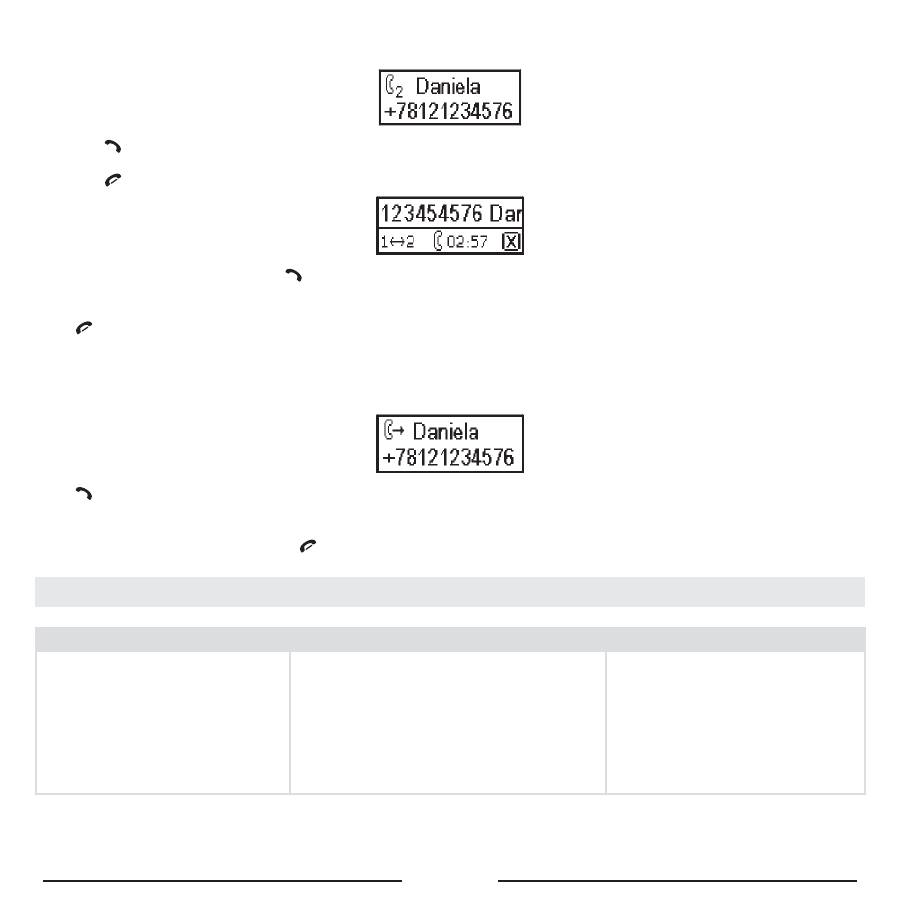
Second incoming call
•
The caller information appears on the display.
• Press to receive the second incoming call.
•
The first call will be put on hold.
• Press to end the current call.
•
To switch between the calls, press
.
7. ENDING A CALL
Press
to end a call.
8. ANSWERING A CALL
If there is an incoming call, the number of the caller will appear on the display.
If the name and number are stored in the phonebook of the Blue Compact, the name will appear on the display as well.
Press
to answer a call.
9. REJECTING A CALL
If you do not want to receive a call, press
.
TROUBLE-SHOOTING TROUBLE-SHOOTING
Problem
Reason Elimination
The device does not work. The green
LED of the power adapter is off.
1. The cigarette lighter jack is damaged.
2. No contact between the power adapter
and the cigarette lighter jack.
3. 1.5 A fuse in the power adapter is
burned.
4. The power adapter is damaged.
1. Check if the cigarette lighter func-
tions normally.
2. Clean the contact of the cigarette
lighter jack and the power adapter.
3. Change
the
fuse.
4. If items 1-3 did not help, apply to
a service center.
Оглавление
- DECLARATION OF CONFORMITYDECLARATION OF CONFORMITY
- TABLE OF CONTENTSTABLE OF CONTENTS
- SAFETY INSTRUCTIONSSAFETY INSTRUCTIONS
- DESCRIPTIONDESCRIPTION
- INSTALLATION INSTALLATION
- OPERATIONOPERATION
- TROUBLE-SHOOTINGTROUBLE-SHOOTING
- TECHNICAL PARAMETERSTECHNICAL PARAMETERS
- CARE AND TECHNICAL MAINTENANCECARE AND TECHNICAL MAINTENANCE
- INHOUDSTAFELINHOUDSTAFEL
- VEILIGHEIDSINSTRUCTIESVEILIGHEIDSINSTRUCTIES
- BESCHRIJVINGBESCHRIJVING
- INSTALLATIE INSTALLATIE
- WERKINGWERKING
- VERHELPEN VAN PROBLEMENVERHELPEN VAN PROBLEMEN
- BLUETOOTHBLUETOOTH
- TABLE DES MATITABLE DES MATI ÈÈ RESRES
- INSTRUCTIONS DE SÉCURITÉINSTRUCTIONS DE SÉCURITÉ
- DESCRIPTIONDESCRIPTION
- INSTALLATION INSTALLATION
- FONCTIONNEMENTFONCTIONNEMENT
- RÉSOLUTION DE PROBLRÉSOLUTION DE PROBL ÈÈ MESMES
- BLUETOOTHBLUETOOTH
- INHALTSVERZEICHNISINHALTSVERZEICHNIS
- SICHERHEITSHINWEISESICHERHEITSHINWEISE
- BESCHREIBUNGBESCHREIBUNG
- MONTAGEMONTAGE
- BETRIEBBETRIEB
- AbmeldungPairing
- PROBLEMLÖSUNGPROBLEMLÖSUNG
- BLUETOOTHBLUETOOTH
- SOMMARIOSOMMARIO
- NORME DI SICUREZZANORME DI SICUREZZA
- DESCRIZIONEDESCRIZIONE
- INSTALLAZIONEINSTALLAZIONE
- FUNZIONAMENTOFUNZIONAMENTO
- RICERCA DEI PROBLEMIRICERCA DEI PROBLEMI
- BLUETOOTHBLUETOOTH
- ÍNDICEÍNDICE
- INSTRUCCIONES DE SEGURIDADINSTRUCCIONES DE SEGURIDAD
- DESCRIPCIÓNDESCRIPCIÓN
- INSTALACIÓN INSTALACIÓN
- FUNCIONAMIENTOFUNCIONAMIENTO
- LOCALIZACIÓN DE AVERÍASLOCALIZACIÓN DE AVERÍAS
- BLUETOOTHBLUETOOTH
- ÍNDICEÍNDICE
- INSTRUÇINSTRUÇ ÕÕ ES DE SEGURANÇAES DE SEGURANÇA
- DESCRIÇDESCRIÇ ÃÃ OO
- INSTALAÇINSTALAÇ ÃÃ OO
- UTILIZAÇUTILIZAÇ ÃÃ OO
- RESOLUÇRESOLUÇ ÃÃ O DE PROBLEMASO DE PROBLEMAS
- PARÂMETROS TÉCNICOSPARÂMETROS TÉCNICOS
- BLUETOOTHBLUETOOTH
- TARTALOMJEGYZÉKTARTALOMJEGYZÉK
- BIZTONSÁGI RENDSZABÁLYOKBIZTONSÁGI RENDSZABÁLYOK
- ÁTTEKINTÉSÁTTEKINTÉS
- ÜZEMBE HELYEZÉS ÜZEMBE HELYEZÉS
- MŰKÖDTETÉSMŰKÖDTETÉS
- HIBAELHÁRÍTÁSHIBAELHÁRÍTÁS
- MŰSZAKI ADATOKMŰSZAKI ADATOK
- SADRŽAJSADRŽAJ
- UPOZORENJA O SIGURNOSTI UPOZORENJA O SIGURNOSTI
- OPIS UREĐAJAOPIS UREĐAJA
- UGRADNJAUGRADNJA
- RUKOVANJERUKOVANJE
- PROBLEMI U RADUPROBLEMI U RADU
- BLUETOOTHBLUETOOTH
- OBSAHOBSAH
- BEZPEČNOSTNÍ POKYNYBEZPEČNOSTNÍ POKYNY
- POPISPOPIS
- INSTALACEINSTALACE
- OVLÁDÁNÍ SADYOVLÁDÁNÍ SADY
- KDYŽ SE DOSTAVÍ PROBLÉMYKDYŽ SE DOSTAVÍ PROBLÉMY
- PÉČE A ÚDRŽBA PÉČE A ÚDRŽBA
- СОДЕРЖАНИЕСОДЕРЖАНИЕ
- ПРАВИЛА ТЕХНИКИ БЕЗОПАСНОСТИПРАВИЛА ТЕХНИКИ БЕЗОПАСНОСТИ
- ОПИСАНИЕОПИСАНИЕ
- УСТАНОВКА УСТАНОВКА
- РАБОТА С УСТРОЙСТВОМРАБОТА С УСТРОЙСТВОМ
- ВОЗМОЖНЫЕ НЕИСПРАВНОСТИ И ИХ УСТРАНЕНИЕВОЗМОЖНЫЕ НЕИСПРАВНОСТИ И ИХ УСТРАНЕНИЕ
- ТЕХНИЧЕСКИЕ ХАРАКТЕРИСТИКИТЕХНИЧЕСКИЕ ХАРАКТЕРИСТИКИ
- BLUETOOTHBLUETOOTH
