
Nikon 24mm-f-35D-PC-E-Nikkor: The tilt function Revolving
The tilt function Revolving: Nikon 24mm-f-35D-PC-E-Nikkor
Table of contents
- Notes on Safety Operations
- Observe the following precautions when handling the camera and lens
- 1. Nomenclature
- 2. Major features
- Note on the shift and tilt lock-release knobs 3. Usable cameras and available functions
- Cameras
- Aperture stop-down button (one-touch preset aperture operation)
- Important 4. Mounting lens
- 5. Using bayonet hood HB-41
- 6. Determining exposure When using the Nikon D4, D3-Series, Df, When using other Nikon cameras
- Determining exposure (with an external exposure meter) 7. The shift/tilt function Important
- The shift function
- The tilt function Revolving
- 8. Focusing
- 9. Depth of field
- 10. Taking flash pictures using cameras with a built-in flash
- 11. Recommended focusing screens
- 12. Lens care 13. Standard accessories
- 14. Optional accessories 15. Specifications
- Weight: Approx. 730 g (25.7 oz) 16. Customer service
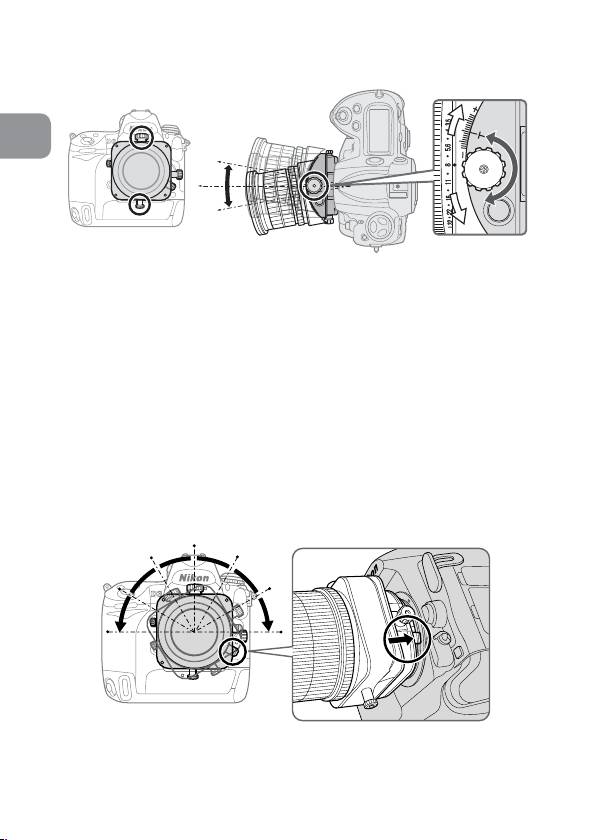
The tilt function
En
Fig. 8
By rotating the tilt knob, the lens is tilted up and down (or
right and left, when the lens is revolved) ±8.5° to the
camera body. By tilting, you can obtain clear focus of the
entire subject plane when it is not parallel to the camera or
can focus small areas of the subject which are parallel to
the camera (p. 207).
• After tilting, tighten the tilt lock release knob to fix the
lens’ tilt position.
• Note that tilting the lens also changes the viewfinder
image.
• Once the lens is tilted, neither the depth-of-field scale nor
the distance scale on the lens barrel can be used.
Revolving
Fig. 9
30
Top 10 manuals
100.00
NZXT HALE90 1000W99.99
Samsung SM-R38099.97
AEG BSB 18C99.97
Dell 2700W99.97
Smeg KSEC70X99.96
Beurer HDE 4099.96
Pyramida KH 50 v.299.96
MSI CSM-H81M-P3299.96
AEG HR 562799.95
Melissa 640-048