
Nikon 24mm-f-35D-PC-E-Nikkor: 6. Determining exposure When using the Nikon D4, D3-Series, Df, When using other Nikon cameras
6. Determining exposure When using the Nikon D4, D3-Series, Df, When using other Nikon cameras: Nikon 24mm-f-35D-PC-E-Nikkor
Table of contents
- Notes on Safety Operations
- Observe the following precautions when handling the camera and lens
- 1. Nomenclature
- 2. Major features
- Note on the shift and tilt lock-release knobs 3. Usable cameras and available functions
- Cameras
- Aperture stop-down button (one-touch preset aperture operation)
- Important 4. Mounting lens
- 5. Using bayonet hood HB-41
- 6. Determining exposure When using the Nikon D4, D3-Series, Df, When using other Nikon cameras
- Determining exposure (with an external exposure meter) 7. The shift/tilt function Important
- The shift function
- The tilt function Revolving
- 8. Focusing
- 9. Depth of field
- 10. Taking flash pictures using cameras with a built-in flash
- 11. Recommended focusing screens
- 12. Lens care 13. Standard accessories
- 14. Optional accessories 15. Specifications
- Weight: Approx. 730 g (25.7 oz) 16. Customer service
6. Determining exposure
When using the Nikon D4, D3-Series, Df,
D800-Series, D700, D610, D600, D300-Series,
D90, D7100, D7000, D5300, D5200, D5100,
En
D5000, D3200, D3100 or D3000 camera
a
Set the shift and tilt amount to 0 by
rotating the shift and tilt knobs.
(Fig. 2)
b
Set the camera’s exposure mode.
c
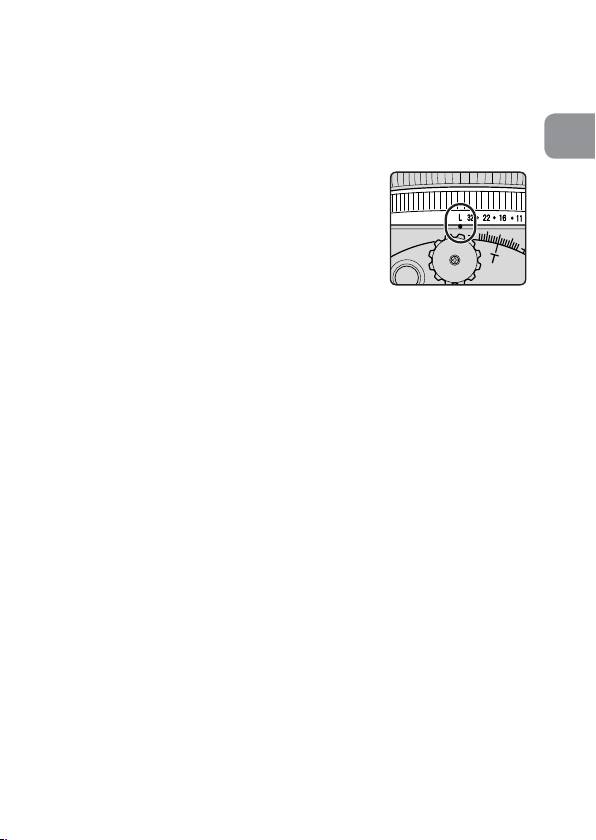
With A or M exposure mode, set the
aperture using the aperture ring or the
camera’s command dial. When using the
Fig. 6
camera’s command dial, set the aperture
to minimum aperture lock (L) (Fig. 6).
With P or S mode, set the aperture using
the camera’s command dial.
When using other Nikon cameras
a
Set the shift and tilt amount to 0 by rotating the shift
and tilt knobs. (Fig. 2)
b
Set the camera’s exposure mode to M.
c
Press the aperture stop-down button to fully open the
aperture, set the aperture ring to “3.5” (maximum
aperture), and set the shutter speed for correct
exposure.
d
Set the desired aperture by rotating the aperture ring
and shift the shutter speed by the same number of
changed steps.
• Setting the aperture ring to minimum aperture lock (L)
fixes the aperture at f/32 (minimum aperture).
• Set the aperture with the lens’ aperture ring even on a
camera that requires aperture to be set via its command
dial. With a camera that has the custom setting menu
“aperture setting with lens’ aperture ring,” this setting
is not required.
27
