
Nikon 24mm-f-35D-PC-E-Nikkor: 11. Recommended focusing screens
11. Recommended focusing screens: Nikon 24mm-f-35D-PC-E-Nikkor
Table of contents
- Notes on Safety Operations
- Observe the following precautions when handling the camera and lens
- 1. Nomenclature
- 2. Major features
- Note on the shift and tilt lock-release knobs 3. Usable cameras and available functions
- Cameras
- Aperture stop-down button (one-touch preset aperture operation)
- Important 4. Mounting lens
- 5. Using bayonet hood HB-41
- 6. Determining exposure When using the Nikon D4, D3-Series, Df, When using other Nikon cameras
- Determining exposure (with an external exposure meter) 7. The shift/tilt function Important
- The shift function
- The tilt function Revolving
- 8. Focusing
- 9. Depth of field
- 10. Taking flash pictures using cameras with a built-in flash
- 11. Recommended focusing screens
- 12. Lens care 13. Standard accessories
- 14. Optional accessories 15. Specifications
- Weight: Approx. 730 g (25.7 oz) 16. Customer service
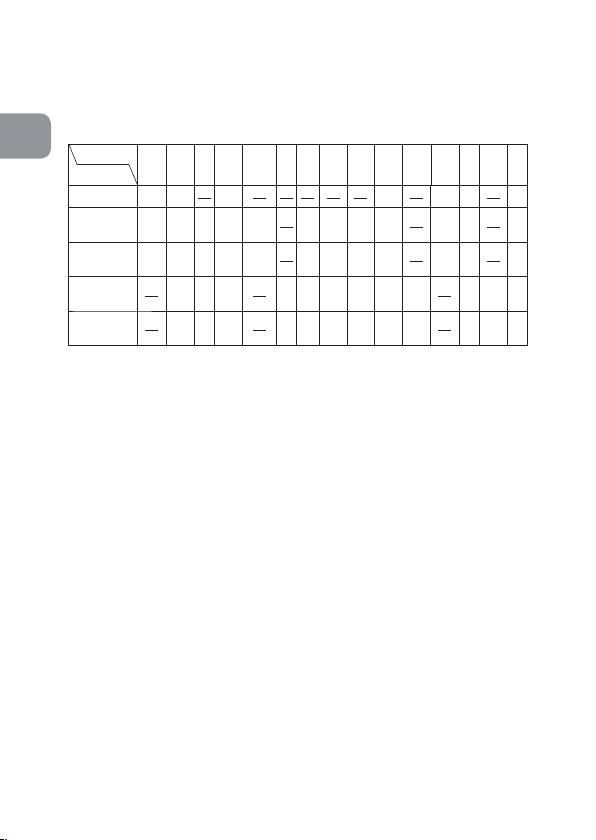
11. Recommended focusing screens
Various interchangeable focusing screens are available for
certain Nikon SLR cameras to suit any picture-taking
situation. The ones recommended for use with this lens are:
En
Screen
EC-B
G1
ABCE
F
G2 G3 J K L M P U
Camera
EC-E
G4
F6
◎◎ ◎ ◎◎
○
F5+DP-30
◎◎ ◎ ◎
◎◎
(+1.0)
◎
◎
◎
◎
F5+DA-30
◎◎
○
(+1.0)
(+0.5)
(+0.5)
(+1.0)
◎
◎
◎
◎
◎
F4+DP-20
◎
(+1.0)
(+1.0)
(+1.0)
(+1.0)
(+1.0)
◎
◎
○
◎
◎
◎
F4+DA-20
(+1.0)
(+1.0)
(+0.5)
(+1.0)
(+1.0)
(+1.0)
◎: Excellent focusing
○: Acceptable focusing
Slight vignetting or moiré patterns appear in the
viewfinder, but not on the film.
− : Not available.
( ): Indicates degree of exposure compensation needed
(Center-Weighted metering only). For F6 cameras,
compensate by selecting “Other screen” in Custom
Setting “b6: Screen comp.“ and setting the EV level to
-2.0 to +2.0 in 0.5 EV steps. When using screens other
than type B or E, “Other screen” must be selected even
when the required compensation value is “0” (no
compensation required). For F5 cameras, compensate
using Custom Setting #18 on the camera body. For
F4-Series cameras, compensate using the Exposure
Compensation Dial for the focusing screen.
See user’s manual of the camera body for more details.
Blank box means not applicable. Since type M screen can be
used for both macrophotography at a magnification ratio of 1:1
or above and for photomicrography, it has different applications
than other screens.
34
