
Nikon 24mm-f-35D-PC-E-Nikkor: 5. Using bayonet hood HB-41
5. Using bayonet hood HB-41: Nikon 24mm-f-35D-PC-E-Nikkor
Table of contents
- Notes on Safety Operations
- Observe the following precautions when handling the camera and lens
- 1. Nomenclature
- 2. Major features
- Note on the shift and tilt lock-release knobs 3. Usable cameras and available functions
- Cameras
- Aperture stop-down button (one-touch preset aperture operation)
- Important 4. Mounting lens
- 5. Using bayonet hood HB-41
- 6. Determining exposure When using the Nikon D4, D3-Series, Df, When using other Nikon cameras
- Determining exposure (with an external exposure meter) 7. The shift/tilt function Important
- The shift function
- The tilt function Revolving
- 8. Focusing
- 9. Depth of field
- 10. Taking flash pictures using cameras with a built-in flash
- 11. Recommended focusing screens
- 12. Lens care 13. Standard accessories
- 14. Optional accessories 15. Specifications
- Weight: Approx. 730 g (25.7 oz) 16. Customer service
b
Set the tilt and shift knobs. (Fig. 3)
Note: Turning either knob too tightly may damage the
knob.
En
Fig. 3
c
Turn the camera power off,
align the mounting indexes on
the lens and camera and then
twist the lens counterclockwise
until it locks into place. (Fig. 4)
•
Mounting the lens to a
camera while camera’s power
is on, may prevent the camera
Fig. 4
from operating correctly.
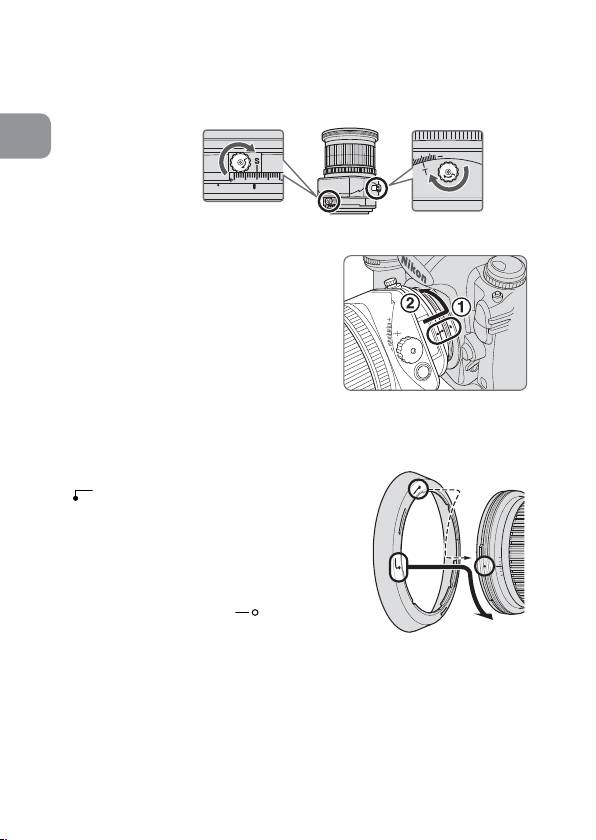
5. Using bayonet hood HB-41
Align the lens hood attachment index
(
) on the hood (either of two
indexes) with the lens hood mounting
index on the lens, and turn the hood
clockwise until it click stops to secure.
• Make sure that the lens hood
mounting index aligns with the lens
hood setting index (
).
• If the lens hood is not correctly
Fig. 5
attached, vignetting can occur.
• To facilitate attachment or removal of the hood,
hold it by its base around the lens hood
attachment index rather than its outer edge.
• To store the lens hood, attach it in the reverse position.
26
