
Indesit IWDC 7105: Description of the washer-dryer andstarting a wash cycle
Description of the washer-dryer andstarting a wash cycle: Indesit IWDC 7105
4
GB
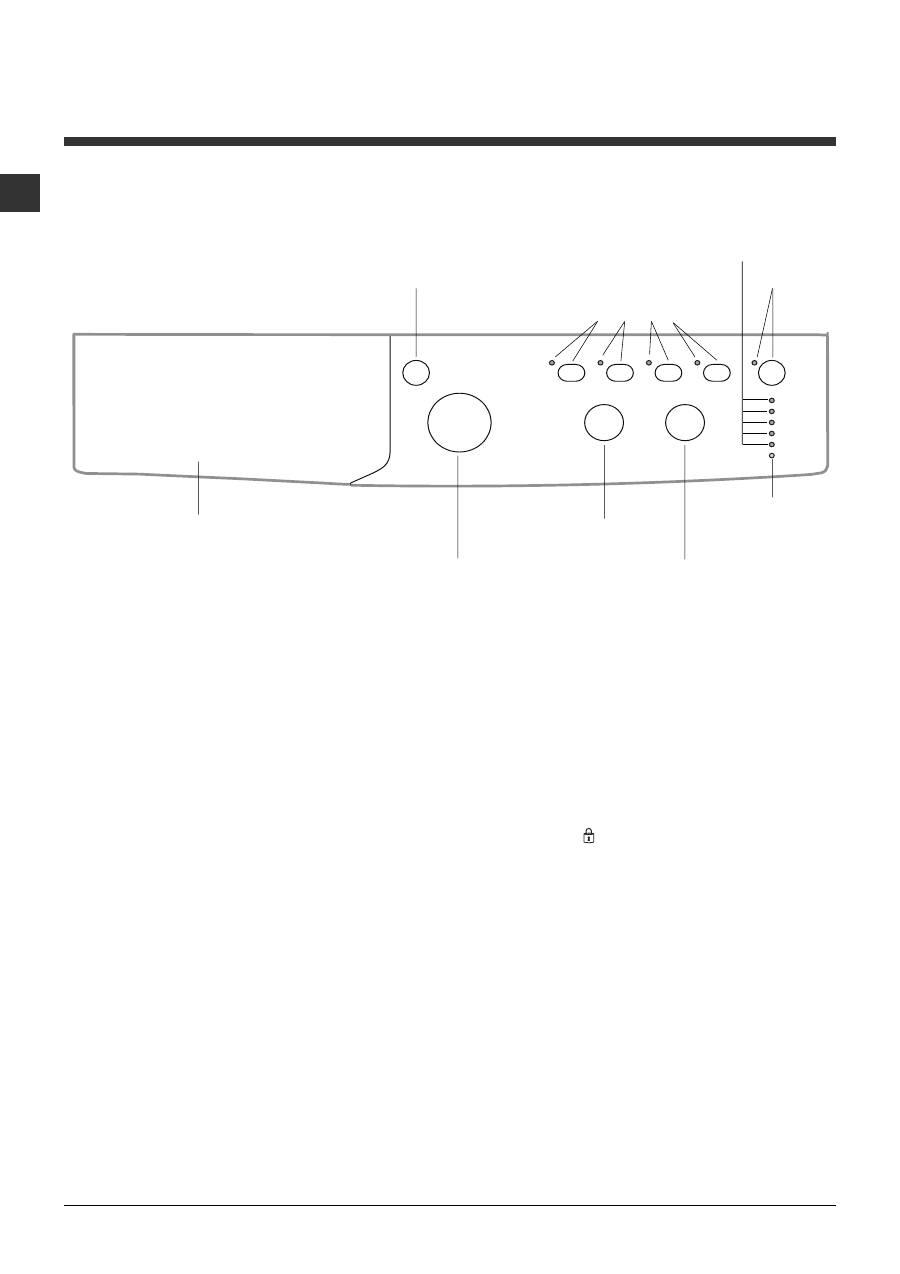
Detergent dispenser drawer:
used to dispense
detergents and washing additives (
see Detergents
and laundry
).
ON/OFF
button: switches the washer-dryer on and
off.
WASH CYCLE
knob: programmes the wash cycles.
During the wash cycle, the knob does not move.
FUNCTION
buttons with indicator light
:
used to
select the available functions. The indicator light
corresponding to the selected function will remain lit.
TEMPERATURE
knob: sets the temperature or the
cold wash cycle (
see Personalisation
).
DRYING
knob: used to set the desired drying
programme (
see Personalisation
).
WASH CYCLE PROGRESS/DELAY TIMER
indicator lights:
used to monitor the progress of the
wash cycle.
The illuminated indicator light shows which phase is in
progress.
If the Delay Timer function has been set, the time
remaining until the wash cycle starts will be indicated
(see next page).
DOOR LOCKED
indicator light: indicates whether
the door may be opened or not
(see next page)
.
START/PAUSE
button with indicator light: starts or
temporarily interrupts the wash cycles.
N.B.
To pause the wash cycle in progress, press this
button; the corresponding indicator light will flash
orange, while the indicator light for the current wash
cycle phase will remain lit in a fixed manner. If the
DOOR LOCKED indicator light is switched off, the
door may be opened.
To start the wash cycle from the point at which it was
interrupted, press this button again.
Standby mode
This washing machine, in compliance with new
energy saving regulations, is fitted with an automatic
standby system which is enabled after about 30
minutes if no activity is detected. Press the ON-OFF
button briefly and wait for the machine to start up
again.
Description of the washer-dryer and starting a wash cycle
WASH CYCLE PROGRESS/
DELAY TIMER
indicator lights
DOOR LOCKED
indicator light
START/
PAUSE
button with
indicator light
Control panel
Detergent dispenser drawer
ON/OFF
button
WASH CYCLE
knob
TEMPERATURE
knob
FUNCTION
buttons with
indicator lights
DRYING
knob
GB
5
Indicator lights
The indicator lights provide important information.
This is what they can tell you:
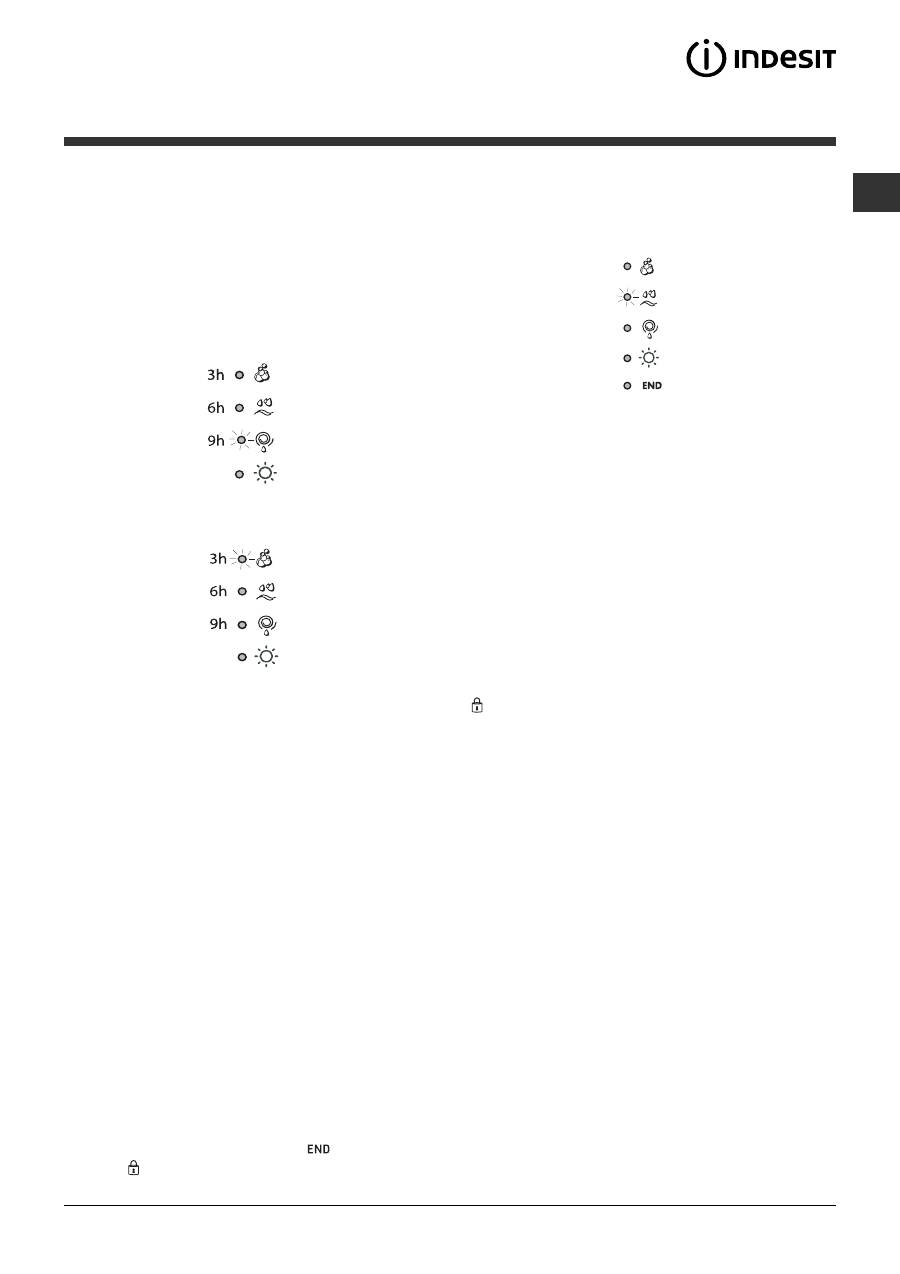
Delayed start
If the DELAY TIMER function has been activated (
see
Personalisation
), after the wash cycle has been
started the indicator light corresponding to the
selected delay period will begin to flash:
As time passes, the remaining delay will be displayed
and the corresponding indicator light will flash:
The set programme will start once the selected time
delay has expired.
Wash cycle phase indicator lights
Once the desired wash cycle has been selected and has
begun, the indicator lights switch on one by one to
indicate which phase of the cycle is currently in progress.
Note:
when the drying cycle has finished, the
DRYING knob should be returned to the
0
position.
Function buttons and corresponding indicator lights
When a function is selected, the corresponding
indicator light will illuminate.
If the selected function is not compatible with the
programmed wash cycle, the corresponding indicator
light will flash and the function will not be activated.
If the selected function is not compatible with another
function which has been selected previously, the
indicator light corresponding to the first function
selected will flash and only the second function will be
activated; the indicator light corresponding to the
enabled option will remain lit.
Door locked indicator light
When the indicator light is on, the porthole door is
locked to prevent it from being opened; make sure
the indicator light is off before opening the door (wait
approximately 3 minutes). To open the door during a
running wash cycle, press the START/PAUSE button;
the door may be opened once the DOOR LOCKED
indicator light turns off.
Fast flashing of the "programme phases" and DOOR
LOCKED indicator lights indicate an anomaly (
see
Troubleshooting
).
Starting a wash cycle
1.
Switch the washer-dryer on by pressing the ON/OFF button. All indicator lights will switch on for a few
seconds, then they will switch off and the START/PAUSE indicator light will pulse.
2.
Load the laundry and close the door.
3.
Set the WASH CYCLE knob to the desired programme.
4.
Set the washing temperature (
see Personalisation).
5.
Set the drying cycle if necessary
(see Personalisation).
6.
Measure out the detergent and washing additives (
see Detergents and laundry).
7.
Select the desired functions.
8.
Start the wash cycle by pressing the START/PAUSE button and the corresponding indicator light will remain lit
in a fixed manner, in green.
To cancel the set wash cycle, pause the machine by pressing the START/PAUSE button and select a new cycle.
9.
At the end of the wash cycle the
indicator light will switch on. The door can be opened once the DOOR
LOCKED indicator light turns off. Take out your laundry and leave the appliance door ajar to make sure the
drum dries completely. Switch the washer-dryer off by pressing the ON/OFF button.
Wash
Rinse
Spin/Drain
Drying
End of wash cycle
Table of contents
- Installation
- Description of the washer-dryer andstarting a wash cycle
- Wash cycles
- Personalisation
- Detergents and laundry
- Precautions and tips
- Care and maintenance
- Troubleshooting
- Service
- Ðóêîâîäñòâî ïîýêñïëóàòàöèè
- Óñòàíîâêà
- Îïèñàíèå ñòèðàëüíîé ìàøèíû èïîðÿäêà çàïóñêà ïðîãðàììû
- Ïðîãðàììû
- Ïåðñîíàëèçèðîâàííûåíàñòðîéêè
- Ìîþùèå ñðåäñòâà èòèïû áåëüÿ
- Ïðåäîñòîðîæíîñòè èðåêîìåíäàöèè
- Òåõíè÷åñêîå îáñëóæèâàíèåè óõîä
- Ïîèñê íåèñïðàâíîñòåé èìåòîäû èõ óñòðàíåíèÿ
- Ñåðâèñíîåîáñëóæèâàíèå
- Instrukcja obs³ugi
- Instalacja
- Opis pralki iuruchamianie programu
- Programy
- Personalizacja
- rodki pior¹ce i bielizna
- Zalecenia i rodkiostro¿noci
- Utrzymanie i konserwacja
- Nieprawid³owoci w dzia³aniui sposoby ich usuwania
- Serwis Techniczny
- Ïäçãßåò ÷ñÞóçò
- ÅãêáôÜóôáóç
- ÐåñéãñáöÞ ôïõ ðëõíôçñßïõ êáéåêêßíçóç åíüò ðñïãñÜììáôïò
- ÐñïãñÜììáôá
- Åîáôïìéêåýóåéò
- ÁðïññõðáíôéêÜ êáé ìðïõãÜäá
- ÐñïöõëÜîåéò êáéóõìâïõëÝò
- ÓõíôÞñçóç êáé öñïíôßäá
- Áíùìáëßåò êáé ëýóåéò
- ÕðïóôÞñéîç
- Kullanma Kýlavuzu
- Montaj
- Çamaþýr makinesinin tanýmý veprogramlarýn çalýþtýrýlmasý
- Programlar
- Kiþisel ayarlar
- Deterjanlar ve çamaþýr
- Önlemler ve öneriler
- Bakým ve özen
- Arýzalar ve onarýmlar
- Teknik Servis


