
Yamaha RX-397: Remote control
Remote control: Yamaha RX-397
Table of contents
- CAUTION: READ THIS BEFORE OPERATING YOUR UNIT.
- CONTENTS
- FEATURES SUPPLIED ACCESSORIES
- CONTROLS AND FUNCTIONS Front panel
- CONTROLS AND FUNCTIONS
- Front panel display
- CONTROLS AND FUNCTIONS Rear panel
- Remote control
- CONTROLS AND FUNCTIONS Installing batteries in the remote control Using the remote control
- CONNECTIONS CAUTION
- CONNECTIONS Connecting speakers
- Connecting the AM and FM antennas
- CONNECTIONS Connecting the AM loop antenna
- CONNECTIONS Connecting the power supply cord
- CONNECTIONS Turning on and off this unit
- PLAYING AND RECORDING CAUTION Playing a source
- PLAYING AND RECORDING Adjusting the tonal quality
- Recording a source
- Using the sleep timer
- Muting the sound output
- FM/AM TUNING Automatic tuning
- Manual tuning Automatic preset tuning
- Customized automatic preset tuning
- Manual preset tuning
- Selecting preset stations Exchanging preset stations
- RADIO DATA SYSTEM (EUROPE MODEL ONLY) Receiving Radio Data System stations Changing the Radio Data System mode
- PTY SEEK function
- EON function
- Press STANDBY/ON on the front panel to set ADVANCED SETUP Changing the ADVANCED SETUP menu parameters
- Press STANDBY/ON to confirm your setting.
- General TROUBLESHOOTING Problem
- Tuner Problem
- Remote control Problem
- SPECIFICATIONS
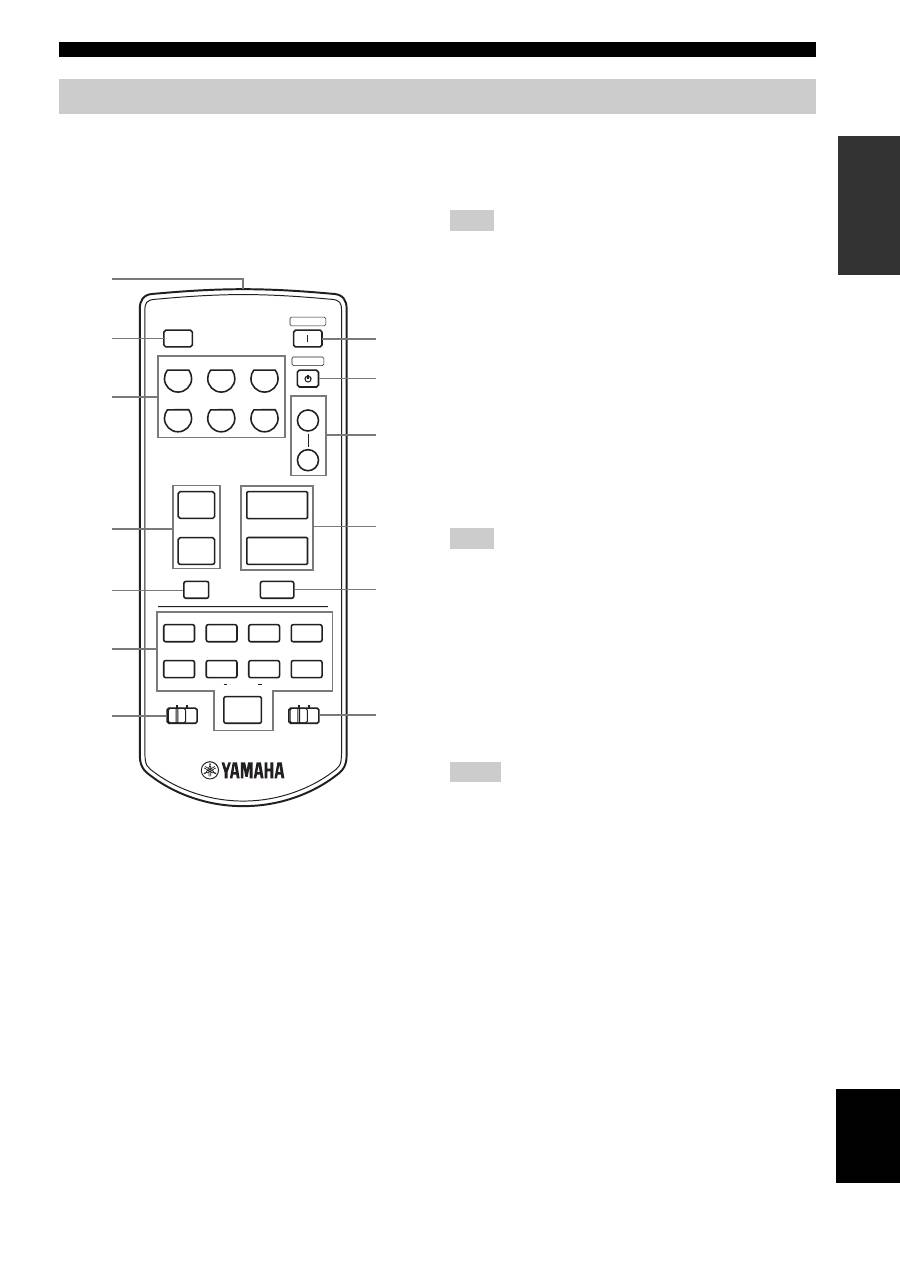
CONTROLS AND FUNCTIONS
7
INTR
ODUCTION
English
This section describes the function of each button on the
remote control used to control this unit or other
components made by YAMAHA. The functions of the
buttons used to control your other audio components are
the same as those of the corresponding buttons on those
components. Refer to those components’ instruction
manuals for details.
1
Infrared signal transmitter
Sends infrared signals.
2
SLEEP
Sets the sleep timer.
3
Input selector buttons
Select the desired input source.
4
PRESET
u
/
d
Selects the preset station number (1 to 8) when TUNER is
selected as the input source.
5
A/B/C/D/E
Selects the preset station group (A to E) when TUNER is
selected as the input source.
6
Radio Data System/CD player/Cassette tape
deck control buttons
Controls Radio Data System features, YAMAHA CD
players or YAMAHA cassette tape deck.
The Radio Data System features (FREQ/TEXT, PTY SEEK
MODE and PTY SEEK START) are only applicable to the
Europe model and are operational only when TUNER is selected
as the input source and the AMP/DEVICE switch is slid to the
AMP position.
7
AMP/DEVICE switch
Switches the function of the control buttons numbered
6
between controlling this unit and controlling YAMAHA
CD players or YAMAHA cassette tape deck.
8
POWER
Turns on this unit.
9
STANDBY
Sets this unit to the standby mode.
In the standby mode, this unit consumes a small amount of power
to receive infrared signals from the remote control.
0
SPEAKERS A/B
Turns on or off the set of speakers connected to the
SPEAKERS A and/or SPEAKERS B terminals on the rear
panel of this unit when the corresponding button is
pressed each time.
A
VOLUME +/–
Increases or decreases the sound output level.
• This does not affect the OUT (REC) level.
• When you press VOLUME +/– to control the sound output
level of this unit, VOLUME on the front panel rotates.
B
MUTE
Mutes the sound output. Press again to restore the sound
output to the previous volume level (see page 19).
C
CD/TAPE switch
Switches the function of the control buttons numbered
6
between controlling YAMAHA CD players and
controlling YAMAHA cassette tape deck when the
AMP/DEVICE switch is slid to the DEVICE position.
Remote control
CD/DVD
PHONO
TUNER
MD
TAPE
AUX
SPEAKERS
B
A
POWER
STANDBY
+
–
u
d
SLEEP
REC
EON
FREQ/TEXT MODE
START
PTY SEEK
A/B
DISC
DIR A
p
DIR B
A/B/C/D/E
MUTE
PRESET
VOLUME
TAPE
CD
DEVICE
AMP
w
e
f
b
s
a
DISPLAY
8
9
0
A
B
C
1
3
7
6
4
5
2
Note
Note
Notes
