
Yamaha RX-397: CONNECTIONS Connecting the power supply cord
CONNECTIONS Connecting the power supply cord: Yamaha RX-397
Table of contents
- CAUTION: READ THIS BEFORE OPERATING YOUR UNIT.
- CONTENTS
- FEATURES SUPPLIED ACCESSORIES
- CONTROLS AND FUNCTIONS Front panel
- CONTROLS AND FUNCTIONS
- Front panel display
- CONTROLS AND FUNCTIONS Rear panel
- Remote control
- CONTROLS AND FUNCTIONS Installing batteries in the remote control Using the remote control
- CONNECTIONS CAUTION
- CONNECTIONS Connecting speakers
- Connecting the AM and FM antennas
- CONNECTIONS Connecting the AM loop antenna
- CONNECTIONS Connecting the power supply cord
- CONNECTIONS Turning on and off this unit
- PLAYING AND RECORDING CAUTION Playing a source
- PLAYING AND RECORDING Adjusting the tonal quality
- Recording a source
- Using the sleep timer
- Muting the sound output
- FM/AM TUNING Automatic tuning
- Manual tuning Automatic preset tuning
- Customized automatic preset tuning
- Manual preset tuning
- Selecting preset stations Exchanging preset stations
- RADIO DATA SYSTEM (EUROPE MODEL ONLY) Receiving Radio Data System stations Changing the Radio Data System mode
- PTY SEEK function
- EON function
- Press STANDBY/ON on the front panel to set ADVANCED SETUP Changing the ADVANCED SETUP menu parameters
- Press STANDBY/ON to confirm your setting.
- General TROUBLESHOOTING Problem
- Tuner Problem
- Remote control Problem
- SPECIFICATIONS
13
CONNECTIONS
PREP
ARA
TION
English
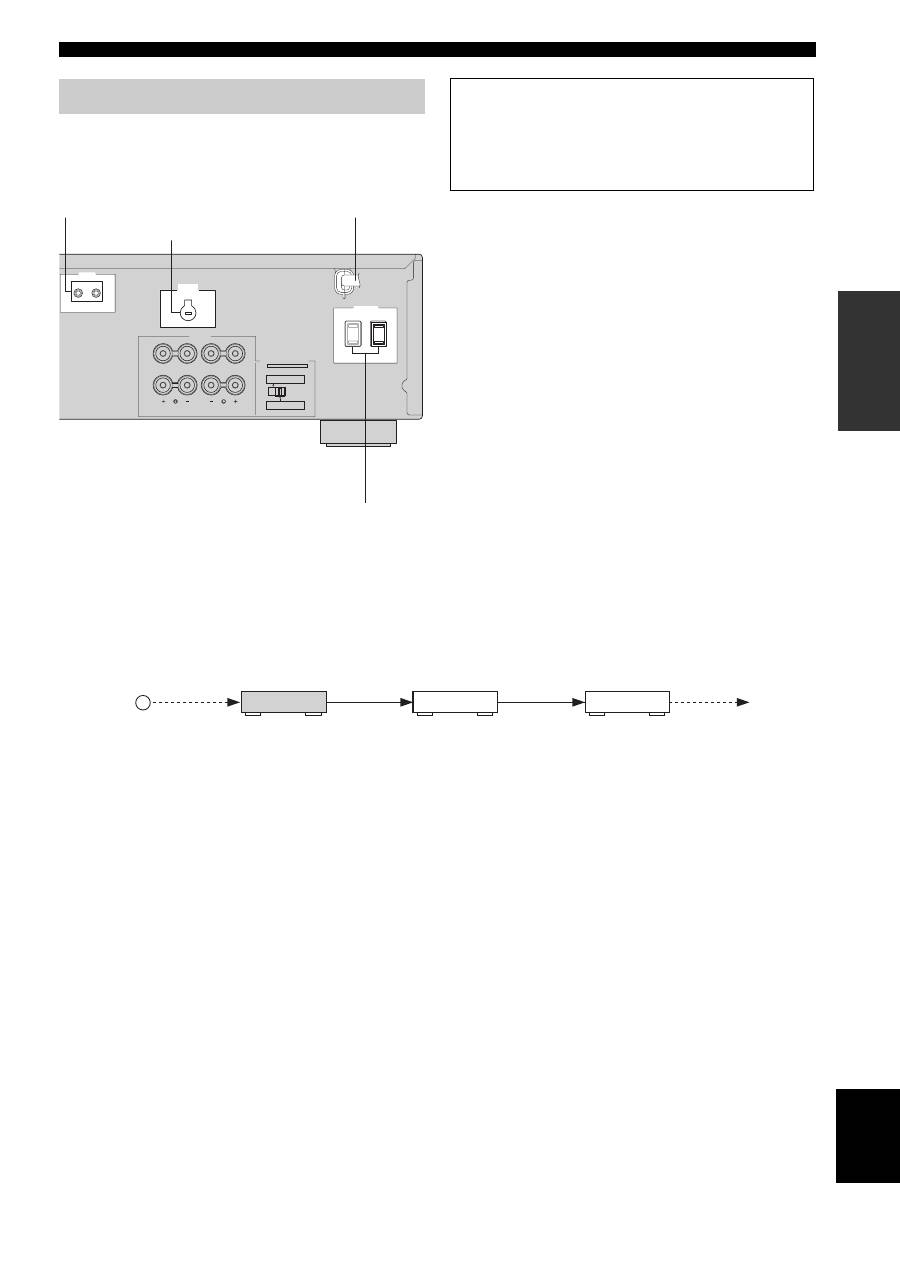
Plug the power supply cord into the AC wall outlet after
all other connections are complete.
■
REMOTE jacks
Some YAMAHA models are able to connect directly to the
REMOTE jack on the rear panel of this unit. If you own these
products, you may not need to use an infrared emitter. Up to six
YAMAHA components can be connected as shown below.
■
AC OUTLET(S) (SWITCHED)
Australia model ......................................................1 outlet
Other models ....................................................... 2 outlets
Use these outlets to connect the power supply cords from
your other components to this unit. The AC OUTLET(S)
supplies power to any connected components whenever
the power of this unit is turned on. For information on the
maximum power (total power consumption of
components), see “SPECIFICATIONS” on page 33.
■
VOLTAGE SELECTOR
(Asia and General models only)
VOLTAGE SELECTOR on the rear panel of this unit must
be set for your local main voltage BEFORE plugging the
power supply cord into the AC wall outlet.
Voltages are as follows:
Asia model ......................... AC 220/230–240 V, 50/60 Hz
General model ...... AC 110/120/220/230–240 V, 50/60 Hz
Connecting the power supply cord
REMOTE
IN
OUT
A OR B: 4
Ω
MIN. /SPEAKER
A + B: 8
Ω
MIN. /SPEAKER
A OR B: 8
Ω
MIN. /SPEAKER
A + B:16
Ω
MIN. /SPEAKER
IMPEDANCE SELECTOR
SET BEFORE POWER ON
SPEAKERS
CLASS 2 WIRING
VOLTAGE
SELECTOR
A
B
AC OUTLETS
SWITCHED
(General model)
AC power supply cord
VOLTAGE SELECTOR
AC OUTLET(S)
REMOTE jacks
Memory back-up
The memory back-up circuit prevents the stored data
from being lost. However, the stored data will be lost if
the power cord is disconnected from the AC wall outlet
for more than one week.
OUT
OUT
IN
REMOTE
IN
REMOTE
OUT
IN
REMOTE
REMOTE
This unit
YAMAHA
component
YAMAHA
component
Infrared signal
receiver
