
Yamaha RX-397: Press STANDBY/ON on the front panel to set ADVANCED SETUP Changing the ADVANCED SETUP menu parameters
Press STANDBY/ON on the front panel to set ADVANCED SETUP Changing the ADVANCED SETUP menu parameters: Yamaha RX-397
Table of contents
- CAUTION: READ THIS BEFORE OPERATING YOUR UNIT.
- CONTENTS
- FEATURES SUPPLIED ACCESSORIES
- CONTROLS AND FUNCTIONS Front panel
- CONTROLS AND FUNCTIONS
- Front panel display
- CONTROLS AND FUNCTIONS Rear panel
- Remote control
- CONTROLS AND FUNCTIONS Installing batteries in the remote control Using the remote control
- CONNECTIONS CAUTION
- CONNECTIONS Connecting speakers
- Connecting the AM and FM antennas
- CONNECTIONS Connecting the AM loop antenna
- CONNECTIONS Connecting the power supply cord
- CONNECTIONS Turning on and off this unit
- PLAYING AND RECORDING CAUTION Playing a source
- PLAYING AND RECORDING Adjusting the tonal quality
- Recording a source
- Using the sleep timer
- Muting the sound output
- FM/AM TUNING Automatic tuning
- Manual tuning Automatic preset tuning
- Customized automatic preset tuning
- Manual preset tuning
- Selecting preset stations Exchanging preset stations
- RADIO DATA SYSTEM (EUROPE MODEL ONLY) Receiving Radio Data System stations Changing the Radio Data System mode
- PTY SEEK function
- EON function
- Press STANDBY/ON on the front panel to set ADVANCED SETUP Changing the ADVANCED SETUP menu parameters
- Press STANDBY/ON to confirm your setting.
- General TROUBLESHOOTING Problem
- Tuner Problem
- Remote control Problem
- SPECIFICATIONS
ADVANCED SETUP
28
■
ADVANCED SETUP menu parameters
Change the initial settings (indicated in bold under each
parameter) to reflect the needs of your listening
environment.
Factory presets
PRESET
Use to reset all parameters to the factory presets.
Choices:
CANCEL
, RESET
• Select CANCEL if you do not want the parameters of
this unit to be initialized when you reset the factory
presets.
• Select RESET if you want all of the parameters of this
unit to be initialized when you reset the factory presets.
• This setting does not affect the parameters in the ADVANCED
SETUP menu.
• The resetting process starts next time you turn on the power of
this unit.
Tuner
TU
(Asia and General models only)
Use to switch the frequency step selection according to the
frequency spacing in your area.
Choices:
AM10/FM100
, AM9/FM50
• North, Central and South America:
AM10/FM100 (kHz)
• Other areas: AM9/FM50 (kHz)
The ADVANCED SETUP menu is displayed in the front
panel display.
y
• During the ADVANCED SETUP procedure, audio output is
muted.
• During the ADVANCED SETUP procedure, only
STANDBY/ON, A/B/C/D/E and the preset station number
buttons (1 and 2) on the front panel are operational.
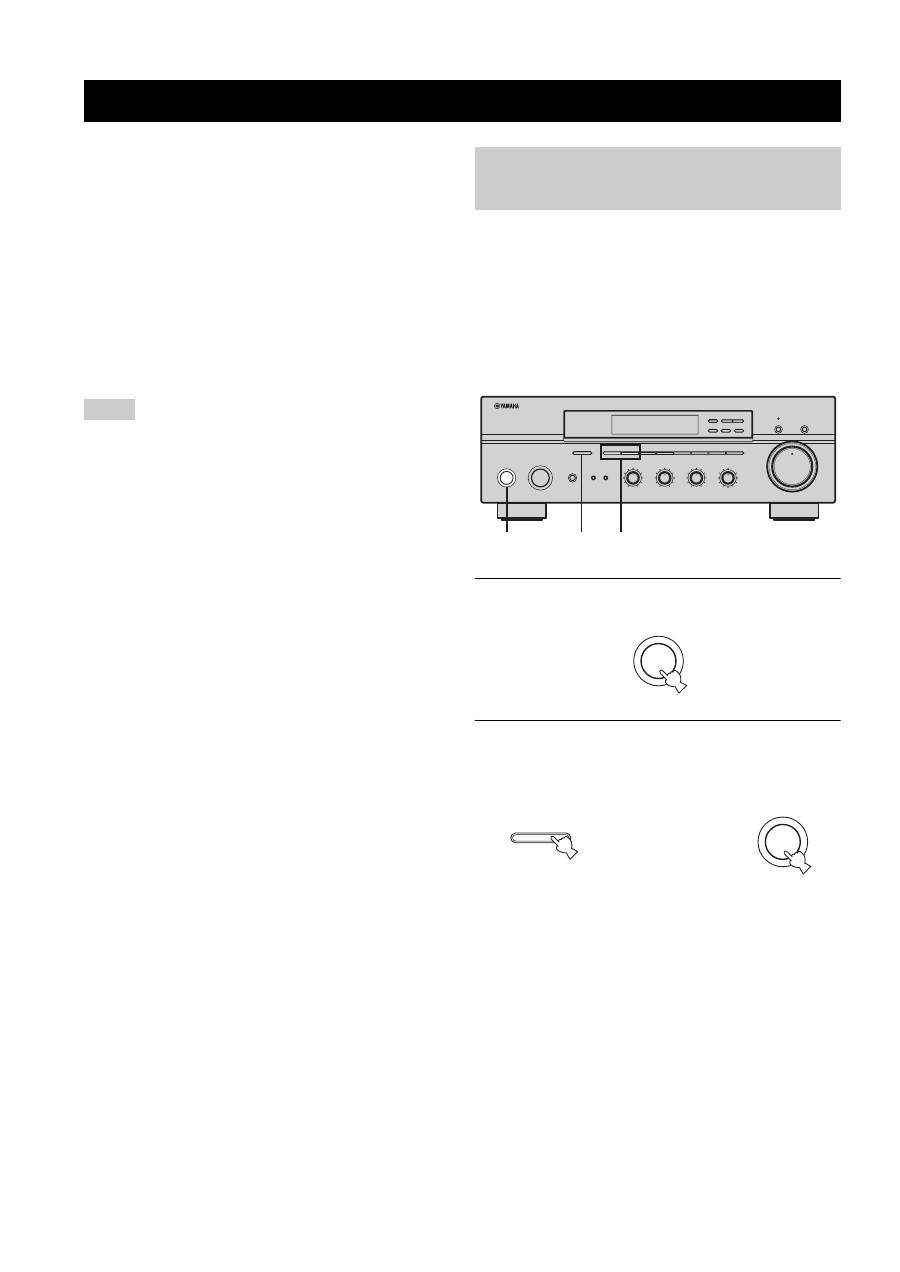
1
Press STANDBY/ON on the front panel to set
this unit to the standby mode.
2
Press and hold A/B/C/D/E on the front panel
and then press STANDBY/ON.
This unit is turned on, and the ADVANCED SETUP
menu appears in the front panel display.
ADVANCED SETUP
Notes
Changing the ADVANCED SETUP menu parameters
STANDBY
/ON
INPUT
PHONES
BASS
TAPE MONITOR
PURE DIRECT
5
5
1
0
1
4
4
2
2
3
3
+
–
VOLUME
l
TUNING
h
FM/AM
EDIT
A/B/C/D/E
1
2
3
4
5
6
7
8
MEMORY
MAN'L/AUTO FM
TUNING MODE
AUTO/MAN'L
TREBLE
5
5
1
0
1
4
4
2
2
3
3
+
–
BALANCE
5
5
1
0
1
4
4
2
2
3
3
R
L
LOUDNESS
5
7
1
FLAT
6
4
8
2
10
–30dB
3
9
SPEAKERS
B
A
2,4
1,2,5
3
0
12
12
2
8
4
∞
20
20
60
60
26
26
40
40
16
16
-dB
-dB
STANDBY
/ON
While holding down,
press
A/B/C/D/E
STANDBY
/ON
