
Nikon COOLSHOT: Internal display Measurement display mode
Internal display Measurement display mode: Nikon COOLSHOT
Table of contents
- Cautions before use SAFETY PRECAUTIONS SAFETY PRECAUTIONS CARE AND MAINTENANCE
- Key features Nomenclature/Composition
- Internal display Measurement display mode
- Target priority mode Distance display units Changing battery LED illumination
- Measurement
- Specifications
- Others Troubleshooting/Repair
- Troubleshooting/Repair
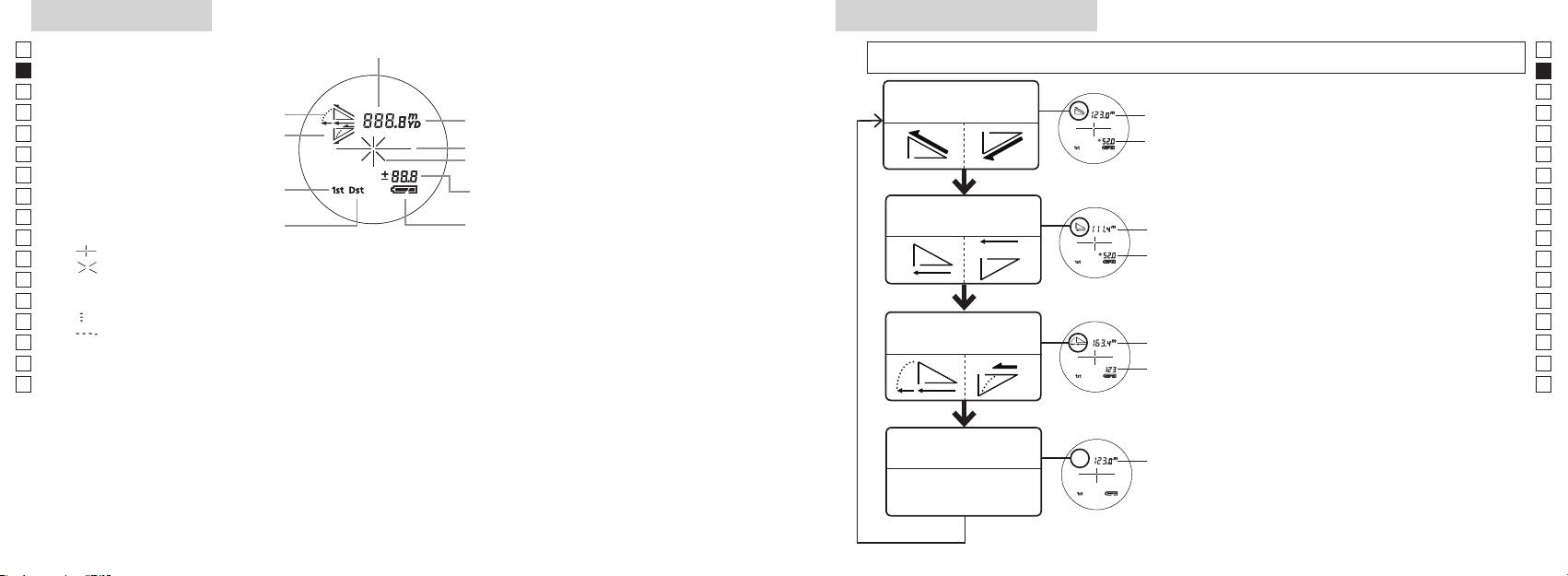
Internal display
Measurement display mode
Jp
Distance
Jp
than 2 seconds) to change the mode in the order shown below.
En
En
Es
Es
Actual Distance
1. Turn on the power (Confirm the internal display
Actual
Fr
Incline
and Height Mode
Fr
is on).
Distance
De
Decline
De
Target mark
Height
immediately (less than 0.5 second) depress the
It
It
Laser irradiation mark
Se
Se
Height
seconds.
Nl
Nl
3. Release your finger from the
Horizontal Distance
Ru
to switch the
Horizontal
Ru
Battery condition
and Height Mode
Measurement display mode.
Pt
Distance
Pt
『 』
4. Repeat steps 2 and 3 until your desired mode is
Pl
Height
Pl
『 』 - Appears while the laser is being irradiated for a measurement.
displayed.
Fi
Fi
Remains present during single measurement. Blinks during continuous measurements.
*
If the buttons are not pressed in the correct
No
Do not look into the objective lens while this mark is shown.
order, switching will not take place.
No
Dk
『
』 - Now measuring
Slope
*
Switching the mode after measurement
Dk
『
』 - "Failure to measure" or "Unable to measure"
Golf Mode
Adjusted
converts the results to the new mode.
Cz
Cz
Distance
*
After the mode is set, measurements are
Ro
Ro
Actual
performed in the new mode.
Hu
* Usually, an LCD employs equal or lower magnification. However the LCD of this product is magnified
Distance
Hu
by the high magnification of the eyepiece. Although this LCD was produced using the most advanced
technology, it is impossible to eliminate dust completely. As a result, dust may be seen. It will not,
however, affect measurement accuracy or safety during use.
Actual Distance
Actual
Mode
Distance
28 29
