
Cambridge Audio Azur 740C: 740C azur
740C azur: Cambridge Audio Azur 740C
740C azur
5
ENGLISH
Off
Power
On
Manufactured in an
ISO9002 approved facility
This device complies with
part 15 of FCC rules
Caution
Risk of electric shock.
Do not open.
Avis
Risque de choc electrique.
Ne pas ouvrir.
Achtung
Vorm öffnen des gerätes.
Netzstecker ziehen.
Digital Outputs
Power AC
IR Emitter
In
In
Out
Control Bus
S/P DIF
Co-axial
Toslink
Optical
Digital Inputs 1
S/P DIF
Co-axial
Toslink
Optical
Digital Inputs 2
S/P DIF
Co-axial
Toslink
Optical
Class 1 Laser Product
Luokan 1 Laserplaite
Klass 1 Laserapparat
Designed in London, England
Incorporating
Q5
™
from:
ANAGRAM
TECHNOLOGIES
Line Output
Line Output
Right
Right
Left
Left
azur 740C Upsampling
Compact Disc Player
www.cambridge-audio.com
Power Rating:
230V AC ~ 50Hz
Max Power Consumption:
25W
AЯ
46
1
2
3
4
6
5
8
7
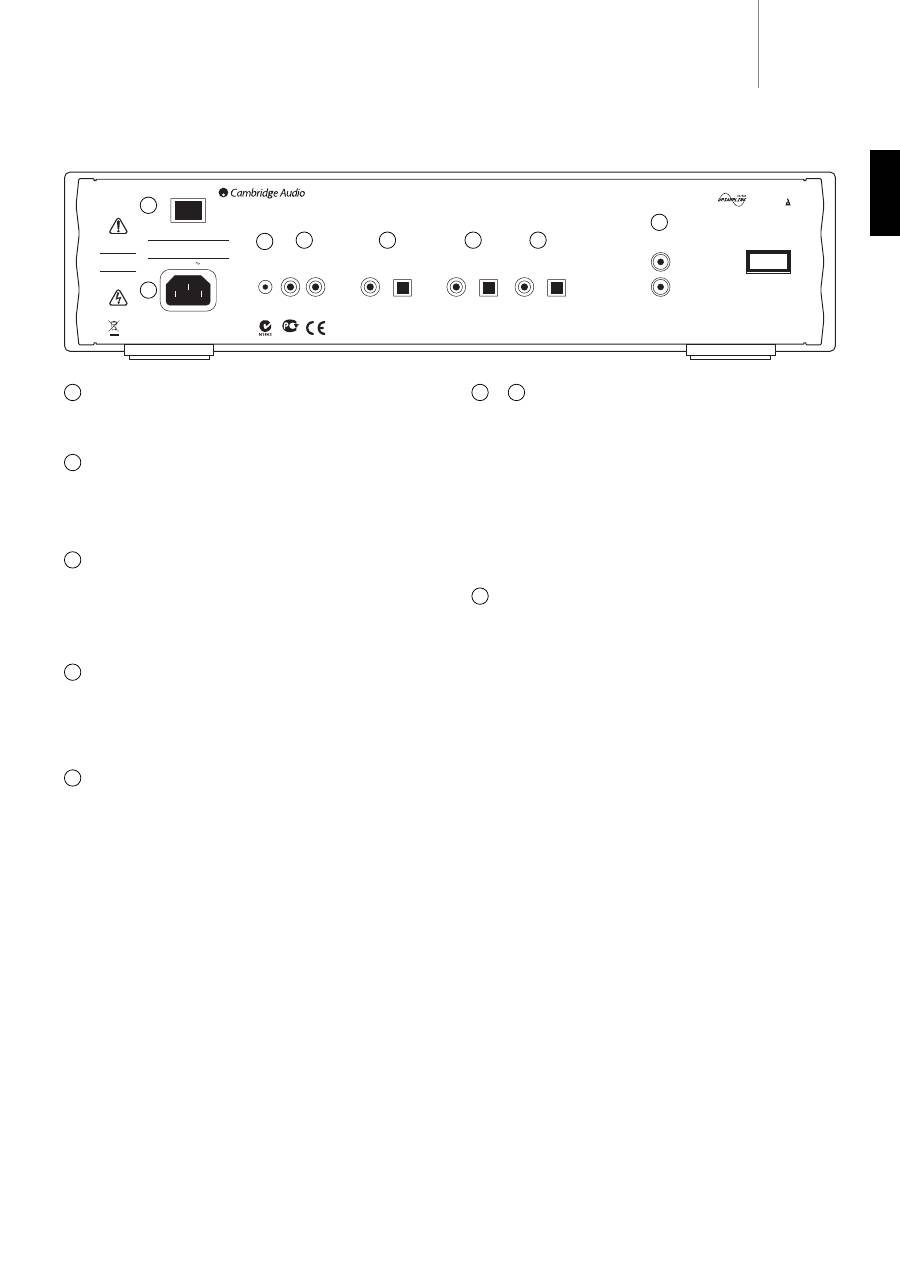
Rear panel connections
Power On/Off
Switches the unit on and off.
AC power socket
Once you have completed all connections to the amplifier, plug the AC
power cable into an appropriate mains socket then switch on. Your
compact disc player is now ready for use.
IR (Infra Red) Emitter In
Allows modulated IR commands from multi-room systems or IR repeater
systems to be received by the amplifier. Commands received here are
not looped out of the Control Bus. Refer to the ‘Custom Installation’
section for more information.
Control Bus
In - Allows un-modulated commands from multi-rooms systems or other
components to be received by the unit.
Out - Loop out for control bus commands to another unit.
Digital outputs
The digital outputs allow a separate DAC or digital recording device to be
connected. The sophisticated DSP software in the 740C even allows
these outputs to be set to output raw (pass through) or upsampled data
independently from the main audio outputs. Refer to the ‘CD player
setup’ section for more information.
S/P DIF CO-aaxial Digital - To obtain best results, use a high quality 75
ohm digital RCA interconnect cable (not one designed for normal audio
use).
Toslink Optical Digital - Use a high quality TOSLINK fibre optic
interconnect cable designed specifically for audio use.
Only one of the two output types should be used at a time.
1
& Digital Inputs 1 / 2
The digital inputs allow the digital outputs of other source components
to be connected to the 740C. The 740C can then act as a very high
quality upsampling DAC, improving the sound quality of the connected
sources. Two digital inputs allow two external sources to be connected:
S/P DIF CO-aaxial Digital - Use a high quality 75 ohm digital RCA
interconnect cable (not one designed for normal audio use).
Toslink Optical Digital - Use a high quality TOSLINK fibre optic
interconnect cable designed specifically for audio use.
Only one of the two input types for each input should be used at a time.
Line Output
Use good quality RCA/Phono interconnect cables from these sockets to
any line level input on your amplifier.
2
3
5
4
6
7
8
6
Standby / On
Stop
Play
Pause
Open
Close
Select
Menu
Skip
Scan
azur
740C
Upsampling Compact Disc Player
1
2
3
4
5
9
7
6
10
8
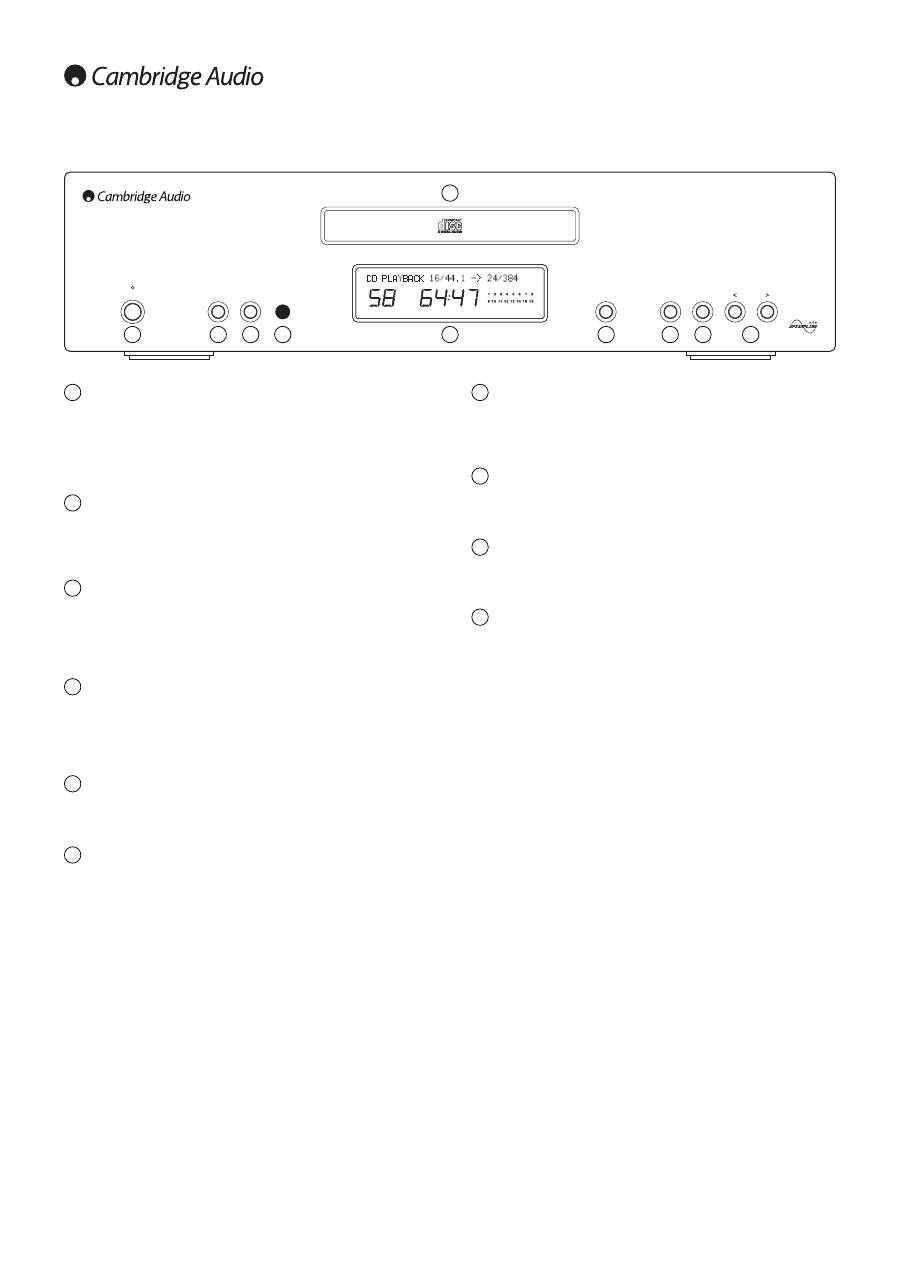
Front panel controls
Standby/On
Switches the unit between Standby mode (indicated by dim power LED)
and On (indicated by bright power LED). Standby is a low power mode
where the power consumption is less than 10 Watts. The unit should be
left in Standby mode when not in use.
Menu
Press to scroll through the 740C menu screens. Please refer to the ‘CD
player setup’ section of this manual for more information.
Select
Press to select between CD Playback or Digital Inputs 1 and 2. Also used
to toggle through the options on selected menu screens. Please refer to
the ‘CD player setup’ section of this manual for more information.
Infrared sensor
Receives IR commands from the supplied Azur remote control. A clear
unobstructed line of sight between the remote control and the sensor is
required.
Disc tray
Compact Disc tray. Use the
Open/Close
button to activate.
Display
LCD used to display upsampling rate, CD track number,
elapsed/remaining time and other CD functions. Please refer to the ‘CD
player setup’ section of this manual for more information.
1
2
3
4
5
6
Open/Close
Allows you to open and close the disc tray thus making it possible to load
a disc. Pressing
Play
will also close the tray and start the CD.
Play/Pause
Plays the disc and pauses play.
Stop
Stops the CD playing.
Skip/Scan
Allows for skipping between tracks and also searching within tracks.
Press once to skip a track, press and hold to search within a track.
7
8
9
10
Table of contents
- 740C azur
- 740C azur
- 740C azur
- 740C azur
- 740C azur
- 740C azur
- 740C azur
- 740C azur
- 740C azur
- 740C azur
- 740C azur
- 740C azur
- 740C azur
- 740C azur
- 740C azur
- 740C azur
- 740C azur
- 740C azur
- 740C azur
- 740C azur
- 740C azur
- 740C azur
- 740C azur
- 740C azur
- 740C azur
- 740C azur
- 740C azur
- 740C azur
- 740C azur
- 740C azur
- 740C azur
- 740C azur
- 740C azur
- 740C azur
- 740C azur
- 740C azur
