
Jabra HALO BT650s: – or + on the touch control (2). Tap the touch
– or + on the touch control (2). Tap the touch : Jabra HALO BT650s

Skip one track forward
- Double Tap on the + end of the touch control (2) - continue
tapping to skip several tracks forward
Skip one track back
- Double Tap on the – end of the touch control (2) - continue
tapping to skip several tracks backward
Answer a call
english
- Tap the Answer/End button (1) to answer a call
End a call
- Tap the Answer/End button (1) to end an active call
Reject a call**
- Press and hold the Answer/End button when the phone rings
to reject an incoming call. Depending on your phone settings,
the person who called you will either be forwarded to voice
mail or hear the busy signal.
Make a call**
- When your Jabra HALO is connected to your phone, all calls
made from your phone will automatically be transferred to
your headset. (subject to phone settings)
Redial last number**
- Double tap the Answer/End button
Adjust sound and volume*
- Touch and slide your nger along the touch control (2) to turn
volume up or down
Mute microphone when on a phone call
- Double Tap on
– or + on the touch control (2). Tap the touch
control to un-mute
Using your Jabra HALO with the 3.5mm music cable (not
Bluetooth)
- Insert the 3.5mm music cable into the micro-USB socket and
connect the 3.5mm jack to the device. Please note that the
Bluetooth features (including receiving calls and touch
control) are disabled when using the Jabra HALO with the
cable.
- Using your Jabra HALO with the 3.5mm music cable is not
possible if the battery is completely discharged, so make sure
that it is at least partly charged
JABRA HALO
7
* Refer to phone’s user manual
** Device dependent
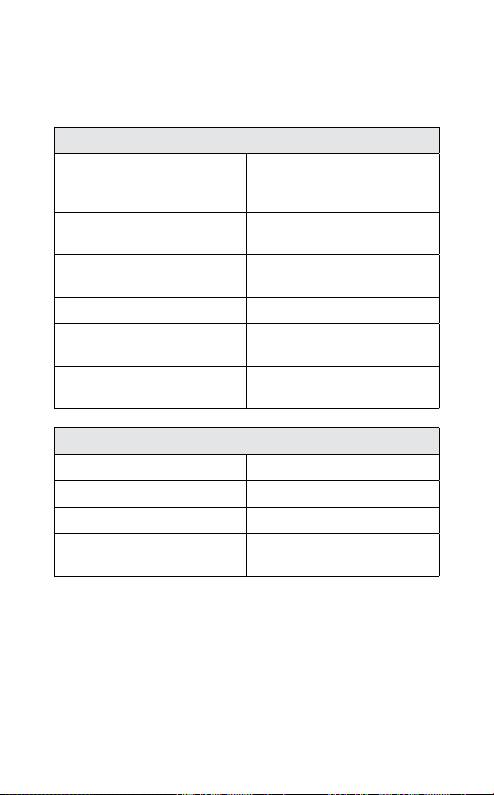
What the dIsPLay means
On the right inside of Jabra HALO two display icons indicate
dierent states of the product:
Bluetooth Icon (only Blue)
Solid In pairing mode – see “Pair
english
Jabra HALO to a phone or
other device”
Slow Single Flash Connected to phone and in
(A)
standby mode
Single Flash Connected to phone and
(A)
active on call
Quick Double Flash Incoming call
Three slow ashes Not connected to phone and
(A)
standby mode
Solid (+ Battery Indicator
In alternative pairing mode –
Solid Orange)
see “Troubleshooting & FAQ”
Battery Indicator Icon:
Solid Red Charging
Solid Green Fully charged
Single Red Flash Low Battery
Solid Orange (+ Bluetooth
In Special Pairing mode – see
Icon Solid Blue)
“Troubleshooting & FAQ”
(A)
Jabra HALO Display icons turn o after 30 seconds of non-
activity. Headset is still active, and light will ash again after a tap
on the Answer/end button or any call activity.
Communication by sound alerts
Your Jabra HALO employs sound alerts to communicate die-rent
actions or information. One important alert is “Low Battery”,
which is two short beeps, and indicates 5 minutes of battery time
remains.
JABRA HALO
8

usInG your Jabra haLo WIth tWo mobILe
devICes
The Jabra HALO is capable of having two mobile phones (or
Bluetooth devices) connected to the headset at the same time.
This will give you the freedom of having only one headset to
operate both of your mobile phones. Please note that Last
Number Redial will dial the number from the last outgoing call,
english
independent of the mobile phone.
If the headset is connected to two phones please note that Play /
Pause and Next / Previous track will be sent to the phone that was
the last connected phone (Last connected AVRC prole).
troubLeshootInG & faQ
I hear crackling noises
- Bluetooth is a radio technology which means it is sensitive to
objects between the headset and the device it is connected
to. You should be able to have up to 10 meters (33 feet) of
distance between the headset and the connected device when
there are no major objects in the way (walls, etc.).
I cannot hear the phone call in the headset
- Increase the volume on the Jabra HALO.
- Make sure your phone is connected to the headset by i.e.
tapping the Answer/End button, or viewing the Bluetooth icon
in the Display.
I have pairing problems
- You may have deleted the pairing connection in your mobile
phone – follow the pairing instructions in ‘Pair Your Headset to
a Phone or other Device ‘.
I cannot use Reject call, Call on hold or Redial
- These features are dependent on your phone supporting them;
please consult your phone’s manual for details.
I cannot hear music in the headset
- Ensure that the headset is connected to your Bluetooth
enabled device.
- You may have been out-of-range (10 meters) to your Bluetooth
enabled device or the headset might have experienced an ESD
JABRA HALO
9

(Electrostatic discharge) incidence. Press the Multi Function
Button to re-establish the Bluetooth audio link.
- Increase the volume on your device.
- Make sure that the Jabra HALO is charged.
The music I hear sounds very poor
Make sure the other device supports Bluetooth 1.1 or higher
including the Advanced Audio Distribution Prole (A2DP) for
english
music streaming.
If the above procedure did not help then it is possible that your
phone is using the stereo audio connection in a dierent way. You
can enable this mode on Jabra HALO by performing pairing in the
following way:
- Remove the Bluetooth connection to Jabra HALO on your
phone
- Make sure the headset is on (un-folded)
- Press and hold the answer / end button for more than 5 seconds
until the both Display icons are solid Blue and solid Orange
- Go through the regular steps in pairing the headset to a
Bluetooth device.
Be aware that standby time of the Jabra HALO can be lower when
using this pairing.
need more heLP?
1. Web:
http://www.jabra.com/support
(for the latest support info and online User Manuals)
2. E-mail:
support.uk@jabra.com
Information: info@jabra.com
3. Phone:
Australia
1-800-738-521
China
800-858-0789
Hong Kong
800-968-265
Indonesia
001-803-852-7664
Japan
0034-800-400-594
Malaysia
1800-812-160
New Zealand
0800-447-982
JABRA HALO
10

Singapore
800-101-2329
Taiwan
0080-186-3013
India
000-800-852-1185
Philippines
1800 765 8068
takInG Care of your headset
english
-
Always store the Jabra HALO with the power o and safely protected
- Avoid storage at extreme temperatures (above 45°C/113°F –
including direct sunlight – or below -10°C/14°F). This can
shorten battery life and may aect operation.
- High temperatures may also degrade performance. Do not
expose the Jabra HALO to rain or other liquids.
WarnInG!
EXCESSIVE VOLUME LEVELS CAN CAUSE PERMANENT
HEARING DAMAGE. USE AS LOW A VOLUME AS POSSIBLE.
Headsets are capable of delivering sounds at loud volumes and
high pitched tones which under certain circumstances can result
in permanent hearing loss damage. Avoid prolonged use of the
headset at excessive sound pressure levels. Please read the safety
guidelines below prior to using this headset.
You can reduce the risk of hearing damage by following these
safety guidelines
1. Prior to using this product follow these steps
- Before putting on the headset, turn the volume control to its
lowest level,
- Put the headset on, and then
- Slowly adjust the volume control to a comfortable level.
2. During the use of this product
- Keep the volume at the lowest level possible and avoid using
the headset in noisy environments where you may be inclined
to turn up the volume;
- If increased volume is necessary, adjust the volume control slowly;
- If you experience discomfort or ringing in your ears, immediately
discontinue using the headset and consult a physician.
With continued use at high volume, your ears may become
JABRA HALO
11

accustomed to the sound level, which may result in permanent
damage to your hearing without any noticeable discomfort.
ACA TS028 – Ignition of ammable atmospheres
Do not use the headset in environments where there is a danger
of ignition of ammable gases.
safety InformatIon!
- Use of a headset will impair your ability to hear other sounds.
english
Use caution while using your headset when you are engaging
in any activity that requires your full attention.
- If you have a pace maker or other electrical medical devices,
you should consult your physician before using this device.
- This package contains small parts that may be hazardous to
children and should be kept out of reach from children. The
bags themselves or the many small parts they contain may
cause choking if ingested.
- Never try to dismantle the product yourself. None of the
components can be replaced or repaired by users. Only authorized
dealers or service centers may open the product. If any parts
of your product require replacement for any reason, including
normal wear and tear or breakage, contact your dealer.
- Avoid exposing your product to rain, moisture or other liquids
to protect against damage to the product or injury to you.
- Observe all signs and instructions that require an electrical
device or RF radio product to be switched o in designated
areas such as hospitals or aircrafts.
Remember: Always drive safely, avoid distractions and follow
local laws!
Using the headset while operating a motor vehicle, motorcycle,
watercraft or bicycle may be dangerous, and is illegal in some
jurisdictions, just as use of this headset with both ears covered
while driving is not permitted in certain jurisdictions. Check your
local laws. Use caution while using your headset when you are
engaging in any activity that requires your full attention. Also,
do not take notes or read documents.
JABRA HALO
12

buILt-In battery Care:
- Your device is powered by a rechargeable battery.
- The full performance of a new battery is achieved only after
two or tree complete charge and discharge cycles.
- The battery can be charged and discharged hundreds of times,
but will eventually wear out. Recharge your battery only with
the provided approved chargers designated for this device.
english
- Unplug the charger from the electrical plug and the device
when not in use. Do not leave a fully charged battery connected
to a charger, since overcharging may shorten its lifetime.
- If left unused, a fully charged battery will lose its charge over time.
- Leaving the device in hot or cold places, such as in a closed car
in the summer and winter conditions, will reduce the capacity
and lifetime of the battery.
- Always try to keep the battery between 15°C and 25°C (59°F
and 77°F). A device with a hot or cold battery may not work
temporary, even when the battery is fully charged. Battery
performance is particularly limited in temperatures well below
freezing.
- Do not dispose of batteries in a re as they may explode.
- Batteries may also explode if damaged.
Battery warning!
- ”Caution” – The battery used in this device may present a risk
of re or chemical burn if mistreated.
- Do not attempt to open the product or replace the battery.
It is built-in and not changeable.
- Use of other batteries may present a risk of re or explosion
and the warranty will be terminated.
- Recharge your battery only with the provided approved
chargers designated for this device.
- Dispose of batteries according to local regulations. Please
recycle when possible. Do not dispose as household waste.
- Always store product out of the reach of children.
JABRA HALO
13

CharGer Care:
- Do not attempt to charge your headset with anything other
than the AC adaptor provided. The use of any other types
may damage or destroy the headset and may invalidate any
approval or warranty, and may be dangerous. For availability
of approved enhancements, please check with your dealer.
Important: The headset cannot be used while charging
english
Charger warning!
- When you disconnect the power cord or any enhancement,
grasp and pull the plug, not the cord, never use a charger that
is damaged.
- Do not attempt to disassemble the charger as it may expose
you to dangerous electric shock. Incorrect reassembly can cause
electric shock or re when the product is subsequently used.
- Avoid charging your headset in extremely high or low temperatures
and do not use the charger outdoors or in damp areas.
Warranty
Limited One (1) -year Warranty
GN Netcom A/S (“GN”) warrants this Product to be free from
defects in materials and workmanship (subject to the terms set
forth below) for a period of one (1) year from the date of purchase
(“Warranty Period”). During the Warranty Period, GN will repair
or replace (at GN’s discretion) this Product or any defective parts
(“Warranty Service”). If repair or replacement is not commercially
practicable or cannot be timely made, GN may choose to refund
to you the purchase price paid for the aected Product. Repair or
replacement under the terms of this Warranty does not give right
to any extension or a new beginning of the period of Warranty.
Claims under the Warranty
To obtain Warranty Service, please contact the GN dealer from
which you purchased this product or visit www.jabra.com for
further information about customer support. You will need to
return this Product to the dealer or ship it to the dealer or to GN (if
so indicated on www.jabra.com) in either its original packaging or
packaging aording an equal degree of protection. You will bear
the cost of shipping the product to GN. If the Product is covered
by the warranty, GN will bear the cost of shipping product back
to you after the completion of service under this warranty. Return
JABRA HALO
14

shipping will be charged to you for products not covered by the
warranty or requiring no warranty repair.
The Following information must be presented to obtain Warranty
Service: (a) the product, and (b) proof of purchase, which clearly
indicates the name and address of the seller, the date of purchase
and the product type, which is evidence that this product is
within the Warranty Period. Please further include (c) your return
address. (d) daytime telephone number, and (e) reason for return.
english
As part of GN Netcom’s eorts to reduce environmental waste
you understand that the product may consist of reconditioned
equipment that contains used components, some of which have
been reworked. The used components all live up to GN’s high
quality standards and comply with the GN product performance
and reliability specications. You understand that replaced parts
or components will become the property of GN.
Limitation of Warranty
This Warranty is only valid for the original purchaser and will
automatically terminate prior to expiration, if this Product is sold
or otherwise transferred to another party. The Warranty provided
by GN in this statement applies only to Products purchased for
use, and not for resale. It does not apply to open box purchases,
which are sold “as is” and without any warranty. Specically
exempt from Warranty are limited-life consumable components
subject to normal wear and tear, such as microphone windscreens,
ear cushions, modular plugs, ear tips, decorative nishes, batteries
and other accessories. This Warranty is invalid if the factory-applied
serial number, date code label, or product label has been altered
or removed from this Product. This Warranty does not cover
defects or damages that result from: (a) improper storage, misuse
or abuse, accident or neglect, such as physical damage (cracks,
scratches, etc.) to the surface of the Product resulting from misuse;
(b) contact with water, extreme humidity, sand, dirt or the like or
extreme heat; (c) use of the Product or accessories for commercial
purposes or subjecting the Product or accessories to abnormal
usage or conditions; or (d) other acts which are not the fault of GN.
This Warranty does not cover damage due to improper operation,
maintenance or installation, or attempted repair by anyone other
than GN or a GN dealer which is authorized to do GN warranty
work. Any unauthorized repairs will void this Warranty. This
Warranty does not cover defects or damages that result from the
use of non-GN branded or certied products, accessories, or other
peripheral equipment.
JABRA HALO
15

REPAIRS OR REPLACEMENTS AS PROVIDED UNDER THIS WARRANTY
ARE THE EXCLUSIVE REMEDY OF THE CONSUMER. GNSHALL NOT
BE LIABLE FOR ANY INCIDENTAL OR CONSEQUENTIAL DAMAGES
FOR BREACH OF ANY EXPRESS OR IMPLIED WARRANTY ON THIS
PRODUCT. EXCEPT TO THE EXTENT PROHIBITED BY LAW, THIS
WARRANTY IS EXCLUSIVE AND IN LIEU OF ALL OTHER EXPRESS
AND IMPLIED WARRANTIES WHAT SO EVER, INCLUDING BUT NOT
LIMITED TO THE WARRANTY OF MERCHANTABILITY AND FITNESS
english
FOR A PRACTICAL PURPOSE.
NOTE! This warranty gives you specic legal rights. You may
have other rights which vary from location to location. Some
jurisdictions do not allow the exclusion or limitation of incidental
or consequential damages or implied warranties, so the above
exclusions may not apply to you. This warranty does not aect your
legal (statutory) rights under your applicable national or local laws.
CertIfICatIon
CE
This product is CE marked according to the provisions of the
R & TTE Directive (99/5/EC). Hereby, GN Netcom A/S, declares that
this product is in compliance with the essential requirements
and other relevant provisions of Directive 1999/5/EC. For further
information please consult http://www.jabra.com.
Bluetooth
The Bluetooth® word mark and logos are owned by the Bluetooth
SIG, Inc. and any use of such marks by GN Netcom A/S is under
license. Other trademarks and trade names are those of their
respective owners.
Dispose of the product according to local standards and regulations.
www.jabra.com/weee
JABRA HALO
16

GLossary
1. Bluetooth is a radio technology that connects devices, such
as mobile phones and headsets, without wires or cords over
a short distance (approx. 10 meters/33 feet). Bluetooth is safe
to use. It is secure too, so once a connection has been made
no-one can listen in and there is no interference from other
Bluetooth devices either. Get more information at
english
www.bluetooth.com.
2. Bluetooth proles are the dierent ways that Bluetooth
devices communicate with other devices. Bluetooth phones
support the headset prole, the hands-free prole or both. In
order to support a certain prole, a phone manufacturer must
implement certain mandatory features within the phone’s
software.
3. Pairing creates a unique and encrypted link between two
Bluetooth devices and lets them communicate with each other.
Bluetooth devices will not work if the devices have not been
paired.
4. Passkey or PIN is a code that you enter on your Bluetooth
enabled device (e.g. a mobile phone) to pair it with your Jabra
HALO. This makes your device and the Jabra HALO recognize
each other and automatically work together.
5. Standby mode is when the Jabra HALO is passively waiting for
a call. When you ‘end’ a call on your mobile phone, the headset
goes into standby mode.
Dispose of the product according
to local standards and regulations.
www.jabra.com/weee
JABRA HALO
17

indholdSfortegnelSe
TAK ............................................................2
OM JABRA HALO...............................................2
HEADSETTETS FUNKTIONER....................................3
KOM GODT I GANG.............................................4
EngElsk
OPLADNING AF DIT JABRA HALO ..............................4
TÆND/SLUK FOR DIT JABRA HALO..............................4
SÅDAN PARRES DIT JABRA HALO MED EN TELEFON
ELLER EN ANDEN ENHED .......................................5
BÆREMÅDE ....................................................5
SÅDAN GØR DU ................................................6
HVAD BETYDER DISPLAYET .....................................8
SÅDAN BRUGES DIT JABRA HALO MED TO MOBILENHEDER .....9
FEJLFINDING OG OFTE STILLEDE SPØRGSMÅL...................9
BRUG FOR MERE HJÆLP? ......................................10
PLEJE AF HEADSETTET.........................................10
ADVARSEL! ....................................................11
SIKKERHEDSINFORMATION!....................................11
PLEJE AF INDBYGGET BATTERI .................................12
PLEJE AF OPLADER ............................................13
GARANTI ......................................................14
CERTIFICERING OG SIKKERHEDSGODKENDELSER ...............16
ORDLISTE .....................................................16
JABRA HALO
1
tAK
Tak, fordi du købte Jabra HALO Bluetooth® headsettet. Vi håber, du
får fornøjelse af det! Brugervejledningen vil hjælpe dig med at
komme i gang og få mest muligt ud af dit headset.
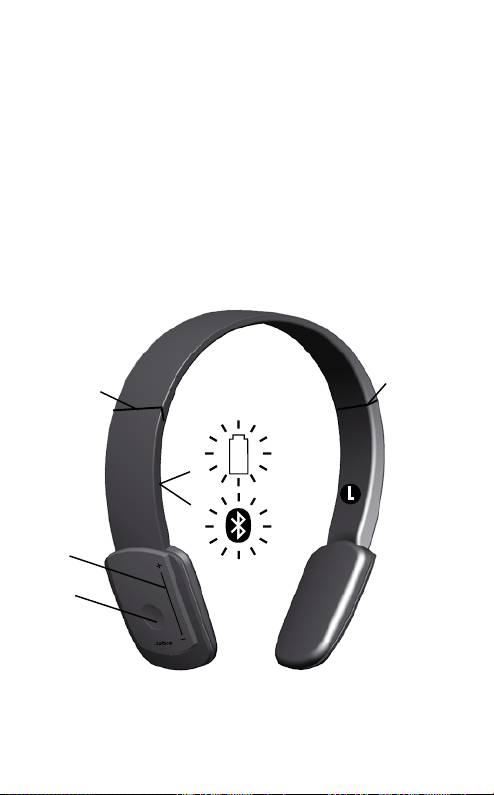
om JAbrA hAlo
EngElsk
1 Knappen besvar/afslut eller afspil/pause
2 Berøringsfølsom sensor til lydstyrkeregulering eller skift af
nummer
3 Hængsler til sammenfoldning af headset
4 Batteriindikator
5 Indikator for Bluetooth-forbindelse
2
JABRA HALO
2
L
3
3
4
5
1

heAdSettetS funKtioner
Med Jabra HALO kan du lytte til musik i stereo via din Bluetooth-
aktiverede mobiltelefon eller musikafspiller samtidig med, at du
altid vil kunne høre, når telefonen ringer.
- Afspil din musik trådløst
- Besvar eller afslut opkald
- Afvis indgående opkald
EngElsk
- Genkald det sidst opkaldte nummer
- MultiUse™ – hav forbindelse til to Bluetooth-enheder samtidigt
(f. eks. din pc og din mobiltelefon)
- Brug 3,5mm-musikkablet til at lytte til musik, f. eks. på din mp3-
afspiller eller din computer
Specikationer
Musik:
- Op til 8 timers musik og 13 dages standby-tid
- Skift musiknummer (næste eller forrige nummer) med
berøringsfølsom knap (AVRCP)
- A2DP (Advanced Audio Distribution Prole) til streaming af musik
Opkald:
- Taletid i op til 8 timer
- Dobbelt mikrofon for Noise Blackout™
- Digital lydforbedring via DSP-teknologi
- Støjreduktion ved transmission og modtagelse af lyd
- Støjafhængig justering af lydstyrke*
- Automatisk justering af lydstyrke for modtaget lyd
- Akustisk beskyttelse
- Kvalificeret til Bluetooth-specifikation version 2.0 + EDR
(enhanced data rate), og understøtter headsetprofil og
håndfri prol til telefonsamtaler og A2DP (Advanced Audio
Distribution Prole) til streaming af musik
- e-SCO for bedre lydkvalitet
- 128-bit kryptering
JABRA HALO
3
* Se brugervejledningen til telefonen

Enheden:
- Genopladeligt batteri med opladning via et mikro-USB-stik fra
en stikkontakt, fra en computer via et USB-kabel eller fra en
biloplader (medfølger ikke)
- Lysdioder i ere farver indikerer Bluetooth-status og batteriniveau
- Udfoldet størrelse: H 165 mm - 190 mm x B 136 mm x D 45 mm
- Sammenfoldet størrelse: H 78 mm x B 132 mm x D 45 mm
EngElsk
- Vægt: 80 gram
- Rækkevidde på op til 10 meter
Bemærk, at dit Jabra HALO kan modstå en kort regnbyge, men det er
ikke vandtæt og må ikke nedsænkes i væske. Hvis enheden bliver våd,
skal vandet aftørres for at beskytte den mod eventuel beskadigelse.
Kom godt i gAng
Følg disse tre trin, før du tager headsettet i brug:
1. Oplad headsettet (ca. 2 timer)
2. Aktiver Bluetooth på din mobiltelefon (se vejledningen til
mobiltelefonen)
3. Par headsettet med mobiltelefonen
oplAdning Af dit JAbrA hAlo
Sørg for, at dit Jabra HALO er helt opladt, inden du bruger det
første gang. Under opladningen skifter batteriindikatoren fra rød
til grøn, når enheden er helt opladt. Opladningstiden er ca. 2 timer.
Du kan bruge Jabra HALO, mens det genoplades.
Bemærk: Batteriets levetid reduceres markant, hvis enheden ikke
oplades igennem længere tid. Jabra anbefaler derfor, at du genoplader
enheden mindst en gang om måneden.
tænd/SluK for dit JAbrA hAlo
Headsettet tændes ved at udfolde det.
Headsettet slukkes ved at sammenfolde det.
- Sådan sammenfoldes det: Træk forsigtigt udad i headsettets
hængsler (3) og fold. Headsettet er nu bekvemt sammenfoldet,
så det ikke fylder så meget.
JABRA HALO
4

- Sådan udfoldes det: Fold forsigtigt headsettet ud og lås
hængslerne på plads.
Headsettet slukkes automatisk efter 10 minutter, hvis det ikke har
forbindelse til en enhed.
SådAn pArreS dit JAbrA hAlo med en telefon
eller en Anden enhed
EngElsk
Headset opretter forbindelse med telefoner eller andre
Bluetooth-enheder vha. en procedure kaldet‘parring’. Parring kan
udføres på nogle få sekunder ved at følge et par nemme trin.
1. Sæt headsettet i parringstilstand
1.a. Første gang du parrer
- Sammenfold og udfold headsettet, hvorefter Jabra HALO
automatisk skifter til parringstilstand (indikatoren (5) lyser fast
blåt) og begynder at søge efter en enhed.
1.b. Parring på et senere tidspunkt
- Tryk og hold besvar/afslut-knappen (1) nede, indtil indikatoren
(5) lyser fast blåt (ca. 4 sekunder).
2. Kongurer din Bluetooth-telefon eller -enhed til at søge efter
Jabra HALO
- Følg brugervejledningen til din telefon. Du skal først sikre dig,
at Bluetooth er aktiveret på din mobiltelefon. Kongurer derefter
telefonen til at søge efter headsettet. Du skal normalt bruge
en opsætnings-, tilslutnings- eller Bluetooth-menu på telefonen
og vælge en indstilling til at ‘søge efter’ eller ‘tilføje’ en Bluetooth-
enhed.*
3. Telefonen nder Jabra HALO
- Din telefon vil nde headsettet under navnet ”Jabra HALO”.
- Derefter vil din telefon spørge dig, om du vil parre med
headsettet.
- Accepter ved at trykke ’Ja’ eller 'OK' på telefonen, og bekræft
med adgangskoden eller PIN-koden = 0000 (fire nuller).
Telefonen bekræfter, når parringen er gennemført.
bæremåde
Bemærk venstre/højre-indikatorerne for bæremåde, der ndes på
hovedremmens inderside. Alternativt kan Jabra HALO altid bæres
med besvar/afslut-knappen i højre side.
JABRA HALO
5
* Se brugervejledningen til telefonen
Du kan tilpasse størrelsen af Jabra HALO ved at forlænge
hovedremmen ved højtalerne.
SådAn gør du
Jabra HALO er nem at betjene. Besvar/afslut-knappen udfører
forskellige funktioner, afhængigt af, hvor lang tid du holder den
nedtrykket:
EngElsk
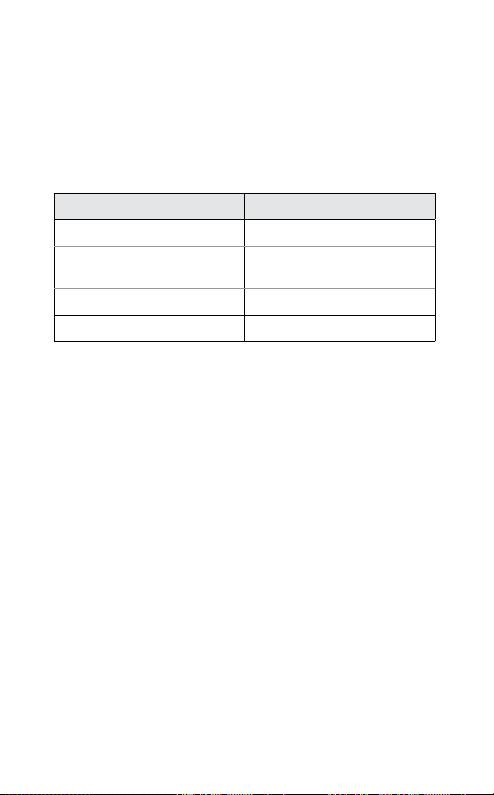
Vejledning Varighed af tryk
Tryk Tryk kort
Dobbelttryk Tryk hurtigt to gange indenfor
0,5 sekund
Tryk Cirka: 1 sekund
Tryk og hold nede Cirka: 4 sekunder
Afspil musik (nogle telefoner kræver muligvis, at du først starter
en medieafspiller)*
- Tryk på besvar/afslut-knappen (1)
Sæt musik på pause
- Tryk på besvar/afslut-knappen – tryk igen for at fortsætte afspilningen
Stop musikken
- Tryk på besvar-/afslut-knappen
Besvar et opkald, når du afspiller musik
- Når du lytter til musik og modtager et opkald, sættes musikken
på pause, og du hører ringetonen.
- Tryk på besvar/afslut-knappen, hvorefter musikken sættes på
pause, og der oprettes forbindelse til opkaldet
Afslut et opkald
- Tryk på besvar/afslut-knappen for at afslutte et aktivt opkald -
når du afslutter opkaldet, starter musikken igen**
Spring frem til det næste nummer
- Tryk to gange på + enden af den berøringsfølsomme knap (2) -
fortsæt med at trykke for at springe ere numre over
JABRA HALO
6
* Se brugervejledningen til telefonen
** Afhængigt af enhed
Оглавление
- – or + on the touch control (2). Tap the touch
- – or + on the touch control (2). Tap the touch
- – or + on the touch control (2). Tap the touch
- – eller + på den berøringsfølsomme
- – ou + sur la touche de contrôle tactile (2).
- – ou + de la commande tactile (2).
- -“ oder „+“ markierte Seite des
- – или + на сенсорном регуляторе
- – або + на сенсорному регуляторі
- – of + op de aanraaksensor (2). Tik op de
- – tai +. Voit poistaa
- – o + del comando a
- – ou + no controle sensível ao toque (2).
- – o + en el control táctil (2). Pulse el control
- – o + en el control táctil (2). Para activar
- – nebo +.
- – lub + na regulacji dotykowej (2).
- –ή το + του στοιχείου ελέγχου αφή (2).
- – ya da + işaretine iki kez dokunun.
- – vagy + jelű részét.
- – sau + de pe butonul tactil (2). Apăsaţi
- +–
- +–
- –
- – +
- – または + を 2 回軽く押しま
- – 또는 +를 가볍게 두 번 누릅니다. 음소
- – atau + pada kawalan sentuh (2). Ketik
- –+
