
Yamaha A-S700: ■ Using the PURE DIRECT switch ■ Adjusting the BASS and TREBLE controls Adjusting the tonal quality ■ Using the CD DIRECT AMP switch
■ Using the PURE DIRECT switch ■ Adjusting the BASS and TREBLE controls Adjusting the tonal quality ■ Using the CD DIRECT AMP switch: Yamaha A-S700
Table of contents
- CAUTION: READ THIS BEFORE OPERATING YOUR UNIT.
- CONTENTS FEATURES SUPPLIED ACCESSORIES
- CONTROLS AND FUNCTIONS Front panel
- Remote control
- Installing batteries in the remote Using the remote control control
- Rear panel
- Connecting speakers and other components CAUTION
- ■ Bi-wire connection CAUTION ■ Connecting via banana plug
- Connecting the supplied power cable
- Playing a source
- ■ Using the PURE DIRECT switch ■ Adjusting the BASS and TREBLE controls Adjusting the tonal quality ■ Using the CD DIRECT AMP switch
- ■ Adjusting the LOUDNESS control Recording a source
- TROUBLESHOOTING ■ General Problems Possible Causes Solutions
- Problems Possible Causes Solutions
- ■ Remote control Problems Possible Causes Solutions
- SPECIFICATIONS
PLAYING AND RECORDING
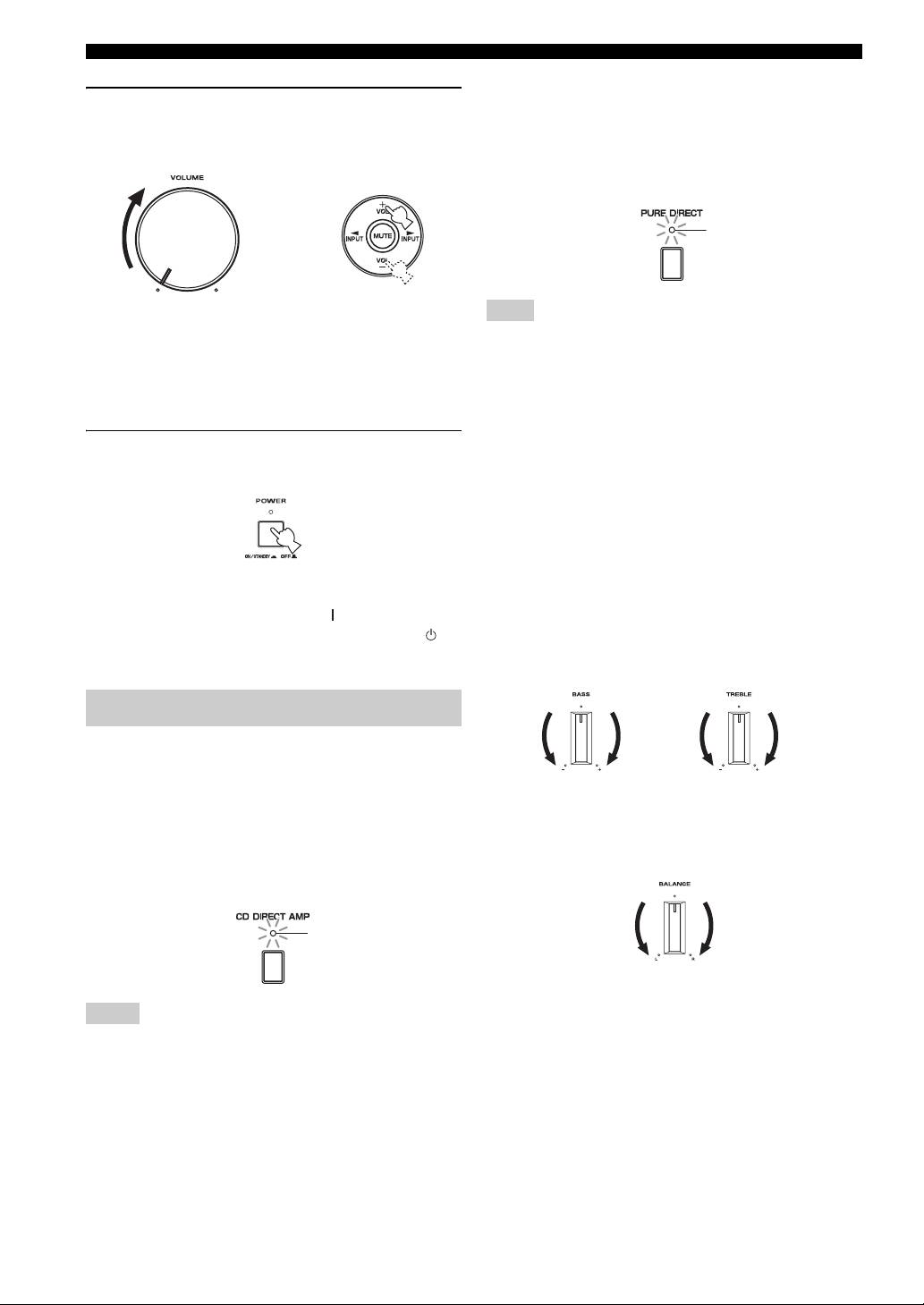
■ Using the PURE DIRECT switch
6 Rotate VOLUME on the front panel (or press
Routes input signals from your audio sources. As a result,
VOL +/– on the remote control) to adjust the
the input signals bypass the BASS, TREBLE, BALANCE
sound output level.
and LOUDNESS controls, thus eliminating any alterations
to the audio signals to produce more direct and high-grade
sound from all input sources.
Lights up
or
Remote controlFront panel
Note
The BASS, TREBLE, BALANCE and LOUDNESS controls do
y
not function while the PURE DIRECT switch is turned on.
You can adjust the tonal quality by using the BASS, TREBLE,
BALANCE and LOUDNESS controls, the CD DIRECT AMP
■ Adjusting the BASS and TREBLE
switch, or the PURE DIRECT switch on the front panel.
controls
Adjust the high and low frequency response.
7 After using, press POWER on the front panel
The center position produces a flat response.
to turn off the power.
BASS
When you feel a lack of bass sound, rotate clockwise to
boost. When you feel excessive bass sound, rotate
counterclockwise to suppress.
Control range: –10 dB to +10 dB (20 Hz)
y
TREBLE
You can turn on the power by pressing the button on the remote
When you feel a lack of treble sound, rotate clockwise to
control if you set this unit to standby mode by pressing the
boost. When you feel excessive treble sound, rotate
button on the remote control.
counterclockwise to suppress.
Control range: –10 dB to +10 dB (20 kHz)
Adjusting the tonal quality
■ Using the CD DIRECT AMP switch
Routes input signals directly to the power amplifier from
your CD player, regardless of the INPUT selector setting.
■ Adjusting the BALANCE control
As a result, the input signals bypass the INPUT selector
and the BASS, TREBLE, BALANCE and LOUDNESS
Adjust the sound output balance of the left and right
speakers to compensate for sound imbalance caused by
controls. The gain is also adjusted appropriately for CD so
that the purest possible sound is reproduced without any
speaker locations or listening room conditions.
alterations to the CD signals.
Lights up
Notes
• The BASS, TREBLE, BALANCE, LOUDNESS controls and
INPUT selector do not function while the CD DIRECT AMP
switch is turned on.
• Be sure to connect the CD player to the CD input jacks if you
use the CD DIRECT AMP switch.
10 En
