
Yamaha A-S700: Playing a source
Playing a source: Yamaha A-S700
Table of contents
- CAUTION: READ THIS BEFORE OPERATING YOUR UNIT.
- CONTENTS FEATURES SUPPLIED ACCESSORIES
- CONTROLS AND FUNCTIONS Front panel
- Remote control
- Installing batteries in the remote Using the remote control control
- Rear panel
- Connecting speakers and other components CAUTION
- ■ Bi-wire connection CAUTION ■ Connecting via banana plug
- Connecting the supplied power cable
- Playing a source
- ■ Using the PURE DIRECT switch ■ Adjusting the BASS and TREBLE controls Adjusting the tonal quality ■ Using the CD DIRECT AMP switch
- ■ Adjusting the LOUDNESS control Recording a source
- TROUBLESHOOTING ■ General Problems Possible Causes Solutions
- Problems Possible Causes Solutions
- ■ Remote control Problems Possible Causes Solutions
- SPECIFICATIONS
OPERATION
PLAYING AND RECORDING
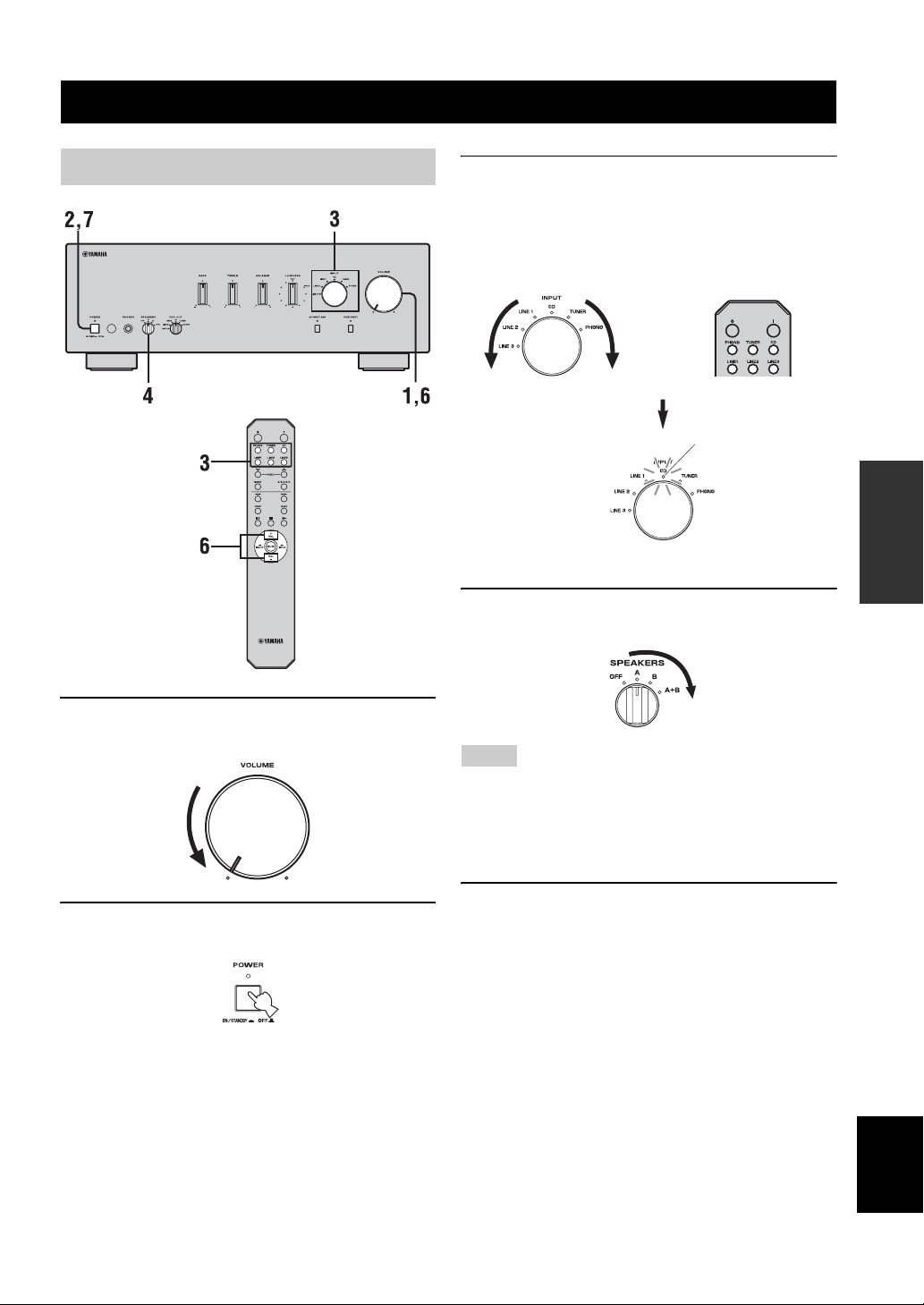
Playing a source
3 Rotate the INPUT selector on the front panel
(or press one of the input selector buttons on
the remote control) to select the input source
you want to listen to.
The indicator of the selected input source lights up.
or
Front panel Remote control
Lights up
OPERATION
4 Rotate the SPEAKERS selector on the front
panel to select SPEAKERS A, B or A+B.
1 Rotate VOLUME on the front panel to the
extreme counterclockwise position.
Notes
• Switch the SPEAKERS selector to the A+B position when
making bi-wire connections, or when using two sets of speakers
simultaneously (A and B).
• If you listen with headphones, rotate the selector to the OFF
position.
5 Play the source.
2 Press POWER on the front panel inward to
the ON position.
English
9 En
Top 10 manuals
100.00
NZXT HALE90 1000W99.99
Samsung SM-R38099.97
AEG BSB 18C99.97
Dell 2700W99.97
Smeg KSEC70X99.96
Beurer HDE 4099.96
Pyramida KH 50 v.299.96
MSI CSM-H81M-P3299.96
AEG HR 562799.95
Melissa 640-048