
Yamaha A-S700: TROUBLESHOOTING ■ General Problems Possible Causes Solutions
TROUBLESHOOTING ■ General Problems Possible Causes Solutions: Yamaha A-S700
Table of contents
- CAUTION: READ THIS BEFORE OPERATING YOUR UNIT.
- CONTENTS FEATURES SUPPLIED ACCESSORIES
- CONTROLS AND FUNCTIONS Front panel
- Remote control
- Installing batteries in the remote Using the remote control control
- Rear panel
- Connecting speakers and other components CAUTION
- ■ Bi-wire connection CAUTION ■ Connecting via banana plug
- Connecting the supplied power cable
- Playing a source
- ■ Using the PURE DIRECT switch ■ Adjusting the BASS and TREBLE controls Adjusting the tonal quality ■ Using the CD DIRECT AMP switch
- ■ Adjusting the LOUDNESS control Recording a source
- TROUBLESHOOTING ■ General Problems Possible Causes Solutions
- Problems Possible Causes Solutions
- ■ Remote control Problems Possible Causes Solutions
- SPECIFICATIONS
ADDITIONAL INFORMATION
TROUBLESHOOTING
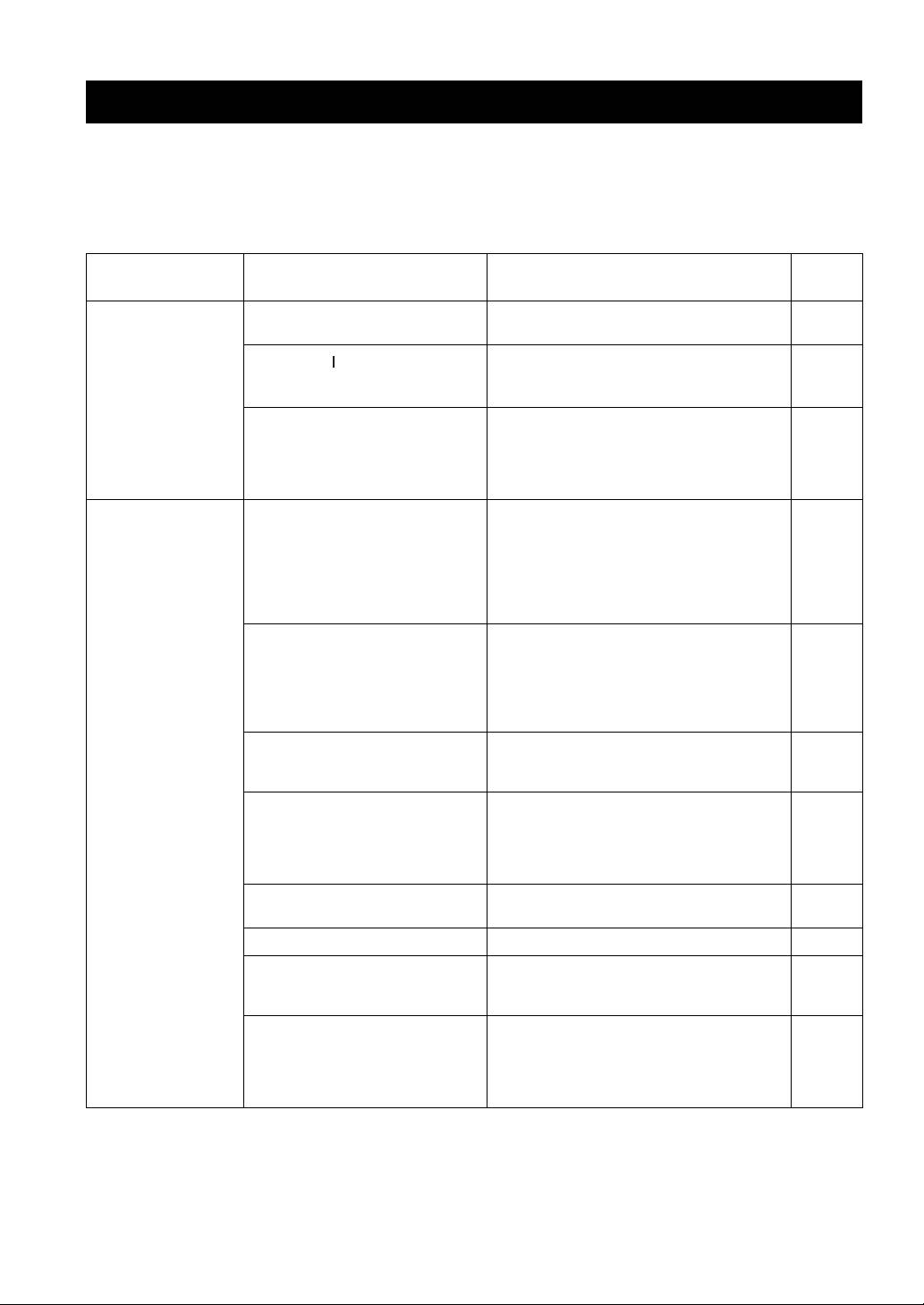
Refer to the chart below if this unit does not function properly. If the problem you are experiencing is not listed below or
if the instructions below do not help, set this unit to the standby mode, disconnect the power cable, and contact the
nearest authorized Yamaha dealer or service center.
■ General
Refer to
Problems Possible Causes Solutions
page
Pressing the POWER
The supplied power cable is not connected
Connect the supplied power cable firmly.
8
switch on the front
or the cable is not completely inserted.
panel does not turn
on this unit. The
The POWER ( ) button is pressed on the
Press POWER on the front panel to ON.
POWER on indicator
remote control while this unit is turned
3
also does not light up.
off.
There is a problem with the internal
Disconnect the AC power cable and contact the
circuitries of this unit.
nearest authorized Yamaha dealer or service center. If
an unusual odor or noise is generated from the unit,
—
do not turn on the power, disconnect the AC power
cable, and contact a service center for repair.
The power of this unit
The speaker wires are touching each other
Connect the speaker cables properly and press the
is turned off suddenly
or shorting out against the rear panel.
power button ON again. The VOLUME is decreased
and the POWER on
automatically and this unit is turned on after the
indicator blinks.
INPUT indicator blinks for about 15 seconds.
7
Confirm normal sound output from speakers by
increasing the volume gradually, then you can operate
This unit is turned off
this unit normally.
after several seconds
The speaker is a malfunction. Replace the speaker set and press the power button
of turning on, and the
ON again. The VOLUME is decreased automatically
POWER on indicator
and this unit is turned on after the INPUT indicator
blinks.
—
blinks for about 15 seconds. Confirm normal sound
output from speakers by increasing the volume
gradually, then you can operate this unit normally.
The protection circuitry has been activated
Rotate the VOLUME control on the front panel to
because of excessive input or excessive
decrease the volume level and then turn the power on
—
volume level.
again.
The protection circuitry has been activated
Allow about 30 minutes for the temperature inside
due to excessive internal temperature.
this unit to decrease, rotate the VOLUME control on
the front panel to lower the volume and then turn the
—
power on again. Set the unit in a place where heat can
readily dissipate from the unit.
The IMPEDANCE SELECTOR switch
Turn the power off and slide the IMPEDANCE
5
may not be fully slid to either position.
SELECTOR switch all the way to either position.
The impedance setting is incorrect. Set the impedance to match your speakers. 5
This unit has been exposed to a strong
Set this unit to the standby mode, disconnect the
external electric shock (such as lightning
power cable, plug it back in after 30 seconds, then use
—
or strong static electricity).
it normally.
There is a problem with the internal
Disconnect the AC power cable and contact the
circuitries of this unit.
nearest authorized Yamaha dealer or service center. If
an unusual odor or noise is generated from the unit,
—
do not turn on the power, disconnect the AC power
cable, and contact a service center for repair.
12 En
