
Yamaha A-S700: ■ Adjusting the LOUDNESS control Recording a source
■ Adjusting the LOUDNESS control Recording a source: Yamaha A-S700
Table of contents
- CAUTION: READ THIS BEFORE OPERATING YOUR UNIT.
- CONTENTS FEATURES SUPPLIED ACCESSORIES
- CONTROLS AND FUNCTIONS Front panel
- Remote control
- Installing batteries in the remote Using the remote control control
- Rear panel
- Connecting speakers and other components CAUTION
- ■ Bi-wire connection CAUTION ■ Connecting via banana plug
- Connecting the supplied power cable
- Playing a source
- ■ Using the PURE DIRECT switch ■ Adjusting the BASS and TREBLE controls Adjusting the tonal quality ■ Using the CD DIRECT AMP switch
- ■ Adjusting the LOUDNESS control Recording a source
- TROUBLESHOOTING ■ General Problems Possible Causes Solutions
- Problems Possible Causes Solutions
- ■ Remote control Problems Possible Causes Solutions
- SPECIFICATIONS
PLAYING AND RECORDING
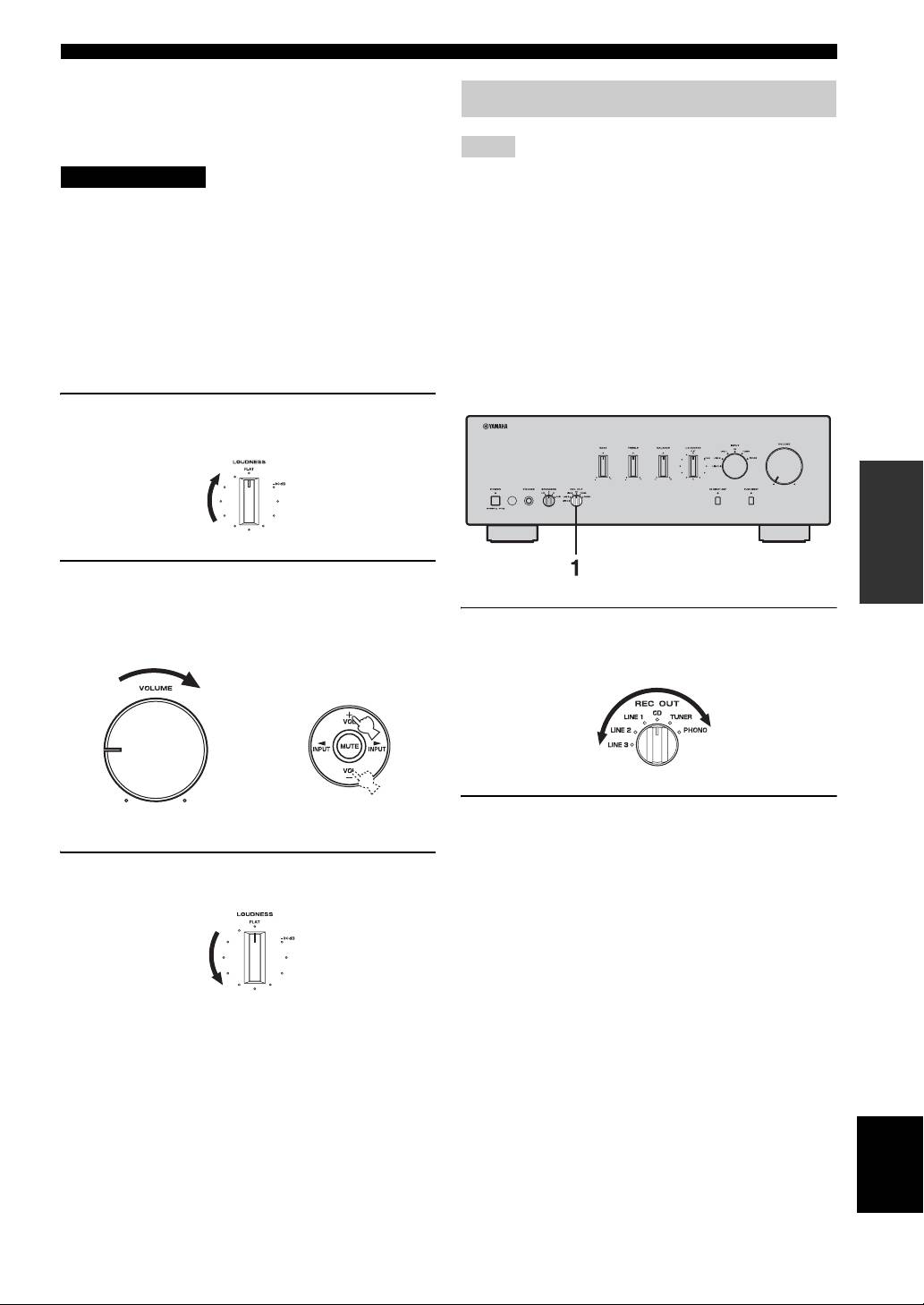
■ Adjusting the LOUDNESS control
Retain a full tonal range at any volume level, thus
Recording a source
compensating for the human ears’ loss of sensitivity to
high and low-frequency ranges at low volume.
Notes
CAUTION
• The audio signals are not output via the LINE 2 REC or LINE 3
REC output jacks when LINE 2 or LINE 3 is selected with the
If the CD DIRECT AMP switch (or the PURE DIRECT
REC OUT selector.
switch) is turned on with the LOUDNESS control set at a
The audio signals are output at both LINE 2 REC and LINE 3
certain level, the input signals bypass the loudness control,
REC output jacks if you select PHONO, TUNER, CD or LINE
resulting in a sudden increase in the sound output level. To
1.
• The VOLUME, BASS, TREBLE, BALANCE and
prevent your ears or the speakers from being damaged, be
LOUDNESS controls and the CD DIRECT AMP switch (and
sure to press the CD DIRECT AMP switch (or the PURE
the PURE DIRECT switch) have no effect on the source being
DIRECT switch) AFTER lowering the sound output level
recorded.
or AFTER checking that the LOUDNESS control is
• Check the copyright laws in your country to record from
properly set.
records, CDs, radio, etc. Recording copyright-protected
material may infringe on copyright laws.
1 Set the LOUDNESS control to the FLAT
position.
OPERATION
2 Rotate VOLUME on the front panel (or press
VOL +/– on the remote control) to set the
sound output level to the loudest listening
1 Rotate the REC OUT selector on the front
level that you would listen to.
panel to select the source you want to
record.
or
Remote controlFront panel
2 Play the source and begin recording on
recording device connected to the REC
output jacks (LINE 2 and/or LINE 3) on the
3 Rotate the LOUDNESS control until the
rear panel. See page 6.
desired volume is obtained.
y
• If you select the same source with the INPUT selector as you
select with the REC OUT selector, you can monitor the
recording.
• To listen to another input source without affecting the current
record out signal, select the source with the INPUT selector.
y
After setting the LOUDNESS control, enjoy listening to music at
your preferred volume level by controlling VOLUME. If the
effect of the loudness control is too strong or weak, readjust the
LOUDNESS control.
English
11 En
