
Yamaha A-S700: Remote control
Remote control: Yamaha A-S700
Table of contents
- CAUTION: READ THIS BEFORE OPERATING YOUR UNIT.
- CONTENTS FEATURES SUPPLIED ACCESSORIES
- CONTROLS AND FUNCTIONS Front panel
- Remote control
- Installing batteries in the remote Using the remote control control
- Rear panel
- Connecting speakers and other components CAUTION
- ■ Bi-wire connection CAUTION ■ Connecting via banana plug
- Connecting the supplied power cable
- Playing a source
- ■ Using the PURE DIRECT switch ■ Adjusting the BASS and TREBLE controls Adjusting the tonal quality ■ Using the CD DIRECT AMP switch
- ■ Adjusting the LOUDNESS control Recording a source
- TROUBLESHOOTING ■ General Problems Possible Causes Solutions
- Problems Possible Causes Solutions
- ■ Remote control Problems Possible Causes Solutions
- SPECIFICATIONS
CONTROLS AND FUNCTIONS
C PURE DIRECT and indicator
D VOLUME
Reproduces any input source in the purest sound possible.
Control the sound output level.
The indicator above it lights up when this function is
This does not affect the REC level for recording.
turned on. See page 10 for details.
INTRODUCTION
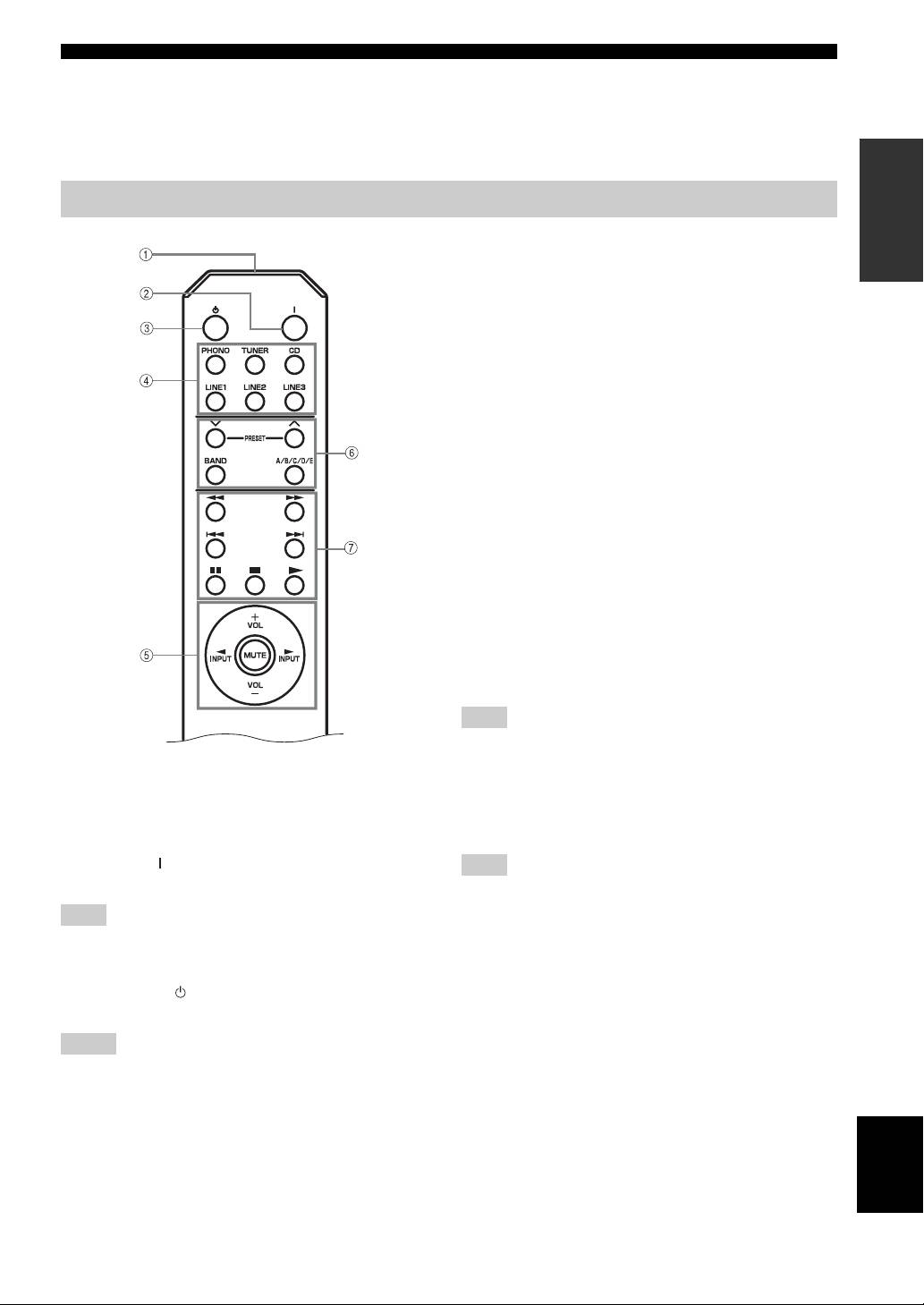
Remote control
4 Input selector buttons
Select the input source you want to listen to.
5 Amplifier control buttons
INPUT l / h
Select the input source you want to listen to.
VOL +/–
Control the sound output level.
This does not affect the REC level for recording.
MUTE
Mute the sound output. Press MUTE again to resume the
audio output. Selected Input indicator blinks when the
sound is muted.
■ Controlling other components
The functions of the buttons to control other Yamaha
components are the same as those of the corresponding
buttons on those components. Refer to the components’
instruction manuals for details.
6 Yamaha tuner control buttons
Control various functions of Yamaha tuner. Refer to the
owner’s manual of your tuner for details.
Note
Not all Yamaha tuners or functions can be controlled by this
remote control.
■ Controlling this unit
7 Yamaha CD player control buttons
1 Infrared signal transmitter
Control various functions of Yamaha CD player. Refer to
Sends signals to the main unit.
the owner’s manual of your CD player for details.
2 POWER ( )
Note
Turn on the unit.
Not all Yamaha CD players or functions can be controlled by this
remote control.
Note
This button is operational only when POWER on the front panel
is pressed inward to the ON position.
3 STANDBY ( )
Set this unit to the standby mode.
Notes
• This button is operational only when POWER on the front
panel is pressed inward to the ON position.
• In the standby mode, this unit consumes a small amount of
power in order to receive infrared-signals from the remote
English
control.
3 En
