
Sharp CV-P10PR Climatiseur mobile: MAINTENANCE CLEANING THE FILTER CLEANING THE UNIT AND THE REMOTE CONTROL WHEN STORING FOR A LONG PERIOD (NOT IN USE)
MAINTENANCE CLEANING THE FILTER CLEANING THE UNIT AND THE REMOTE CONTROL WHEN STORING FOR A LONG PERIOD (NOT IN USE): Sharp CV-P10PR Climatiseur mobile
Table of contents
- CONTENTS
- SAFETY PRECAUTIONS WARNINGS CAUTIONS
- LOCATION INCLUDED
- PART NAMES FRONT VIEW REAR VIEW
- REMOTE CONTROL REMOTE CONTROL DISPLAY
- INSTALLATION AND REMOVAL OF EXHAUST HOSE Installation of the exhaust hose 1 2 3
- 4 5
- USING THE REMOTE CONTROL LOADING BATTERIES HOW TO USE THE REMOTE CONTROL
- NOTE ON OPERATION NOTES ON OPERATION OPERATING CONDITIONS ENERGY EFFICIENCY TIPS
- COOL MODE DRY MODE
- FAN MODE VENTILATION MODE
- USE FOR AIR CONDITIONER TO CHANGE AIR FLOW DIRECTION UP / DOWN AIR FLOW DIRECTION LEFT / RIGHT AIR FLOW DIRECTION
- TURBO COOL OPERATION SLEEP OPERATION
- TIMER ON USE FOR AIR CONDITIONER TIMER OPERATION TIMER OFF
- USE FOR ION GENERATOR ION GENERATOR MODE Note for ION GENERATOR MODE
- USE FOR ION GENERATOR TO CHANGE AIR FLOW DIRECTION MAX DENSITY OPERATION
- REFRESH OPERATION TIMER OFF OPERATION
- MAIN UNIT OPERATION DRAINAGE
- MAINTENANCE CLEANING THE FILTER CLEANING THE UNIT AND THE REMOTE CONTROL WHEN STORING FOR A LONG PERIOD (NOT IN USE)
- BEFORE CALLING FOR SERVICE
MAINTENANCE
Be sure to disconnect the power from the wall socket before cleaning.
ENGLISH
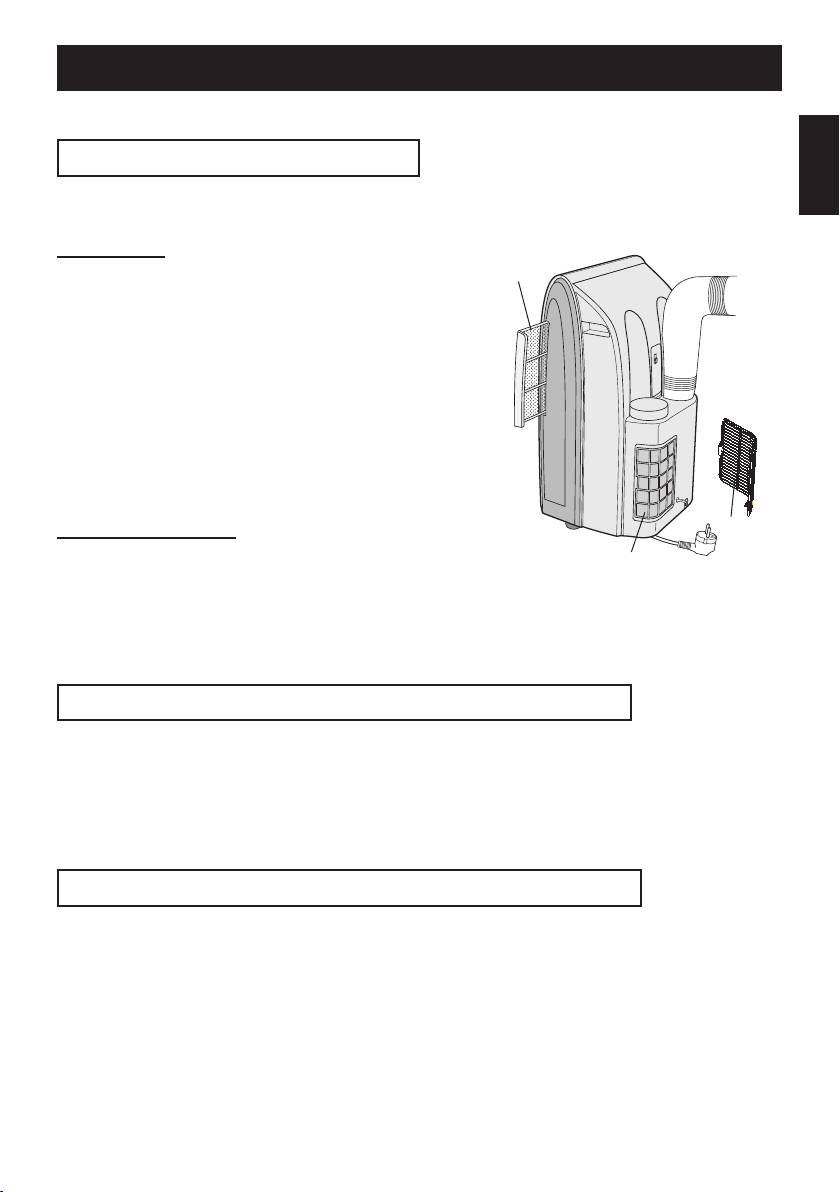
CLEANING THE FILTER
If the lter is clogged with dust, the airow will be reduced, resulting in poor cooling per-
formance. The lter should be cleaned every two weeks.
AIR FILTER
Air lter
REMOVE THE FILTER
1
• Pull the lter to the right.
CLEAN THE FILTER
2
• Use a vacuum cleaner to remove any dust. If the
lter is very dirty, wash it with detergent and rinse
carefully with clean water. Dry the lter before re-
installing them. Do not leave it in direct sun light.
REINSTALL THE FILTER
3
AIR INLET FILTER
Grille
Remove the grille and clean the air inlet
Air inlet lter
lter with a vacuum cleaner.
CAUTION:
Never operate the unit without the lter. Doing so may
result in serious damage to the unit.
CLEANING THE UNIT AND THE REMOTE CONTROL
Wipe them with a soft, dry cloth or with a cloth moistened with a mild soap. Carefully re-
move any residue by wiping with a damp cloth and dry completely.
Avoid splashing water onto the unit. Water can dangerously damage the electrical insula-
tion.
Never use harsh chemicals or abrasive cleaners on any part of the unit. To avoid damag-
ing the unit, do not use hot water (50°C or hotter) when cleaning.
WHEN STORING FOR A LONG PERIOD (NOT IN USE)
Perform drainage to drain out water within the unit and attach the stop-
1
cock securely to the drainpipe.
Operate the unit in the FAN or VENTILATION mode for about half a day
2
to thoroughly dry inside the unit.
Cleanthelters,thenreinstallthem.
3
Disconnect the power from the wall socket.
4
GB-19
01_CV-P10PR_OM_EN.indd 19 14/08/29 16:42
