
Nikon AI-S Zoom-NIKKOR ED 200-400mm f-4: ■ Slip-in filter holder ■ Recommended focusing screens
■ Slip-in filter holder ■ Recommended focusing screens: Nikon AI-S Zoom-NIKKOR ED 200-400mm f-4
Table of contents
- Notes on Safety Operations
- Observe the following precautions when handling the camera and lens
- ■ Nomenclature
- En
- ■ Major features ■ Usable cameras and available functions
- Cameras
- ■ Focusing
- To limit the range of autofocus ■ Focus operation selection switch and focus operation button (See p. 20 for compatible cameras.) Focus lock (AF-L)
- Memory recall (MEMORY RECALL)
- Autofocus (AF) start on the lens (AF-ON) ■ Vibration reduction mode (VR
- Setting the vibration reduction ON/OFF switch Setting the vibration reduction mode switch
- ■ Setting the aperture ■ Focusing, zooming, and depth of field
- ■ Using a built-in rotating tripod collar ■ Using the lens hood ■ Lens protective glass
- ■ The built-in flash and vignetting
- ■ Slip-in filter holder ■ Recommended focusing screens
- ■ Lens care
- ■ Standard accessories ■ Optional accessories ■ Specifications
- Weight: Approx. 3,360 g (7.4 lbs) with lens protective
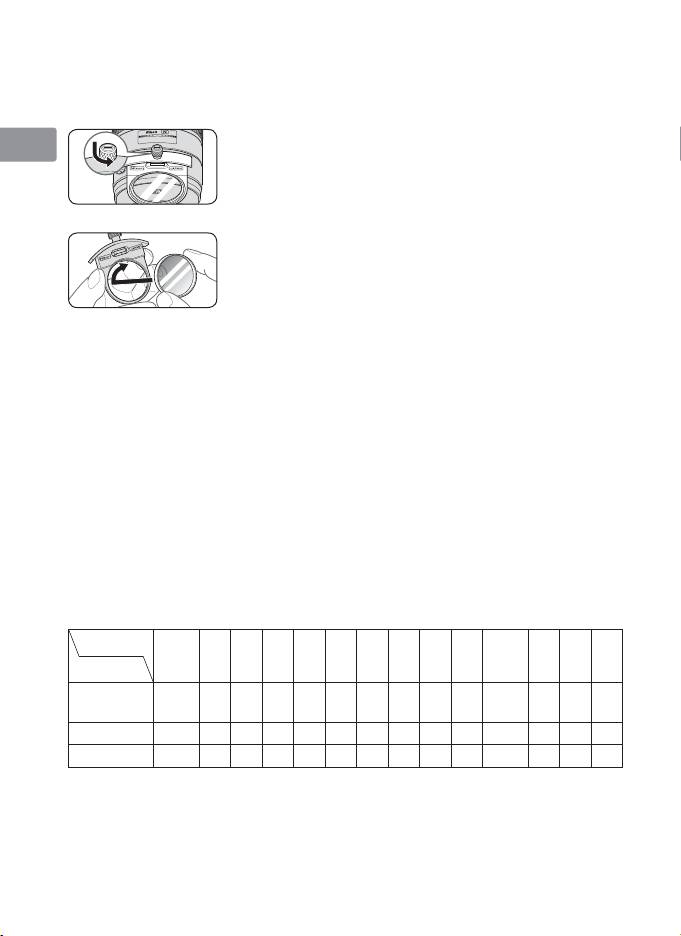
■ Slip-in filter holder
Always use a (52mm screw-on) filter. A 52mm Screw-on NC Filter is
Jp
attached to the filter holder when shipped from the factory.
a Press down on the slip-in filter holder knob, and
En
turn counterclockwise until the white line on the
knob is at a right angle to the axis of the lens.
De
b
Pull the slip-in filter holder from the lens body
c
Detach the attached filter from the filter holder.
Fr
d
Screw a filter onto the side of the filter holder
marked with the words “Nikon” and “JAPAN”.
Es
• The slip-in filter holder can be attached with the
“Nikon” and “JAPAN” facing either the lens or
Se
camera side without any effect on your pictures.
Slip-in Circular Polarizing Filter C-PL1L (optional)
Ru
• Blocks reflections from nonmetallic surfaces such as glass and water.
• When a Slip-in Circular Polarizing Filter C-PL1L is attached, the focus
Nl
distance is different from when a 52mm screw-on filter is attached.
The distance scale is shifted from the correct position. The closest
It
focused distance is extended slightly.
• The memory set position may change slightly when using focus
Ck
preset.
• Attach the C-PL1L filter before using the memory set function.
Ch
■ Recommended focusing screens
Various interchangeable focusing screens are available for certain
Kr
Nikon SLR cameras to suit any picture-taking situation. The ones
recommended for use with this lens are:
Screen
G1
EC-B
ABCE
F
G2
G4 J K L M P U
EC-E
Camera
G3
◎
◎
F6
◎
—
◎
————
◎
—
—
◎
(–0.5)
(–0.5)
F5+DP-30
◎◎○◎◎
—
○◎
—
◎
—
◎
F5+DA-30
◎ ◎○◎◎
—
○◎
—
◎
—
◎
◎
: Excellent focusing
○
: Acceptable focusing
Slight vignetting or moiré patterns appear in the viewfinder, but not on
the film.
—
: Not available
30
