
Kenwood DPX404U: Listening to the Radio
Listening to the Radio: Kenwood DPX404U
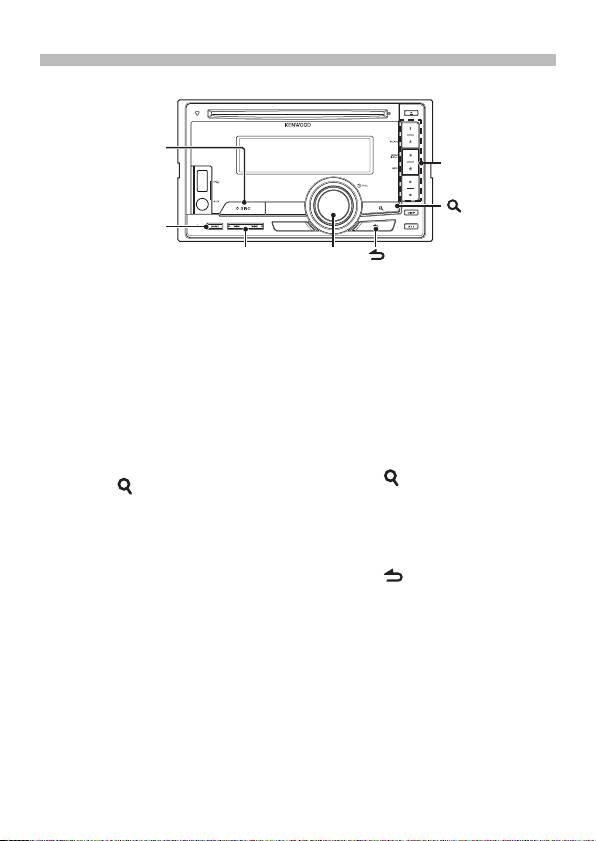
Listening to the Radio
[SRC]
[1] – [6]
[ ]
[BAND]
[
4
]/[
¢
]
[VOL]
[ ]
Selecting a Tuner source
Station preset memory
Press the [SRC] button to select “TUNER”.
Keep pressing the button ([1] to [6]) to
which you want to assign the selected
Selecting the Band
station for at least 2 seconds.
Press the [BAND] button to change the
band in the order of FM1 ➜ FM2 ➜ FM3
Recalling the stations in the
➜ AM.
memory
Press the button ([1] to [6])
Selecting a Station
corresponding to the station you want
Press the [4] or [¢] button to select
to listen to.
the station you want to listen to.
PTY (Program Type)
Traffic information
Press the [ ] button.
Press the [ ] button for at least 1
Turn the [VOL] knob to select Program
second to turns on or off the traffic
Type.
information function alternately.
If traffic bulletin starts when the function
Press the [4] or [¢] button to search
is ON, “Traffic INFO ON”/ “TI ON” is
for the selected Program Type station.
displayed and traffic information is
Press the [ ] button.
received.
English
|
7
B59-2055-00_00_2DIN_E_QSG.indb 7 11/01/19 15:00
Table of contents
- Contents Before use
- Before use
- First step
- Basic Operations
- Playing Music (CD/USB/iPod)
- Listening to the Radio
- Appendix Installation accessories
- Before installation
- Connecting Wires to Terminals ⁄
- Connecting Wires to Terminals
- Connecting Wires to Installation/Removing the Unit Terminals
- Installation/Removing the Unit
- Table des matières Avant utilisation
- Avant utilisation
- Étape 1
- Fonctionnement basique
- Reproduire de la musique (CD/USB/iPod)
- Écoute de la radio
- Annexe Accessoires pour l'installation
- Avant installation
- Connexion des câbles aux bornes ⁄
- Connexion des câbles aux bornes
- Connexion des câbles Installation/Retrait de l’appareil aux bornes
- Installation/Retrait de l’appareil
- Inhalt Vor der Verwendung
- Vor der Verwendung
- Erste Schritte
- Grundbedienung
- Musikwiedergabe (CD/USB/iPod)
- Radiowiedergabe
- Anhang Montagezubehör
- Vor dem Einbau
- Anschlussdiagramm ⁄
- Anschlussdiagramm
- Anschlussdiagramm Einbau/Entfernen des Geräts
- Einbau/Entfernen des Geräts
- Inhoud Voor de ingebruikneming
- Voor de ingebruikneming
- Eerste stap
- Basisbediening
- Muziek afspelen (CD/USB/iPod)
- Naar de radio luisteren
- Appendix Installatieaccessoires
- Voor de installatie
- Verbinden van kabels met aansluitingen ⁄
- Verbinden van kabels met aansluitingen
- Verbinden van kabels Toestel installeren/ verwijderen met aansluitingen
- Toestel installeren/ verwijderen
- Sommario Prima dell'uso
- Prima dell'uso
- Primo passo
- Funzioni di base
- Riproduzione della musica (CD/USB/iPod)
- Ascolto della radio
- Appendice Accessori di installazione
- Prima dell'installazione
- Collegamento dei cavi ai terminali ⁄
- Collegamento dei cavi ai terminali
- Collegamento dei cavi Installazione/rimozione dell’unità ai terminali
- Installazione/rimozione dell’unità
- Índice Antes de usar
- Antes de usar
- Primer paso
- Funciones básicas
- Reproducción de música (CD/USB/iPod)
- Escuchar la radio
- Apéndice Instalación de accesorios
- Antes de la instalación
- Conexión de cables a los terminales ⁄
- Conexión de cables a los terminales
- Conexión de cables a Instalación/Desmontaje de la unidad los terminales
- Instalación/Desmontaje de la unidad
- Índice Antes da utilização
- Antes da utilização
- Primeiro passo
- Operação Básica
- Reproduzir música (CD/USB/iPod)
- Ouvir rádio
- Anexo Acessórios de instalação
- Antes da instalação
- Ligar os cabos aos terminais ⁄
- Ligar os cabos aos terminais
- Ligar os cabos aos Instalação/Retirar o aparelho terminais
- Instalação/Retirar o aparelho
- Содержание Подготовка к эксплуатации
- Подготовка к эксплуатации
- Первый шаг
- Основные операции
- Воспроизведение музыки (CD/USB/iPod)
- Прослушивание радио
- Приложение Принадлежности, используемые при
- Перед установкой
- Подсоединение кабелей к гнездам для подключения ⁄
- Подсоединение кабелей к гнездам для подключения
- Подсоединение Установка/Cнятие устройства кабелей к гнездам
- Установка/Cнятие устройства
- Зміст Перед використанням
- Перед використанням
- Перший крок
- Основні операції
- Відтворення музики (CD/USB/iPod)
- Прослуховування радіо
- Додаток Додаткове приладдя, необхідне для
- Перед встановленням
- Підключення кабелів до роз'ємів ⁄
- Підключення кабелів до роз'ємів
- Підключення кабелів Установка/виймання приладу до роз'ємів
- Установка/виймання приладу


