
Canon LEGRIA HF R48: Wi-Fi connection Wi-Fi connection IMPORTANT
Wi-Fi connection Wi-Fi connection IMPORTANT: Canon LEGRIA HF R48
Table of contents
- Table of Contents Trademark Acknowledgements
- Getting Started Introduction to Wi-Fi
- Wi-Fi connection Wi-Fi connection
- Wi-Fi connection Wi-Fi connection IMPORTANT
- Before Using Wi-Fi Functions About the Wi-Fi antenna About the camcorder’s Wi-Fi standard Recording Movies Using a Smartphone as a Remote Control
- POINTS TO CHECK
- Remote Browse: Viewing Recordings Using a Web Browser on Your iOS Device or Android Smartphone Operating modes: 1 Camcorder: From any movie index screen, set the camcorder to connect with the smartphone.
- 2 Smartphone: Activate Wi-Fi in the settings screen (A 11). Uploading Videos Using an iOS Device
- POINTS TO CHECK
- NOTES Connecting Directly to a Smartphone or Similar Device Sharing Recordings with CANON iMAGE GATEWAY
- CANON iMAGE GATEWAY General requirements Playback on a Computer
- Troubleshooting List of Messages
Wi-Fi connection
4
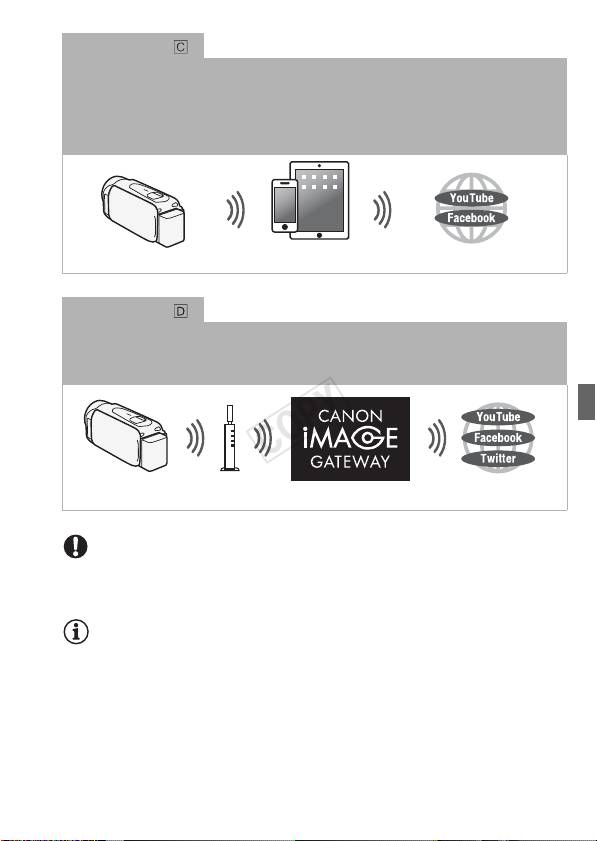
After you download the Movie Uploader app
, wirelessly connect the camcorder to an iOS
device (A 9) to save, play back and upload your recordings. You can even use this
connection type if you plan to share videos on YouTube and Facebook on the go.
4
The Movie Uploader app, provided by PIXELA, is available for free from the App
Store.
iOS device
Wi-Fi connection
Wirelessly connect the camcorder to a wireless router (access point) on your home
network. Use this connection if you plan to connect to CANON iMAGE GATEWAY (A 11).
After doing so, you can even share videos on YouTube and Facebook.
Wireless router
(Access point)
IMPORTANT
• Using an unprotected Wi-Fi network can expose your files and data to
monitoring by unauthorized third parties. Be aware of the risks involved.
NOTES
• Do not open the memory card slot cover during the wireless connec-
tion.
• While using Wi-Fi functions, the camcorder’s automatic power off func-
tion will be disabled.
5
