
Canon CanoScan 9000F Mk II: instruction
Class: Office Equipment
Type: Scanner
Manual for Canon CanoScan 9000F Mk II
Table of contents

ENGLISH
MAGYARPOLSKIРУССКИЙ
FRANÇAIS DEUTSCHITALIANOESPAÑOL
SLOVENSKY
TÜRKÇE
Quick Start Guide
Kurzanleitung
Guide de démarrage rapide
NEDERLANDS
Guida rapida all'installazione
Guía de iniciación rápida
Aan de Slag-gids
Quick Start Guide
PORT DO BRASIL
Guia de consulta rápida
Introduktionsvejledning
Οδηγός Γρήγορης Εκκίνησης
DANSKΕΛΛΗΝΙΚΑ
Kort innføring
Pikaopas
Snabbguide
Stručná příručka
Beüzemelési útmutató
NORSKSUOMISVENSKAČESKY
Szybkie wprowadzenie
Краткое руководство по началу работы
Stručná príručka
Hızlı Kurulum Kılavuzu
CANON INC.
30-2, Shimomaruko 3-chome, Ohta-ku, Tokyo 146-8501, Japan
CANON EUROPA N.V.
Bovenkerkerweg 59-61 1185 XB Amstelveen The Netherlands
QT5-5862-V02 © CANON INC. 2012 PRINTED IN XXXXXXXX
XXXXXXXX
IMPRIME XX XXXXXXXX
ENGLISH
Please read this guide before operating this scanner. After you finish reading this guide, store it in a safe
place for future reference.
Table of Contents
Safety Precautions ......................................... 3 Package Contents ..........................................4
Preparing the Scanner ................................... 5 Installing the Software ....................................6
1
Quick Start Guide
Quick Start Guide

ENGLISH
* Screens are based on Windows 7 operating system Home Premium and Mac OS X 10.7.x.
Actual screens may differ depending on the OS version.
• Windows is a trademark or registered trademark of Microsoft Corporation in the U.S. and/
or other countries.
• Mac and Mac OS are trademarks of Apple Inc., registered in the U.S. and other countries.
• All other company names and products mentioned herein may be trademarks or
registered trademarks of their respective companies.
Warning
When you use this product, you should pay attention to the following legal issues:
• Scanning of certain documents, such as bank notes (bank bills), government bonds
and public certificates, may be prohibited by law and may result in criminal and/or civil
liability.
• You may be required under law to obtain authorization from a person possessing
copyrights or other legal rights to the item being scanned.
If you are uncertain of the legality of scanning any particular item, you should consult
your legal adviser in advance.
The socket-outlet shall be installed near the equipment and shall be easily accessible.
Notes for Energy Saving Setting
For purpose of energy saving, this product will be automatically turned off after designated
period without operation (The Auto Power Off function).
For instructions on how to change the setting, refer to the "On-Screen Manual".
Turning the Power Off
To turn the scanner off, be sure to press the ON button. Check the POWER lamp goes off,
and then unplug the power cord.
If you unplug the power cord while the POWER lamp is lighting or blinking, the scanning unit
does not move correctly
.
2
Safety Precautions
ENGLISH
Safety Precautions
Make sure to read following precautions before using the scanner and accessories.
Read the "On-Screen Manual" for precautions against product damages.
WARNING
Indicates a warning concerning operations that may lead to death or injury to persons if not
performed correctly. In order to use the scanner safely, always pay attention to these
warnings.
WARNING
This product emits low level magnetic flux. If you use a cardiac pacemaker and feel
abnormalities, please move away from this product and consult your doctor.
WARNING
Fire or electrical shock may result when following acts are carried out.
• Do not place the scanner near flammable liquids such as alcohol or thinners.
• Do not use cables other than the one supplied.
• Do not plug the power cord into outlets with voltages other than the specified voltages.
• Always plug the power cord in all the way.
• Do not plug in /unplug the power cord with wet hands.
• Do not pull or excessively bend the power cord.
• Do not place heavy objects on the power cord.
• Do not twist or tie the power cord.
• Do not connect excessive numbers of plugs into one electrical outlet.
• Do not use multiple extension cords.
• If lightning strikes in your neighborhood, unplug the power cord from the outlet and refrain
from using it.
• When cleaning the scanner, always unplug the power cord. Do not use flammable liquids
such as alcohol, benzene or thinners. Wipe with a soft dry cloth.
• Do not take apart or modify the scanner and supplies.
Unplug the power cord once a month to see if the cord/plug shows anything unusual such as
heat, rust, bent, scratch and split and so on. Unplug the power cord and call for service if
above is observed since they may lead to a fire or an electric shock afterwards.
If you hear unusual noises, see smoke, feel excessive heat, smell anything unusual, drop
metallic part or spill liquid into the scanner, immediately unplug the power cord and call for
service. Continued use of the scanner may result in fire or electrical shock.
3
Package Contents
ENGLISH
Package Contents
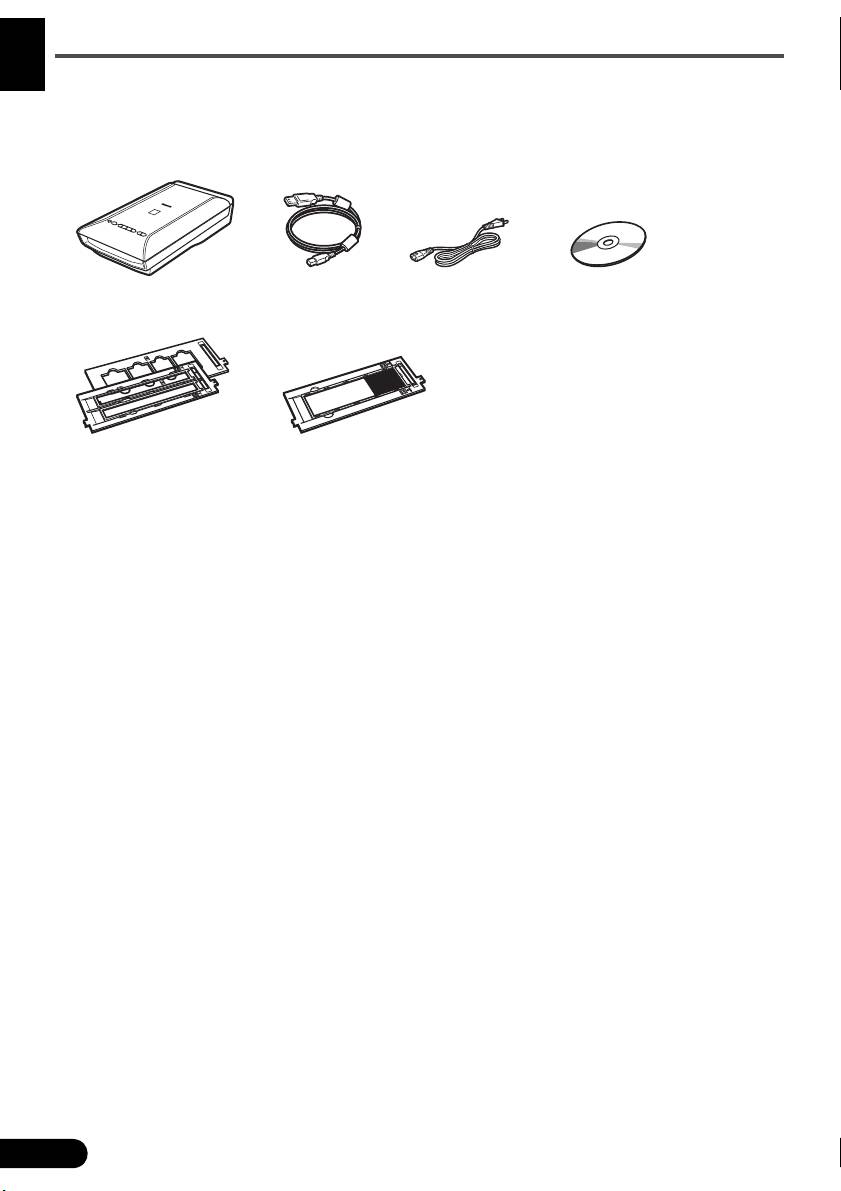
Scanner and Accessories
Documentation
• Quick Start Guide (this document)
• Additional Documents
4
Scanner USB Cable
Power Cord Setup CD-ROM
Film Guides
Film Guide
(for 35 mm film strip/slide)
(for 120 format film)
Preparing the Scanner
ENGLISH
Preparing the Scanner
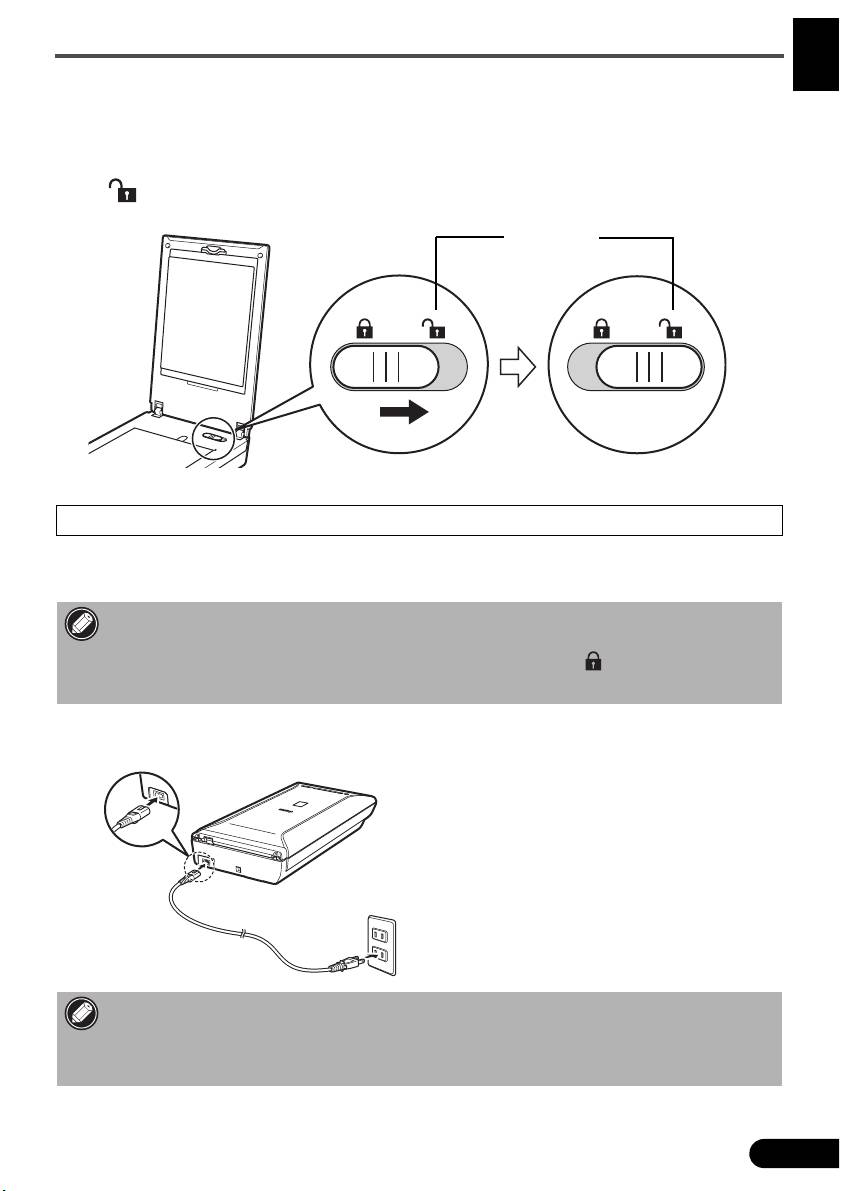
1 Peel the shipping tapes off the scanner.
2 Open the document cover and slide the scanner lock switch toward the unlock mark
().
• The document cover is locked temporarily at an angle of about 50 degrees.
3 Close the document cover.
• Handle the scanner with both hands. Be careful not to drop the scanner.
• When you carry or transport the scanner, press the ON button to turn the power off, and then
make sure to slide the scanner lock switch toward the lock mark ( ) to fasten the scanning
unit.
4 Connect the supplied power cord to the scanner.
5 Plug the power cord into the electrical outlet.
• Only use the power cord provided with the scanner. Use of other cables may lead to a
malfunction.
• Always attach the power cord to the scanner before plugging into the electrical outlet.
Reversing this order may lead to malfunctions.
5
Unlock Mark
Installing the Software
ENGLISH
Installing the Software
• Quit all applications before installation.
• Log on using an administrator account.
• Internet connection may be required during the installation. Connection fees apply.
• Internet connection is required during software installation. Connection fees apply.
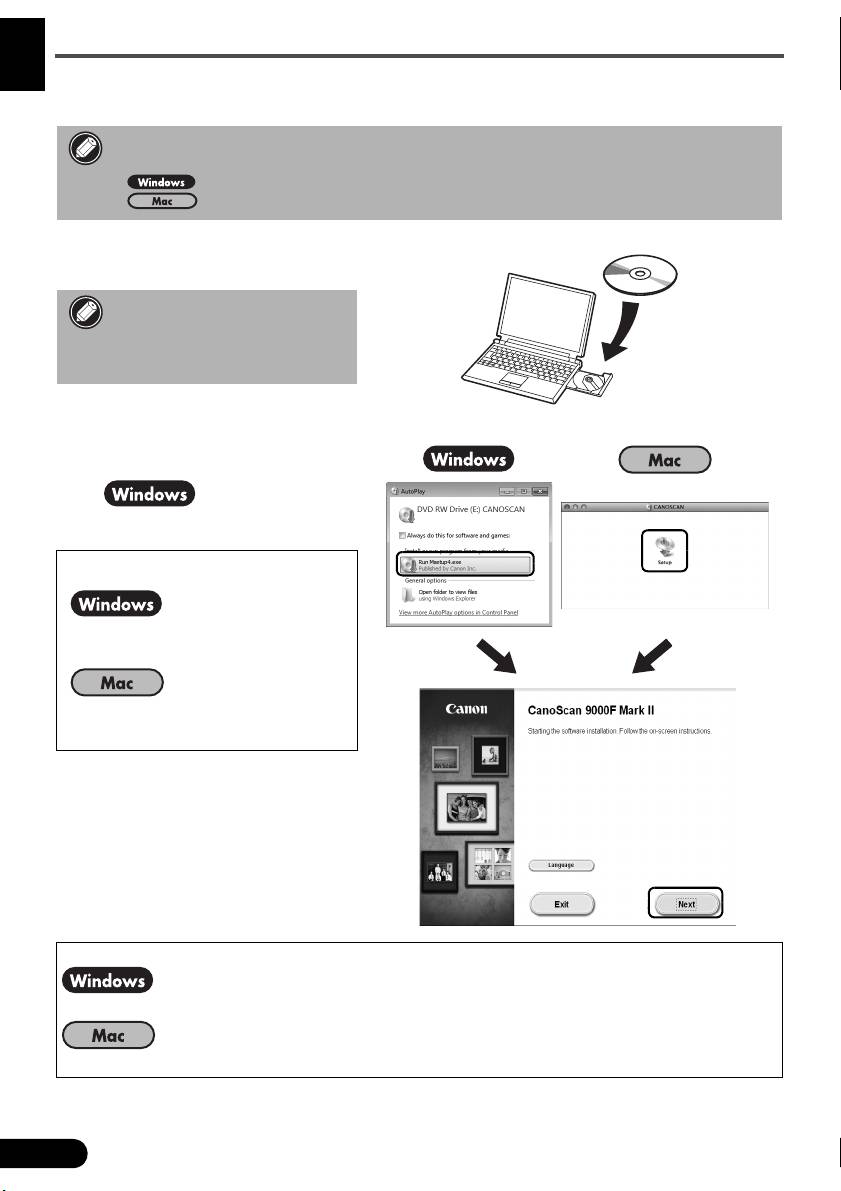
1 Insert the CD-ROM into the
computer.
If the USB cable is already
connected, unplug it. If a
message appears on the
computer, click Cancel.
2 Follow the on-screen
instructions to proceed.
To select a language, click
Language.
If the CD-ROM does not autorun:
Double-click (My) Computer > CD-
ROM icon > MSETUP4.EXE.
Double-click the CD-ROM icon on
the desktop.
To complete the installation, follow the on-screen instructions on the computer.
During installation, you will be prompted to connect the USB cable and turn the power on.
After installation is completed, connect the USB cable and turn the power on.
6
Installing the Software
ENGLISH
Use the On-Screen Manual on the Computer
For more information about the functions and operation of the software and also the
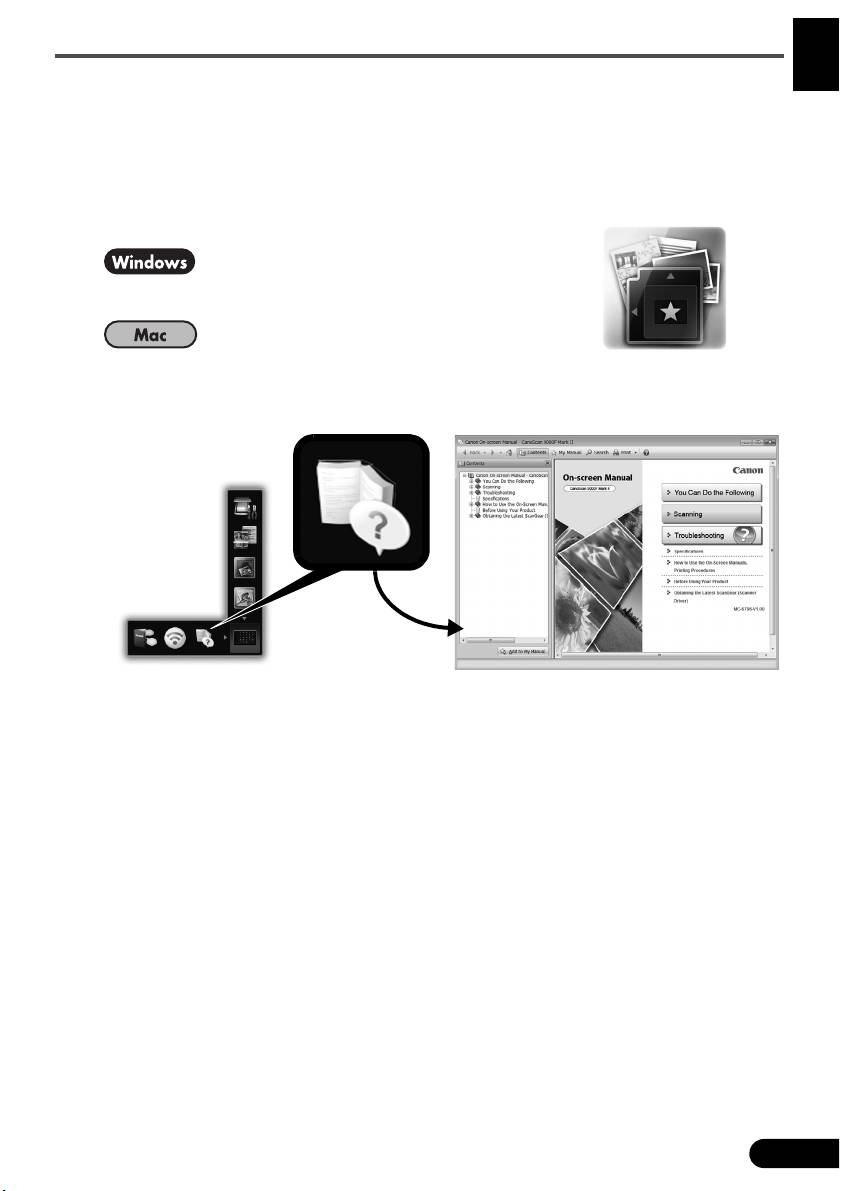
troubleshooting tips, refer to the "On-Screen Manual". You can start the "On-Screen
Manual" from the Quick Menu.
Starting the On-Screen Manual
1 Start the Quick Menu.
Double-click the Quick Menu shortcut icon on the
desktop.
Click the Quick Menu icon in the Dock.
2 Click the on-screen manual icon on the Quick Menu.
• It requires the installations of the Quick Menu and the "On-Screen Manual".
Types of Document Supported
• A sheet of photo document and CD/DVD
• Several sheets of photo documents and CD/DVD
• Magazine and book
•Films
There are various ways to place documents in accordance with the document type and
number of documents. For details, refer to the "On-Screen Manual".
7
DEUTSCH
Lesen Sie diese Anleitung vor dem Betrieb des Scanners durch. Bewahren Sie die Anleitung nach dem
Lesen für den späteren Gebrauch an einem sicheren Ort auf.
Inhalt
Sicherheitsvorkehrungen................................ 3 Packungsinhalt ...............................................4
Vorbereitung des Scanners ............................ 5 Installieren der Software ................................. 6
1
Kurzanleitung
Kurzanleitung

* Die Bildschirme beziehen sich auf Windows 7 operating system Home Premium und Mac
OS X 10.7.x. Die tatsächlichen Bildschirme weichen möglicherweise je nach verwendeter
Betriebssystemversion ab.
DEUTSCH
• Windows ist eine Marke oder eingetragene Marke der Microsoft Corporation in den USA
und/oder anderen Ländern.
• Mac und Mac OS sind eingetragene Marken von Apple Inc. in den USA und anderen
Ländern.
• Alle anderen hier erwähnten Unternehmensnamen und Produkte können ebenfalls
Marken oder eingetragene Marken des jeweiligen Herstellers sein.
Warnung
Beachten Sie beim Gebrauch des Geräts die folgenden gesetzlichen Regelungen:
• Das Scannen bestimmter Vorlagen wie Geldscheine (Banknoten),
Bundesobligationen und Urkunden ist untersagt und kann straf- und zivilrechtlich
verfolgt werden.
• Zum Scannen urheberrechtlich geschützten Materials kann die Genehmigung
des Urheberrechtsinhabers erforderlich sein.
In Fällen, in denen Sie sich bezüglich der rechtlichen Lage nicht sicher sind,
fragen Sie vorsorglich Ihren Rechtsberater.
Die Steckdose muss sich in der Nähe des Geräts befinden und leicht zugänglich sein.
Hinweise zur Energiespareinstellung
Dieses Produkt wird automatisch ausgeschaltet, wenn in einem bestimmten Zeitraum keine
Bedienvorgänge am Gerät stattfinden (Funktion zum automatischen Ausschalten).
Anweisungen zum Ändern der Einstellung finden Sie im „On-Screen-Handbuch“.
Ausschalten des Geräts
Drücken Sie zum Ausschalten des Scanners die Taste EIN (ON). Vergewissern Sie sich,
dass die POWER-Anzeige nicht mehr leuchtet, und ziehen Sie dann das Netzkabel ab.
Falls Sie das Netzkabel abziehen, während die POWER-Anzeige leuchtet oder blinkt,
bewegt sich das Scan-Modul nicht einwandfrei
.
2
Sicherheitsvorkehrungen
Sicherheitsvorkehrungen
Lesen Sie die nachfolgenden Warnhinweise unbedingt, bevor Sie den Scanner und dessen
Zubehör in Betrieb nehmen.
DEUTSCH
Lesen Sie das „On-Screen-Handbuch“, das Warnhinweise zu Produktschäden enthält.
WARNUNG
Kennzeichnet Warnhinweise, die Vorgänge betreffen, welche bei unvorschriftsmäßiger
Durchführung zu Verletzungen oder zum Tod führen können. Bitte beachten Sie diese
Warnhinweise unbedingt, um einen sicheren Betrieb des Scanners zu gewährleisten.
WARNUNG
Dieses Produkt erzeugt ein geringes Magnetfeld. Falls Sie einen Herzschrittmacher tragen
und Auffälligkeiten feststellen, entfernen Sie sich von diesem Produkt und wenden Sie sich
an einen Arzt.
WARNUNG
Die folgenden Vorgänge können einen Brand oder Stromschlag zur Folge haben.
• Stellen Sie das Gerät keinesfalls in der Nähe von entflammbaren Flüssigkeiten wie
Alkohol, Verdünner usw. auf.
• Verwenden Sie nur die mitgelieferten Kabel.
• Stecken Sie das Netzkabel nicht in Steckdosen mit einer niedrigeren Spannung als
angegeben ein.
• Führen Sie das Netzkabel stets komplett in den Anschluss ein.
• Fassen Sie Netzkabel und -stecker beim Ein- und Ausstecken in die Steckdose nicht mit
nassen Händen an.
• Ziehen Sie nicht am Netzkabel, und biegen Sie es nicht übermäßig.
• Legen Sie keine schweren Gegenstände auf das Netzkabel.
• Verdrehen Sie das Netzkabel nicht, und machen Sie keinen Knoten in das Kabel.
• Schließen Sie keine übermäßige Anzahl von Steckern an eine Steckdose an.
• Verwenden Sie keinesfalls mehrere Verlängerungskabel.
• Falls in der Nähe ein Blitz einschlägt, ziehen Sie das Netzkabel aus der Steckdose,
und sehen Sie von einer Verwendung ab.
• Vor dem Reinigen des Scanners unbedingt das Netzkabel abziehen. Keinesfalls
entflammbare Substanzen wie Alkohol, Benzin oder Verdünner zur Reinigung
verwenden. Wischen Sie den Scanner mit einem weichen, trockenen Tuch ab.
• Den Scanner und die Verbrauchsmaterialien keinesfalls zerlegen oder verändern.
Ziehen Sie das Netzkabel einmal im Monat aus der Steckdose, um Kabel und Stecker auf
Hitze, Rost, Verbiegung, Kratzer, Risse und Ähnliches zu überprüfen. Ziehen Sie das
Netzkabel aus der Steckdose, und rufen Sie den Kundendienst an, wenn Sie oben
Genanntes beobachten, da hierdurch ein Brand oder Stromschlag verursacht werden kann.
Ziehen Sie das Netzkabel sofort ab, und rufen Sie den Kundendienst an, wenn Sie
ungewöhnliche Geräusche, Rauch, Geruch oder übermäßige Hitzeentwicklung feststellen
bzw. Metallteile oder Flüssigkeiten in den Scanner gelangen. Bei Fortsetzung des
Scannerbetriebs besteht die Gefahr von Brand oder Stromschlag.
3
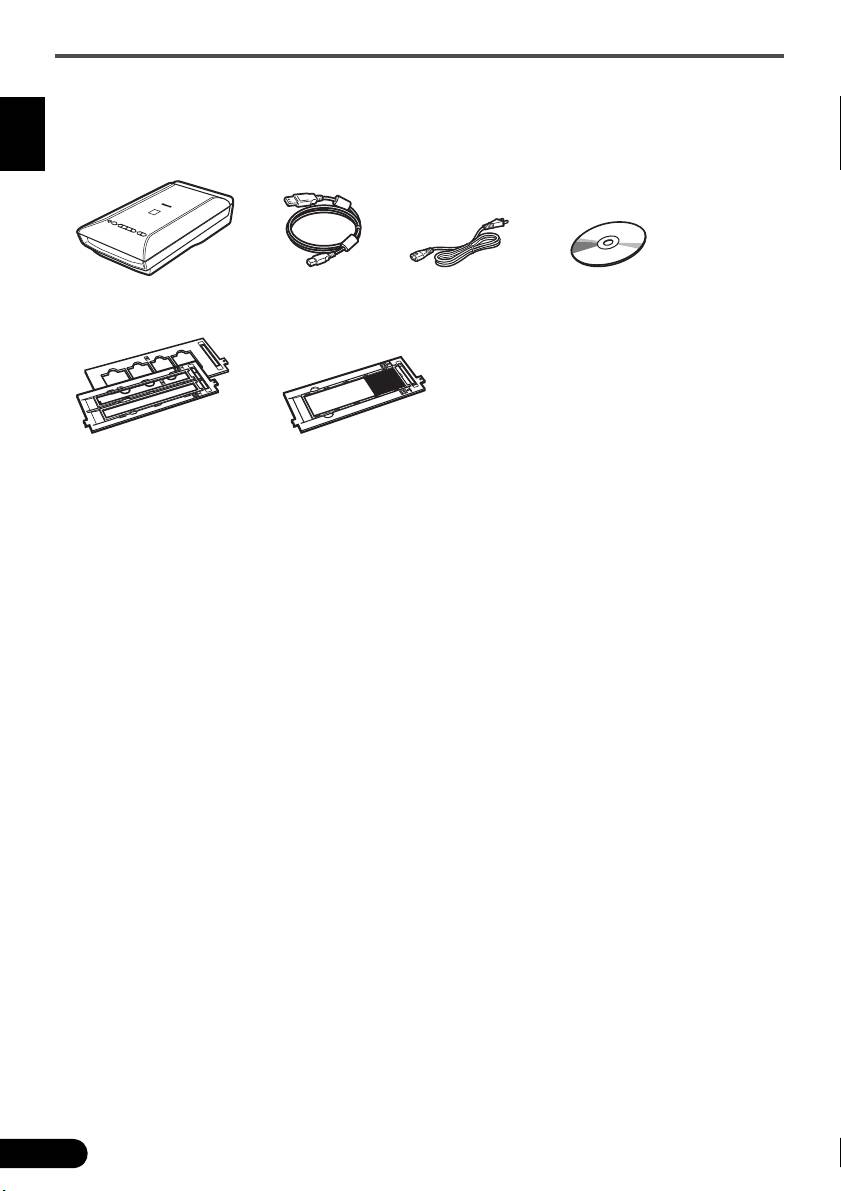
Packungsinhalt
Packungsinhalt
Scanner und Zubehör
DEUTSCH
Dokumentation
• Kurzanleitung (vorliegendes Dokument)
• Zusätzliche Dokumente
4
Scanner USB-Kabel
Netzkabel Installations-CD-ROM
(Setup CD-ROM)
Filmvorlagenhalter
Filmvorlagenhalter
(für 35-mm-Filmstreifen/Dia)
(für 120er Filme)
Vorbereitung des Scanners
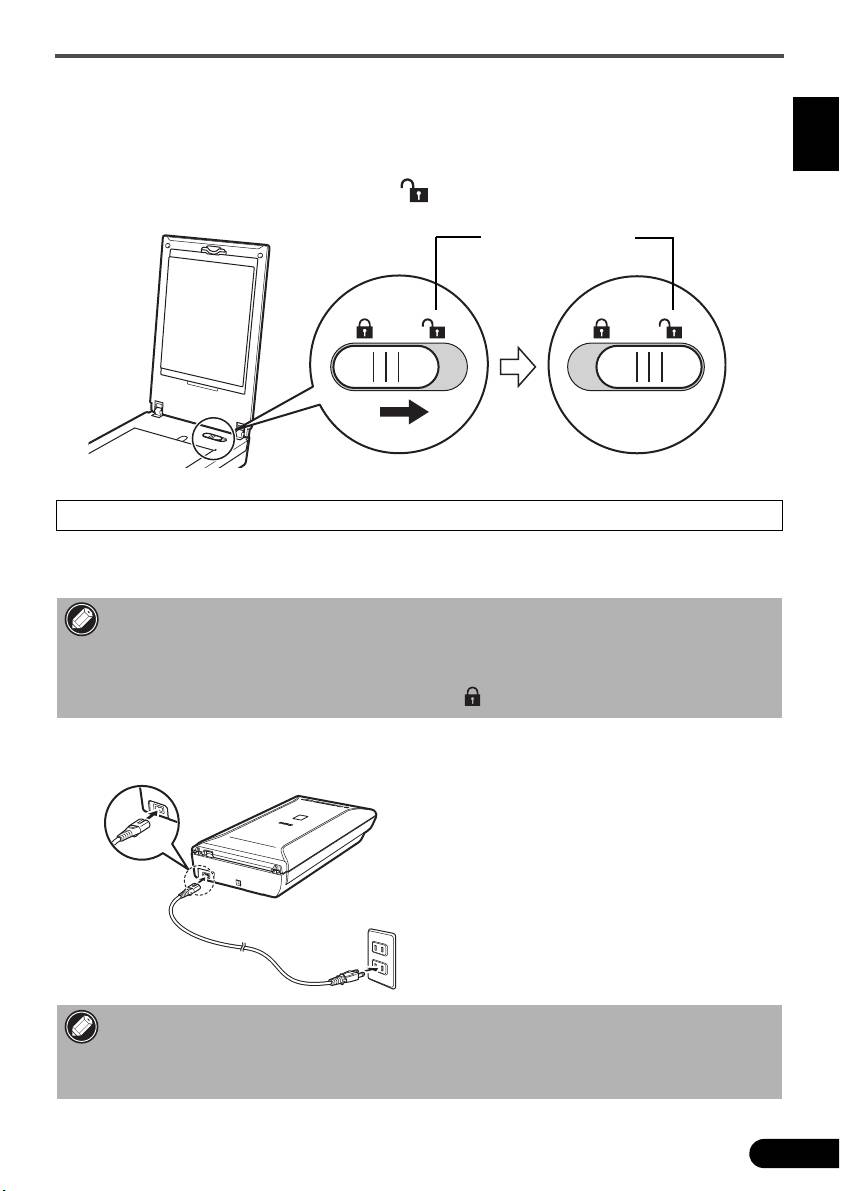
Vorbereitung des Scanners
1 Ziehen Sie die für den Versand am Scanner angebrachten Klebebänder ab.
DEUTSCH
2 Öffnen Sie den Vorlagendeckel, und schieben Sie den Scanner-Sperrschalter in
Richtung Entriegelungskennzeichen ( ).
• Der Vorlagendeckel wird vorübergehend in einem Winkel von circa 50 Grad gesperrt.
3 Schließen Sie den Vorlagendeckel.
• Fassen Sie den Scanner stets mit beiden Händen an. Achten Sie darauf, den Scanner nicht
fallen zu lassen.
• Drücken Sie beim Tragen oder Transportieren des Scanners die Taste EIN (ON), um das
Gerät auszuschalten, und stellen Sie sicher, dass der Scanner-Sperrschalter in Richtung des
Verriegelungskennzeichens verschoben wurde ( ), damit das Scan-Modul verriegelt ist.
4 Schließen Sie das mitgelieferte Netzkabel an den Scanner an.
5 Stecken Sie das Netzkabel in die Steckdose.
• Verwenden Sie nur das im Lieferumfang des Scanners enthaltene Netzkabel. Der Gebrauch
anderer Kabel kann zu Fehlfunktionen führen.
• Schließen Sie das Netzkabel immer zuerst an den Scanner an, bevor Sie es in die Steckdose
stecken. Andernfalls kann es zu Fehlfunktionen beim Gerät kommen.
5
Entriegelungskennzeichen
Installieren der Software
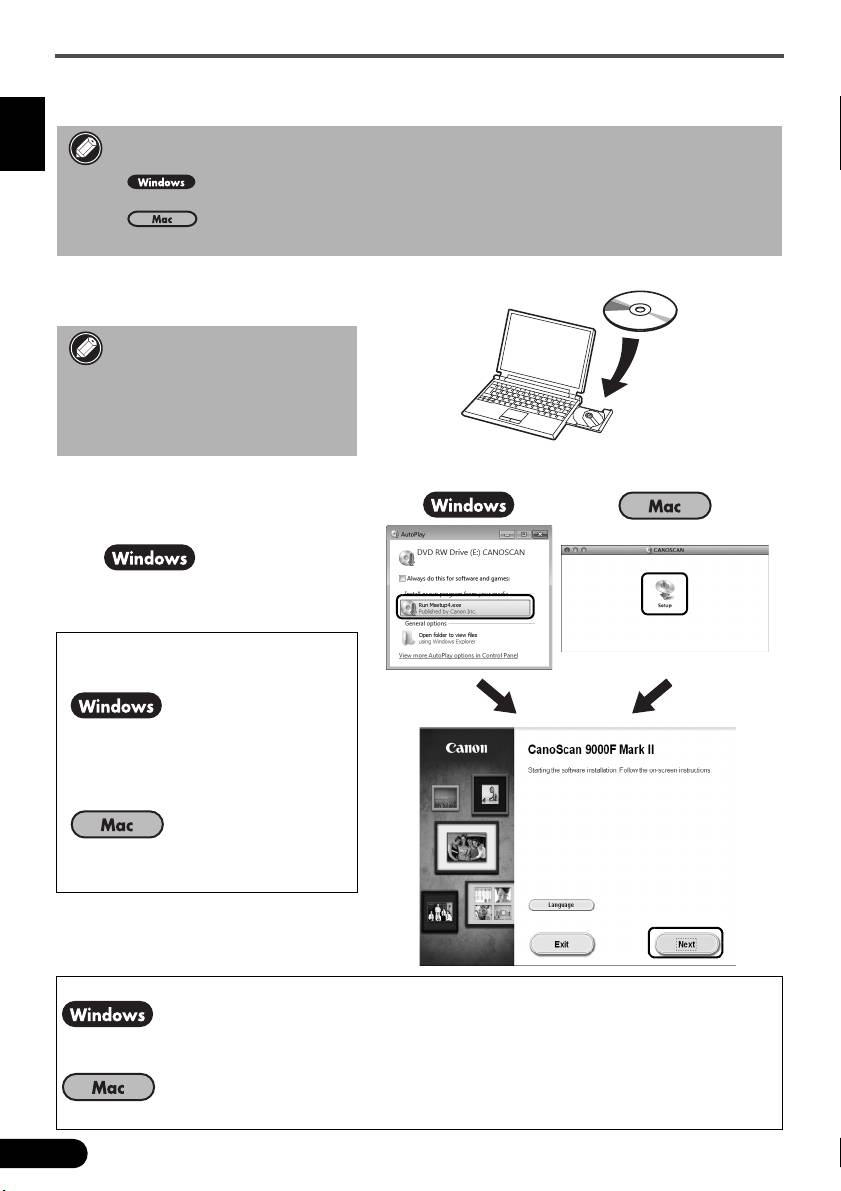
Installieren der Software
• Schließen Sie vor der Installation alle Anwendungen.
DEUTSCH
• Melden Sie sich über ein Administratorkonto an.
• Während der Installation ist möglicherweise eine Internetverbindung erforderlich.
Es fallen Verbindungsgebühren an.
• Während der Softwareinstallation ist eine Internetverbindung erforderlich.
Es fallen Verbindungsgebühren an.
1 Legen Sie die CD-ROM in den
Computer ein.
Wenn das USB-Kabel bereits
angeschlossen ist, ziehen Sie
es ab. Falls auf dem
Computerbildschirm eine
Meldung angezeigt wird, klicken
Sie auf Abbrechen (Cancel).
2 Befolgen Sie die Anweisungen
auf dem Bildschirm,
um fortzufahren.
Klicken Sie zur Auswahl einer
Sprache auf Sprache
(Language).
Falls die CD-ROM nicht
automatisch gestartet wird:
Doppelklicken Sie auf
Computer bzw. Arbeitsplatz
((My) Computer) > CD-ROM-
Symbol > MSETUP4.EXE.
Doppelklicken Sie auf das CD-ROM-
Symbol auf dem Desktop.
Befolgen Sie die Anweisungen auf dem Computerbildschirm, um die Installation abzuschließen.
Während der Installation werden Sie angewiesen, das USB-Kabel anzuschließen und das
Gerät einzuschalten.
Schließen Sie nach Abschluss der Installation das USB-Kabel an und schalten Sie das Gerät ein.
6
Installieren der Software
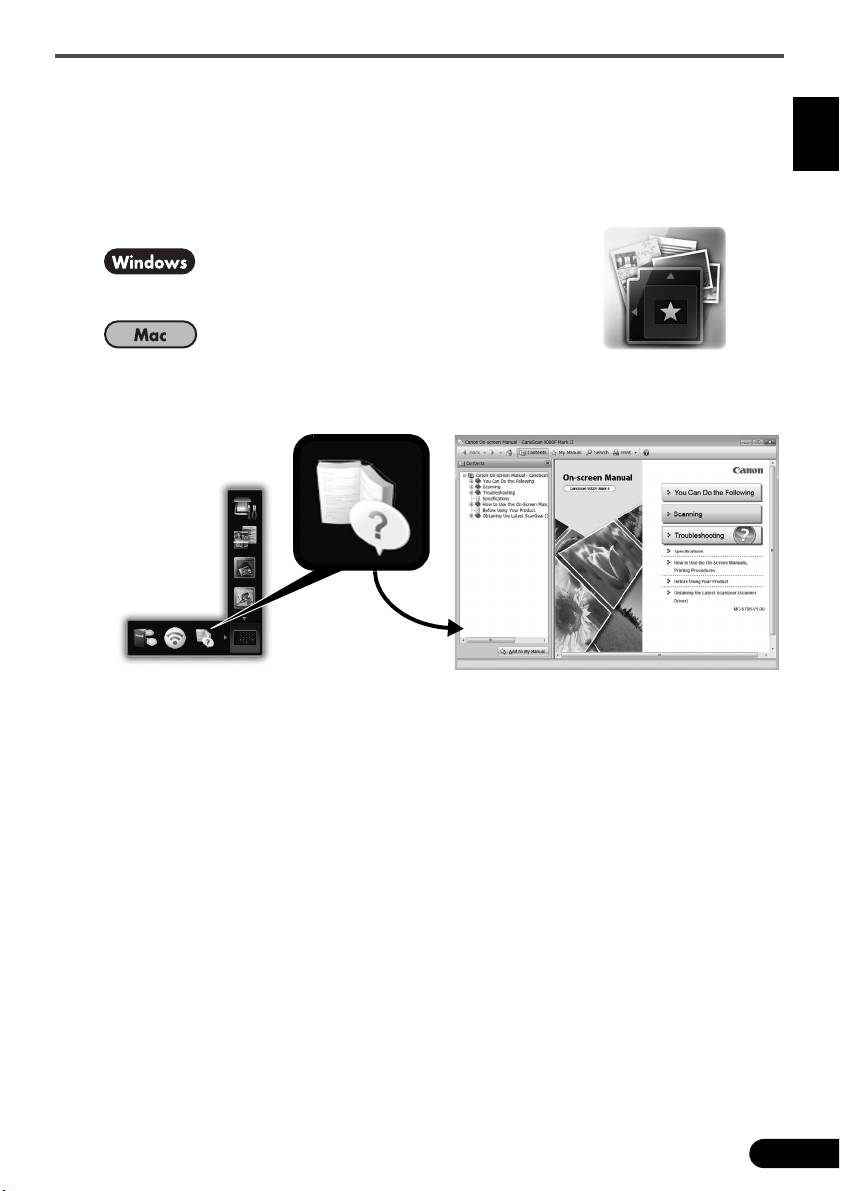
Verwenden Sie das On-Screen-Handbuch auf dem Computer
Weitere Informationen zu den Funktionen und der Verwendung der Software sowie Tipps zur
Fehlersuche finden Sie im „On-Screen-Handbuch“. Sie können das „On-Screen-Handbuch“
über das Quick Menu starten.
DEUTSCH
Starten vom On-Screen-Handbuch
1 Starten Sie das Quick Menu.
Doppelklicken Sie auf das Quick Menu-
Verknüpfungssymbol auf dem Desktop.
Kicken Sie auf das Quick Menu-Symbol im Dock.
2 Klicken Sie im Quick Menu auf das Symbol für das On-Screen-Handbuch.
• Die Installation von Quick Menu und „On-Screen-Handbuch“ ist erforderlich.
Unterstützte Dokumenttypen
• Ein Fotodokument und CD/DVD
• Mehrere Fotodokumente und CD/DVD
• Zeitschrift und Buch
•Filme
Je nach Dokumenttyp und Anzahl der Dokumente werden die Dokumente auf
unterschiedliche Art platziert. Weitere Informationen finden Sie im „On-Screen-Handbuch“.
7
Lisez ce guide avant d'utiliser ce scanner. Quand vous avez terminé la lecture de ce guide, rangez-le en
lieu sûr afin de pouvoir le consulter ultérieurement.
FRANÇAIS
Table des matières
Précautions de sécurité.................................. 3 Contenu de l'emballage ..................................4
Préparation du scanner .................................. 5 Installation des logiciels ..................................6
1
Guide de démarrage rapide
Guide de démarrage rapide

* Les captures d'écran ont été prises sous Windows 7 operating system Home Premium et
Mac OS X 10.7.x. Les écrans peuvent varier en fonction du système d'exploitation utilisé.
• Windows est une marque ou une marque déposée de Microsoft Corporation aux États-
Unis et/ou dans d'autres pays.
• Mac et Mac OS sont des marques d'Apple Inc., déposées aux États-Unis et dans d'autres
pays.
• Tous les autres noms et produits mentionnés ci-dessus sont susceptibles d'être des
FRANÇAIS
marques ou des marques déposées de leurs propriétaires respectifs.
Avertissement
Lorsque vous utilisez ce produit, vous devez être attentif aux aspects légaux suivants :
• La numérisation de certains documents, notamment les billets de banque,
les emprunts d'état et les certificats publics peut être interdite par la loi et peut
constituer un délit ou entraîner une responsabilité civile.
• La loi peut exiger que vous obteniez l'autorisation du détenteur des droits d'auteur
ou d'autres droits légaux avant de numériser un document.
Si vous n'êtes pas certain qu'il est légal de numériser un document particulier,
adressez-vous au préalable à votre conseiller juridique.
La prise doit être installée à proximité de l'appareil et être facilement accessible.
Remarques concernant la gestion de l'alimentation
À des fins d'économie d'énergie, ce produit est automatiquement mis hors tension au bout
d'une certaine période d'inactivité (fonction de mise hors tension automatique).
Pour plus d'informations sur la modification de ce paramètre, reportez-vous au « Manuel
àl'écran ».
Mise hors tension
Pour mettre le scanner hors tension, appuyez sur le bouton MARCHE (ON). Vérifiez que le
voyant ALIMENTATION (POWER) s'éteint, puis débranchez le cordon d'alimentation.
Si vous débranchez le cordon d'alimentation alors que le voyant ALIMENTATION (POWER)
est allumé ou clignote, l'unité de numérisation ne se déplace pas correctement
.
2
Précautions de sécurité
Précautions de sécurité
N'oubliez pas de lire les précautions suivantes avant d'utiliser le scanner et ses accessoires.
Pour plus d'informations sur les précautions à prendre pour éviter l'endommagement du
produit, reportez-vous au « Manuel à l'écran ».
AVERTISSEMENT
Avertissements concernant des opérations qui peuvent entraîner la mort ou causer des
FRANÇAIS
blessures si elles ne sont pas effectuées correctement. Afin d'utiliser le scanner en toute
sécurité, suivez toujours ces avertissements.
AVERTISSEMENT
Ce produit émet un flux magnétique faible. Si vous portez un stimulateur cardiaque et que
vous constatez des effets anormaux, éloignez-vous de l'appareil et consultez votre médecin.
AVERTISSEMENT
Pour éviter les risques d'incendie ou d'électrocution, respectez les consignes suivantes.
• Ne placez pas le scanner près de liquides inflammables tels que de l'alcool ou des
diluants.
• Utilisez exclusivement les câbles fournis.
• Ne branchez pas le cordon d'alimentation sur des prises ne fournissant pas les tensions
spécifiées.
• Branchez toujours complètement le cordon d'alimentation.
• Ne branchez pas et ne débranchez pas le cordon d'alimentation avec des mains
mouillées.
• Ne tirez pas sur le cordon d'alimentation et ne le pliez pas de façon excessive.
• Ne placez pas d'objets lourds sur le cordon d'alimentation.
• Ne tordez pas le cordon d'alimentation et ne le nouez pas.
• Ne branchez pas un nombre excessif de fiches sur une prise électrique.
• N'utilisez pas de barres multiprises.
• Par temps d'orage, débranchez le câble d'alimentation de la prise pour éviter d'utiliser le
scanner.
• Lors du nettoyage du scanner, débranchez toujours le cordon d'alimentation. N'utilisez
pas de liquides inflammables, tels que de l'alcool, du benzène ou des diluants. Essuyez
le scanner avec un chiffon doux et sec.
• Ne démontez pas le scanner et les accessoires et ne les modifiez pas.
Débranchez le cordon d'alimentation une fois par mois pour détecter d'éventuels problèmes
sur le cordon et la fiche (chaleur, rouille, pliure du cordon, rayures et fissures, etc.).
Débranchez le cordon d'alimentation et contactez le service d'assistance si vous constatez
l'un des problèmes répertoriés ci-dessus, car ils peuvent entraîner des risques d'incendie et
d'électrocution.
Si vous entendez des bruits inhabituels, si vous apercevez de la fumée, si vous sentez une
chaleur excessive ou une odeur étrange, si des pièces métalliques tombent ou encore si
vous versez de l'eau dans le scanner, débranchez immédiatement le cordon d'alimentation
et contactez le service d'assistance. L'utilisation du scanner dans ces conditions peut
entraîner des risques d'incendie ou d'électrocution.
3
Contenu de l'emballage
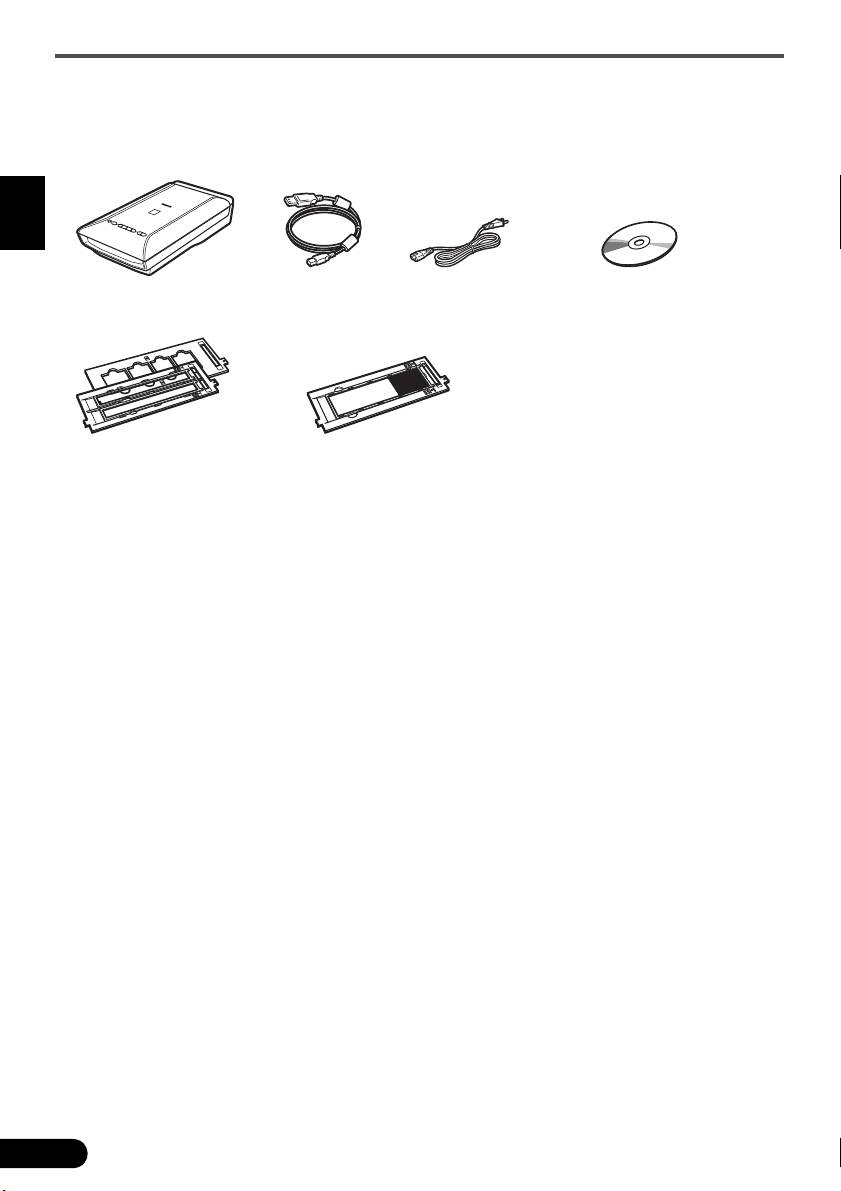
Contenu de l'emballage
Scanner et accessoires
FRANÇAIS
Documentation
• Guide de démarrage rapide (ce document)
• Documents supplémentaires
4
Scanner Câble USB
Cordon d'alimentation CD-ROM d'installation
Guides de film
Guide de film
(pour pellicule/diapositive 35 mm)
(pour film au format 120)
Préparation du scanner
Préparation du scanner
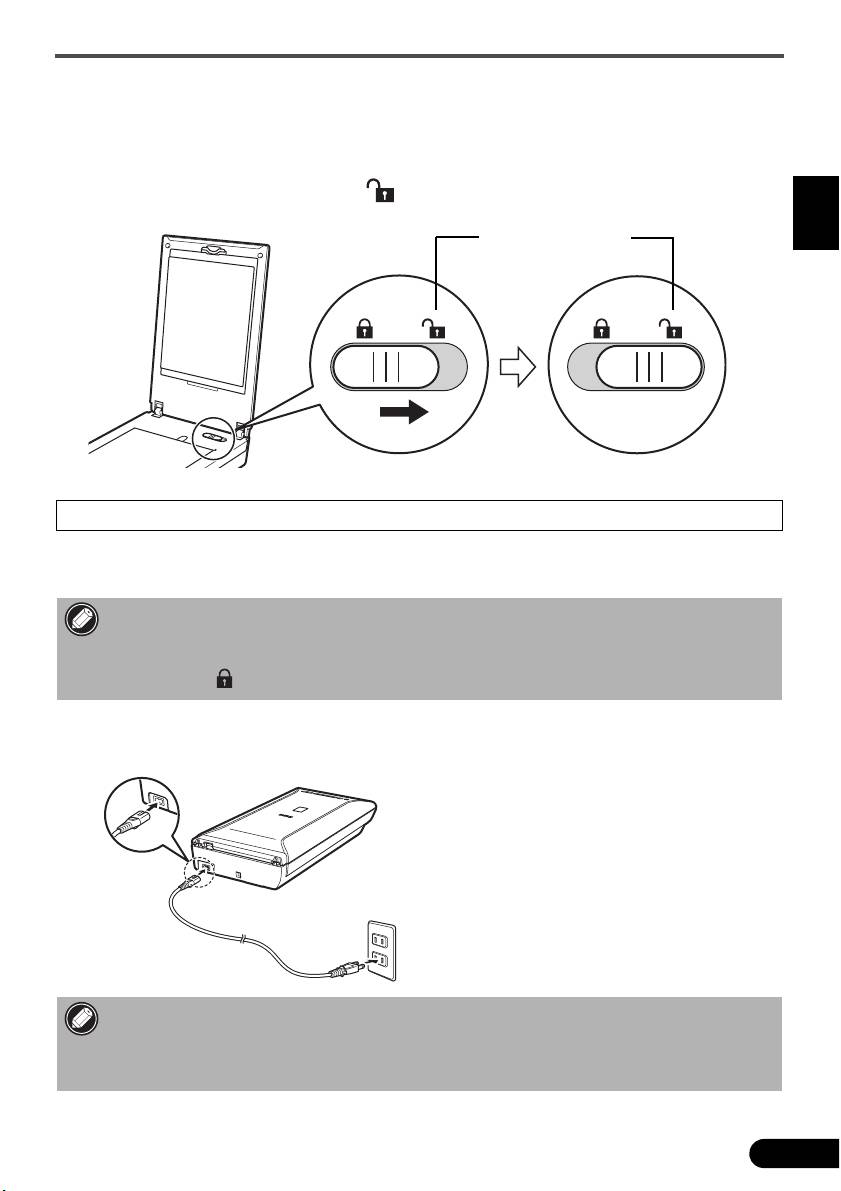
1 Retirez les bandes de protection du scanner.
2 Ouvrez le couvercle du scanner et faites glisser le bouton de verrouillage du scanner
vers le repère de déverrouillage ( ).
FRANÇAIS
• Le couvercle du scanner est verrouillé provisoirement avec un angle de verrouillage de 50 degrés.
3 Fermez le couvercle du scanner.
• Manipulez le scanner des deux mains. Veillez à ne pas le laisser tomber.
• Lorsque vous transportez le scanner, appuyez sur le bouton MARCHE (ON) pour le mettre
hors tension, puis veillez à faire glisser le bouton de verrouillage du scanner vers le repère de
verrouillage ( ) pour attacher l'unité de numérisation.
4 Branchez le cordon d'alimentation fourni sur le scanner.
5 Branchez le cordon d'alimentation sur la prise électrique.
• Utilisez exclusivement le cordon d'alimentation fourni avec le scanner. L'utilisation d'autres
câbles peut provoquer un dysfonctionnement.
• Raccordez toujours le cordon d'alimentation au scanner avant de le brancher sur la prise
électrique. L'inversion de cette séquence pourrait provoquer des dysfonctionnements.
5
Repère de déverrouillage
