
Canon LEGRIA HF R406: instruction
Class: Household, kitchen appliances, electronics and equipment
Type:
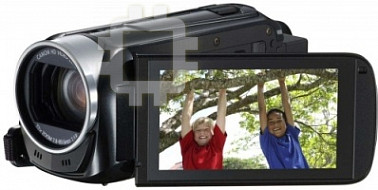
Manual for Canon LEGRIA HF R406
Table of contents
En
Fr
De
It
Es
Ru
Zh
Startup Guide
Guide de démarrage
Startanleitung
Guida introduttiva
Guía de inicio
Вводное руководство
PUB. DIM-1066-000
Jp
スタートアップガイド
Transfer Utility LE
COP
Y

Jp
02
Transfer Utility LE
を
インストール
すると
何
が
できるの?
PIXELA
社製のソフトウェア
Transfer Utility LE
を株式会社ピクセラのサイ
トからダウンロードして、
Windows
パソコンにインストールすると、撮
影した映像ファイル (
AVCHD
形式の動画 ) をパソコンに簡単に取り込め
ます。
● 映像ファイルのパソコンへの保存
− 撮影した
AVCHD
形式の映像ファイルをパソコンに取り込むことが
できます。
● 音楽ファイルのビデオカメラへの転送
− ビデオカメラで再生するときに使う音楽ファイル(
BGM
)を、パソ
コンから転送できます。付属の
iVIS
ディスクに入っている音楽ファ
イルをビデオカメラに転送するときなどに使用します。
本ソフトウェアの詳細は
Transfer Utility LE
取扱説明書(電子マニュア
ル)* をご覧ください。
* 株式会社ピクセラのサイト(後述)から
ファイルでダウンロードでき
ます。
ファイル をご覧いただくには、
Adobe
®
Reader
®
6
以降が必要
です。
Transfer Utility LE
と取扱説明書をダウンロードする
本ソフトウェアと取扱説明書は、株式会社ピクセラのサイトからダウン
ロードできます。下記サイトの案内に従ってダウンロードした
zip
ファイ
ルを、パソコン上でインストーラと取扱説明書に展開します。
http://pixela.jp/cjtule_dl/
COP Y

Jp
03
ソフトウェアをインストールする
以下は、ソフトウェアの主なシステム要件です。詳細な動作環境とインス
トール手順については、
Transfer Utility LE
取扱説明書をご覧ください。
*
Windows 7 / Windows 8
の
64
ビット版は、
2GB
以上。
OS
CPU
メモリー
Windows 8
Windows 7 SP1
Windows Vista SP2
Windows XP SP3
(
32
ビットのみ)
Intel
®
Core
™
以上
1 GB
以上 *
COP Y

En
04
After you download PIXELA’s software
Transfer Utility LE
from PIXELA’s Web
site and install it on your Windows computer, you can easily transfer to the
computer AVCHD movies you recorded. The following functions are available.
• Saving movies onto a computer
You can save your favorite AVCHD movies onto a computer.
• Transfer music files to the camcorder
After you transfer music files from the CD-ROM supplied with the
camcorder, you can use them as background music when you play back
recordings on the camcorder.
For more details, check the ‘Transfer Utility LE Software Guide’, which is a
PDF file* that you can download from PIXELA’s Web site.
* Adobe
®
Reader
®
6 or later is required to view the PDF file.
Downloading the software and software guide
You can download the software and software guide from PIXELA’s Web site.
Follow the instructions on the site below to download and open the ZIP file,
which contains the installation module and software guide.
http://pixela.jp/cetule_dl/ (English only)
Installing the software
See the ‘Transfer Utility LE Software Guide’ for step-by-step installation
instructions and full system requirements. Below are the main system
requirements.
* 2 GB for 64-bit versions of Windows 7 and Windows 8.
OS
CPU
RAM
Windows 8, Windows 7 SP1,
Windows Vista SP2,
Windows XP SP3 (32-bit only)
Intel
®
Core
™
1 GB*
COP Y

Fr
05
Après avoir téléchargé le logiciel
Transfer Utility LE
de PIXELA à partir du site
Web PIXELA et l’avoir installé dans votre ordinateur Windows, vous pouvez
transférer facilement à l’ordinateur les séquences vidéo enregistrées. Les
fonctions suivantes sont disponibles.
• Sauvegarde de séquences vidéo dans un ordinateur
Vous pouvez sauvegarder vos séquences vidéo AVCHD favorites sur un
ordinateur.
• Transfert de fichiers musicaux dans le caméscope
Après avoir transféré des fichiers musicaux du CD-ROM fourni avec le
caméscope, vous pouvez les utiliser comme musique de fond lors de la
lecture d’enregistrements sur le caméscope.
Pour plus de détails, vérifiez le ‘Guide du logiciel Transfer Utility LE’, qui est un
fichier PDF* que vous pouvez télécharger à partir du site Web de PIXELA.
* Adobe
®
Reader
®
6 ou ultérieur est nécessaire pour afficher le fichier PDF.
Téléchargement du logiciel et du guide du logiciel
Vous pouvez télécharger le logiciel et le guide du logiciel du site Web PIXELA.
Suivez les instructions sur le site ci-dessous pour télécharger et ouvrir le
fichier ZIP contenant le module d’installation et le guide du logiciel.
http://pixela.jp/cetule_dl/ (Seulement en anglais)
Installation du logiciel
Consultez le ‘Guide du logiciel Transfer Utility LE’ pour les instructions
d’installation étape par étape et toutes les conditions système. Voici les
exigences système principales.
* 2 Go pour les versions à 64 bits de Windows 7 et Windows 8.
Système d’exploitation
Processeur
RAM
Windows 8, Windows 7 SP1,
Windows Vista SP2,
Windows XP SP3 (32 bits uniquement)
Intel
®
Core
™
1 Go*
COP Y

De
06
Nachdem Sie die Software
Transfer Utility LE
von PIXELA von der PIXELA-
Website heruntergeladen und auf Ihrem Windows-Computer installiert haben,
können Sie AVCHD-Filme, die Sie aufgenommen haben, mühelos auf den
Computer übertragen. Die folgenden Funktionen sind verfügbar:
• Filme auf einem Computer speichern
Sie können Ihre AVCHD-Lieblingsfilme auf einem Computer speichern.
• Musikdateien auf den Camcorder übertragen
Nachdem Sie Musikdateien von der im Lieferumfang des Camcorders
enthaltenen CD-ROM übertragen haben, können Sie sie als
Musikuntermalung verwenden, wenn Sie Aufnahmen am Camcorder
wiedergeben.
Weitere Informationen finden Sie im ‘Software-Handbuch Transfer Utility LE’.
Dies ist eine PDF-Datei*, die Sie von der PIXELA-Website herunterladen
können.
* Zum Lesen der PDF-Datei ist Adobe
®
Reader
®
6 oder höher erforderlich.
Herunterladen der Software und des Software-Handbuchs
Sie können die Software und das Software-Handbuch von der PIXELA-
Website herunterladen. Folgen Sie den Anweisungen auf der unten
angegebenen Website, um die ZIP-Datei mit dem Installationsmodul und dem
Softwarehandbuch herunterzuladen und zu öffnen.
http://pixela.jp/cetule_dl/ (nur in englischer Sprache)
Installieren der Software
Eine schrittweise Anleitung zur Installation und die komplette Liste der
Systemanforderungen finden Sie im ‘Software-Handbuch Transfer Utility LE’.
Die wichtigsten Systemanforderungen sind:
* 2 GB bei den 64-Bit-Versionen von Windows 7 und Windows 8.
Betriebssystem
CPU
RAM
Windows 8, Windows 7 SP1,
Windows Vista SP2,
Windows XP SP3 (nur 32-Bit)
Intel
®
Core
™
1 GB*
COP Y

It
7
Dopo aver scaricato il software PIXELA
Transfer Utility LE
dal sito Web di
PIXELA e averlo installato sul vostro computer Windows, potrete trasferire
facilmente al computer i filmati AVCHD che avete registrato. Sono disponibili le
seguenti funzioni:
• Salvataggio di filmati sul computer
Potete salvare i vostri filmati AVCHD preferiti su un computer.
• Trasferimento di file musicali alla videocamera
Dopo aver trasferito sulla videocamera i file musicali contenuti sul CD-ROM
fornito in dotazione, potrete utilizzarli come musica di sottofondo durante la
riproduzione delle registrazioni sulla videocamera.
Per informazioni dettagliate, consultate la ‘Guida del software Transfer Utility
LE’, che è un file in formato PDF* reperibile sul sito Web di PIXELA.
* Per la visualizzazione di file in formato PDF è necessario utilizzare Adobe
®
Reader
®
versione 6 o successiva.
Come scaricare il software e la guida del software
Potete scaricare il software e la guida del software dal sito Web di PIXELA.
Seguite le istruzioni fornite nel sito Web indicato di seguito per scaricare e
aprire il file ZIP contenente il modulo di installazione e la guida al software.
http://pixela.jp/cetule_dl/ (solo in inglese)
Installazione del software
Per istruzioni dettagliate sull’installazione del software e requisiti di sistema,
consultate la ‘Guida del software Transfer Utility LE’. Di seguito si elencano i
requisiti di sistema principali.
* 2 GB per le versioni a 64 bit di Windows 7 e Windows 8.
Sistema operativo
CPU
RAM
Windows 8, Windows 7 SP1, Windows Vista SP2,
Windows XP SP3 (solo 32 bit)
Intel
®
Core
™
1 GB*
COP Y

Es
8
Una vez que haya descargado el software
Transfer Utility LE
de PIXELA
desde el sitio web de PIXELA y lo haya instalado en el ordenador Windows,
podrá transferir fácilmente al ordenador las películas AVCHD que haya
grabado. Tiene a su disposición las siguientes funciones.
• Guardar películas en un ordenador
Puede guardar sus peliculas AVCHD favoritas en un ordenador.
• Transferir archivos de música a la videocámara
Una vez que haya transferido los archivos de música desde el CD-ROM
suministrado con la videocámara, podrá utilizarlos como música de fondo
cuando vuelva a reproducir las grabaciones en la videocámara.
Para obtener más información, consulte la ‘Guía de software Transfer Utility
LE’, que es un archivo PDF* que podrá descargar desde el sitio web de
PIXELA.
* Se requiere Adobe
®
Reader
®
6 o posterior para poder visualizar el archivo PDF.
Descarga del software y de la guía de software
Puede descargar el software y la guía de software desde el sitio web de
PIXELA. Siga las instrucciones del sitio a continuación para descargar y abrir
el archivo ZIP que contiene el módulo de instalación y la guía de software.
http://pixela.jp/cetule_dl/ (solo en inglés)
Instalación del software
Consulte la ‘Guía de software Transfer Utility LE’ para obtener las
instrucciones de instalación paso a paso y los requisitos del sistema
completos. A continuación puede encontrar los principales
requisitos del sistema.
* 2 GB para versiones de 64 bits de Windows 7 y Windows 8.
Sistema operativo
CPU
RAM
Windows 8, Windows 7 SP1, Windows Vista SP2,
Windows XP SP3 (solo de 32 bits)
Intel
®
Core
™
1 GB*
COP Y

Ru
9
После загрузки программного обеспечения
Transfer Utility LE
,
разработанного корпорацией PIXELA, с веб-сайта PIXELA и установки
его на компьютер с операционной системой Windows можно с
легкостью передавать на компьютер записанные AVCHD-видеофильмы.
Доступны следующие функции.
• Сохранение видеофильмов на компьютер
Можно сохранить любимые AVCHD-видеофильмы на компьютер.
• Передача музыкальных файлов на видеокамеру
После передачи музыкальных файлов с CD-диска, поставляемого в
комплекте с видеокамерой, их можно использовать в качестве фона
при воспроизведении записей на видеокамере.
Подробнее см. руководство по использованию ‘Руководство по
программному обеспечению Transfer Utility LE’ PDF-файл*, который
можно загрузить с веб-сайта PIXELA.
* Для просмотра PDF-файла необходима программа Adobe® Reader® 6 или ее
более поздняя версия.
Загрузка программного обеспечения и руководства по
использованию программного обеспечения
Программное обеспечение и руководство по использованию
программного обеспечения можно загрузить с веб-сайта PIXELA.
При загрузке и открывании ZIP-файла, содержащего установочный
модуль и руководство по использованию программного обеспечения,
следуйте приведенным ниже инструкциям на веб-сайте.
http://pixela.jp/cetule_dl/ (только на английском языке)
Установка программного обеспечения
Пошаговые инструкции по установке и полный перечень требований к
системе см. в руководстве по использованию ‘Руководство по
программному обеспечению Transfer Utility LE’. Ниже указаны основные
требования к системе.
* 2 ГБ для 64-битовых версий Windows 7 и Windows 8.
ОС
Процессор
ОЗУ
Windows 8, Windows 7 SP1, Windows Vista SP2,
Windows XP SP3 (только 32-битовая версия)
Intel® Core™
1 ГБ*
COP Y

Zh
10
从 PIXELA 网站下载 PIXELA 的
Transfer Utility LE
软件,然
后安装在 Windows 计算机上,便可将记录的 AVCHD 影片轻松传
输到计算机。
Transfer Utility LE
软件提供了以下功能。
•
将影片保存到计算机
可将喜爱的 AVCHD 影片保存到计算机。
•
将音乐文件传输到摄像机
将摄像机随附 CD-ROM 上的音乐文件传输到摄像机后,在摄像
机上播放记录时便可将这些音乐用作背景音乐。
有关更多详细信息,请查看 PDF 文件格式
*
的 ‘Transfer
Utility LE 软件手册’(可从 PIXELA 网站下载)。
*
查看该 PDF 文件需要使用 Adobe
®
Reader
®
6 或更高版本。
下载软件和软件手册
可从 PIXELA 网站下载软件和软件手册。
根据下面网站上的说明下载并打开 ZIP 文件 (其中包含安装模
块和软件手册)。
http://pixela.jp/cetule_dl/ (仅英语)
安装软件
有关详细的安装步骤说明和完整的系统要求,请参阅
‘Transfer Utility LE 软件手册’。以下是主要的系统要求。
*
Windows 7 和 Windows 8 64 位版本,2 GB。
OS
CPU
RAM
Windows 8、Windows 7 SP1、
Windows Vista SP2、
Windows XP SP3 (仅限 32 位)
Intel
®
Core
™
1 GB
*
COP Y
PUB. DIM-1066-000
© CANON INC. 2013


