
Acme MP01: 3.7.2 Copy under File Manager 4 UPGRADING THE FIRMWARE
3.7.2 Copy under File Manager 4 UPGRADING THE FIRMWARE: Acme MP01
Table of contents
- 1 USER INFORMATION 1.1 Preface
- 2 PRODUCT INTRODUCTION 2.1 Product Overview
- 2.2 Package Contents 2.3 Connection 2.3.1 Power connection
- 2.3.2 Connect to Computer 2.3.3 TV connection 2.3.3.1 A/V OUT
- 2.3.3.2 HDMI OUT 2.3.4 USB Mass Storage Device (like USB stick, USB drive etc.) Connection
- 2.3.5 Connecting a Memory Card 2.4 Front Panel
- 2.5 Back Panel 2.7 Menu Language
- 2.7 Remote Control
- No. Button Function
- 3 MAIN FUNCTIONS 3.1 Setup Menu 3.1.1 Changing System Settings
- Menu Language Screen Saver
- 3.1.2 Changing Audio Settings 3.1.3 Changing Video Settings
- Aspect Ratio TV SYSTEM 3.1.4 Miscellaneous
- 3.2 Movie Playback 3.2.1 Movie Library Options
- 3.2.2 Movie Playback Control 3.2.3 Movie Playback Options
- 3.3 Photo Playback 3.3.1 Photo Library Options
- 3.3.2 Photo Playback Control 3.3.3 Photo Playback Options
- 3.4 Music Playback 3.4.1 Music Library Options
- 3.4.2 Music Playback Control 3.4.3 Music Playback Options
- 3.5 File Manager 3.5.1 File Manager Options
- 3.6 Playlist management 3.6.1 Music playlist
- 3.6.2 Photo Album
- 3.7 Copy Function 3.7.1 Copy under Media Library
- 3.7.2 Copy under File Manager 4 UPGRADING THE FIRMWARE
- 5 APPENDIXES 5.1 Specifications
- 5.2 Frequently Asked Questions
- 6 COPYRIGHTS AND TRADEMARKS
GB
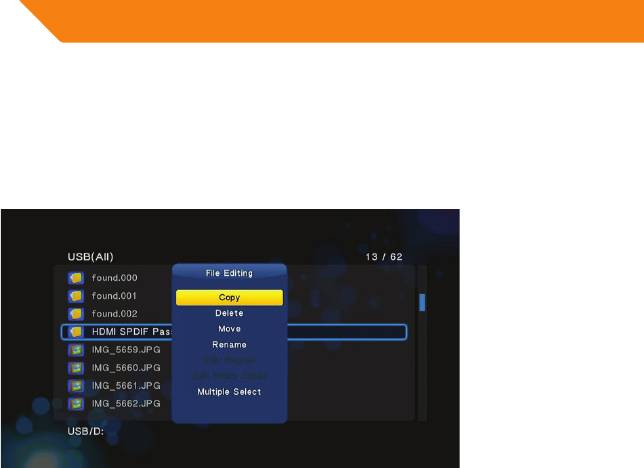
3.7.2 Copy under File Manager
Press Edit button to enter file editing menu, choose Copyandfollowtheprompt
onscreentofinishtheprocess.Ifyouwanttoselectmorefilesandfolders,please
choose Multiple Select to enter the file selecting menu.
4 UPGRADING THE FIRMWARE
The firmware is the operating system (OS) installed on the device. Firmware
upgradescanbringnewfeatures,improvementsandbugfixes.
Step 1, Copy ‘install.img’ to the root directory of a USB stick, and connect it to the
USBHOSTportoftheplayer.
Step 2, Press and hold the power/standby button on the front panel, and do not
loosen.
Step 3,PlugthepowercableintotheDCINjack,waitforabout5secondsormore,
and then loosen your finger on the power/standby button;
Firmwareinstallationwillstart.Thereisanotherwayforupgrading.Pleasereferto
USB Update in chapter ‘3.1.4 Miscellaneous’ for more details.
26


