
Acme BTC500: instruction
Class: Computer Accessories
Type:
Manual for Acme BTC500
Table of contents
- User’s Manual About the Car Kit Overview
- Charging the Car Kit Using the USB Car Charger Using Solar Power
- Basic Operation Power on/off Pairing with a Bluetooth Mobile Phone
- Built-in Phone Book Function
- Call Records Making a Call with the Car Kit
- The operation is as follows:
- Call waiting
- FAQs What should I do when there is interference? What should I do when there is no sound? What should I do when the BTC500 doesn’t connect to my mobile phone? What should I do when BTC500 can’t be turned off?
- Specifications
- Care and maintenance
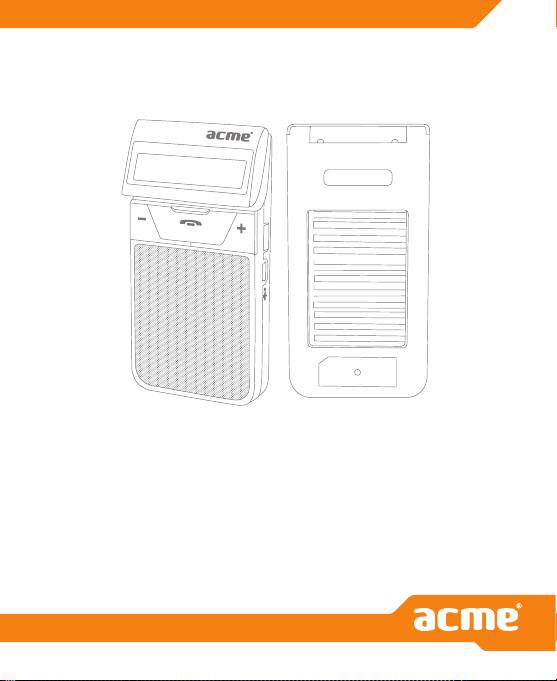
Model: BTC500
solar bluetooth
hands-free car kit
www.acme.eu
GB
User’s Manual
Congratulations on your purchase of this ACME solar Bluetooth hands-free car
kit, BTC500. Please read this user’s manual carefully before use.
About the Car Kit
BTC500 is a solar-powered Bluetooth hands-free car kit. It has the following
features:
• Answer a call, end a call and reject a call
• Redial last number
• Voice dial (This function needs to be supported by your mobile phone)
• Volume control
• Call transfer between your mobile phone and the car kit
• Microphone mute
• LCD showing caller ID
• Caller ID memory
• Built-in phone book
• Charging by solar power
• Full duplex DSP for echo cancellation and noise reduction
• Call waiting
Overview
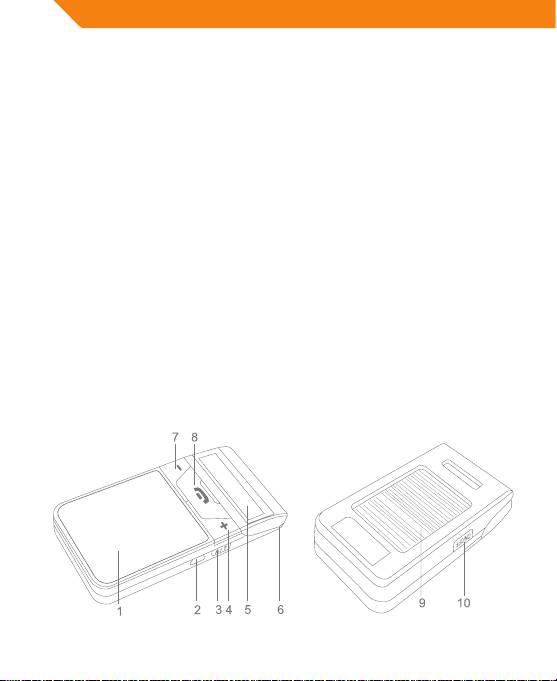
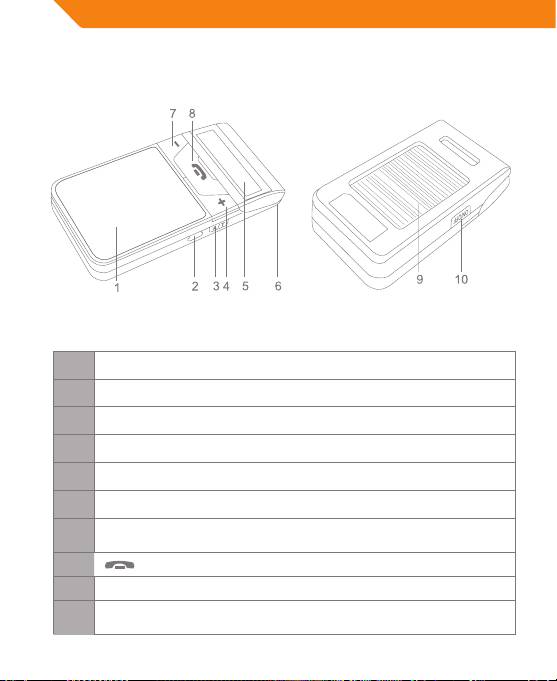
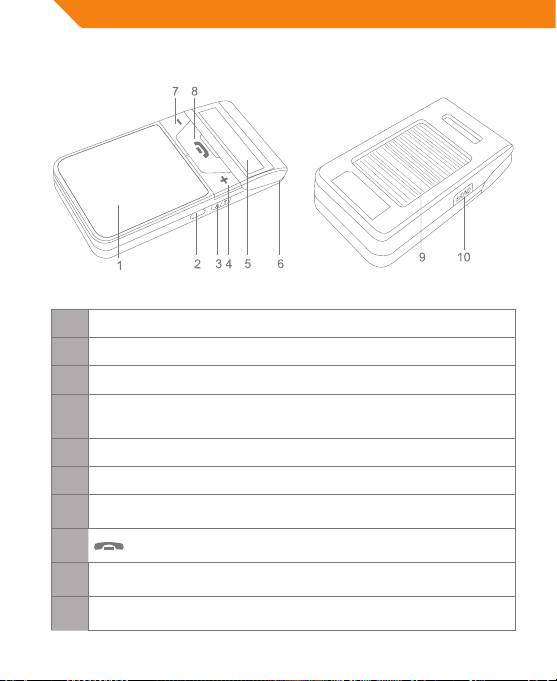
Front of Main Body Back of Main Body
2
GB
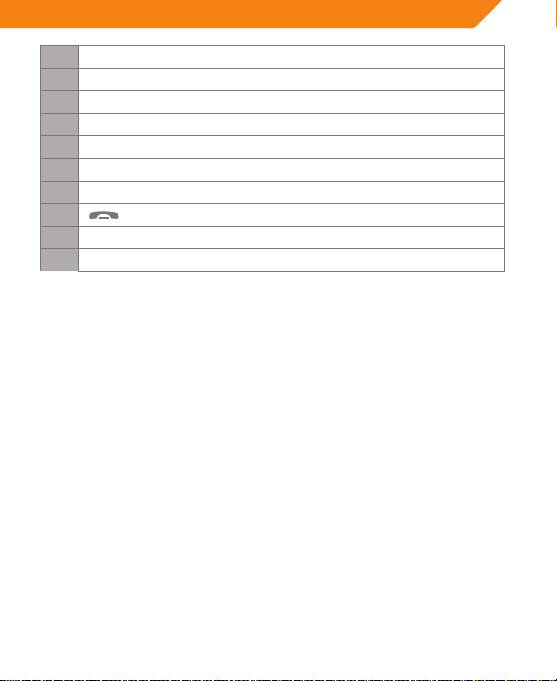
1 Loudspeaker
2 USB port - Charging port
3 A/T button - Phone book transfer
4 + button - Increase the volume, see last phone number
5 LCD screen - Display current status
6 Microphone
7 – button - Reduce the volume, see next phone number
8
button - Multi-function button (MFB)
9 Solar panel
10 ON/OFF button - Power on/o, enter pairing mode
Charging the Car Kit
The car kit comes with a built-in rechargeable Li-polymer battery, prior to using
it, it is recommended to charge the battery fully for the rst time.
When the LCD screen displays a low power icon and a “DU” tone can be heard
every 15 seconds, you have to recharge the battery of the car kit.
Using the USB Car Charger
Please connect the car kit to car cigarette lighter socket using USB car charger. It
will take about 2 hours to charge the battery fully.
Using Solar Power
Please stick the car kit onto the car windshield, when the car is in sunlight, the
car kit will be able to use the sunlight to charge its battery. It will take about
28hours to charge the battery fully.
While charging is in progress, the battery icon on the LCD will blink. It will stop
blinking after charging has completed.
Note: If you want to charge the battery of the car kit by using solar power, you
must rst turn on the car kit.
3
GB
Basic Operation
Power on/off
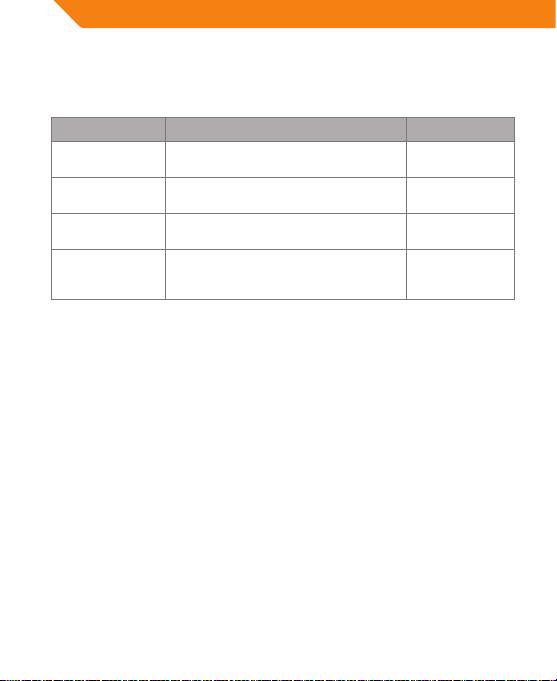
Function Operation LCD indicator
Power on Press and hold ON/OFF button for
Power On
about 2 seconds
Power o Press and hold ON/OFF button for
Power O
3~5 seconds
Entering
When power is o, press and hold
Pairing...
pairing mode
ON/OFF button for 6~7 seconds
Reset to power
Press ON/OFF button and volume +
None
o
button simultaneously to reset the
car kit
Note: The car kit will turn o automatically if it is in standby mode and can’t
connect to any devices after 10 minutes.
Pairing with a Bluetooth Mobile Phone
Prior to using the car kit for the rst time, you have to pair it with a Bluetooth-
enabled mobile phone. The pairing procedures are dierent for all models of
mobile phones. Please refer to the user manual of your mobile phone for further
information. The general pairing procedures are as follows:
1. Keep the car kit and your Bluetooth mobile phone within 1 metre when
pairing;
2. Make sure the car kit is turned o, otherwise turn it o;
3. Press and hold the ON/OFF button for about 6~7 seconds until the LCD
screen displays “Pairing…” Now the car kit entered pairing mode;
4. Activate your mobile phone’s Bluetooth function and search for Bluetooth
devices. After the search is completed, select “BTC500” from the Bluetooth
device list;
5. As directed, enter either password or PIN No: “0000”, and press “Yes” or
“conrm”;
6. After successful pairing, select “BTC500”from the Bluetooth device list and
press“connect”. After successful connecting, the LCD screen will display the
name of your mobile phone.
4

GB
Notes:
• Pairing mode will last 3 minutes. The BTC500 will switch to standby mode
automatically if it can’t pair with any devices after 3 minutes. Standby mode
will remain activated until the BTC500 runs out of power. If you want to
continue to pair BTC500 with a Bluetooth device, please turn o the BTC500
rst and pair again according to steps 1~6 mentioned above.
• The BTC500 can remember 8 paired devices. When the number of paired
devices exceeds 8, the rst one will be replaced.
• When BTC500 is turned on but doesn’t connect to any devices, you can press
the MFB once to connect the BTC500 to the last connected device.
• Every time the BTC500 is turned on, it will connect to the last connected
device automatically. If you want to pair it with other devices, please turn o
the Bluetooth function of the last connected devices rst and then try to pair
the BTC500 with a new device according to steps 1~6 mentioned above.
Built-in Phone Book Function
The car kit has a built-in phone book. You can transfer the phone book from your
mobile phone to the car kit, which will be more convenient for you to make a call
with the car kit.
1. Transferring the phone book from a mobile phone via AT command:
Please make sure the BTC500 and the mobile phone are connected to each
other and press and hold A/T button for about 3 seconds to start transfer.
The LCD screen will display “SYNC Phonebook” and then will display the
searching phone number during the transfer. If there are no phone numbers
in searching position, the LCD screen will display “Downloading”. After the
transfer is completed, the LCD screen will display “SYNC DONE”. If the transfer
has failed, the LCD screen will display “Sync Fail”.
2. Transferring phone numbers via OPP (Object Push Prole): When BTC500 and
your mobile phone are paired or connected, you can transfer phone numbers
from your mobile phone to the BTC500. Please refer to the user manual of
your mobile phone for further information.
3. Displaying phone book: Briey press A/T button once to display names and
telephone numbers. When the name is Chinese, just the phone number will
be displayed. Press volume + button or volume – button to see the previous/
next phone number.
4. Erasing the phone book: Briey press A/T button once to enter the phone
book and the LCD screen will now display a phone number, and then press
the
button for about 5 seconds, the LCD screen will display “Erase all?”.
If you want to erase all phone numbers, briey press the button once
and the LCD screen will display “Erase Complete”. The phone book has been
5

GB
deleted.
5. Erasing a single phone number: Briey press the A/T button to enter the
phone book. The LCD screen will display the rst phone number now. By
pressing volume + button or volume – button, you can search for the phone
number you want to erase and by pressing the volume + and volume –
button simultaneously, the phone number will be deleted. The LCD screen
now displays “Erase Complete”.
Notes:
• When the phone number being transferred already has been sent to BTC500,
the LCD screen will display “Same Number” and prompt “SYNC DONE” while
exiting the transfer. When you use the BTC500 to extract all phone numbers
from a mobile phone, the LCD screen will display “Same Number” when
encountering an already copied number and move on to the next one.
• The car kit’s phone book can store 400 phone numbers at most. When
transferring the phone book from a mobile phone via AT command, the
BTC500 can only search 400 phone numbers stored in the mobile phone and
200 phone numbers stored in the SIM card.
• When transferring the phonebook from the mobile phone via AT command,
an HFP connection will be used.
Call Records
BTC500 can store the last 20 call records, including received calls and missed calls.
1. Checking call records: When the BTC500 is in standby mode and connected
to a device, briey press volume + button or volume – button to check the
call records. The LCD screen will display corresponding phone number and
contact name, simply press
button to dial the phone number.
2. Erasing call records: When the LCD screen displays a phone number, press
volume + button and volume – button simultaneously to erase the current
phone number. After deletion, the LCD screen will display “Erase Complete”.
Making a Call with the Car Kit
You can make a call with the BTC500 when it connects to a mobile phone, and
you can make a call in dierent ways.
1. Make a call from your mobile phone: Find the number you want to dial
from the phone book of mobile phone and dial it.
2. Make a call from the phone book of the BTC500: When BTC500 is in
standby mode, briey press A/T button once to open the phone book of
the BTC500, LCD screen will display the phone book of the BTC500, and
then press the volume + button or volume – button to see previous or next
6
GB
phone number to nd the number you want to dial, nally briey press
the button.
3. Make a call from the call records of the BTC500: When the BTC500 is in
standby mode, briey press the volume + button or volume – button once
to open the call records of the BTC500, LCD screen will display the last
incoming call, and then press volume + button or volume – button to see
previous or next phone number to nd the number you want to dial, nally
briey press button.
4. Redial last number from the BTC500: Double click the button to dial
last number.
The operation is as follows:
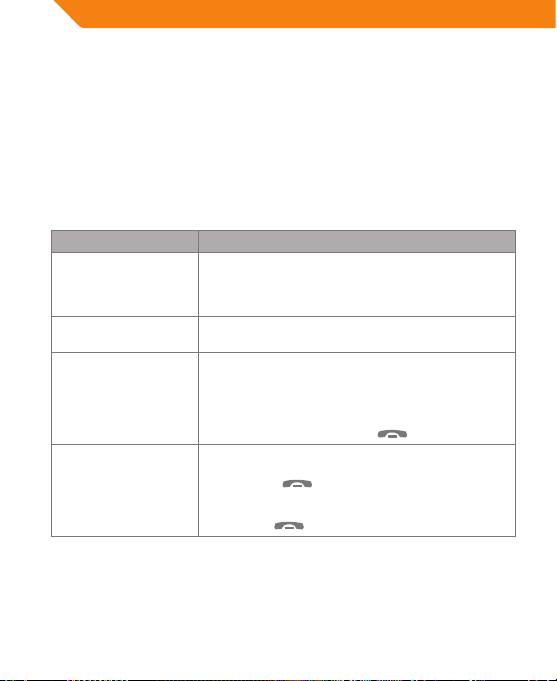
Function Operation
Voice dial Briey press the button once
Redial last number Double click the button
Cancel calling Briey press the
button once
Volume up Briey press the volume + button
Volume down Briey press the volume – button
End a call Briey press the
button once
Answer a call Briey press the
button once
When there is an incoming call, briey press the
Reject a call
button twice
Transfer call (BTC500
Press and hold the volume + button for 2 seconds
to mobile phone)
Transfer call (mobile
Press and hold the volume + button for 2 seconds
phone to the BTC500)
Microphone mute Press and hold the volume – button for 2 seconds
Cancel mute Press and hold the volume – button for 2 seconds
Reconnection Briey press the
button once
7
GB
Notes:
• Not all mobile phones support all the functions listed above. Please refer to
your mobile phone’s user’s manual for further information.
• When the volume is adjusted to max. or min. you will hear a long “DU” tone.
• When pressing the answer button on some mobile phones, the call will be
transferred to the mobile phone. You have to switch the call to the hands-free
car kit manually then. Please refer to your mobile phone’s user’s manual for
further information.
Call waiting
The BTC500 supports call waiting function, so you will never have to worry about
missing a call while talking on the phone. It requires your mobile phone to have
call waiting function enabled.
Function Operation
Incoming ring When there is a new incoming call, BTC500 will ring
End current call and then
When there is a new incoming call, briey press the
answer a new call
MFB button once
Keep current call and
When there is a new incoming call, press and hold
then answer a new call
the MFB button for about 2 seconds
Press and hold the MFB button for about 2 seconds
Call transfer
during a call
End current call and
then switch to the call to
Briey press the MFB button once during a call
be kept
Note: When there is a new incoming call, the LCD screen will display the caller
ID. When put through and during call, the LCD screen will display” calling” all
the time.
8

GB
FAQs
What should I do when there is interference?
1. Keep a little distance between the BTC500 and your mobile phone to
minimize interferences due to mobile phone radiation;
2. Stay within the Bluetooth operating range and avoid barriers between the
devices to ensure good conversation quality.
What should I do when there is no sound?
1. Make sure the BTC500 is charged and turned on;
2. Ensure the BTC500 is connected to your mobile phone. If they are not
connected, press MFB once to reconnect or check your mobile phone’s
Bluetooth device list.
What should I do when the BTC500 doesn’t connect to my
mobile phone?
1. Make sure the BTC500 is charged and turned on;
2. Ensure the BTC500 is paired with your mobile phone;
3. Make sure your mobile phone’s Bluetooth function is turned on, refer to its
user’s manual for further information;
4. Keep the BTC500 and your mobile phone within 10 metres and make sure
there are no barriers like walls or other electronic devices between them.
5. Try pairing your cell phone with BTC500 again in case you still encounter
diculties.
What should I do when BTC500 can’t be turned off?
Press ON/OFF button and volume + button simultaneously to turn o the
BTC500.
9
GB
Specifications
Bluetooth specication Bluetooth V2.1
Bluetooth proles supported HSP and HFP
Operating distance Up to 10 metres Class II
Talk time Up to 10 hours
Standby time Up to 160 hours
Charging input voltage DC 5 V
Charging time About 2 hours
Solar panel 5.5V
50mA
Working temperature -10~60°C
Storage temperature -20~70°C
Dimensions 106×54×15mm
Main body: 65g
Weight
Windshield mount: 14g
10

GB
Care and maintenance
Your device is a product of superior design and craftsmanship and should be
treated with care. The suggestions below will help you protect your warranty
coverage.
• Keep all accessories and enhancements out of the reach of small children.
• Keep the device dry. Precipitation, humidity, and all types of liquids or
moisture can contain minerals that will corrode electronic circuits. If your
device does get wet, allow it to dry completely.
• Do not use or store the device in dusty, dirty areas. Its moving parts and
electronic components can be damaged.
• Do not store the device in hot areas. High temperatures can shorten the life of
electronic devices, damage batteries, and warp or melt certain plastics.
• Do not store the device in cold areas. When the device returns to its normal
temperature, moisture can form inside the device and damage electronic
circuit boards.
• Do not drop, knock, or shake the device. Rough handling can break internal
circuit boards and ne mechanics.
• Do not use harsh chemicals, cleaning solvents, or strong detergents to clean
the device.
• Do not paint the device. Paint can clog the moving parts and prevent proper
operation.
All of the above suggestions apply equally to your device, battery, charger, or
any enhancement. If any device is not working properly, take it to the nearest
authorized service facility.
11
LT
Naudotojo vadovas
Priekinė korpuso pusė Galinė korpuso pusė
1 Garsiakalbis
2 USB prievadas – įkrovimo prievadas
3 A/T mygtukas – telefonų knygos perkėlimas
4 + mygtukas – garsinimas, paskutinio telefono numerio peržiūrėjimas
5 Skystųjų kristalų ekranas – rodoma esama būsena
6 Mikrofonas
– mygtukas – garso sumažinimas, kito telefono numerio
7
peržiūrėjimas
8
mygtukas – daugiafunkcis mygtukas (MFB)
9 Saulės baterija
ON/OFF mygtukas – įjungimas (išjungimas), poravimo režimo
10
įvedimas
12
LT
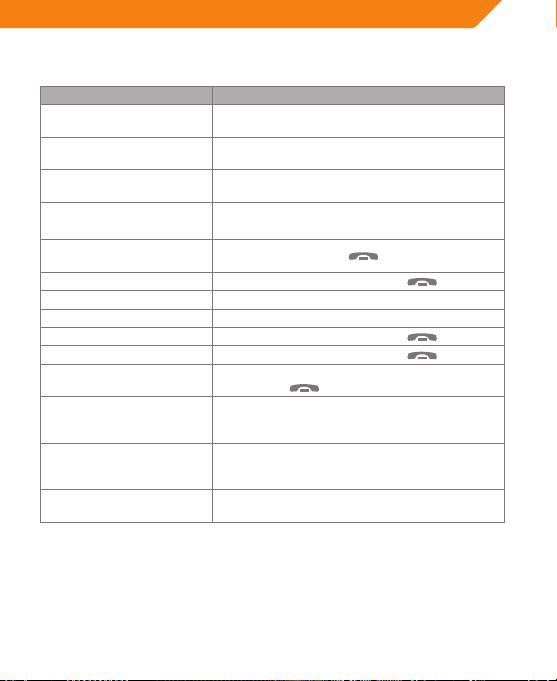
Pagrindinės funkcijos
Funkcija Veiksmas
Įjungimas Nuspauskite ON/OFF mygtuką ir laikykite jį
nuspaustą apie 2 sekundes.
Išjungimas Nuspauskite ON/OFF mygtuką ir laikykite jį
nuspaustą 3–5 sekundes.
Poravimo režimo įvedimas Išjungę prietaisą, nuspauskite ON/OFF mygtuką
ir laikykite jį nuspaustą 6–7 sekundes.
Nustatymas iš naujo Kartu nuspauskite ON/OFF mygtuką ir + garso
mygtuką – iš naujo nustatysite mašinos rinkinį.
Paskutinio numerio
Du kartus spustelėkite
mygtuką.
rinkimas iš naujo
Skambinimo atšaukimas Vieną kartą trumpai nuspauskite
mygtuką.
Garsinimas Trumpai nuspauskite + garso mygtuką.
Garso mažinimas Trumpai nuspauskite – garso mygtuką.
Pokalbio baigimas Vieną kartą trumpai nuspauskite
mygtuką.
Atsiliepimas į skambutį Vieną kartą trumpai nuspauskite
mygtuką.
Esant gaunamajai iškvietai, du kartus trumpai
Skambučio atmetimas
nuspauskite
mygtuką.
Skambučio perdavimas
Nuspauskite ir 2 sekundes laikykite nuspaustą +
(iš „BTC500“ į mobilųjį
garso mygtuką.
telefoną)
Skambučio perdavimas
Nuspauskite ir 2 sekundes laikykite nuspaustą +
(iš mobiliojo telefono į
garso mygtuką.
„BTC500“)
Nuspauskite ir 2 sekundes laikykite nuspaustą –
Mikrofono pritildymas
garso mygtuką.
Poravimas su „Bluetooth“ mobiliuoju telefonu
1. Poruodami mašinos rinkinį su savo „Bluetooth“ mobiliuoju telefonu, tarp jų
išlaikykite 1 metro atstumą;
2. Įsitikinkite, kad mašinos rinkinys išjungtas, o jei ne – jį išjunkite;
3. Nuspauskite mygtuką ON/OFF ir laikykite jį nuspaustą maždaug 6–7
13
LT
sekundes, kol skystųjų kristalų ekrane bus rodomas užrašas „Pairing…“. Dabar
mašinos rinkinys perjungtas į poravimo režimą;
4. Įjunkite „Bluetooth“ funkciją savo telefone ir ieškokite „Bluetooth“ įrenginių.
Paieškai pasibaigus pasirinkite „BTC500“ „Bluetooth“ įrenginių sąraše;
5. Pagal nurodymą įveskite slaptažodį arba PIN Nr. 0000 ir nuspauskite „Yes”
(taip) arba „conrm“ (patvirtinti);
6. Sėkmingai įvykdę poravimą, pasirinkite „BTC500“ „Bluetooth“ įrenginių sąraše
ir spauskite „connect“ (jungtis). Sėkmingai prisijungus skystųjų kristalų
ekrane bus rodomas Jūsų mobiliojo telefono pavadinimas.
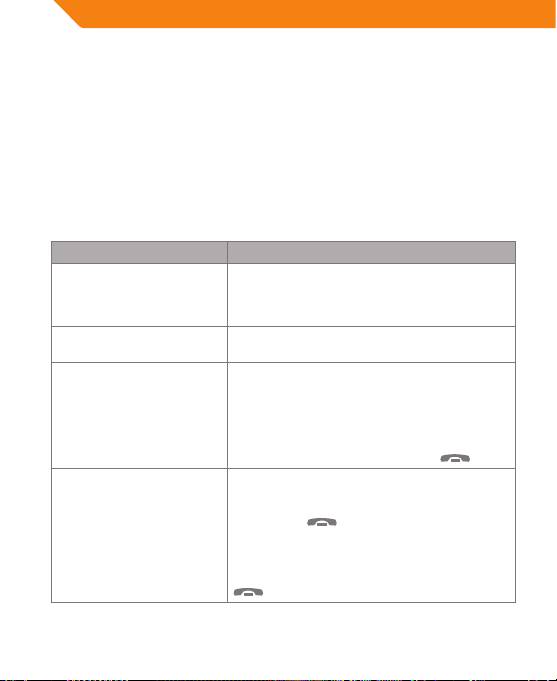
Įtaisyta telefonų knygos funkcija
Funkcija Veiksmas
Telefonų knygos
Nuspaustą mygtuką A/T laikykite apie 3
perdavimas iš mobiliojo
sekundes.
telefono, naudojant AT
komandą
Telefonų knygos rodymas Vieną kartą trumpai nuspauskite mygtuką A/T
– bus rodomi vardai ir telefonų numeriai.
Skambinimas iš telefonų
Vieną kartą trumpai nuspauskite mygtuką A/T
knygos
– atversite „BTC500“ telefonų knygą, skystųjų
kristalų ekrane bus rodoma „BTC500“ telefonų
knyga, tada spauskite + garso mygtuką arba –
garso mygtuką, norėdami peržiūrėti ankstesnį
arba kitą numerį ir rasti norimą rinkti numerį, o
tada trumpai nuspauskite mygtuką
.
Telefonų knygos trynimas Vieną kartą trumpai nuspauskite mygtuką
A/T – įeisite į telefonų knygą, tada skystųjų
kristalų ekrane bus rodomas telefono numeris,
nuspauskite
mygtuką ir laikykite jį
nuspaustą apie 5 sekundes, tada skystųjų
kristalų ekrane bus rodomas užrašas „Erase all?“
(Trinti viską?). Jei norite ištrinti visus telefonų
numerius, vieną kartą trumpam nuspauskite
mygtuką.
14

LT
Priežiūra ir eksploatacija
Jūsų prietaisas yra puikaus dizaino ir meistriškumo gaminys, kuriuo naudotis
reikia atsargiai. Žemiau pateikiami patarimai padės užtikrinti nepriekaištingą
įrenginio veikimą ir atitikimą garantinėms normoms.
• Laikykite visus priedus ir patobulinimus vaikams nepasiekiamoje vietoje.
• Prietaisas turi būti sausas. Krituliai, drėgmė ir visokių rūšių skysčiai ar
drėgnumas gali turėti mineralų, ėdančių elektronines grandines. Jeigu jūsų
prietaisas sušlampa, leiskite jam visiškai išdžiūti.
• Nenaudokite ir nelaikykite prietaiso dulkėtose, nešvariose vietose. Gali būti
pažeistos jo judančios dalys ir elektroniniai komponentai.
• Nelaikykite prietaiso karštose vietose. Aukšta temperatūra gali sutrumpinti
elektroninių prietaisų naudojimo trukmę, pažeisti baterijas ir deformuoti ar
išlydyti tam tikrus plastikus.
• Nelaikykite prietaiso šaltose vietose. Kai prietaisas atšyla iki įprastos
temperatūros, jo viduje gali susikaupti drėgmė, kuri gali pažeisti elektroninės
grandinės komutatorius.
• Nenumeskite, netrankykite ir nekratykite prietaiso. Dėl grubaus elgesio su
prietaisu gali būti pažeisti vidinės grandinės komutatoriai ir smulki mechanika.
• Prietaisui valyti nenaudokite šiurkščių chemikalų, valymo tirpiklių ar stiprių
ploviklių.
• Nedažykite prietaiso. Dažai gali užkimšti judančias dalis ir sutrikdyti prietaiso
veikimą.
Visi anksčiau išvardinti patarimai galioja tiek jūsų prietaisui, tiek baterijai,
krovikliui ar bet kuriam priedui. Jeigu kuris nors prietaisas tinkamai neveikia,
nuneškite jį į artimiausią įgaliotą techninio aptarnavimo centrą.
15
LV
Lietotāja rokasgrāmata
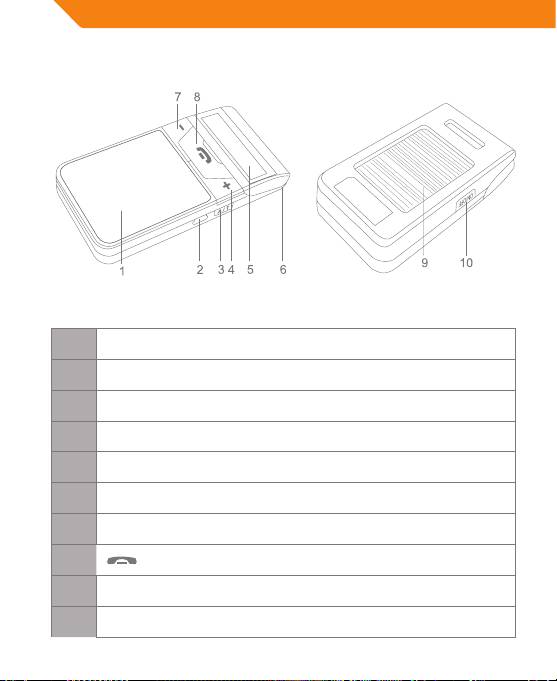
Korpusa priekšpuse Korpusa aizmugure
1 Skaļrunis
2 USB ligzda – uzlādēšanas ligzda
3 „A/T” poga – pārvietot tālruņu grāmatu
4 + poga – palielināt skaļumu, aplūkot pēdējo tālruņa numuru
5 LCD ekrāns – rāda pašreizējo statusu
6 Mikrofons
7 – poga – samazināt skaļumu, aplūkot nākamo tālruņa numuru
8
poga – daudzfunkciju poga (DFP)
9 Saules panelis
10 „ON/OFF” poga – ieslēgt/izslēgt, ieiet pārošanas režīmā
16
LV
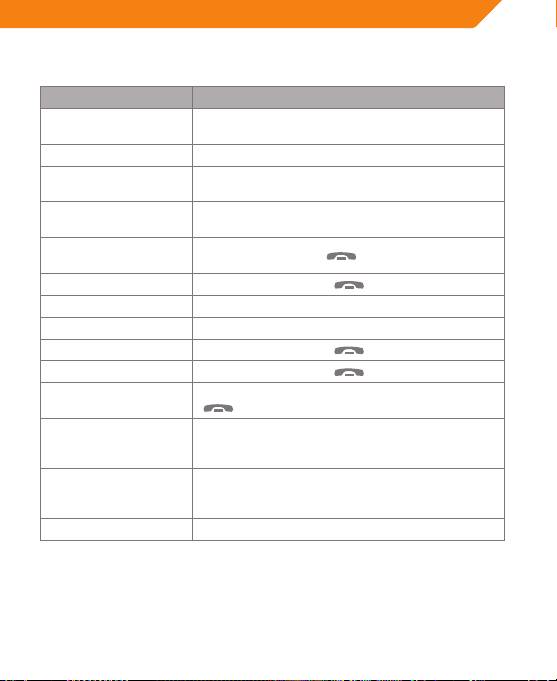
Pamata darbības
Funkcija Darbība
Ieslēgt Nospiest un turēt „ON/OFF” pogu aptuveni divas
sekundes.
Izslēgt Nospiest un turēt „ON/OFF” pogu 3–5 sekundes.
Ieiet pārošanas režīmā Kad izslēgts, nospiest un turēt „ON/OFF” pogu
6–7sekundes.
Atiestatīt, lai izslēgtu Nospiest „ON/OFF” pogu un skaļuma + pogu
vienlaicīgi, lai atiestatītu automobiļa komplektu.
Zvanīt pēdējiem
Divas reizes nospiest
pogu.
numuriem
Atcelt zvanīšanu Vienu reizi īsi nospiest
pogu.
Skaļāk Īsi nospiest skaļuma + pogu.
Klusāk Īsi nospiest skaļuma – pogu.
Beigt zvanu Vienu reizi īsi nospiest
pogu.
Atbildēt uz zvanu Vienu reizi īsi nospiest
pogu.
Ja ir ienākošais zvans, divas reizes īsi nospiest
Noraidīt zvanu
pogu.
Zvana pārsūtīšana (no
Nospiest un turēt skaļuma + pogu divas
„BTC500” uz mobilo
sekundes.
tālruni)
Zvana pārsūtīšana
Nospiest un turēt skaļuma + pogu divas
(no mobilā tālruņa uz
sekundes.
„BTC500”)
Apklusināt mikrofonu Nospiest un turēt skaļuma - pogu divas sekundes.
Savienošana pārī ar „Bluetooth” mobilo tālruni
1. Savienojot ierīces pārī, turiet automobiļa komplektu un „Bluetooth” mobilo
tālruni ne tālāk par metru vienu no otra.
2. Pārliecinieties, ka automobiļa komplekts ir izslēgts, ja nē, izslēdziet to.
17
LV
3. Nospiediet un turiet „ON/OFF” pogu aptuveni 6–7 sekundes, kamēr LCD
ekrāns parāda „Pairing…”. Tagad ierīce ir pārošanas režīmā.
4. Ieslēdziet tālruņa „Bluetooth” funkciju un meklējiet „Bluetooth” ierīces. Kad
meklēšana ir pabeigta, izvēlieties „BTC500” no „Bluetooth” ierīču saraksta.
5. Saskaņā ar norādēm ievadiet paroli vai PIN Nr. 0000 un nospiediet „Yes” (Jā)
vai „Conrm” (Apstiprināt).
6. Pēc veiksmīgas savienošanas pārī izvēlieties „BTC500” no „Bluetooth” ierīču
saraksta un nospiediet „Connect” (Savienot). Pēc veiksmīgas pieslēgšanās
LCD ekrāns rādīs jūsu mobilā tālruņa nosaukumu.
Iebūvētā tālruņu grāmatas funkcija
Funkcija Darbība
Tālruņa grāmatas
Nospiediet un turiet „A/T” pogu aptuveni trīs
pārsūtīšana no
sekundes.
mobilā tālruņa ar „AT”
komandu
Tālruņa grāmatas
Vienu reizi īsi piespiediet „A/T” pogu, lai parādītu
parādīšana
vārdus un tālruņu numurus.
Veikt zvanu no
Vienu reizi īsi piespiediet „A/T” pogu, lai atvērtu
tālruņu grāmatas
„BTC500” tālruņu grāmatu. LCD ekrāns parādīs
„BTC500” tālruņu grāmatu. Tad spiediet skaļuma
+ vai – pogu, lai apskatītu iepriekšējo vai nākamo
tālruņa numuru. Lai atrastu numuru, kuram
vēlaties zvanīt, īsi nospiediet
pogu.
Tālruņa grāmatas
Vienu reizi īsi piespiediet „A/T” pogu, lai ieietu
dzēšana
tālruņa grāmatā. LCD ekrāns rādīs tālruņa numuru.
Tad spiediet
pogu aptuveni piecas sekundes.
LCD ekrāns rādīs „Erase all?” (dzēst visu?). Ja
vēlaties dzēst visus tālruņa numurus, vienu reizi īsi
nospiediet pogu.
18

LV
Garantijas apkalpošana un
ekspluatācija
Brīvroku ierīcei ir lielisks dizains. Lai nodrošinātu garantijas apkalpošanu, lietojiet
ierīci uzmanīgi un ievērojiet šādus nosacījumus:
• Turiet ierīci, tās rīkus un uzlabojumus bērniem nesasniedzamās vietās.
• Rūpējieties par to, lai ierīce vienmēr būtu tīra un sausa. Nokrišņi, mitrums un
dažādu veidu šķidrumi var saturēt minerālus, kas var saēst elektroniskās ķēdes.
Ja uz ierīces nonācis šķidrums un tā samirkusi, ļaujiet tai pilnībā izžūt.
• Neturiet un nelietojiet ierīci putekļainās un netīrās vietās, pretējā gadījumā
varat sabojāt tās kustīgās un elektroniskās daļas.
• Neturiet un nelietojiet ierīci karstās vietās. Lietojot ierīci augstā temperatūrā,
var samazināties elektronisko ierīču kalpošanas laiks, sabojāties baterija, izkust
un deformēties plastmasa.
• Neturiet un nelietojiet ierīci aukstās vietās. Pēc tam, kad ierīce atsilst līdz
standarta temperatūrai, tajā var izveidoties mitrums un sabojāt elektroniskās
ķēdes komutatorus.
• Nemētājiet, nedauziet un nekratiet ierīci. Pavirši rīkojoties ar ierīci, varat
sabojāt elektroniskās ķēdes komutatorus un smalko mehānismu.
• Nelietojiet ierīces tīrīšanai asas ķimikālijas, šķīdinātājus vai tīrīšanas līdzekļus.
• Nekrāsojiet ierīci. Ierīces kustīgās daļas var saķept, un tas var radīt ierīces
darbības traucējumus.
Visi iepriekš minētie nosacījumi attiecas tiklab uz ierīci, kā arī uz tās daļām
— bateriju, lādētāju u.c. Ja kāda no ierīces daļām nedarbojas, vērsieties pēc
palīdzības pie serticēta speciālista tuvākajā tehniskās apkalpošanas centrā.
19
EE
Kasutusjuhend
Põhiseadme esiosa Põhiseadme tagaosa
1 Kõlar
2 USB-liides – laadimisliides
3 A/T-nupp – telefoniraamatu ülekanne
+ nupp – helitugevuse suurendamine, viimase telefoninumbri
4
vaatamine
5 LCD-ekraan – praeguse oleku kuvamine
6 Mikrofon
– nupp – helitugevuse vähendamine, järgmise telefoninumbri
7
vaatamine
8
nupp – mitmefunktsionaalne nupp (MFB)
9 Päikesepaneel
10 ON/OFF-nupp – toide sisse/välja, sidumisrežiimi sisenemine
20
