
Acme MP01: 3.6.2 Photo Album
3.6.2 Photo Album: Acme MP01
Table of contents
- 1 USER INFORMATION 1.1 Preface
- 2 PRODUCT INTRODUCTION 2.1 Product Overview
- 2.2 Package Contents 2.3 Connection 2.3.1 Power connection
- 2.3.2 Connect to Computer 2.3.3 TV connection 2.3.3.1 A/V OUT
- 2.3.3.2 HDMI OUT 2.3.4 USB Mass Storage Device (like USB stick, USB drive etc.) Connection
- 2.3.5 Connecting a Memory Card 2.4 Front Panel
- 2.5 Back Panel 2.7 Menu Language
- 2.7 Remote Control
- No. Button Function
- 3 MAIN FUNCTIONS 3.1 Setup Menu 3.1.1 Changing System Settings
- Menu Language Screen Saver
- 3.1.2 Changing Audio Settings 3.1.3 Changing Video Settings
- Aspect Ratio TV SYSTEM 3.1.4 Miscellaneous
- 3.2 Movie Playback 3.2.1 Movie Library Options
- 3.2.2 Movie Playback Control 3.2.3 Movie Playback Options
- 3.3 Photo Playback 3.3.1 Photo Library Options
- 3.3.2 Photo Playback Control 3.3.3 Photo Playback Options
- 3.4 Music Playback 3.4.1 Music Library Options
- 3.4.2 Music Playback Control 3.4.3 Music Playback Options
- 3.5 File Manager 3.5.1 File Manager Options
- 3.6 Playlist management 3.6.1 Music playlist
- 3.6.2 Photo Album
- 3.7 Copy Function 3.7.1 Copy under Media Library
- 3.7.2 Copy under File Manager 4 UPGRADING THE FIRMWARE
- 5 APPENDIXES 5.1 Specifications
- 5.2 Frequently Asked Questions
- 6 COPYRIGHTS AND TRADEMARKS
GB
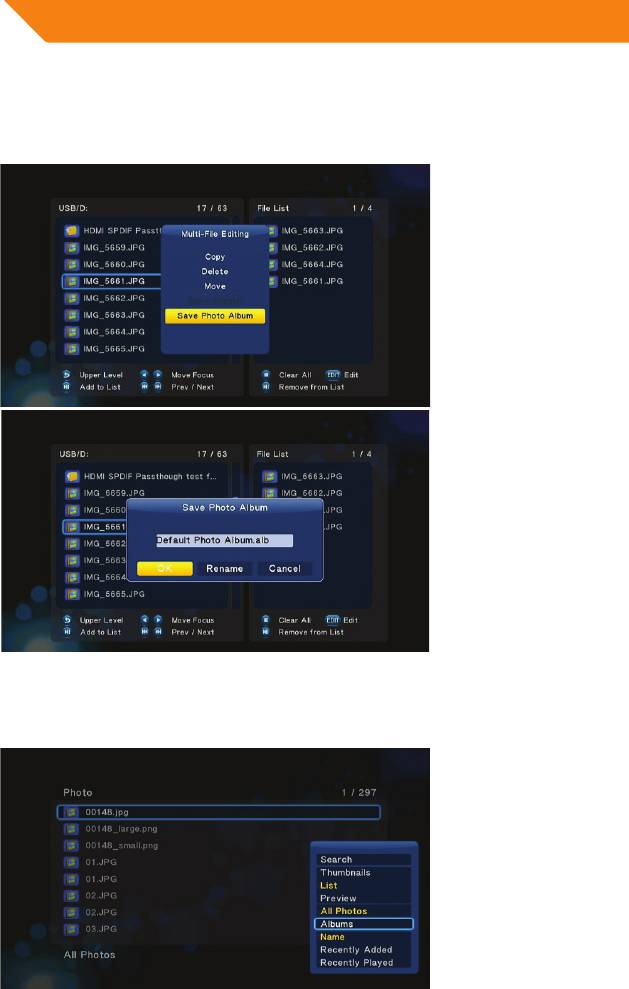
3.6.2 Photo Album
Select photos in file selecting menu, and then save them to photo ablum.
Enter photo library, press MENU button and choose Albumstoshowyourphoto
ablums.
24
Top 10 manuals
100.00
NZXT HALE90 1000W99.99
Samsung SM-R38099.97
AEG BSB 18C99.97
Dell 2700W99.97
Smeg KSEC70X99.96
Beurer HDE 4099.96
Pyramida KH 50 v.299.96
MSI CSM-H81M-P3299.96
AEG HR 562799.95
Melissa 640-048


