
ASRock Z75 Pro3 – страница 10
Инструкция к Материнской Плате ASRock Z75 Pro3
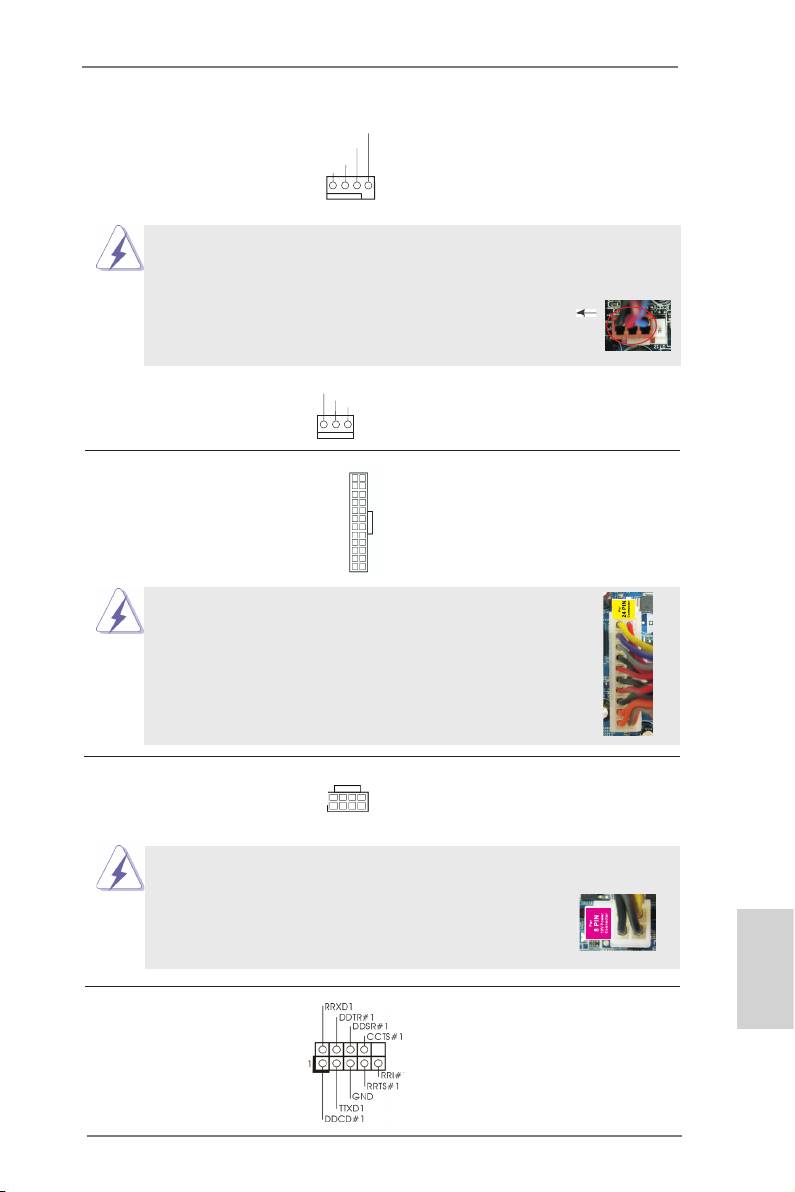
CPU 風扇接頭 請將 CPU 風扇連接線接到這個接
FAN_S PEED_CONTROL
CPU_FAN_SPEED
(4 針 CPU_FAN1)
頭,並讓黑線與接地的針腳相接
+ 12V
( 見第 2 頁第 1 項 )
GND
。
1 2 3 4
雖然此主板支持 4-Pin CPU 風扇 (Quiet Fan, 靜音風扇 ), 但是沒有調速功能的
3-Pin CPU 風扇仍然可以在此主板上正常運行。如果您打算將 3-Pin CPU 風扇
連接到此主板的 CPU 風扇接口 , 請將它連接到 Pin 1-3。
Pin 1-3 連接
3-Pin 風扇的安裝
(4 針 CPU_FAN2)
GND
+ 12V
( 見第 2 頁第 2 項 )
CPU_FAN_SPEED
ATX 電源接頭 請將 ATX 電源供應器連接到這個
12
24
(24 針 ATXPWR1)
接頭。
( 見第 2 頁第 8 項 )
1
13
雖然此主機板提供 24-pin ATX 電源接口 , 但是您仍然可以使
12
24
用傳統的 20-pin ATX 電源。為了使用 20-pin ATX 電源 , 請順
著 Pin 1 和 Pin 13 插上電源接頭。
20-Pin ATX 電源安裝說明
1
13
ATX 12V 電源接口 請將 ATX 12V 電源供應器連接到
8 5
(8 針 ATX12V1)
這個接頭。
4 1
( 見第 2 頁第 4 項 )
雖然此主機板提供 8-pin ATX 12V 電源接口 , 但是您仍然可以使用傳統的
4-pin ATX 12V 電源。為了使用 4-pin ATX 12V 電源 , 請
8 5
順著 Pin 1 和 Pin 5 插上電源接頭。
4-Pin ATX 12V 電源安裝說明
4 1
序列埠 這個序列埠 COM1 支援一個序列
繁體中文
(9 針 COM1)
埠的裝置。
( 見第 2 頁第 28 項 )
181
ASRock Z75 Pro3 Motherboard

HDMI_SPDIF 接頭 HDMI_SPDIF 接頭,提供 SPDIF
1
(2 針 HDMI_SPDIF1)
音效輸出至 HDMI 顯示卡,支援
GND
SPDIFOUT
( 見第 2 頁第 29 項 )
將電腦連接至帶 HDMI 的數位電
視 / 投影機 / 液晶銀幕等設備。
請將 HDMI 顯示卡的 HDMI_SPDIF
接口連接到這個接頭。
2. BIOS 訊息
主板上的Flash Memory晶片存儲了BIOS設置程序。啟動系統,在系統開機自檢(POST)
的過程中按下 <F2> 或 <Del> 鍵,就可進入 BIOS 設置程序,否則將繼續進行開機自檢
之常規檢驗。如果需要在開機自檢後進入 BIOS 設置程序,請按下 <Ctl> + <Alt> +
<Delete> 鍵重新啟動電腦,或者按下系統面板上的重開按鈕。功能設置程序儲存有主
板自身的和連接在其上的設備的缺省和設定的參數。這些訊息用於在啟動系統和系統
運行需要時,測試和初始化元件。有關 BIOS 設置的詳細訊息,請查閱隨機支援光碟
裡的使用手冊 (PDF 文件 )。
3. 支援光碟訊息
®
®
®
本主板支援各種微軟 Windows
操作系統:Microsoft
Windows
7/7 64 位元 /
TM
TM
Vista
/Vista
64 位元 /XP/XP 64 位元。主板附帶的支援光碟包含各種有助於提高主
板效能的必要驅動和實用程式。請將隨機支援光碟放入光碟機裡,如果系統的“自動
運行”功能已啟用,銀幕將會自動顯示主菜單。如果主菜單不能自動顯示,請查閱支
援光碟內 BIN 文件夾下的 ASSETUP.EXE 文件並雙點它,即可調出主菜單。
繁體中文
182
ASRock Z75 Pro3 Motherboard

1. Penjelasan
Terima kasih telah membeli motherboard ASRock Z75 Pro3, motherboard andal
yang diproduksi berdasarkan kontrol kualitas tinggi ASRock secara konsisten.
Motherboard ini memberikan performa terbaik dengan desain yang kokoh sesuai
komitmen ASRock untuk kualitas dan daya tahan.
Panduan Pemasangan Ringkas ini berisi pendahuluan tentang motherboard dan
panduan pemasangan langkah demi langkah. Informasi lengkap lainnya tentang
motherboard ini tersedia di buku panduan yang diberikan bersama Support CD (CD
Pendukung).
Karena spesikasi papan induk dan software BIOS barangkali dapat diperbarui, isi
dalam buku pedoman ini akan mengikuti perubahan tanpa peringatan. Dalam
kondisi terjadinya modikasi buku pedoman ini, versi baru akan diperlihatkan dalam
website ASRock tanpa peringatan lebih. Anda dapat mendapatkan kartu- kartu yang
paling baru dan daftar bantuan CPU pada website ASRock.
Website ASRock http://www.asrock.com
1.1 Isi Paket
Papan Induk Z75 Pro3 ASRock
(Faktor Form ATX: 12.0-in x 7.6-in, 30.5 cm x 19.3 cm)
Pemimpin Instalasi Cepat Z75 Pro3 ASRock
Support CD Z75 Pro3 ASRock
2 x Kabel satu serial Data ATA (SATA) (bebas-pilih)
1 x Satu Pelindung I/O
ASRock Mengingatkan...
®
TM
Untuk mendapatkan performa lebih baik di Windows
7/ 7 64-bit/ Vista
/
TM
Vista
64-bit, sebaiknya atur pilihan BIOS dalam Storage Conguration
(Kongurasi Penyimpanan) ke mode AHCI. Untuk kongurasi BIOS, lihat
“Panduan Pengguna” dalam CD dukungan kami untuk informasi rinci.
Bahasa Indonesia
183
ASRock Z75 Pro3 Motherboard

1.2 Spesifikasi
Podium - Faktor Form ATX: 12.0-in x 7.6-in, 30.5 cm x 19.3 cm
- Desain All Solid Capacitor
®
TM
CPU - Mendukung Intel
Core
i7 / i5 / i3 Generasi Ke-3 dan Ke-2
dalam Paket LGA1155
- Digi Power Desain
- Desain daya 4 + 1 fase
®
- Menggunakan Teknologi Intel
Turbo Boost 2.0
- Mendukung CPU K-Series jenis “unlocked”
- Menggunakan Teknologi Hyper-Threading
®
- Mendukung Intel
Rapid Start Technology dan Smart
®
Connect Technology dengan Intel
Ivy Bridge CPU
®
Grup Chip - Intel
Z75
Ingatan - Teknologi ingatan DDR3 dwisaluran
- 4 x Alur DDR3 DIMM
- Mendukung memori DDR3 2800+(OC)/2400(OC)/2133(OC)
/1866(OC)/1600/1333/1066 non-ECC yang tidak di-buffer
- Kapasitas paling banyak: 32GB
®
- Mendukung Intel
Extreme Memory Prole (XMP)1.3/1.2
Alur Ekspansi - 1 x PCI Express 3.0 x16 slots (PCIE2: x16 mode)
®
* PCIE 3.0 hanya didukung dengan Intel
Ivy Bridge CPU.
®
Dengan Intel
Sandy Bridge CPU, hanya PCIE 2.0 yang
didukung.
- 1 x PCI Express 2.0 x16 slot (PCIE3: x4 mode)
- 1 x PCI Express 2.0 x1 slot
- 2 x Alur PCI
TM
TM
- Mendukung AMD Quad CrossFireX
dan CrossFireX
®
Diagram * Intel
HD Graphics Built-in Visual dan output VGA hanya
dapat didukung dengan prosesor yang mengintegrasikan
GPU.
®
®
- Mendukung Intel
HD Graphics Built-in Visuals: Intel
Quick
®
TM
®
Sync Video 2.0, Intel
InTru
3D, Intel
Clear Video HD
Bahasa Indonesia
®
TM
®
Technology, Intel
Insider
, Intel
HD Graphics 2500/4000
®
- Pixel Shader 5.0, DirectX 11 dengan Intel
Ivy Bridge CPU,
®
Pixel Shader 4.1, DirectX 10.1 dengan Intel
Sandy Bridge
CPU
- Ingatan sama Max. 1760MB
- Output VGA Ganda: mendukung port HDMI dan D-Sub
melalui pengontrol tampilan independen
184
ASRock Z75 Pro3 Motherboard

- Mendukung HDMI 1.4a Technology dengan resolusi
maksimal hingga 1920x1200 @ 60Hz
- Mendukung D-Sub dengan resolusi maksimal hingga
2048x1536 @ 75Hz
- Mendukung Auto Lip Sync, Deep Color (12bpc), xvYCC dan
HBR (High Bit Rate Audio) dengan HDMI (memerlukan
monitor HDMI yang kompatibel)
- Mendukung fungsi HDCP dengan port HDMI
- Mendukung pemutaran 1080p Blu-ray (BD) / HD-DVD
dengan port HDMI
Audio - 7.1 CH HD Audio dengan Content Protection
(Realtek ALC892 Audio Codec)
- Menggunakan Premium Blu-ray audio
LAN - PCIE x1 Gigabit LAN 10/100/1000 Mb/s
- Realtek RTL8111E
- Menggunakan Wake-On-LAN
- Mendukung Deteksi Kabel LAN
- Mendukung Energy Efcient Ethernet 802.3az
- Mendukung PXE
Papan Belakang I/O Panel
I/O - 1 x Port Keyboard PS/2
- 1 x Port D-Sub
- 1 x Port HDMI
- 4 x Port USB 2.0 siap-dipakai
- 2 x Port USB 3.0 siap-dipakai
- 1 x RJ-45 LAN Port LED (ACT/LINK LED dan SPEED LED)
- HD Audio Jack: Penyuara Belakang/Pusat/Bass/Line in/
Penyuara Depan/mikropon
SATA3 - 2 x penghubung SATA3 6.0Gb/s, dapat digunakan RAID
(RAID 0, RAID 1, RAID 5, RAID 10 dan Intel Rapid
Storage), NCQ, AHCI dan fungsi fungsi Hot Plug
USB 3.0 - 2 x Port Belakang USB 3.0, mendukung USB 1.0/2.0/3.0
hingga 5Gb/s
- 1 x Port Depan USB 3.0 (menggunakan 2 port USB 3.0),
mendukung USB 1.0/2.0/3.0 hingga 5Gb/s
Penghubung - 4 x penghubung SATA2 3.0Gb/s, dapat menggunakan RAID
(RAID 0, RAID 1, RAID 5, RAID 10 dan Intel Rapid
Storage), NCQ, AHCI dan fungsi Hot Plug
Bahasa Indonesia
- 2 x penghubung SATA3 6.0Gb/s
- 1 x IR header
185
ASRock Z75 Pro3 Motherboard

- 1 x CIR header
- 1 x port header COM
- 1 x HDMI_SPDIF header
- 1 x header power LED
- Penghubung KIPAS CPU/casis/power
- Penghubung power 24 pin ATX
- Penghubung power 8 pin 12V
- Penghubung audio panel dapan
- 3 x USB 2.0 header (menggunakan 6 port USB 2.0)
- 1 x USB 3.0 header (menggunakan 2 port USB 3.0)
Ciri-ciri BIOS - 64Mb AMI UEFI Legal BIOS dengan dukungan GUI
- Menggunakan “Plug and Play”
- ACPI 1.1 Compliance Wake Up Events
- Menggunakan jumperfree
- Penyokong AMBIOS 2.3.1
- Penyesuaian berbagai tegangan CPU Core, IGPU, DRAM,
1.8V PLL, VTT, VCCSA
Sokongan CD - Driver, Utilitas, Perangkat Lunak Antivirus (Versi
Percobaan), CyberLink MediaEspresso 6.5 Versi
Percobaan
Fitur Unik - ASRock Extreme Tuning Utility (AXTU)
- ASRock Instant Boot
- ASRock Instant Flash
- ASRock APP Charger
- ASRock XFast USB
- ASRock XFast LAN
- ASRock XFast RAM
- ASRock Crashless BIOS
- ASRock OMG (Online Management Guard)
- Lucid Virtu Universal MVP
* Lucid Virtu Universal MVP hanya dapat didukung dengan
prosesor yang mengintegrasikan GPU.
- ASRock On/Off Play Technology
Bahasa Indonesia
- Hybrid Booster:
- Kontrol tanpa langkah Frekwensi CPU
- ASRock U-COP
- Penjaga kegagalan input (B.F.G.)
- Combo Cooler Option (C.C.O.)
- Good Night LED
186
ASRock Z75 Pro3 Motherboard

Penjaga - Perasa Suhu CPU
Hardware - Perasa Suhu Casis
- Pengukur Kipas CPU/casis/power
- Kipas CPU Senyap (Kecepatan Kipas Sasis Otomatis
Disesuaikan Berdasarkan Temperatur CPU)
- Kontrol Multi-Kecepatan Kipas CPU/casis
- Penjagaan voltasi: +12V, +5V, +3.3V, Vcore
®
®
TM
OS - dapat digunakan Microsoft
Windows
7 / 7 64-bit / Vista
/
TM
Vista
64-bit / XP / XP 64-bit
Sertikasi - FCC, CE, WHQL
- ErP/EuP Ready (memerlukan catu daya ErP/EuP ready)
* Untuk informasi rinci, silakan kunjungi website kami: http://www.asrock.com
Bahasa Indonesia
187
ASRock Z75 Pro3 Motherboard

Installing OS on a HDD Larger Than 2TB in AHCI Mode
®
This motherboard adopts UEFI BIOS that allows Windows
OS to be installed on a
large size HDD (>2TB). Please follow the procedures below to install the operating
system.
®
TM
1. Please make sure to use Windows
Vista
64-bit (with SP2 or above) or
®
Windows
7 64-bit (with SP1 or above).
2. Press <F2> or <Delete> at system POST. Set AHCI Mode in UEFI Setup Utility >
Advanced > Storage Conguration > SATA Mode.
3. Choose the item “UEFI:xxx“ to boot in UEFI Setup Utility > Boot > Boot Option #1.
®
(“xxx” is the device which contains your Windows
installation les. Normally it is
an optical drive.) You can also press <F11> to launch boot menu at system POST
and choose the item “UEFI:xxx“ to boot.
®
4. Start Windows
installation.
English
188
ASRock Z75 Pro3 Motherboard
Installing OS on a HDD Larger Than 2TB in RAID Mode
®
This motherboard adopts UEFI BIOS that allows Windows
OS to be installed on a
large size HDD (>2TB). Please follow the procedures below to install the operating
system.
®
TM
1. Please make sure to use Windows
Vista
64-bit (with SP2 or above) or
®
Windows
7 64-bit (with SP1 or above).
®
2. Copy Intel
RAID drivers into a USB ash disk. You can download the driver from
ASRock's website and unzip the le into a USB ash disk OR copy the le from
ASRock motherboard support CD. (please copy the les under following directory:
32 bit: ..\i386\Win7_Vista_Intel_v11.0.0.1032
64-bit: ..\AMD64\Win7-64_Vista64_Intel_v11.0.0.1032
3. Create RAID array for you system. Please refer to "Intel RAID Installation Guide"
le for details.
®
TM
4. Install Windows
Vista
64-bit / 7 64-bit:
®
TM
A. Insert your Windows
Vista
64-bit / 7 64-bit installation disc to the optical
drive.
B. Press <F11> to launch boot menu at system POST and choose the item
“UEFI:xxx“ to boot.
®
C. Start Windows
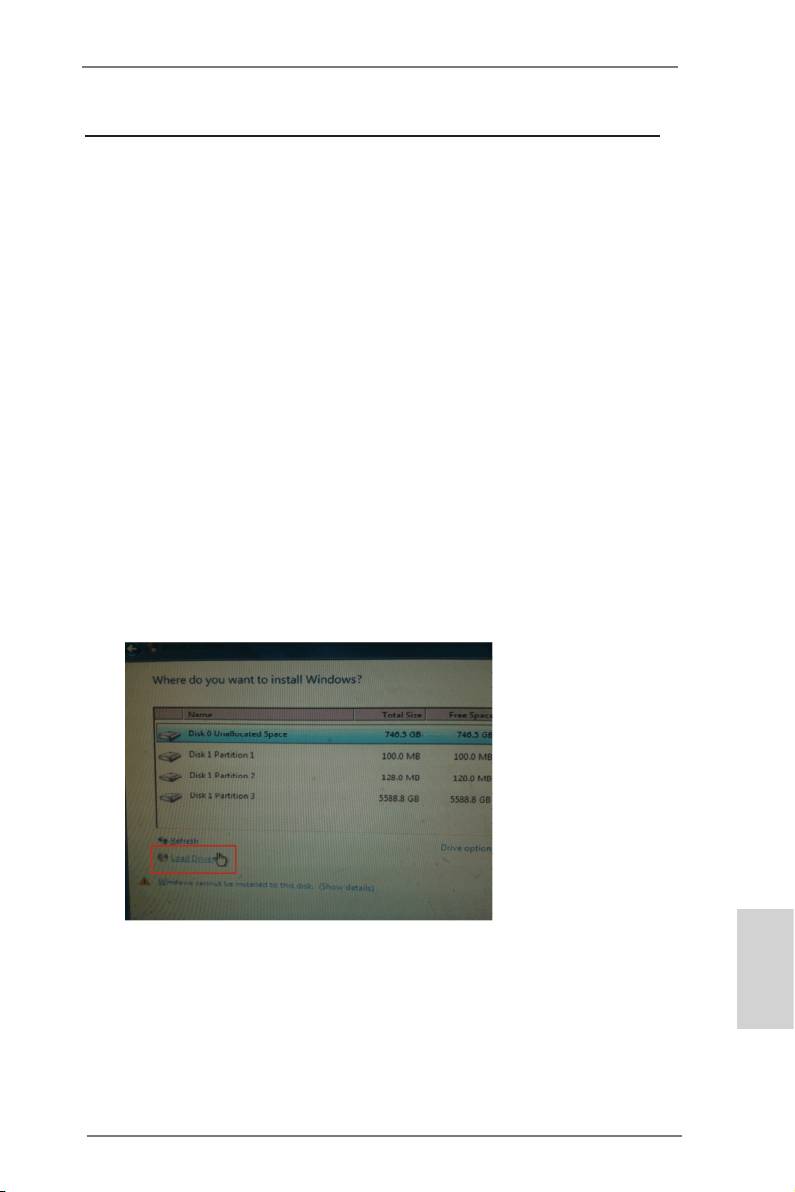
Installation. When you see “Where do you want to install
Windows?” page, please click “Load Driver”.
D. Plug the USB ash disk into your USB port; select “Browse” to nd the RAID
driver. Then choose the directory (xx\AMD64\) you have copied in the rst
step.
English
189
ASRock Z75 Pro3 Motherboard
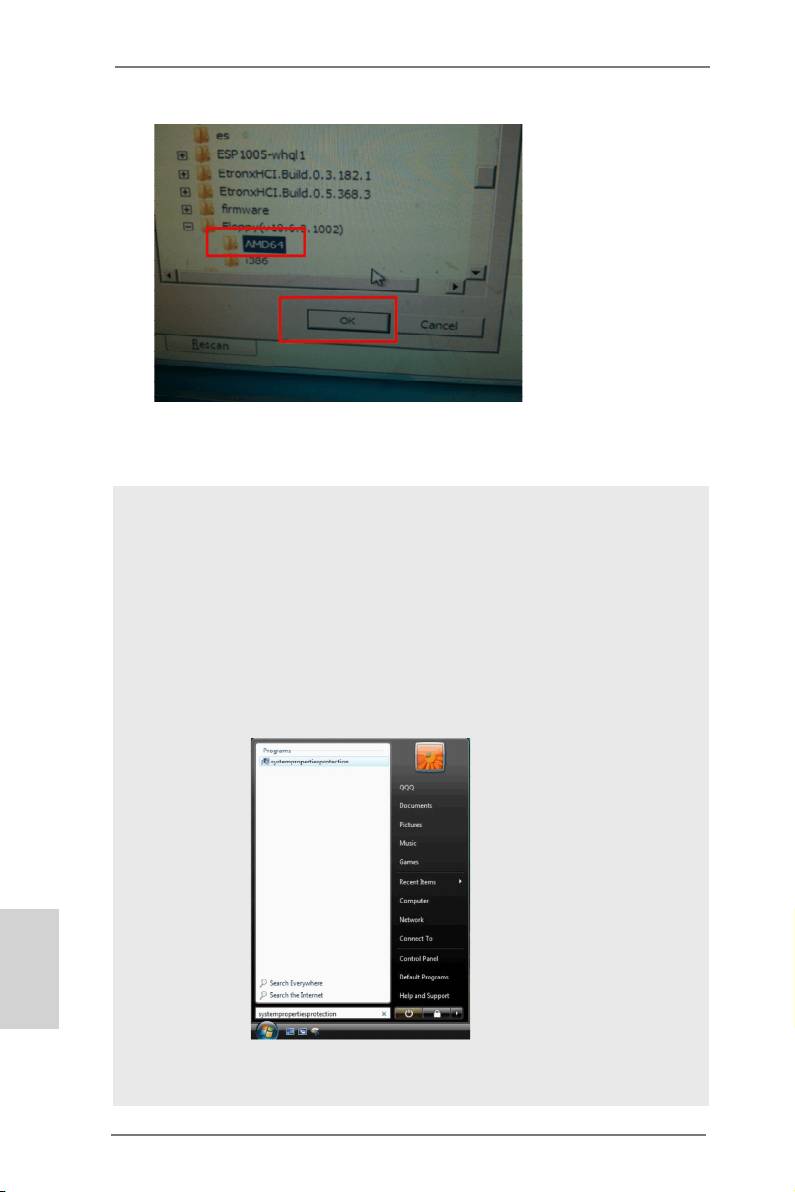
E. Please keep the USB ash disk installed until the system rst reboot.
®
F. Continue to install OS by following the Windows
instructions.
®
5. Follow Windows
Installation Guide to install OS.
®
TM
If you install Windows
7 64-bit / Vista
64-bit in a large hard disk (ex. Disk
®
volume > 2TB), it may take more time to boot into Windows
or install driver/
utilities. If you encounter this problem, you will need to following instructions
to x this problem.
®
TM
Windows
Vista
64-bit:
®
Microsoft
does not provide hotx for this problem. The steps listed below
®
are Microsoft
's suggested solution:
A. Disable System Restore.
a. Type “systempropertiesprotection” in the Start Menu. Then press
"Enter".
English
b. De-select Local Disks for System Restore. Then Click “Turn System
Restore Off” to conrm. Then Press “Ok”.
190
ASRock Z75 Pro3 Motherboard
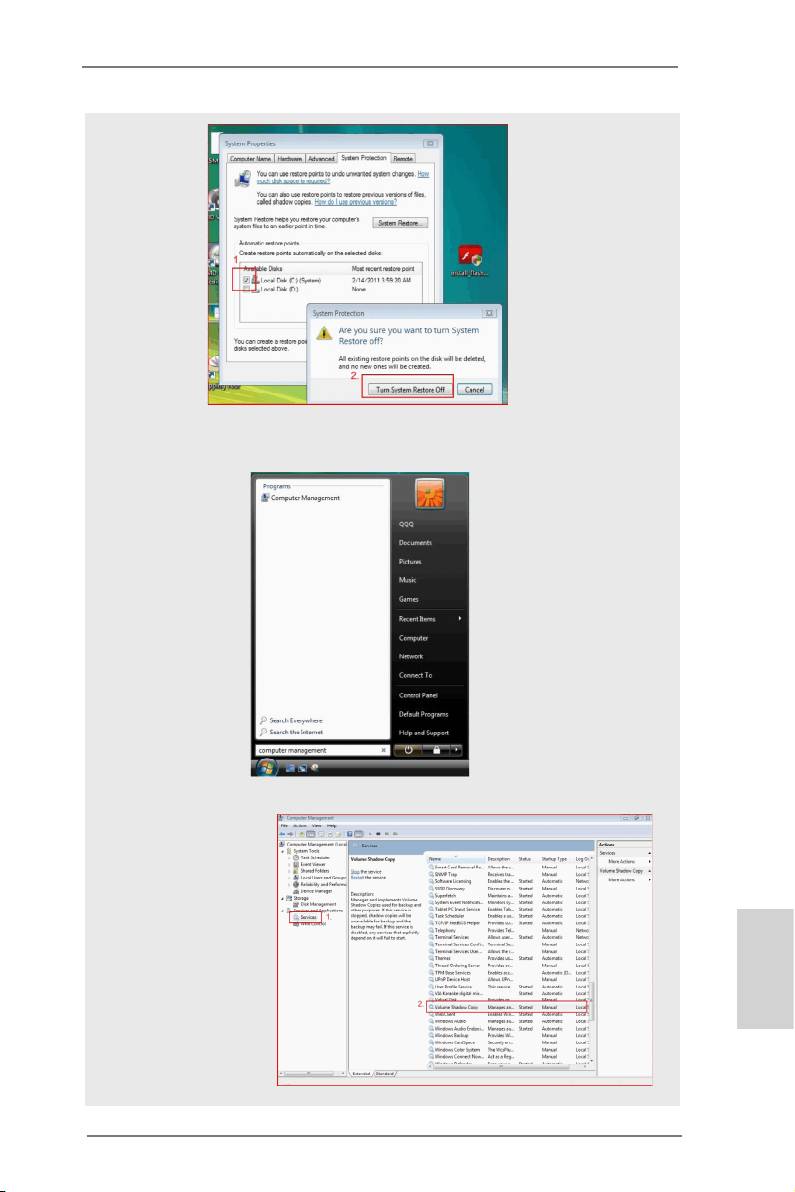
B. Disable “Volume Shadow Copy” service.
a. Type “computer management” in the Start Menu, then press “Enter”.
b. Go to “Services and Applications>Services”; Then double click “Volume
Shadow Copy”.
English
191
ASRock Z75 Pro3 Motherboard
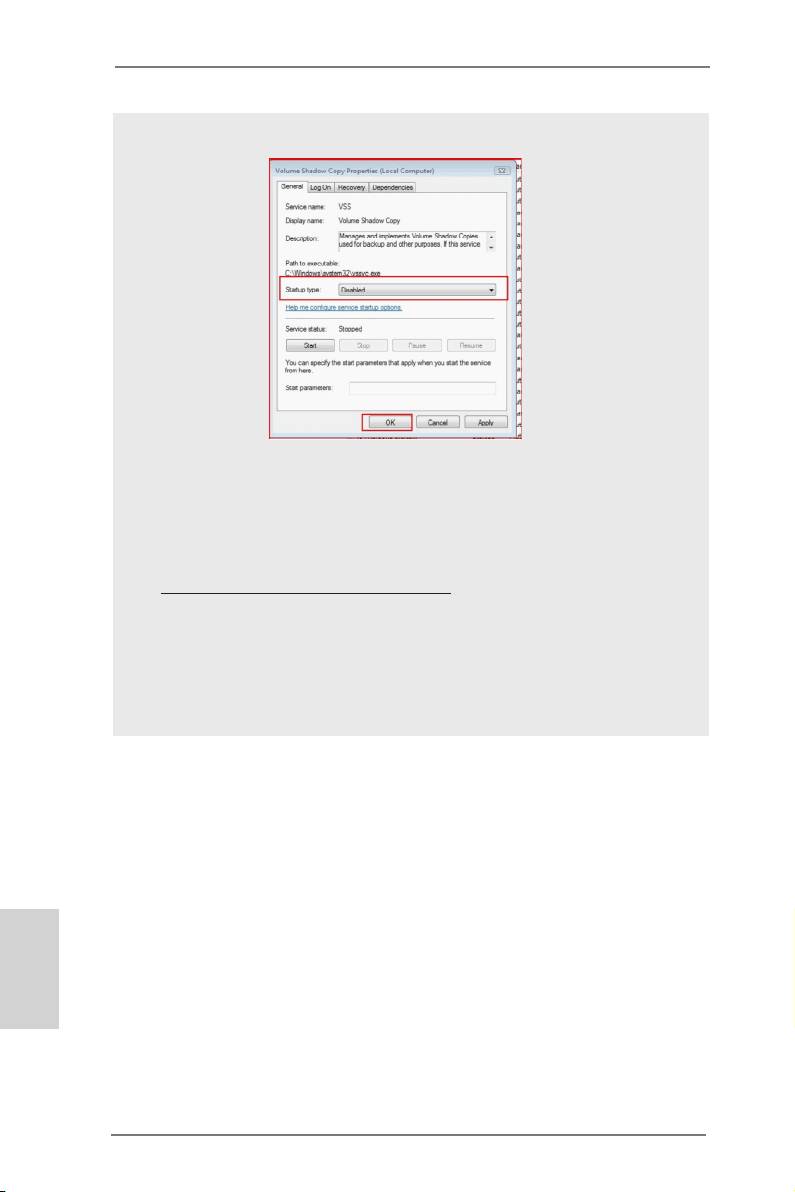
c. Set “Startup type” to “Disable” then Click “OK”.
C. Reboot your system.
D. After reboot, please start to install motherboard drivers and utilities.
®
Windows
7 64-bit:
A. Please request the hotx KB2505454 through this link:
http://support.microsoft.com/kb/2505454/
®
B. After installing Windows
7 64-bit, install the hotx kb2505454.
(This may take a long time; >30 mins.)
C. Reboot your system. (It may take about 5 minutes to reboot.)
®
D. Windows
will install this hotx then reboot by itself.
E. Please start to install motherboard drivers and utilities.
6. Finish.
English
192
ASRock Z75 Pro3 Motherboard
