
Nikon PD-10: Troubleshooting
Troubleshooting: Nikon PD-10
Table of contents
- For Your Safety
- Notices
- Notice for customers in Canada CAUTION IMPORTANT NOTE: ATTENTION
- Caring for the Adapter
- Introduction
- Before You Begin
- Parts of the Adapter
- Inserting the Batteries
- Connecting the PD-10 to a Printer
- Setting Profile Information on the Camera
- Number of Devices That Can Be Set Profile names Turning the PD-10 Off
- Wireless Printing
- LED Lamp Display
- Troubleshooting
- Specifications
Troubleshooting
En
If the camera cannot establish a strong connection to the PD-10 or if printing suddenly stops, check the following items.
Problem Possible cause/Solution
The POWER lamp on the PD-10 does not light. • Use fully-powered batteries.
• Check that the PD-10 is connected to the printer.
Unable to successfully set up the Profile Information on the
• Check that the printer is on and ready to print.
camera and PD-10./The camera cannot establish a strong
connection to the PD-10 (overall).
The camera cannot establish a strong connection to the
The wireless signal may be affected by something nearby. Move the camera and print-
PD-10./The connection is interrupted.
er closer together.
There is a problem with the wireless connection./The con-
The wireless signal may be affected by something nearby. Move the camera and print-
nection is interrupted.
er closer together. Perform a Reset, and then set up the Profile Information on the
camera again (c6).
Unable to successfully set up the Profile Information on the
Perform Steps 3 and 4 in “Setting Profile Information on the Camera” (c6 - 7) in rap-
camera and PD-10. (BUSY lamp blinks rapidly in orange.)
id succession. In Step 4, the START button must be pressed for two seconds.
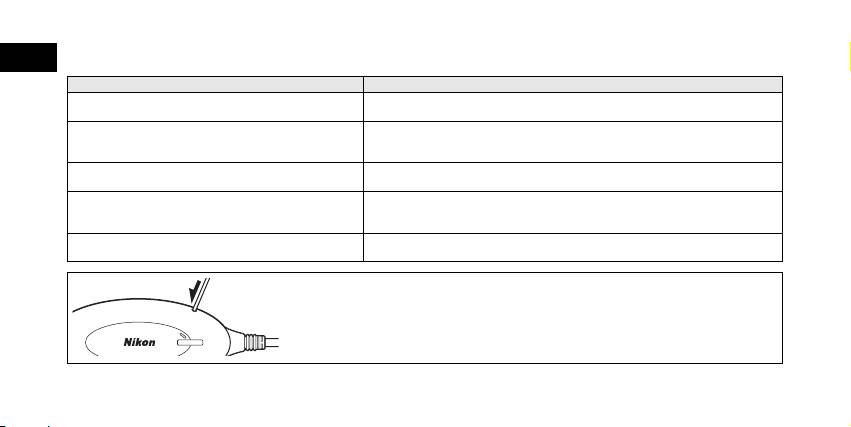
Resetting
• If the Reset button is pressed for about one second while the PD-10 is on and connect-
ed to the printer, all of the Profile Information set in the PD-10 will be deleted.
• Press the Reset button with a small, thin object.
10
BUSY
S
T
A
R
T
P
O
W
E
