
Nikon PD-10: Setting Profile Information on the Camera
Setting Profile Information on the Camera: Nikon PD-10
Table of contents
- For Your Safety
- Notices
- Notice for customers in Canada CAUTION IMPORTANT NOTE: ATTENTION
- Caring for the Adapter
- Introduction
- Before You Begin
- Parts of the Adapter
- Inserting the Batteries
- Connecting the PD-10 to a Printer
- Setting Profile Information on the Camera
- Number of Devices That Can Be Set Profile names Turning the PD-10 Off
- Wireless Printing
- LED Lamp Display
- Troubleshooting
- Specifications
Setting Profile Information on the Camera
En
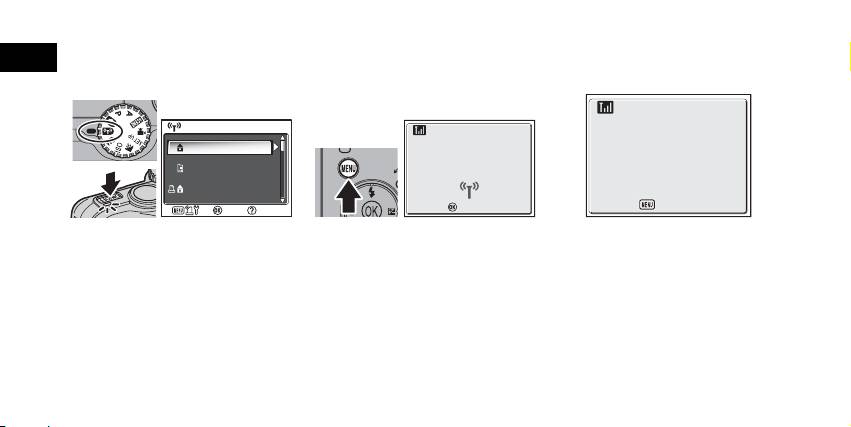
If this is the first time the PD-10 is being used with a particular camera, follow the steps below to set up Profile Information on the
camera and PD-10.
1
Rotate the mode dial on the cam-
2
Press the m button on the cam-
3
The message “Press the button on
era to Y (Wireless transfer
era.
Wireless Printer Adapter” will be
mode), and turn the camera on.
• The message “Connecting to wireless
displayed on the camera monitor.
• The CHOOSE PROFILE screen is displayed
printer adapter” will be displayed on the
on the camera monitor.
camera monitor.
• If no Profile Information is currently set, a
message is displayed prompting you to
add Profile Information.
6
CHOOSE PROFILE 1/3
CHOOSE PROFILE 1/3
Confirm
Confirm
Info
Profile-A
Connecting to
Profile-B
wireless printer adapter
Profile-C
Info
Cancel
Press the button on
Wireless Printer Adapter
Cancel
Cancel
Cancel
