
Nikon PD-10: Number of Devices That Can Be Set Profile names Turning the PD-10 Off
Number of Devices That Can Be Set Profile names Turning the PD-10 Off: Nikon PD-10
Table of contents
- For Your Safety
- Notices
- Notice for customers in Canada CAUTION IMPORTANT NOTE: ATTENTION
- Caring for the Adapter
- Introduction
- Before You Begin
- Parts of the Adapter
- Inserting the Batteries
- Connecting the PD-10 to a Printer
- Setting Profile Information on the Camera
- Number of Devices That Can Be Set Profile names Turning the PD-10 Off
- Wireless Printing
- LED Lamp Display
- Troubleshooting
- Specifications
Number of Devices That Can Be Set
S
T
A
R
T
•
The PD-10 can store the Profile Information
Ready to connect toReady to connect to
En
of up to 50 cameras. If 50 profiles have al-
P
O
W
E
R
B
U
S
Y
LINK
Printer1
ready been created, the oldest profile will
Do you want to connect now?
Do you want to connect now?
be deleted when storing a new profile.
•
The camera can store the Profile Informa-
No
12
tion of up to 9 devices, such as the PD-10,
Yes
computers, and printers connected to com-
puters. If 9 profiles have already been cre-
ated and the Profile Information of the
4
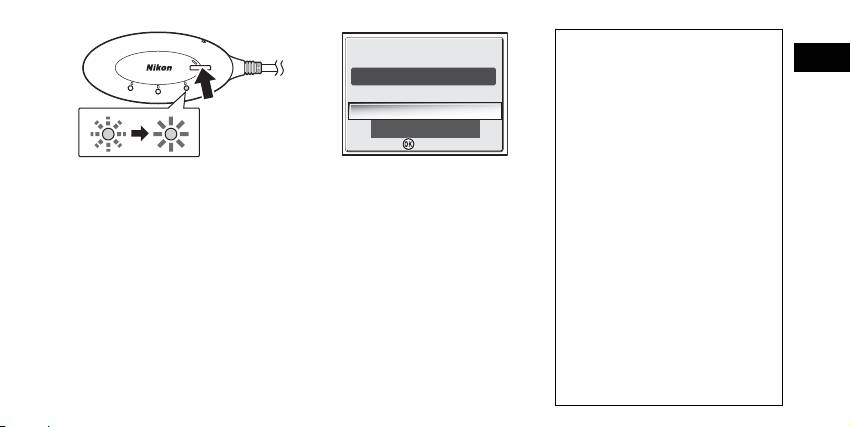
As soon as the message is dis-
5
After setup is complete, the mes-
PD-10 is stored, delete an unneeded profile
first using the Wireless Camera Setup Utili-
played, press the START button on
sage “Ready to connect to
ty provided with the camera. If an unneed-
the PD-10 for two seconds.
Printer1 Do you want to connect
ed profile is not deleted, the oldest profile
• Press the START button while the mes-
now?” will be displayed on the
will be overwritten. See the camera manual
sage is displayed.
camera monitor.
for more information on deleting profiles.
• The BUSY lamp on the PD-10 will blink
•
Select
No
to return to the CHOOSE PRO-
Profile names
slowly in orange 1. After a while, the
FILE screen (
c
6). Select
Yes
to continue
• When the Profile Information of the
BUSY lamp will light in orange for about
operations and print (step 3 on
c
8).
PD-10 is stored in the camera, the pro-
three seconds when setup is complete
•
After Profile Information is set up, the
file name is automatically set to “Printer
2.
camera and PD-10 can be connected any
x” (where x is a digit from 1 to 9).
number of times by choosing the Profile In-
•
The profile name “Printer
x
” can be
formation from the camera CHOOSE PRO-
changed later using the Wireless Camera
FILE screen. Profile Information must be set
Setup Utility provided with the camera. See
up again when Reset (
c
10) is performed.
the camera manual for more information.
Note
Turning the PD-10 Off
If setup fails, the BUSY lamp on the PD-10 will blink rapidly in orange, and a message will be dis-
• The PD-10 will turn off when discon-
played on the camera monitor. If this occurs, press the d button on the camera, and perform set-
nected from the printer.
tings again.
7
Confirm
Confirm
