
Nikon MB-D10: The MB-D10 Control Lock
The MB-D10 Control Lock: Nikon MB-D10
Table of contents
Parts of the MB-D10 (Figure A)
q Contact cap
w Holder for camera contact cover
e Signal contacts
En
r AFON button
t Main command dial
y Multi selector
u Attachment wheel
i Battery-chamber cover
o Battery-chamber latch
!0 Battery chamber
!1 Mounting screw
!2 Power terminals
!3 Shutter-release button
!4 Control lock
!5 Sub-command dial
!6 Tripod socket
!7 MS-D10EN holder for EN-EL3e batteries
!8 Power terminals
!9 Power terminals (EN-EL3e battery holder)
@0 MS-D10 holder for AA batteries
@1 Power terminals (AA battery holder)
@2 BL-3 battery-chamber cover (available sep-
arately)
5
The MB-D10 Shutter Release Button, Multi Selector, Command Dials, and AF-ON Button
The MB-D10 Shutter Release Button, Multi Selector, Command Dials, and AF-ON Button
The MB-D10 is equipped with a shutter-release button (Figure A-
), multi selector (Figure A-
),
main command dial (Figure A-
), sub-command dial (Figure A- ), and AFON button (Figure A-
)
for use when taking photographs in vertical (“tall,” or portrait) orientation.
These controls perform
the same functions as the corresponding controls on the camera and are aff ected by changes to
options in the Custom Settings menu (Group a for the AFON button, Group f for other controls)
that aff ect these camera controls.
See the camera manual for more information.
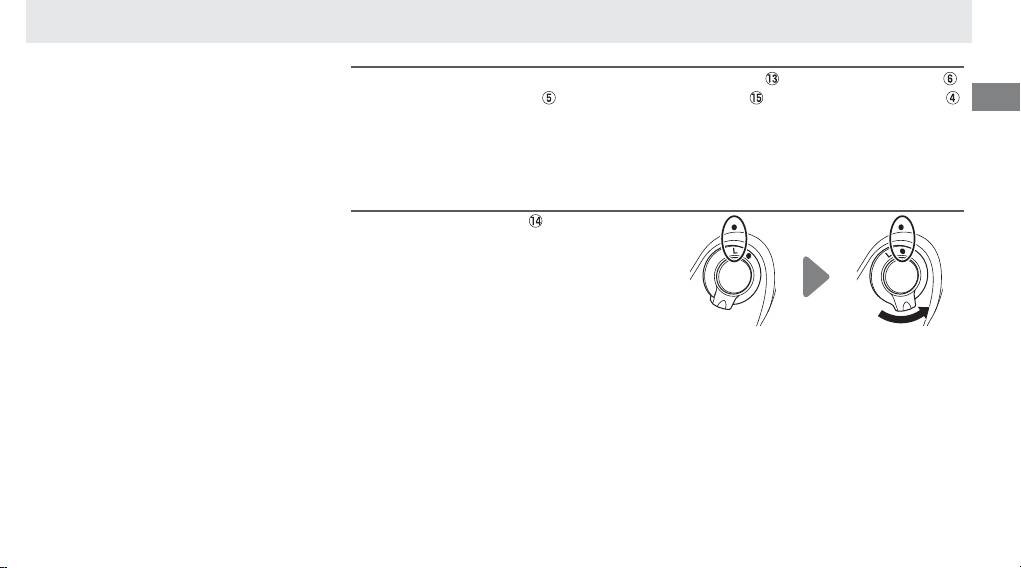
The MB-D10 Control Lock
The MB-D10 Control Lock
The control lock (Figure A- ) locks the con-
trols on the MB-D10 to prevent unintended
use.
Before using these controls to take photo-
graphs in vertical (portrait) orientation, select
● to release the lock as shown at right.
The control lock is not a power switch.
Use the
camera power switch to turn the camera on
and off .
